
1. บทนำ
This manual provides essential information for the safe and effective use of your OWON SDS1022 Digital Oscilloscope. Please read it thoroughly before operating the device and keep it for future reference. The SDS1022 is a 2-channel, 20MHz bandwidth digital oscilloscope with a 100MS/s real-time sample rate, designed for a wide range of applications from electronic circuit debugging to educational purposes.
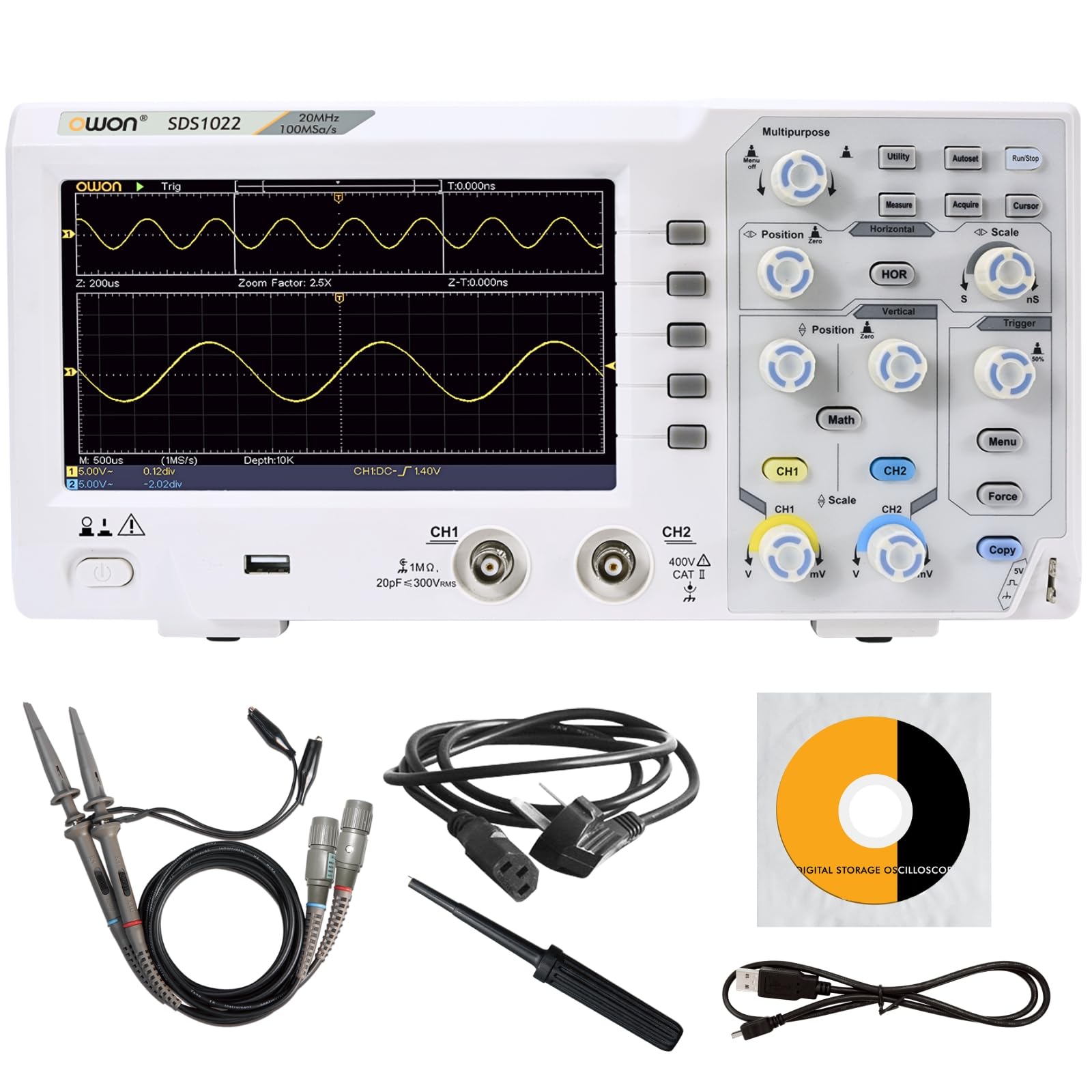
Figure 1: OWON SDS1022 Digital Oscilloscope with probes.
2. คุณสมบัติของผลิตภัณฑ์
- Wide Bandwidth and High-Speed Sampหลิง: The SDS1022 offers a 20MHz bandwidth and a 100MS/s real-time sampling rate, enabling accurate capture of instantaneous waveform changes for precise signal analysis.
- Clear Display and Intuitive Operation: Features a 7-inch high-resolution color LCD for vivid waveform display. The user-friendly menu system ensures intuitive operation for both novice and experienced users. A zoom display function allows quick identification of anomalies.
- Diverse Measurement and Analysis Functions: Includes 30 types of automatic measurement functions, FFT for frequency analysis, and waveform operations (addition, subtraction, multiplication, division, inversion). Pass/fail testing and screenshot capabilities enhance efficiency in testing and reporting.
- Compact Design and Connectivity: With a thin and lightweight design (approx. 1.1kg), the device is easy to place in various environments. Equipped with USB host and device interfaces for data storage and PC connectivity. SCPI command support allows for automated testing and remote control.

Figure 2: Compact design and dimensions.

รูปที่ 3: เกินview of included functions.
3. การตั้งค่า
- การแกะกล่อง: Carefully remove the oscilloscope and all accessories from the packaging. Verify that all included components are present (Power cord, CD-ROM, Quick Guide, USB cable, Probes, Probe adjustment tool).
- การเชื่อมต่อไฟฟ้า: Connect the provided AC power cord to the oscilloscope's power input and then to a suitable AC power outlet.
- เปิดเครื่องครั้งแรก: Press the power button to turn on the oscilloscope. The device will perform a self-test.
- การเชื่อมต่อโพรบ: Connect the oscilloscope probes to the CH1 and CH2 input channels. Ensure a secure connection.
- ค่าตอบแทนการตรวจสอบ: Before taking measurements, perform probe compensation to ensure accurate readings. Connect the probe to the probe compensation output (usually a square wave signal) and adjust the probe until a flat-top square wave is displayed on the screen. Refer to the Quick Guide for detailed steps.

รูปที่ 4: อุปกรณ์เสริมที่รวมอยู่
4. การดำเนินการ
The SDS1022 features a user-friendly interface with dedicated controls for horizontal, vertical, and trigger settings. The 7-inch LCD provides a clear view of waveforms and measurement data.
4.1 การแสดงผลรูปคลื่นพื้นฐาน
- ปุ่มควบคุมแนวตั้ง: Use the CH1/CH2 vertical position and scale knobs to adjust the vertical position and voltage per division for each channel.
- การควบคุมแนวนอน: Use the horizontal position and scale knobs to adjust the horizontal position and time per division.
- การตั้งค่าทริกเกอร์: Adjust the trigger level and mode (Edge, Video, etc.) to stabilize the waveform display. The 'Auto' button can often provide a stable display quickly.
4.2 ฟังก์ชันการวัด
The oscilloscope supports 30 types of automatic measurements. Press the วัด button to access these functions. You can select parameters such as Period, Frequency, Peak-to-Peak Voltage, RMS และอื่นๆ

Figure 5: Automatic measurement display.
4.3 ฟังก์ชั่นขั้นสูง
- การวิเคราะห์ FFT: กดปุ่ม คณิตศาสตร์ button and select FFT to perform frequency domain analysis of your signals.
- Waveform Operations: การ คณิตศาสตร์ menu also allows for waveform addition, subtraction, multiplication, division, and inversion.
- การจัดเก็บข้อมูล: Use the USB host port to save waveforms, screenshots, or setup configurations to a USB flash drive.
Video 1: Demonstration of OWON SDS1104 (similar model) oscilloscope controls and waveform display. This video illustrates general operation principles applicable to the SDS1022.
5. การบำรุงรักษา
- การทำความสะอาด: Use a soft, dry cloth to clean the exterior of the oscilloscope. Do not use abrasive cleaners or solvents.
- พื้นที่จัดเก็บ: Store the device in a dry, dust-free environment away from direct sunlight and extreme temperatures.
- การดูแลโพรบ: Handle probes carefully. Avoid bending or stressing the cables. Store them properly to prevent damage.
- การอัปเดตซอฟต์แวร์: Periodically check the OWON official webเว็บไซต์สำหรับอัพเดตเฟิร์มแวร์เพื่อให้มั่นใจถึงประสิทธิภาพการทำงานที่เหมาะสมที่สุดและการเข้าถึงฟีเจอร์ใหม่ๆ
6 การแก้ไขปัญหา
- ไม่มีไฟฟ้า: Ensure the power cord is securely connected to both the oscilloscope and the power outlet. Check the power outlet for functionality.
- ไม่มีการแสดงรูปคลื่น: Verify that probes are correctly connected to the input channels and the signal source. Adjust vertical scale, horizontal scale, and trigger settings. Use the 'Auto' button to attempt automatic waveform display.
- รูปคลื่นไม่เสถียร: ปรับระดับการกระตุ้นและโหมดการกระตุ้น ตรวจสอบให้แน่ใจว่าได้เลือกแหล่งที่มาของการกระตุ้นอย่างถูกต้องแล้ว
- การวัดที่ไม่ถูกต้อง: Perform probe compensation. Ensure the correct probe attenuation setting (1X, 10X) is selected on both the probe and the oscilloscope.
- อุปกรณ์ USB ไม่ได้รับการตรวจพบ: Ensure the USB device is formatted correctly and functioning. Try a different USB port or device.
For issues not resolved by these steps, please contact OWON customer support.
7. ข้อมูลจำเพาะ
| พารามิเตอร์ | Specification (SDS1022) |
|---|---|
| แบนด์วิธ | 20 เมกะเฮิรตซ์ |
| ช่องทางการ | 2 |
| Sampเลอ อัตรา | 100 มิลลิวินาที/วินาที |
| มาตราส่วนแนวนอน (s/div) | 5ns/div - 1000s/div, step 1-2-5 |
| Rise Time (at input, typical) | ≤3.5 นาโนวินาที |
| อิมพีแดนซ์อินพุต | 1 MΩ ±2%, in parallel with 15pF±5pF |
| DC ได้รับความแม่นยำ | ±3.0% |
| DC Accuracy (average) | Average 16: V±(3% reading + 0.05 div) |
| Max Record Length | 20K |
| ปัจจัยการลดทอนของโพรบ | 1X, 10X, 100X, 1000X |
| ความละเอียดแนวตั้ง (A/D) | 8 บิต |
| ความไวในแนวตั้ง | 5mV/div - 5V/div (input) |
| LF Response (AC, -3dB) | 10Hz (at input, AC coupling, -3dB) |
| Sample Rate / Relay Time Accuracy | ±100 หน้าต่อนาที |
| ประเภททริกเกอร์ | Edge, Video |
| Waveform Operations | Invert, FFT, +, -, ×, ÷ |
| การจัดเก็บรูปคลื่น | 16 waveforms |
| โหมดทริกเกอร์ | อัตโนมัติ, ปกติ, เดี่ยว |
| ฟิวส์ | 2A, T class, 250V |
| อินพุตคัปปลิ้ง | กระแสตรง, ไฟฟ้ากระแสสลับ, ไฟฟ้ากระแสตรง |
| ขนาด (กว้าง x สูง x ลึก) | 301 x 152 x 70 มม. |
| น้ำหนัก | ประมาณ 1.10 กก. |
| แสดง | 7" Color LCD, 800 x 480 Pixels |
For a comparison with other models in the SDS1000 series, refer to the table below:
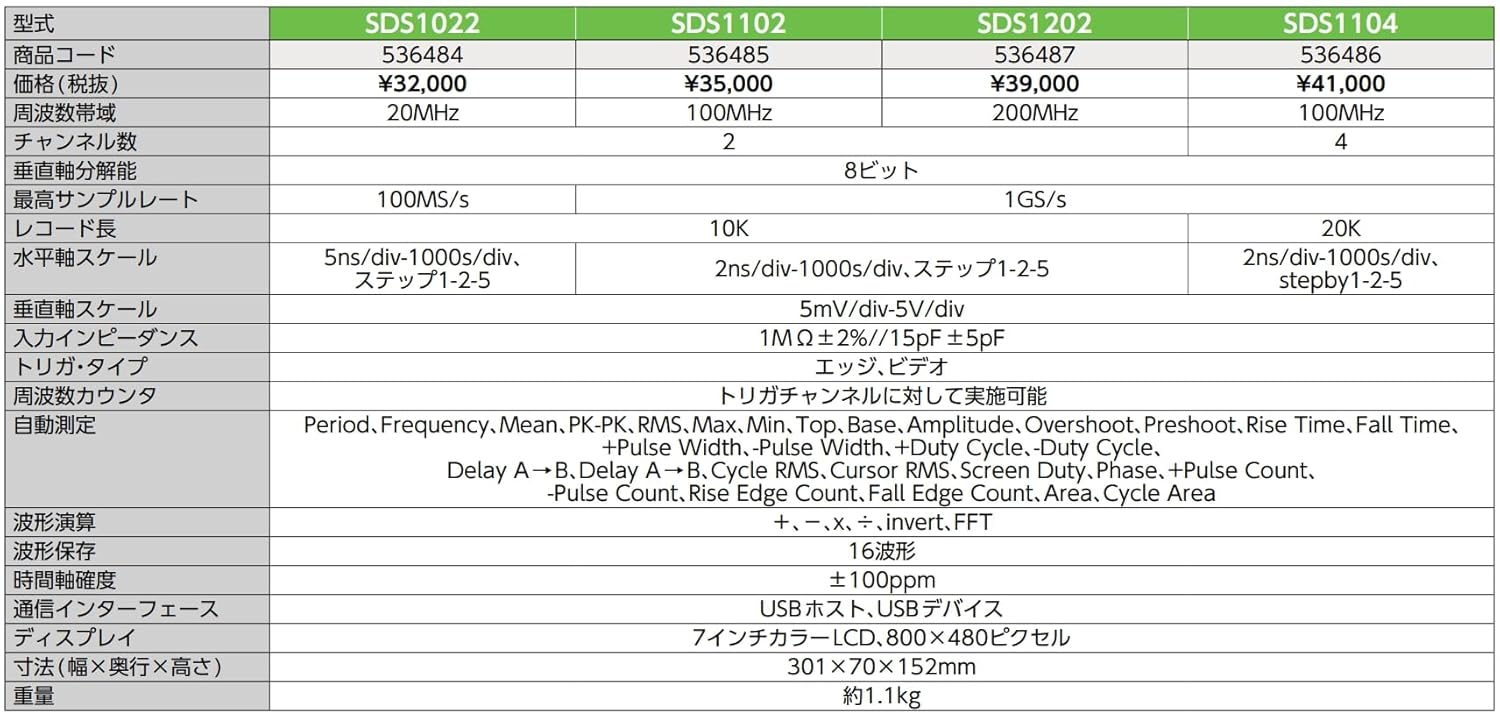
Figure 6: SDS1000 Series Model Comparison.
