
1. บทนำ
Thank you for choosing the ARROWMAX Mini Electric Drill SDS MINI 22. This compact and powerful cordless drill is designed for precision tasks in various materials, making it ideal for DIY enthusiasts, model builders, and jewelers. This manual provides essential information for safe and efficient operation, maintenance, and troubleshooting.
คุณสมบัติหลัก:
- Compact and powerful with a 500 mAh LiPo battery and 600 RPM rotation speed.
- Ergonomic aluminum alloy body for comfortable single-hand operation.
- Includes 10 precision HSS drill bits (0.6mm to 2.2mm) for diverse materials.
- Equipped with 4 shadowless LED lights for optimal visibility and LED battery indicators.
- Simple one-button operation for clockwise, counter-clockwise rotation, and power off.
- Durable aluminum CNC storage case for drill bits.
2. คำแนะนำด้านความปลอดภัย
Please read all safety warnings and instructions carefully before using this product to prevent electric shock, fire, and serious injury.
ความปลอดภัยทั่วไป
- Always wear appropriate personal protective equipment, including safety glasses, when operating the drill.
- รักษาพื้นที่ทำงานของคุณให้สะอาดและมีแสงสว่างเพียงพอ พื้นที่รกหรือมืดชวนให้เกิดอุบัติเหตุ
- ห้ามใช้เครื่องมือไฟฟ้าในสภาพแวดล้อมที่อาจเกิดการระเบิด เช่น ในบริเวณที่มีของเหลวไวไฟ แก๊ส หรือฝุ่น
- ระวังเด็กและผู้คนรอบข้างไม่ให้ใช้เครื่องมือไฟฟ้า เพราะสิ่งรบกวนอาจทำให้คุณควบคุมเครื่องไม่ได้
- หลีกเลี่ยงการสตาร์ทโดยไม่ได้ตั้งใจ ตรวจสอบให้แน่ใจว่าสวิตช์อยู่ในตำแหน่งปิดก่อนต่อเข้ากับชุดแบตเตอรี่ หยิบหรือพกพาเครื่องมือ
ความปลอดภัยทางไฟฟ้า
- อย่าให้เครื่องมือไฟฟ้าโดนฝนหรือเปียกน้ำ น้ำที่เข้าไปในเครื่องมือไฟฟ้าจะเพิ่มความเสี่ยงต่อการเกิดไฟฟ้าช็อต
- ใช้เฉพาะสายชาร์จและอะแดปเตอร์ไฟที่ระบุเท่านั้น
ความปลอดภัยส่วนบุคคล
- จงตื่นตัว ระวังสิ่งที่คุณกำลังทำ และใช้สามัญสำนึกเมื่อใช้งานเครื่องมือไฟฟ้า
- อย่าเอื้อมเกินตัว ควรวางเท้าให้เหมาะสมและทรงตัวอยู่เสมอ
- ยึดชิ้นงานให้แน่น ใช้ clampหรืออุปกรณ์จับยึดชิ้นงาน
- Always ensure the drill bit is securely fastened in the chuck before operation.
3. เนื้อหาบรรจุภัณฑ์
ตรวจสอบว่าสินค้าทั้งหมดที่ระบุไว้ด้านล่างนี้รวมอยู่ในบรรจุภัณฑ์ของคุณแล้ว หากมีสินค้าใดสูญหายหรือเสียหาย โปรดติดต่อผู้ค้าปลีกของคุณ
- 1 x ARROWMAX Mini Electric Drill (SDS MINI 22)
- 10 x HSS Drill Bits (0.6mm, 0.8mm, 1.0mm, 1.2mm, 1.4mm, 1.5mm, 1.6mm, 1.8mm, 2.0mm, 2.2mm)
- 1 x Aluminum Drill Bit Storage Case
- 1 x สายชาร์จ USB (Type-C)
- 1 x คู่มือผู้ใช้
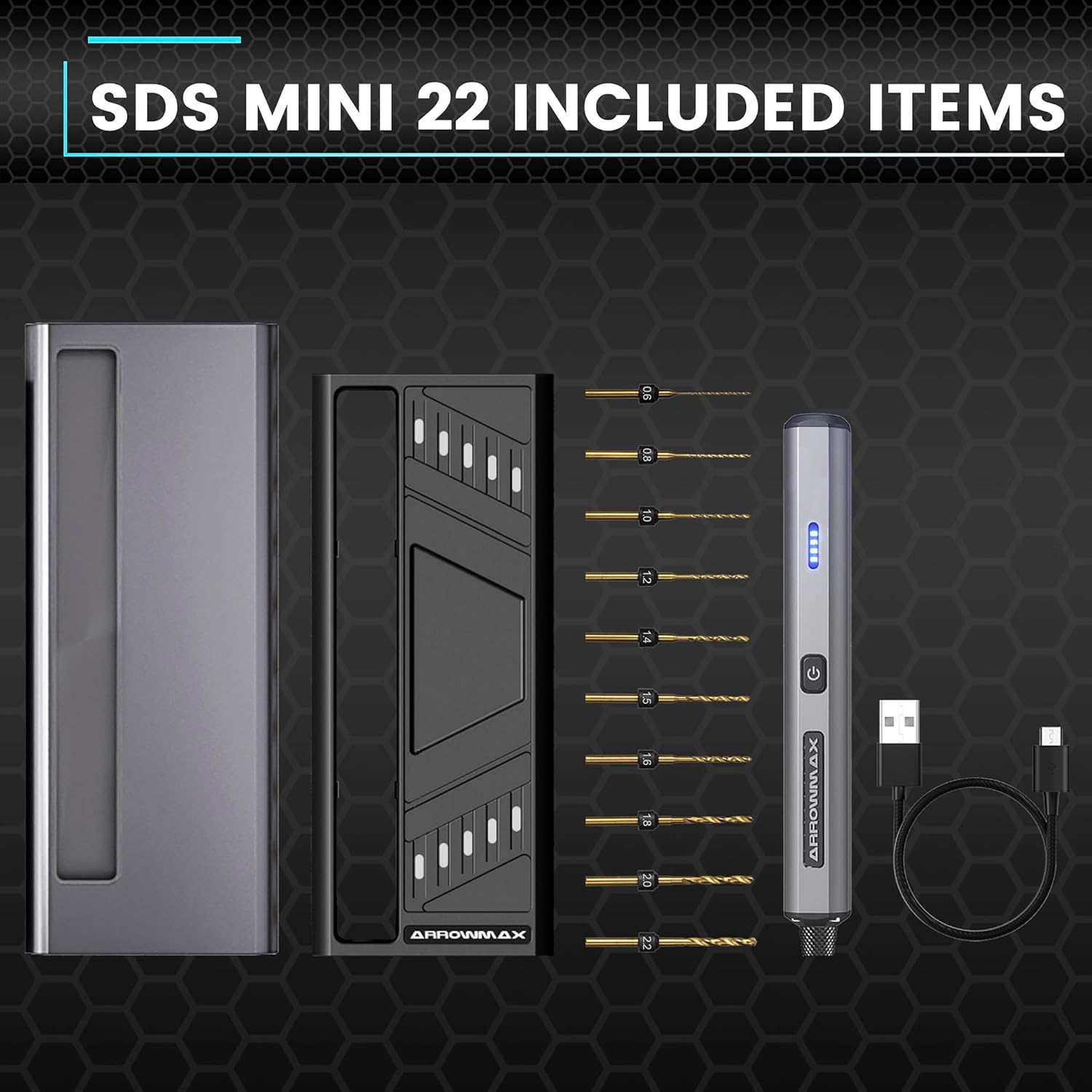
Figure 3.1: Complete package contents of the SDS MINI 22.
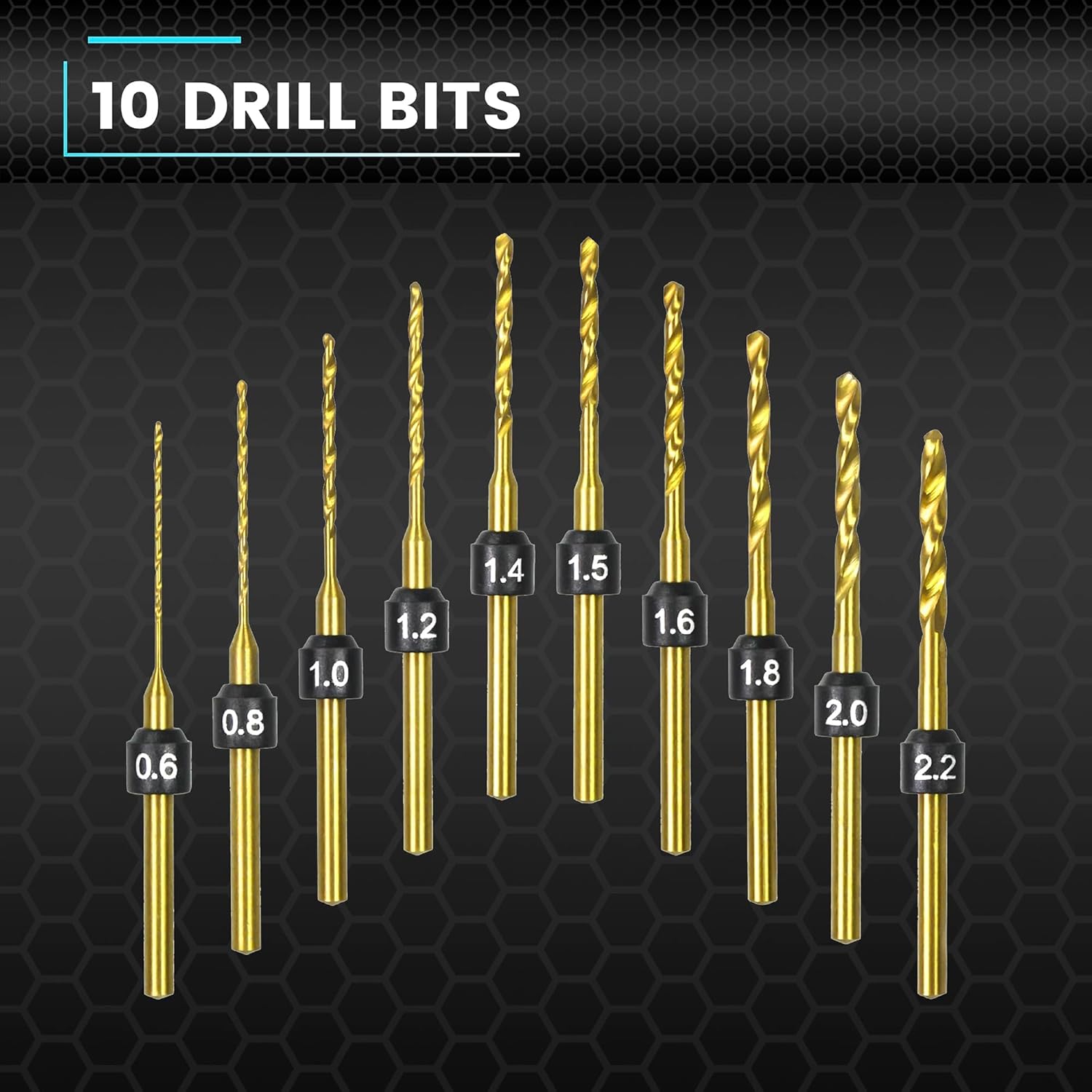
Figure 3.2: The 10 HSS drill bits included with the SDS MINI 22.
4. สินค้าหมดview
Familiarize yourself with the components of your ARROWMAX Mini Electric Drill.
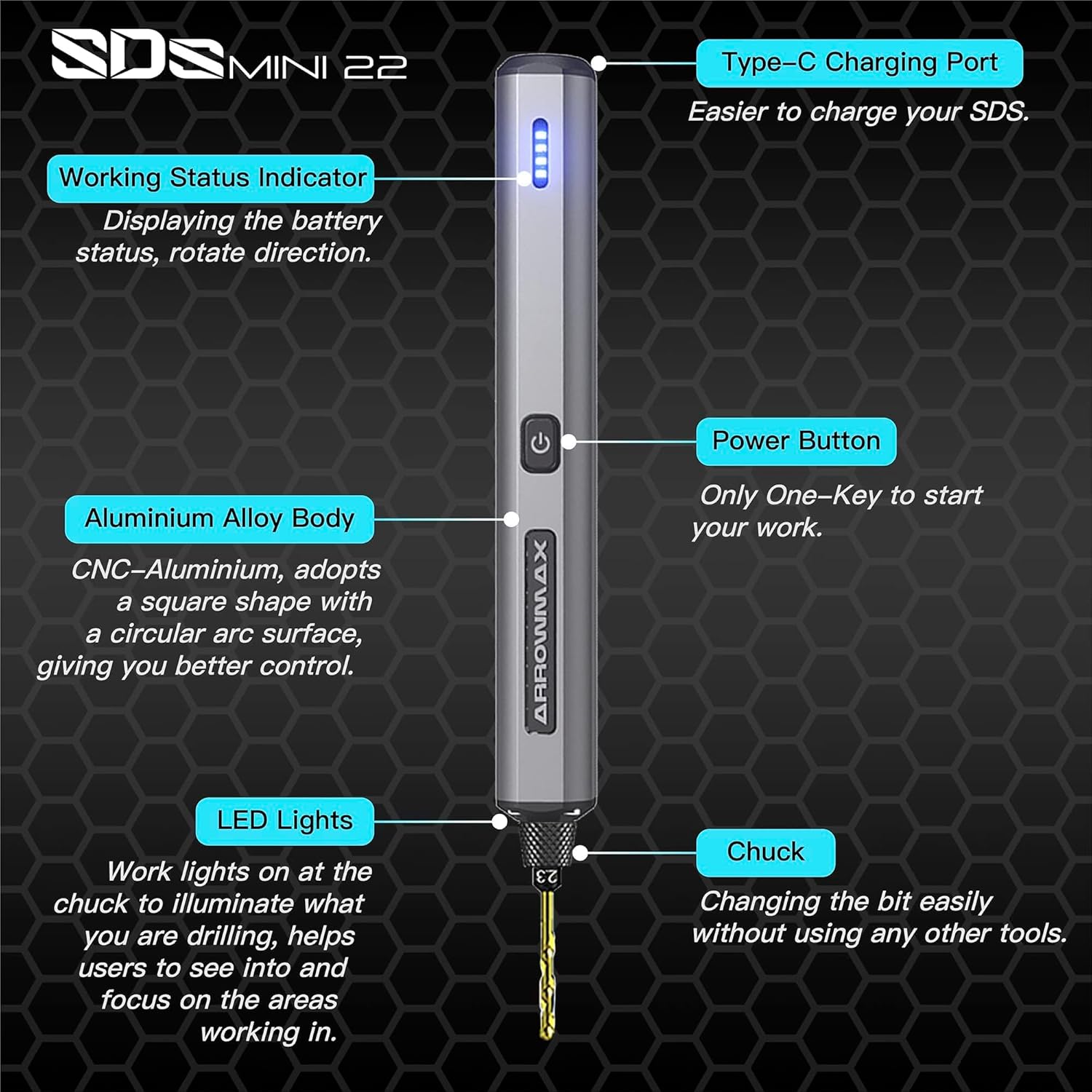
Figure 4.1: Labeled components of the SDS MINI 22.
- พอร์ตชาร์จ Type-C: สำหรับชาร์จแบตเตอรี่ภายใน
- ตัวบ่งชี้สถานะการทำงาน: Displays battery status and rotation direction.
- ปุ่มเปิด/ปิด: Controls power on/off and rotation direction.
- ตัวเครื่องเป็นอลูมิเนียมอัลลอยด์: Provides durability and ergonomic grip.
- ไฟ LED: Illuminates the drilling area for improved visibility.
- เชย: Holds the drill bits securely.
5. การตั้งค่า
5.1 การชาร์จอุปกรณ์
- Locate the Type-C charging port on the top of the drill.
- Connect the provided USB Type-C cable to the drill and the other end to a compatible USB power source (e.g., computer, wall adapter).
- The Working Status Indicator LEDs will illuminate to show the charging progress. A full charge is indicated when all LEDs are solid.
- Allow approximately 60 minutes for a full charge.
5.2 การติดตั้งดอกสว่าน
- Ensure the drill is powered off before installing or removing bits.
- Gently pull the chuck downwards to open the jaws.
- Insert the desired drill bit into the chuck. Ensure the bit is inserted as far as it can go for maximum stability.
- Release the chuck to secure the drill bit. The chuck is designed for tool-free bit changes.
- To remove a bit, pull the chuck downwards and extract the bit.
6. คู่มือการใช้งาน
6.1 Power On/Off and Rotation Control
The SDS MINI 22 features a simple one-button control:
- กดครั้งแรก: The drill will power on and rotate in a clockwise direction. The LED indicator will show the direction.
- กดครั้งที่สอง: The drill will switch to counter-clockwise rotation. The LED indicator will update to show the new direction.
- กดครั้งที่สาม: The drill will power off.
You do not need to continuously hold the button during operation.
6.2 ไฟแสดงสถานะแบตเตอรี่
The LED indicators on the drill body display the remaining battery power. Monitor these lights to know when recharging is necessary.
6.3 Working with Materials
The SDS MINI 22 is suitable for drilling various materials, including:
- พลาสติก
- เปลือกหอย
- ไม้
- หนัง
- Soft metals (e.g., aluminum)
Always select the appropriate drill bit size for your task and material. Apply gentle, consistent pressure. Avoid excessive force, which can damage the bit or the material.
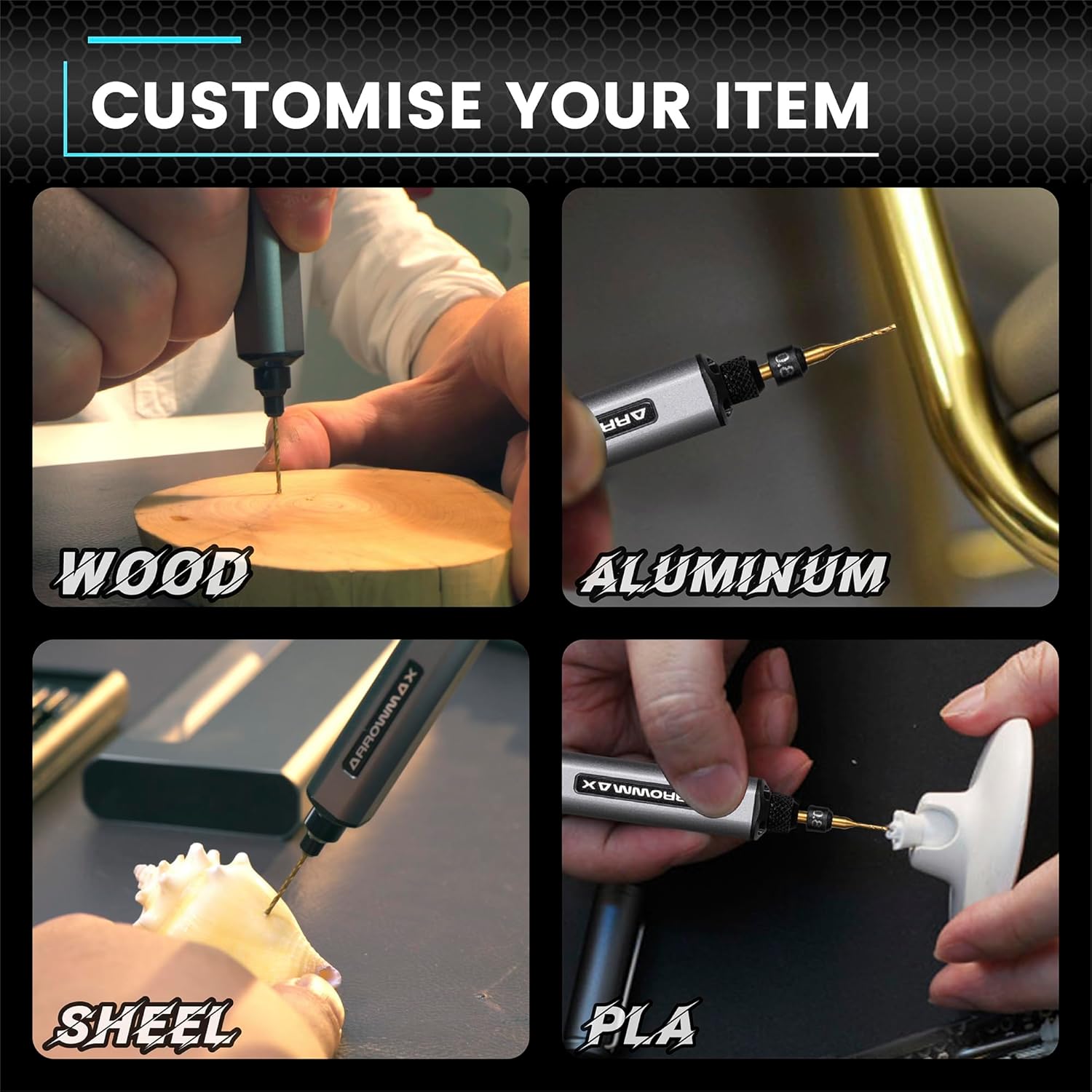
รูปที่ 6.1: อดีตamples of materials suitable for drilling with the SDS MINI 22.
7. การบำรุงรักษา
7.1 การทำความสะอาด
- Ensure the drill is powered off and disconnected from any charging source before cleaning.
- Wipe the drill body with a soft, dry cloth. Do not use harsh chemicals or abrasive cleaners.
- Remove any dust or debris from the chuck and ventilation openings using a soft brush or compressed air.
7.2 พื้นที่จัดเก็บ
- Store the drill and its accessories in a cool, dry place, away from direct sunlight and moisture.
- Always store the drill bits in their provided aluminum case to protect them from damage and loss.
- สำหรับการเก็บรักษาในระยะยาว โปรดตรวจสอบให้แน่ใจว่าแบตเตอรี่มีประจุไฟเหลืออยู่เพียงบางส่วน (ประมาณ 50%) เพื่อยืดอายุการใช้งาน ควรชาร์จแบตเตอรี่ใหม่ทุก 3-6 เดือนหากไม่ได้ใช้งาน
8 การแก้ไขปัญหา
If you encounter issues with your ARROWMAX Mini Electric Drill, refer to the following common problems and solutions:
- Problem: The drill does not turn on.
สารละลาย: Check the battery level. If the battery is low or depleted, connect the drill to a power source using the USB-C cable and charge it fully. Ensure the power button is pressed correctly (first press for clockwise, second for counter-clockwise). - Problem: The drill is not charging.
สารละลาย: Verify that the USB-C cable is securely connected to both the drill and the power source. Try a different USB port or power adapter. Ensure the charging port on the drill is clean and free of debris. - Problem: The drill bit is loose or falls out.
สารละลาย: Ensure the drill bit is inserted correctly and fully into the chuck. Pull the chuck down, insert the bit, and release it to ensure it clamps securely. If the chuck mechanism appears damaged, discontinue use and contact support. - Problem: Reduced drilling performance or unusual noise.
สารละลาย: Check if the drill bit is dull or damaged; replace it if necessary. Ensure you are using the correct bit for the material. If the issue persists, contact customer support.
9. ข้อมูลจำเพาะ
| คุณสมบัติ | ข้อมูลจำเพาะ |
|---|---|
| แบบอย่าง | SDS MINI 22 |
| ยี่ห้อ | แอร์โรว์แม็กซ์ |
| ผู้ผลิต | Freemax Technology Company Limited (IMPORT) |
| ขนาดสินค้า (กว้าง x ยาว x สูง) | 18.5 x 7 x 3 ซม. |
| น้ำหนัก | 280 กรัม |
| แหล่งพลังงาน | ใช้พลังงานจากแบตเตอรี่ |
| ประเภทแบตเตอรี่ | ลิเธียมโพลิเมอร์ |
| ความจุของแบตเตอรี่ | 500 มิลลิแอมป์ |
| เล่มที่tage | 5 โวลต์ |
| Ampอีเรจ | 2 ก |
| ความเร็วในการหมุนสูงสุด | 600 รอบต่อนาที |
| คุณสมบัติพิเศษ | Compact, LED Lights, Battery Indicator |
| สี | สีดำ |
| ส่วนประกอบที่รวมอยู่ | 1 Electric Pen, 10 Drill Bits, 1 Manual, 1 USB Charging Cable |
10. การรับประกันและการสนับสนุน
Specific warranty information for the ARROWMAX Mini Electric Drill SDS MINI 22 is not provided in the product details. For warranty claims, technical support, or inquiries regarding spare parts, please contact your retailer or the manufacturer directly. Keep your purchase receipt as proof of purchase.