
1. บทนำ
Thank you for choosing the AVATTO WT410-BH-3A-W Smart Thermostat. This device is designed to provide intelligent control over your gas boiler system, allowing you to manage your home's heating efficiently. With Wi-Fi connectivity, you can remotely adjust temperatures via a mobile application, integrate with popular voice assistants, and utilize advanced scheduling options. This manual provides detailed instructions for installation, operation, and maintenance to ensure optimal performance and energy savings.
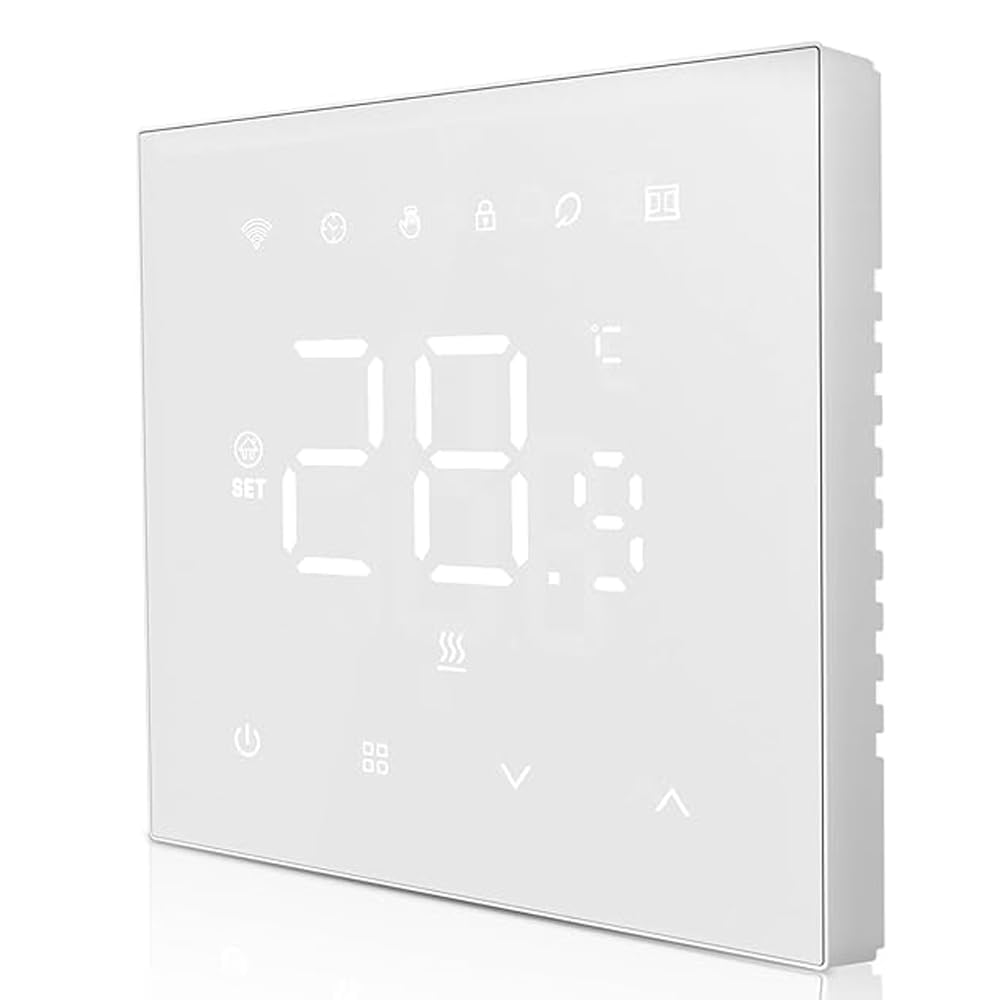
รูปที่ 1: ด้านหน้า view of the AVATTO WT410-BH-3A-W Smart Thermostat, showing its sleek design and LED display.
2. ข้อมูลด้านความปลอดภัย
- อันตรายจากไฟฟ้า: Installation must be performed by a qualified electrician. Disconnect power at the circuit breaker before installation to prevent electrical shock.
- เล่มที่tagความเข้ากันได้: ตรวจสอบให้แน่ใจว่าเทอร์โมสตัทมีปริมาตรtage requirements match your electrical system.
- ความเข้ากันได้ของหม้อไอน้ำ: This thermostat is designed for gas boiler systems with a maximum load of 3A. Verify compatibility with your boiler before installation.
- สภาพแวดล้อม : Do not install in areas with high humidity, direct sunlight, or extreme temperatures.
- ความปลอดภัยของเด็ก: เก็บอุปกรณ์ให้พ้นจากมือเด็ก
3. เนื้อหาบรรจุภัณฑ์
กรุณาตรวจสอบแพ็คเกจสำหรับรายการต่อไปนี้:
- AVATTO WT410-BH-3A-W Smart Thermostat Unit
- สกรูยึด (2 ชิ้น)
- คู่มือการใช้งาน (เอกสารนี้)
4. การติดตั้ง
สำคัญ: Installation should only be carried out by a qualified professional. Ensure the main power supply to your heating system is turned off before proceeding.
- การตัดการเชื่อมต่อไฟฟ้า: Turn off the main power supply to your boiler system at the circuit breaker. Verify that the power is off using a voltagอีผู้ทดสอบ
- ถอดเทอร์โมสตัทตัวเก่าออก (ถ้ามี): ถอดเทอร์โมสตัทเดิมออกจากผนังอย่างระมัดระวัง สังเกตการเชื่อมต่อสายไฟก่อนถอดออก
- การติดตั้งแผ่นฐาน: Separate the front panel of the AVATTO thermostat from its base plate. Secure the base plate to the wall using the provided mounting screws. Ensure it is level.
- การเดินสายไฟ: Connect the wires from your boiler system to the appropriate terminals on the thermostat's base plate. Refer to the "Wiring Diagram" section for detailed instructions. Ensure all connections are secure.
- Attach Thermostat Unit: Carefully attach the front panel of the thermostat onto the mounted base plate, ensuring it clicks securely into place.
- คืนค่าพลัง: Turn the main power supply back on at the circuit breaker. The thermostat display should illuminate.
5. แผนภาพการเดินสายไฟ
The AVATTO WT410-BH-3A-W thermostat typically requires connections for power supply and boiler control.
Standard Wiring (Gas Boiler 3A):
- ล (สด): เชื่อมต่อกับสายไฟจากแหล่งจ่ายไฟของคุณ
- N (เป็นกลาง): เชื่อมต่อกับสายกลางจากแหล่งจ่ายไฟของคุณ
- ไม่ (ปกติเปิด): Connect to the boiler's control input (often labeled as 'SW' or 'COM' on the boiler).
- COM (ทั่วไป): Connect to the other boiler control input.
Note: Always refer to your boiler's specific wiring diagram and consult a qualified electrician if you are unsure about any connections. Incorrect wiring can damage the thermostat or your boiler system.
6. App and Wi-Fi Setup
To unlock the full potential of your AVATTO Smart Thermostat, connect it to your home Wi-Fi network and the compatible mobile application.
- ดาวน์โหลดแอป: ค้นหา "Smart Life" or "Tuya Smart" in your mobile app store (iOS or Android) and download the application.
- ลงทะเบียน/เข้าสู่ระบบ: เปิดแอปและลงทะเบียนบัญชีใหม่หรือเข้าสู่ระบบหากคุณมีบัญชีอยู่แล้ว
- เพิ่มอุปกรณ์: In the app, tap the "+" icon (usually in the top right corner) to add a new device. Select "Thermostat" or "Heater" from the device list.
- โหมดจับคู่: On the thermostat, press and hold the Wi-Fi icon button (or a similar pairing button) until the Wi-Fi indicator light starts blinking rapidly. This indicates it's in pairing mode.
- เชื่อมต่อกับ Wi-Fi: Follow the on-screen instructions in the app. You will need to enter your home Wi-Fi network name (SSID) and password. Ensure your phone is connected to a 2.4GHz Wi-Fi network (5GHz networks are generally not supported by smart home devices).
- การยืนยัน: Once connected, the Wi-Fi indicator on the thermostat will become solid, and the app will confirm successful pairing. You can now control your thermostat remotely.
For voice assistant integration (e.g., Amazon Alexa, Google Assistant), follow the instructions within the "Smart Life" or "Tuya Smart" app to link your account.
7. โหมดการทำงาน
The AVATTO WT410-BH-3A-W thermostat supports four main operating modes to suit your heating needs:
- โหมดแมนนวล: In this mode, the thermostat maintains a constant temperature set by the user until manually changed. It overrides any programmed schedules.
- โหมดการเขียนโปรแกรม: The thermostat follows the pre-set weekly schedule, automatically adjusting the temperature at specified times.
- โหมดการตั้งโปรแกรมชั่วคราว: While in Programming Mode, you can temporarily adjust the temperature. The thermostat will maintain this new temperature until the next scheduled program change, then revert to the schedule.
- Absence Mode (Holiday Mode): Designed for extended periods away from home. You can set a lower, energy-saving temperature for a specified duration, and the thermostat will automatically resume normal operation afterward.
Switch between modes using the dedicated mode button on the thermostat or through the mobile application.
8. รายการประจำสัปดาห์
The thermostat allows for advanced weekly programming, enabling you to set different temperatures for specific time periods throughout the week. This helps optimize comfort and energy efficiency.
You can set up to 6 ช่วงเวลา for weekdays (Monday-Friday) and 2 ช่วงเวลา for weekends (Saturday-Sunday).
- การเข้าถึงโปรแกรม: Press and hold the "M" (Mode) button or navigate to the "Schedule" section in the mobile app.
- ตั้งตารางเวลาสำหรับวันธรรมดา: For Monday to Friday, define up to 6 time periods (e.g., Wake, Leave, Return, Sleep) and their corresponding desired temperatures.
- กำหนดตารางเวลาสำหรับวันหยุดสุดสัปดาห์: For Saturday and Sunday, define up to 2 time periods and their desired temperatures.
- บันทึกการตั้งค่า: Confirm and save your programming. The thermostat will now follow this schedule when in Programming Mode.
The thermostat offers high precision with temperature settings, accurate to 0.5°C, and displays temperature with 0.1°C precision. An adjustable hysteresis function (0.5°C to 10°C) allows fine-tuning of temperature deviation.
9. การบำรุงรักษา
The AVATTO WT410-BH-3A-W Smart Thermostat requires minimal maintenance to ensure long-term performance.
- การทำความสะอาด: เช็ดหน้าจอเบาๆ และ casinเช็ดทำความสะอาดด้วยผ้าแห้งเนื้อนุ่ม ห้ามใช้สารทำความสะอาดที่มีฤทธิ์กัดกร่อน สารละลาย หรือสเปรย์เคมี เพราะอาจทำให้เครื่องเสียหายได้
- หลีกเลี่ยงสิ่งกีดขวาง: Ensure no objects are blocking the thermostat's vents or sensors, as this can affect temperature readings.
- การอัปเดตซอฟต์แวร์: Periodically check the mobile application for firmware updates for your thermostat. Updates can improve performance and add new features.
10 การแก้ไขปัญหา
| ปัญหา | สาเหตุที่เป็นไปได้ | สารละลาย |
|---|---|---|
| จอแสดงผลเทอร์โมสตัทว่างเปล่า | ไม่มีแหล่งจ่ายไฟ | Check the circuit breaker for your heating system. Ensure wiring is correct and secure. |
| เทอร์โมสตัทไม่สามารถเชื่อมต่อกับ Wi-Fi | รหัสผ่าน Wi-Fi ไม่ถูกต้อง; เครือข่าย 5GHz; เทอร์โมสตัทอยู่ไกลจากเราเตอร์เกินไป | Ensure correct 2.4GHz Wi-Fi password. Move thermostat closer to router or use a Wi-Fi extender. Re-enter pairing mode. |
| Boiler not responding to thermostat. | Incorrect wiring; boiler issue; thermostat not in heating mode. | Verify wiring connections. Check boiler's power and status. Ensure thermostat is set to a temperature higher than the current room temperature and is in an active heating mode. |
| การอ่านอุณหภูมิไม่ถูกต้อง | เทอร์โมสตัทติดตั้งอยู่ใกล้แหล่งความร้อน/กระแสลม; เซ็นเซอร์ถูกกีดขวาง | Relocate thermostat if possible. Ensure no objects are blocking the internal sensor. |
If you encounter issues not listed here or require further assistance, please contact AVATTO customer support.
11. ข้อมูลจำเพาะ
| คุณสมบัติ | รายละเอียด |
|---|---|
| ยี่ห้อ | อาวัตโต้ |
| หมายเลขรุ่น | WT410-BH-3A-W |
| ความเข้ากันได้ | Gas Boiler (3A Max Load) |
| การเชื่อมต่อ | ไวไฟ (2.4GHz) |
| ความแม่นยำของอุณหภูมิ | 0.5 องศาเซลเซียส |
| ความแม่นยำในการแสดงอุณหภูมิ | 0.1 องศาเซลเซียส |
| Hysteresis Range | 0.5°C ถึง 10°C |
| การเขียนโปรแกรม | 6 periods (Mon-Fri), 2 periods (Sat-Sun) |
| การสนับสนุนผู้ช่วยเสียง | Yes (via Smart Life/Tuya Smart app integration) |
12. การรับประกันและการสนับสนุน
AVATTO products are manufactured to the highest quality standards. For information regarding warranty coverage, please refer to the warranty card included with your purchase or visit the official AVATTO webเว็บไซต์.
For technical support, troubleshooting assistance, or any questions about your AVATTO WT410-BH-3A-W Smart Thermostat, please contact AVATTO customer service through their official channels.
Webเว็บไซต์: www.avatto.com (หมายเหตุ: นี่เป็นเพียงตัวอย่างชั่วคราว URL as no official support link was provided.)


