
N35
N35 LED Display Low Latency Wireless Earphone TWS 5.3 User Manual
รุ่น : N35
1. บทนำ
This manual provides detailed instructions for the safe and effective use of your N35 LED Display Low Latency Wireless Earphone TWS 5.3. Please read this manual thoroughly before using the product and retain it for future reference.
The N35 earbuds are designed to deliver a seamless and immersive audio experience with features such as low latency technology, intuitive touch controls, and an LED display for battery status and connectivity.
2. ข้อมูลด้านความปลอดภัย
- ห้ามให้หูฟังหรือกล่องชาร์จสัมผัสกับอุณหภูมิที่สูงหรือความชื้นสูงหรือของเหลว
- หลีกเลี่ยงการทำตก กระแทก หรือถอดประกอบอุปกรณ์
- ใช้เฉพาะสายชาร์จที่ให้มาและอะแดปเตอร์ไฟที่เข้ากันได้เท่านั้น
- การฟังเสียงดังเป็นเวลานานอาจทำให้เกิดความเสียหายต่อการได้ยิน โปรดปรับระดับเสียงให้อยู่ในระดับที่ปลอดภัย
- เก็บให้พ้นจากมือเด็กและสัตว์เลี้ยง
- Clean the earbuds and charging case with a soft, dry cloth.
3. เนื้อหาบรรจุภัณฑ์
กรุณาตรวจสอบแพ็คเกจสำหรับรายการต่อไปนี้:
- N35 Wireless Earbuds (Left and Right)
- เคสชาร์จไฟ
- สายชาร์จ USB
- คู่มือการใช้งาน
4. สินค้าหมดview
Familiarize yourself with the components of your N35 earbuds and charging case.
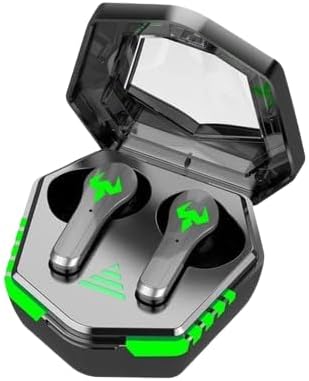
Figure 4.1: N35 Earbuds and Charging Case. The earbuds feature a sleek design with green accents, housed within a transparent-lidded charging case that displays battery status.
4.1 เอียร์บัด
- พื้นที่ควบคุมแบบสัมผัส: สำหรับการจัดการการเล่น การโทร และโหมดต่างๆ
- ไฟแสดงสถานะ LED: แสดงสถานะการจับคู่และระดับแบตเตอรี่
- ไมโครโฟน: สำหรับการโทรด้วยเสียง
- หน้าสัมผัสการชาร์จ: เชื่อมต่อกับเคสชาร์จ
4.2 กล่องชาร์จ
- จอแสดงผล LED: Indicates charging status and battery level of the case and individual earbuds.
- พอร์ตชาร์จ: พอร์ต USB สำหรับชาร์จเคส
- ช่องใส่หูฟัง: ยึดและชาร์จหูฟังได้อย่างปลอดภัย
5. การตั้งค่า
5.1 การชาร์จเริ่มต้น
ก่อนใช้งานครั้งแรก ควรชาร์จหูฟังและเคสชาร์จให้เต็ม
- ใส่หูฟังเอียร์บัดทั้งสองข้างลงในกล่องชาร์จ
- เชื่อมต่อสายชาร์จ USB เข้ากับพอร์ตชาร์จบนเคสและแหล่งจ่ายไฟ (เช่น พอร์ต USB ของคอมพิวเตอร์ อะแดปเตอร์ติดผนัง)
- The LED display on the case will show the charging progress. A full charge typically takes 1-2 hours.
- Once fully charged, the LED display will indicate a full battery.

Figure 5.1: Charging the N35 Earbuds. The image suggests the earbuds' long battery life, suitable for extended use with devices like laptops and smartphones.
5.2 การจับคู่กับอุปกรณ์
หูฟังจะเข้าสู่โหมดจับคู่โดยอัตโนมัติเมื่อนำออกจากเคส
- เปิดกล่องชาร์จและนำหูฟังทั้งสองข้างออก หูฟังจะเปิดโดยอัตโนมัติและพยายามจับคู่กัน
- บนอุปกรณ์ของคุณ (สมาร์ทโฟน แท็บเล็ต คอมพิวเตอร์) เปิดใช้งาน Bluetooth
- ค้นหา available Bluetooth devices. You should see "N35" or a similar name in the list.
- Select "N35" to connect. Once connected, the earbud LED indicators will turn off or flash slowly, and you may hear a confirmation tone.
- หากการจับคู่ล้มเหลว ให้ใส่เอียร์บัดกลับเข้าไปในเคส ปิดฝา รอสองสามวินาที แล้วทำซ้ำขั้นตอนอีกครั้ง
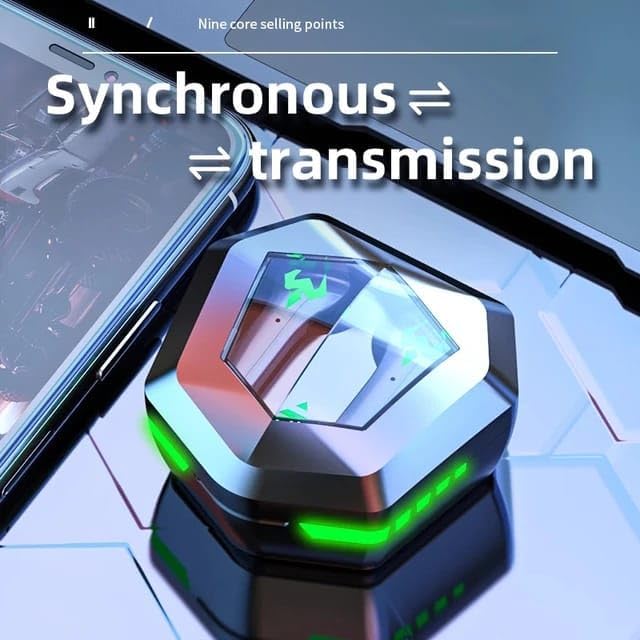
Figure 5.2: Synchronous Transmission. The closed case indicates the earbuds are ready for seamless connection and audio transmission.
6. คู่มือการใช้งาน
6.1 ระบบควบคุมแบบสัมผัส
The N35 earbuds feature intuitive touch controls on each earbud. The functions may vary slightly depending on the specific model variant.
| การกระทำ | การทำงาน |
|---|---|
| แตะครั้งเดียว (L/R) | เล่น/หยุดเพลง, รับ/วางสาย |
| ดับเบิ้ลแท็ป (ซ้าย) | เพลงก่อนหน้า |
| ดับเบิ้ลแท็ป (R) | เพลงถัดไป |
| แตะสามครั้ง (ซ้าย/ขวา) | เปิดใช้งานผู้ช่วยเสียง |
| กดค้าง (2 วินาที) (ซ้าย/ขวา) | ปฏิเสธการรับสาย |
| กดค้าง (3 วินาที) (ซ้าย/ขวา) | สลับโหมดเกม/เพลง |
6.2 โหมดคู่สำหรับฟังเพลง/เล่นเกม
The N35 earbuds support a dual mode for optimized audio experience, switching between music and gaming modes.

Figure 6.1: Music/Game Dual Mode. This image emphasizes the low latency and high sound quality for both music listening and gaming.
- โหมดเพลง: Provides balanced audio for general listening.
- โหมดเกม: ลดความล่าช้าของเสียงเพื่อประสบการณ์การเล่นเกมที่สอดประสานกันมากยิ่งขึ้น
- To switch modes, perform a long press (3 seconds) on either earbud's touch control area. You will hear an audible prompt indicating the mode change.

Figure 6.2: Bluetooth 5.2 Chip. This image showcases the advanced Bluetooth technology within the earbud, contributing to its low latency performance.
7. การบำรุงรักษา
7.1 การทำความสะอาด
- ควรทำความสะอาดหูฟังและเคสชาร์จเป็นประจำ เพื่อให้มั่นใจได้ถึงประสิทธิภาพและสุขอนามัยที่ดีที่สุด
- ใช้ผ้าแห้งนุ่มๆ ที่ไม่มีขนเช็ดทำความสะอาดพื้นผิวของหูฟังและเคส
- For earwax or debris in the earbud tips, use a small, soft brush or cotton swab. Do not use sharp objects.
- ห้ามใช้สารทำความสะอาดที่มีฤทธิ์กัดกร่อน แอลกอฮอล์ หรือตัวทำละลายเคมี
7.2 พื้นที่จัดเก็บ
- เมื่อไม่ได้ใช้งาน ให้เก็บหูฟังไว้ในกล่องชาร์จเพื่อปกป้องหูฟังและชาร์จไฟให้หูฟังอยู่เสมอ
- เก็บอุปกรณ์ไว้ในที่แห้งและเย็น หลีกเลี่ยงแสงแดดโดยตรงและอุณหภูมิที่สูงหรือต่ำเกินไป
8 การแก้ไขปัญหา
| ปัญหา | วิธีแก้ปัญหาที่เป็นไปได้ |
|---|---|
| หูฟังไม่จับคู่กับอุปกรณ์ | Ensure Bluetooth is enabled on your device. Place earbuds back in case, close lid, then reopen and try pairing again. Forget "N35" from your device's Bluetooth list and re-pair. |
| เอียร์บัดตัวเดียวเท่านั้นที่ใช้งานได้ | Ensure both earbuds are charged. Place both earbuds back in the case, close the lid, then reopen. This often re-syncs them. |
| ไม่มีเสียงหรือเสียงเบา | Check volume levels on both the earbuds and your connected device. Ensure earbuds are properly seated in your ears. Clean earbud tips if necessary. |
| เคสชาร์จไม่ชาร์จ | Check the USB cable and power adapter. Ensure the charging cable is securely connected to both the case and the power source. |
| ระบบควบคุมแบบสัมผัสไม่ตอบสนอง | ตรวจสอบให้แน่ใจว่านิ้วของคุณสะอาดและแห้ง ลองรีสตาร์ทหูฟังโดยใส่หูฟังลงในกล่องแล้วนำออกมาอีกครั้ง |

Figure 8.1: Clear Call Performance. The image highlights the earbuds' capability for clear communication, even in potentially noisy environments.
9. ข้อมูลจำเพาะ
| คุณสมบัติ | รายละเอียด |
|---|---|
| ชื่อรุ่น | N35 |
| เทคโนโลยีการเชื่อมต่อ | ไร้สาย (บลูทูธ 5.3) |
| การควบคุมเสียงรบกวน | ระบบตัดเสียงรบกวนแบบแอคทีฟ |
| การวางตำแหน่งหู | ในหู |
| วิธีการควบคุม | สัมผัส |
| วัสดุ | พลาสติก |
| ระดับความต้านทานต่อน้ำ | กันน้ำ |
| อิมพีแดนซ์ | 8 โอห์ม |
| สี | สีดำ |
10. การรับประกันและการสนับสนุน
For warranty information and technical support, please refer to the contact details provided with your purchase or visit the manufacturer's official webเว็บไซต์.
โปรดเก็บหลักฐานการซื้อของคุณไว้เพื่อเรียกร้องการรับประกัน
Ask a question about this manual
Ask about setup, troubleshooting, compatibility, parts, safety, or missing instructions. Manuals+ will review the question and use this page’s manual context to help answer it.