
1. บทนำ
Thank you for choosing the K&F Concept K234A0 Camera Tripod with GD-3W 3-Way Geared Head. This instruction manual provides detailed guidance on the proper setup, operation, and maintenance of your new equipment. Please read this manual thoroughly before use to ensure safe and effective operation and to maximize the lifespan of your product.
2. ข้อมูลด้านความปลอดภัย
- Always ensure your camera and lens are securely mounted to the tripod head before releasinจับให้แน่น
- Do not exceed the maximum load capacity of the tripod or the geared head. Refer to the specifications section for details.
- When adjusting leg sections or the center column, ensure all locking mechanisms are firmly engaged before placing equipment on the tripod.
- ควรหลีกเลี่ยงการวางขาตั้งกล้องไว้ในที่ที่มีอุณหภูมิสูงหรือต่ำเกินไป ความชื้น หรือสารกัดกร่อน
- Keep hands and fingers clear of moving parts during adjustments to prevent pinching.
- Do not carry the tripod with a camera attached over long distances or in crowded areas to prevent accidental damage or injury.
3. เนื้อหาบรรจุภัณฑ์
Please check the package contents upon receipt. If any items are missing or damaged, contact K&F Concept customer support.
- K&F Concept K234A0 Camera Tripod
- K&F Concept GD-3W 3-Way Geared Head
- จานปล่อยด่วน
- กระเป๋าใส่ของ
- คู่มือการใช้งาน
4. การระบุชิ้นส่วน
4.1 GD-3W 3-Way Geared Head Components

Image: Labeled components of the GD-3W Geared Head, including the 1/4" screw, Quick Release Plate, Bubble Level, Pitch Dial, Quick Adjustment Knobs, Fine Tuning Knobs, and 3/8" Bottom Interface.
- สกรูขนาด 1/4 นิ้ว: For attaching the camera to the quick release plate.
- แผ่นปลดเร็ว: Mounts to the camera and slides into the head for quick attachment/detachment.
- ระดับฟอง: Assists in achieving a level horizon.
- Pitch Dial: Controls the vertical tilt angle.
- Quick Adjustment Knob: Provides rapid, larger adjustments for tilt or pan.
- ปุ่มปรับแบบละเอียด: Allows for precise, small adjustments for tilt or pan.
- Horizontal Dial: Controls the horizontal panning angle.
- 3/8" Bottom Interface: Connects the geared head to the tripod's center column.
4.2 K234A0 Tripod Components
- คอลัมน์กลาง: Extends vertically for additional height.
- Center Column Lock: Secures the center column at the desired height.
- ขาส่วน: Multiple telescoping sections for height adjustment.
- ท่าล็อกขา: Twist locks on each leg section to secure extension.
- ตัวปรับมุมขา: Allow setting the leg spread to different angles.
- เท้ายาง: Provide stability and grip on various surfaces.
5. การตั้งค่า
5.1 การกางขาตั้งออก
- Release the leg angle adjusters on each leg.
- Extend the tripod legs outwards until they are fully spread or at your desired angle. Ensure the leg angle adjusters click into place.
5.2 การปรับความสูงของขาตั้งกล้อง

Image: The K234A0 tripod demonstrating its height range, from folded (395mm/15.55") to fully extended (1630mm/64.17").
- ขาส่วน: Twist the leg locks counter-clockwise to unlock each leg section. Pull out the leg sections to the desired length. Twist the leg locks clockwise to firmly secure them. Repeat for all legs.
- คอลัมน์กลาง: Loosen the center column lock. Gently pull up the center column to extend it. Tighten the center column lock to secure it.
5.3 Mounting the GD-3W Geared Head
The GD-3W geared head typically comes pre-mounted. If not, or if you need to re-attach it:
- Ensure the tripod's mounting screw (usually 3/8") is exposed at the top of the center column.
- Align the 3/8" bottom interface of the GD-3W geared head with the tripod's mounting screw.
- Rotate the geared head clockwise until it is securely tightened onto the tripod.
5.4 การติดตั้งกล้อง
- Remove the quick release plate from the GD-3W geared head by loosening its locking knob and sliding it out.
- Attach the quick release plate to the bottom of your camera or lens collar using the 1/4" screw. Ensure it is tightly secured.
- Slide the quick release plate with your camera attached back into the geared head's receiver.
- Tighten the quick release plate locking knob firmly to prevent accidental detachment.
6. Operating the GD-3W Geared Head

Image: The GD-3W Geared Head illustrating its quick adjustment and fine-tuning knobs for accurate composition, including 360-degree panorama capability.
The GD-3W geared head offers precise control over camera positioning using its distinct adjustment knobs.
- Quick Adjustment Knobs: These larger knobs allow for rapid, broader movements of the camera. Turn them to quickly position your camera roughly where you need it.
- Fine Tuning Knobs: Once the quick adjustment knob has set the general position, use the smaller fine-tuning knobs for micro-adjustments. These provide very precise control over the camera's angle, ideal for critical composition.
- Pitch Dial: Use the pitch dial in conjunction with its quick and fine-tuning knobs to control the vertical tilt (up and down) of your camera.
- Horizontal Dial: Use the horizontal dial in conjunction with its quick and fine-tuning knobs to control the horizontal pan (left and right) of your camera. The geared head supports 360-degree panoramic rotation.
- ระดับฟอง: Use the integrated bubble level to ensure your camera is perfectly level for straight horizons.
7. การบำรุงรักษา
- การทำความสะอาด: Wipe down the tripod and head with a soft, dry cloth after each use. For stubborn dirt, use a slightly damp ใช้ผ้าชุบน้ำหมาดๆ เช็ด แล้วเช็ดให้แห้งสนิท หลีกเลี่ยงสารเคมีรุนแรง
- การหล่อลื่น: The geared mechanisms are factory-lubricated. Do not attempt to lubricate them yourself unless specifically instructed by K&F Concept support.
- พื้นที่จัดเก็บ: Store the tripod in its carrying bag in a cool, dry place, away from direct sunlight and extreme temperatures.
- การตรวจสอบ: Periodically check all screws, knobs, and leg locks for tightness. Tighten any loose components.
8 การแก้ไขปัญหา
- ขาตั้งกล้องไม่มั่นคง: Ensure all leg locks are fully tightened and leg angle adjusters are engaged. Check that the center column lock is secure.
- Camera not level: Use the bubble level on the geared head and adjust the tripod legs or the head's fine-tuning knobs until the bubble is centered.
- Stiff adjustments on geared head: Ensure no locking knobs are overtightened. If the issue persists, contact customer support. Do not force adjustments.
- Quick release plate stuck: Ensure the locking knob for the quick release plate is fully loosened. Do not force the plate.
9. ข้อมูลจำเพาะ
9.1 K234A0 Tripod Specifications

Image: The K234A0 Tripod with a ball head, displaying its core specifications.
| คุณสมบัติ | ข้อมูลจำเพาะ |
|---|---|
| ส่วนขา | 4 |
| เส้นผ่านศูนย์กลางท่อ | 2.3 ซม. / 0.91 นิ้ว |
| ความสูงสูงสุด | 163cm / 64.2" (64.17" from product specs) |
| ความยาวเมื่อพับ | 39cm / 15.4" (395mm/15.55" from product specs) |
| ความจุในการรับน้ำหนัก | 8kg / 17.6lbs |
| น้ำหนักสุทธิ | 1.24kg / 2.73lbs |
9.2 GD-3W 3-Way Geared Head Specifications

Image: The GD-3W Gear Drive Head displaying its detailed specifications.
| คุณสมบัติ | ข้อมูลจำเพาะ |
|---|---|
| ความจุในการรับน้ำหนัก | 6kg / 13.22lbs |
| ความสูง | 13 ซม. / 5.11 นิ้ว |
| น้ำหนักสุทธิ | 810 ก. / 1.78 ปอนด์ |
| อินเทอร์เฟซด้านล่าง | 3/8" |
| วัสดุ | โลหะผสมอลูมิเนียม |
| กระบวนการ | CNC precision process |
| อินเทอร์เฟซยอดนิยม | 1/4" |
9.3 GD-3W Geared Head Dimensions
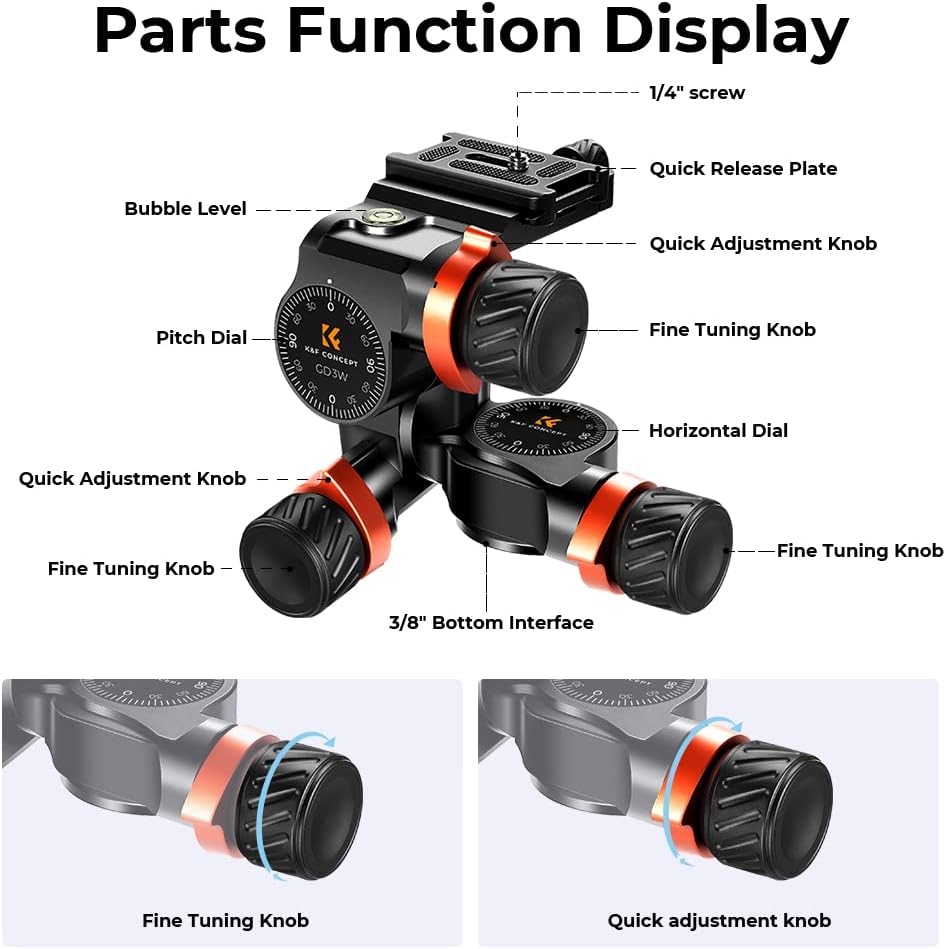
Image: The GD-3W Geared Head showing its overall dimensions (115mm/4.52" height, 130mm/5.11" width, 140mm/5.51" depth) and quick release plate dimensions (60mm/2.23" length, 40mm/1.57" width).
10. การรับประกันและการสนับสนุน
K&F Concept products are designed for reliability and performance. This product comes with a standard manufacturer's warranty against defects in materials and workmanship. For specific warranty terms, please refer to the warranty card included with your product or visit the official K&F Concept webเว็บไซต์.
For technical support, troubleshooting assistance, or warranty claims, please contact K&F Concept customer service through their official webกรุณาระบุรุ่นสินค้าและวันที่ซื้อสินค้าเมื่อติดต่อฝ่ายสนับสนุน (เว็บไซต์หรือร้านค้าที่ซื้อสินค้า)


