
1. บทนำ
Thank you for choosing the OLTEANP 2500W Pure Sine Wave Power Inverter. This device is engineered to convert 12V DC power from your vehicle's battery into stable 230V AC power, making it ideal for powering a wide range of electronic devices and home appliances on the go. With a continuous output of 2500W and a peak power of 5000W, it provides reliable electricity for RVs, road trips, van life, and various off-grid applications. Please read this manual thoroughly before installation and operation to ensure safe and efficient use.
2. คำแนะนำด้านความปลอดภัย
โปรดปฏิบัติตามข้อควรระวังด้านความปลอดภัยต่อไปนี้เสมอ เพื่อป้องกันการบาดเจ็บหรือความเสียหายต่ออินเวอร์เตอร์และอุปกรณ์ที่เชื่อมต่อ:
- การระบายอากาศที่เหมาะสม: Ensure the inverter is installed in a well-ventilated area. Do not block the cooling fans or vents.
- สภาพแวดล้อมที่แห้ง: Keep the inverter away from water, moisture, and any liquids.
- หลีกเลี่ยงวัสดุที่ติดไฟได้: Do not operate the inverter near flammable gases, liquids, or materials.
- การเชื่อมต่อที่ถูกต้อง: Always connect the inverter to the battery with the correct polarity (positive to positive, negative to negative). Incorrect connections can cause severe damage.
- ความจุในการรับน้ำหนัก: Do not exceed the inverter's rated continuous power output (2500W) or peak power (5000W). Overloading can damage the inverter and connected appliances.
- ระบบป้องกันประกายไฟ: This inverter is equipped with a professional spark protection circuit. Ensure proper connection to prevent sparks during initial hook-up.
- เด็กและสัตว์เลี้ยง: เก็บอินเวอร์เตอร์ให้พ้นมือเด็กและสัตว์เลี้ยง
- บุคลากรที่ผ่านการรับรอง: เฉพาะบุคลากรที่มีคุณสมบัติเหมาะสมเท่านั้นที่ควรดำเนินการบำรุงรักษาหรือซ่อมแซม
3. คุณสมบัติและส่วนประกอบของผลิตภัณฑ์
Familiarize yourself with the various parts and features of your OLTEANP Power Inverter.
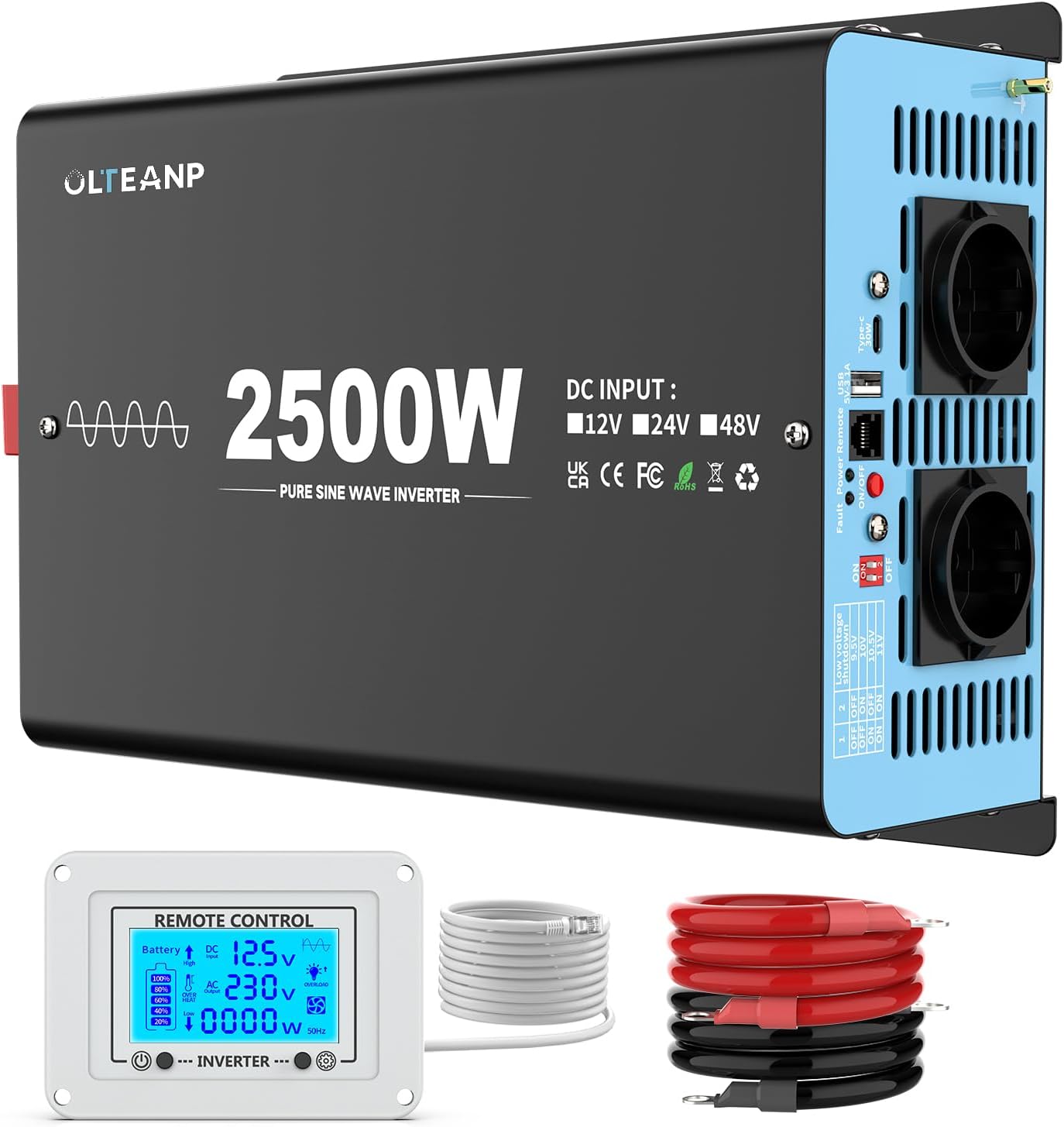
รูปที่ 3.1: เกินview of the OLTEANP 2500W Pure Sine Wave Power Inverter, showing the main unit, remote control with LCD display, and included battery cables.
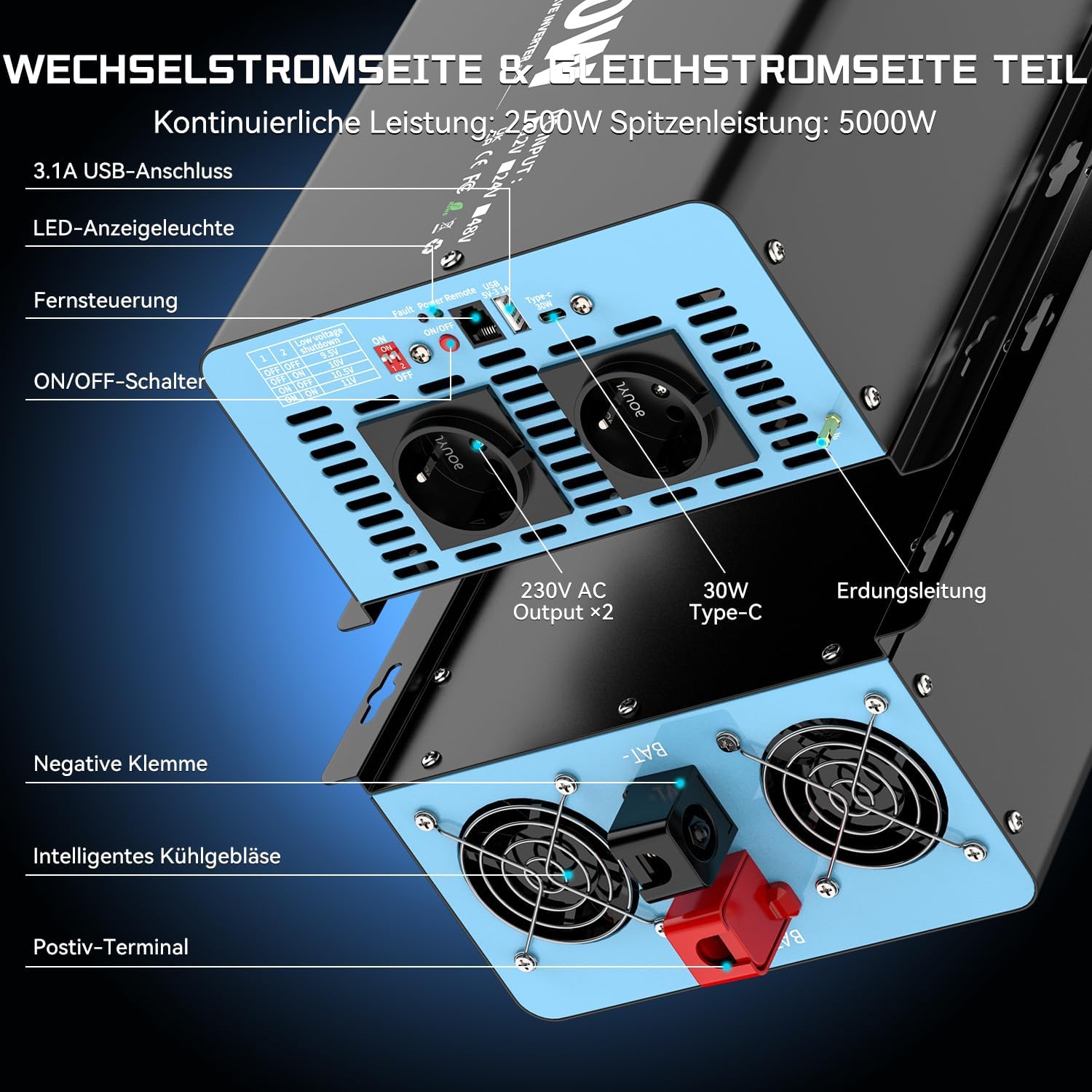
รูปที่ 3.2: รายละเอียด view of the inverter's input and output terminals. The AC side features two 230V AC outlets, a 3.1A USB port, and a 30W Type-C port. It also includes an ON/OFF switch, remote control port, LED indicator light, and fault/power indicator lights. The DC side shows the positive and negative terminals for battery connection, intelligent cooling fans, and an earthing terminal.

รูปที่ 3.3: The remote control with its LCD screen. This display provides real-time information on battery status, DC input voltage, กระแสไฟขาออก voltage, current power consumption (in Watts), and indicators for overheat or overload conditions. Flashing icons on the LCD directly communicate any issues, aiding in troubleshooting and parameter adjustment.

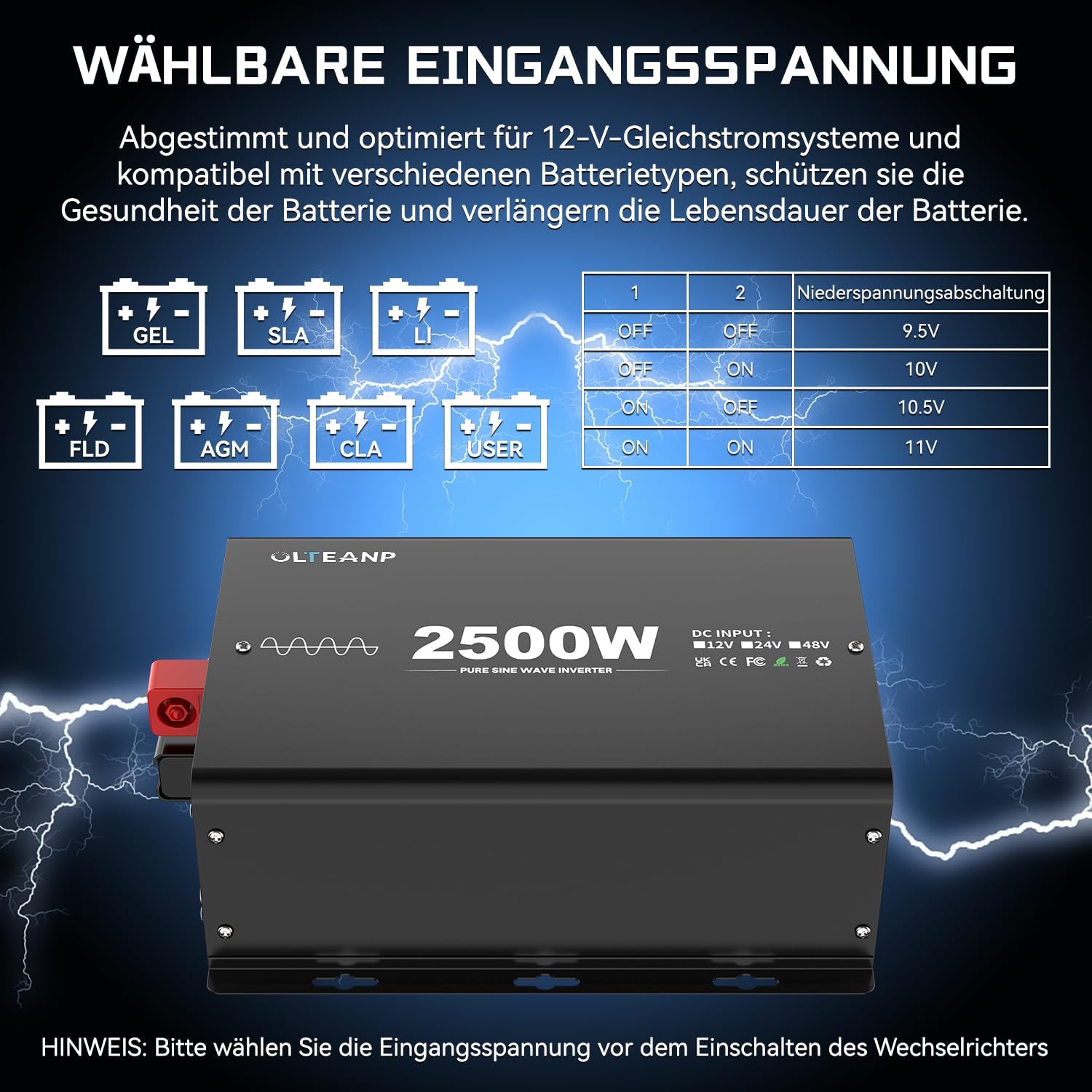
รูปที่ 3.4: The adjustable input voltage function, compatible with various battery types including GEL, SLA, LI (Lithium), FLD, AGM, CLA, and USER-defined settings. The table illustrates how to set the low voltage shutdown threshold using DIP switches (1 and 2) to protect battery health and extend its lifespan. สำคัญ: ปรับระดับเสียงtage only when the inverter is turned OFF.

รูปที่ 3.5: Examples of typical applications for the 2500W Pure Sine Wave Inverter. It can power a wide range of devices such as electric ovens, cameras, laptops, coffee machines, hair dryers, LED lights, TVs, and electric drills, provided their combined power consumption does not exceed 2500 Watts.
รูปที่ 3.6: Dimensions of the OLTEANP 2500W Inverter (approximately 11.88 inches / 302mm in length, 7.91 inches / 201mm in width, and 4.4 inches / 113mm in height). The image also shows the included accessories: the remote control and 80cm battery cables (red for positive, black for negative).
4. การติดตั้ง & ตั้งค่า
ปฏิบัติตามขั้นตอนเหล่านี้เพื่อการติดตั้งที่ถูกต้อง:
- เลือกตำแหน่ง: Select a cool, dry, and well-ventilated area for the inverter. Ensure there is sufficient space around the unit for airflow.
- เชื่อมต่อสายแบตเตอรี่:
- Connect the red (positive) battery cable to the positive (+) terminal of the inverter.
- Connect the black (negative) battery cable to the negative (-) terminal of the inverter.
- ต่อปลายอีกด้านของสายสีแดงเข้ากับขั้วบวก (+) ของแบตเตอรี่ 12V ของคุณ
- ต่อปลายอีกด้านของสายสีดำเข้ากับขั้วลบ (-) ของแบตเตอรี่ 12V ของคุณ
- เชื่อมต่อรีโมทคอนโทรล (ไม่จำเป็น): Plug the remote control cable into the designated port on the inverter.
- Adjust Input Voltage (if necessary): If you are using a lithium battery or wish to customize the low voltage shutdown, refer to Section 3.4 and adjust the DIP switches on the inverter while it is OFF.
- การต่อลงดิน: Connect the grounding terminal on the inverter to a proper earth ground.
5. การดำเนินการ
Once installed, operating the inverter is straightforward:
- เปิดเครื่อง: Press the ON/OFF switch on the inverter or the remote control. The LED indicator light will illuminate, and the LCD screen on the remote control will activate.
- ตรวจสอบสถานะ: The LCD display on the remote control provides real-time information:
- ไอคอนแบตเตอรี่: Shows approximate battery charge level.
- กระแสตรงอินพุตVoltage: แสดงฉบับปัจจุบันtage from your 12V battery.
- กระแสไฟขาออกVoltage: Shows the 230V AC output.
- อัตราการกินไฟ (วัตต์): Indicates the real-time power draw of connected appliances.
- Overheat/Overload Icons: These icons will flash if the inverter detects an overheat or overload condition, indicating a potential issue.
- เชื่อมต่อเครื่องใช้ไฟฟ้า: Plug your 230V AC appliances into the AC outlets. For charging mobile devices, use the 5V/3.1A USB port or the 30W Type-C port.
- หมดแรง: When finished, disconnect appliances and press the ON/OFF switch on the inverter or remote control to turn off the unit.
6. การบำรุงรักษา
การบำรุงรักษาอย่างสม่ำเสมอจะช่วยให้เครื่องแปลงกระแสไฟฟ้าของคุณมีอายุการใช้งานยาวนานและทำงานได้อย่างมีประสิทธิภาพสูงสุด:
- รักษาความสะอาด: Periodically wipe the exterior of the inverter with a dry, soft cloth. Do not use liquid cleaners.
- ตรวจสอบการเชื่อมต่อ: Regularly inspect battery cable connections to ensure they are tight and free from corrosion.
- ตรวจสอบให้แน่ใจว่ามีการระบายอากาศ: Make sure the cooling fans and vents are free from dust and obstructions. Clean them gently if necessary.
- พื้นที่จัดเก็บ: หากต้องเก็บรักษาอินเวอร์เตอร์เป็นเวลานาน ควรตัดการเชื่อมต่อจากแบตเตอรี่และเก็บไว้ในที่แห้งและเย็น
7 การแก้ไขปัญหา
หากคุณพบปัญหาเกี่ยวกับอินเวอร์เตอร์ โปรดดูปัญหาและวิธีแก้ไขทั่วไปต่อไปนี้:
| ปัญหา | สาเหตุที่เป็นไปได้ | สารละลาย |
|---|---|---|
| ไม่มีไฟออก / อินเวอร์เตอร์ไม่ทำงาน | การเชื่อมต่อแบตเตอรี่หลวม ปริมาณแบตเตอรี่ต่ำtage สวิตช์อินเวอร์เตอร์ปิดอยู่ ฟิวส์ขาด (ภายใน) | Check and tighten battery cables ชาร์จหรือเปลี่ยนแบตเตอรี่ Turn ON the inverter switch Contact support (do not attempt to replace internal fuses) |
| Overload warning (LCD icon flashing) | Connected appliance(s) exceed 2500W continuous power | Reduce the total load by unplugging some appliances. Restart the inverter. |
| Overheat warning (LCD icon flashing) | การระบายอากาศไม่ดี อุณหภูมิแวดล้อมสูง Continuous high load | Ensure clear airflow around the inverter. Move to a cooler environment. Reduce load. Allow inverter to cool down. |
| ปริมาณต่ำtage ปิด | ปริมาณแบตเตอรี่tage dropped below set threshold | Recharge the battery. Check battery health. Adjust low voltage shutdown setting if using lithium batteries (refer to Section 3.4). |
| No AC output, but inverter is ON | Short circuit in connected appliance ความผิดพลาดภายใน | Disconnect all appliances and restart. If issue persists, contact support. |
For any issues not covered here, or if troubleshooting steps do not resolve the problem, please contact OLTEANP customer support.
8. ข้อมูลจำเพาะทางเทคนิค
| คุณสมบัติ | ข้อมูลจำเพาะ |
|---|---|
| พลังงานต่อเนื่อง | 2500 วัตต์ |
| พลังสูงสุด | 5000 วัตต์ |
| กระแสตรงอินพุตVoltage | 12V DC (Adjustable range: 9.5V - 16V) |
| กระแสไฟขาออกVoltage | กระแสสลับ 230 โวลต์ |
| รูปคลื่นเอาท์พุต | เพียวไซน์เวฟ |
| AC Outlets AC | 2 |
| พอร์ต USB | 5V / 3.1A |
| พอร์ต Type-C | 30วัตต์ |
| คุณสมบัติการป้องกัน | Spark protection, Overload, Overheat, Low/High Voltagอี. ไฟฟ้าลัดวงจร |
| การทำให้เย็น | พัดลมระบายความร้อนอัจฉริยะ |
| รีโมทคอนโทรล | Yes, with LCD Display |
9. การรับประกันและการสนับสนุน
For warranty information, technical support, or service inquiries, please refer to the product packaging or contact OLTEANP customer service directly through the retailer where the product was purchased. Please have your product model and purchase details ready when contacting support.