
1. บทนำ
ขอบคุณสำหรับการซื้อasing the EsaSam Double Din Car Stereo Multimedia Radio. This manual provides detailed instructions for the installation, operation, and maintenance of your new car stereo system. Please read this manual thoroughly before installation and use to ensure proper function and to prevent damage.
2. ข้อมูลด้านความปลอดภัย
- ควรปรึกษาช่างผู้เชี่ยวชาญในการติดตั้งเสมอ เพื่อหลีกเลี่ยงความเสียหายต่อระบบไฟฟ้าของรถยนต์หรือตัวอุปกรณ์
- อย่าใช้งานอุปกรณ์ในลักษณะที่รบกวนสมาธิในการขับขี่ ให้ความสำคัญกับความปลอดภัยบนท้องถนนเสมอ
- ตรวจสอบให้แน่ใจว่าการเชื่อมต่อสายไฟทั้งหมดมีความปลอดภัยและมีฉนวนหุ้มอย่างเหมาะสมเพื่อป้องกันไฟฟ้าลัดวงจร
- หลีกเลี่ยงการให้เครื่องสัมผัสกับอุณหภูมิที่สูงหรือต่ำเกินไป แสงแดดโดยตรงเป็นเวลานาน หรือความชื้นที่มากเกินไป
- ห้ามพยายามถอดประกอบหรือดัดแปลงตัวเครื่อง เพราะอาจทำให้การรับประกันเป็นโมฆะและเกิดความเสียหาย
3. เนื้อหาบรรจุภัณฑ์
ตรวจสอบว่ามีรายการทั้งหมดอยู่ในแพ็คเกจ:
- EsaSam Car Stereo Head Unit (9-inch touchscreen)
- Power Adapter Harness
- Frame for Lada Granta 2018-2019
- เสาอากาศ GPS
- AHD ด้านหลัง View กล้อง
- ไมโครโฟนภายนอก
- RCA Cable (Audio Out, AUX In, Subwoofer Out)
- สาย USB
- 4G Antenna (if applicable to your model variant)

ภาพ: เหนือview of included accessories such as RCA cables, reversing camera, microphone, GPS antenna, and 4G antenna.
4. สินค้าหมดview และคุณสมบัติที่สำคัญ
The EsaSam Double Din Car Stereo is an advanced multimedia system designed for the Lada Granta 2018-2019. It features a 9-inch high-definition IPS touchscreen and runs on the Android 12 operating system, offering a wide range of functionalities for an enhanced driving experience.
- ระบบปฏิบัติการ: แอนดรอยด์ 12
- โปรเซสเซอร์: 4-core (for m100s model)
- หน่วยความจำ: 1GB RAM + 32GB ROM (for m100s model)
- แสดง: 9-inch IPS Capacitive Multi-Touch Screen, 1024*600 resolution
- การเชื่อมต่อ: Built-in WiFi, Bluetooth 4.0, 4G LTE support (with SIM card slot)
- การนำทาง: Integrated GPS with support for online and offline maps (GPS antenna included)
- เสียง: FM/AM/RDS Radio (AM: 520-1700 Hz, FM: 87.5-108.5MHz), AUX-IN, Subwoofer audio output, various sound effects.
- มัลติมีเดีย: HD 1080P video playback, USB support, file manager for Android apps.
- การบูรณาการ: Wireless Carplay & Android Auto, Steering Wheel Control (SWC) support, Mirror Link (Android & iOS), AHD Rear View อินพุตกล้อง
- คุณสมบัติเพิ่มเติม: Dual Zone function, Day/Night UI switching, Multi-language support.
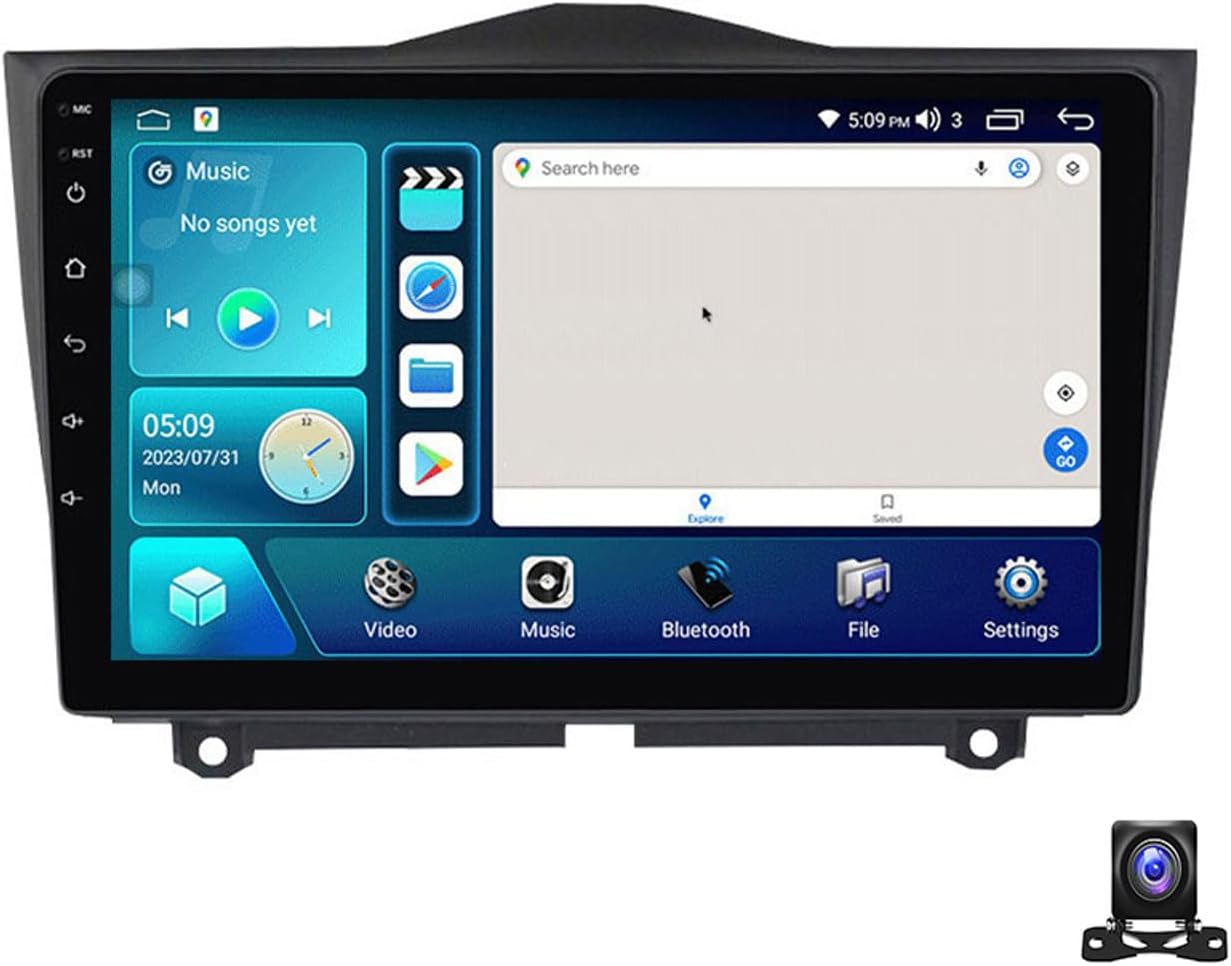
ภาพ: ด้านหน้า view of the EsaSam 9-inch car stereo head unit.
5. การตั้งค่าและการติดตั้ง
5.1 แนะนำให้ติดตั้งโดยช่างผู้เชี่ยวชาญ
Due to the complexity of car electrical systems, professional installation is highly recommended to ensure correct wiring and to prevent damage to your vehicle or the stereo unit.
5.2 ขั้นตอนการติดตั้งview
- ถอดหน่วยเดิมออก: Carefully remove the existing car stereo and trim from your Lada Granta dashboard.
- เชื่อมต่อสายรัดสายไฟ: Connect the provided power adapter harness to the vehicle's wiring. Ensure all connections are secure. Refer to the wiring diagram below.
- เชื่อมต่ออุปกรณ์ต่อพ่วง: Connect the GPS antenna, external microphone, AHD rear view camera, and any other accessories (USB, 4G antenna) to the corresponding ports on the head unit.
- ทดสอบฟังก์ชันการทำงาน: Before fully securing the unit, temporarily power it on to test basic functions like power, display, and sound.
- ติดตั้งหัวหน้าหน่วย: Mount the EsaSam head unit into the dashboard opening using the provided frame. Secure it firmly.
- การประกอบขั้นสุดท้าย: ติดตั้งชิ้นส่วนตกแต่งที่ถอดออกกลับเข้าไปใหม่

Image: Comparison showing the car dashboard before and after the EsaSam car stereo installation.
5.3 แผนผังสายไฟ (ทั่วไป)
The following image illustrates typical wiring connections. Specific wire colors and functions may vary slightly. Always refer to the labels on your harness.

ภาพ: รายละเอียด view of the rear connections of the car stereo, showing ports for USB, WiFi, 4G, and other inputs, along with setup steps for Carplay/Android Auto.
5.4 การเปิดเครื่องครั้งแรกและการตั้งค่าพื้นฐาน
หลังจากติดตั้งแล้ว ให้เปิดสวิตช์กุญแจรถ อุปกรณ์ควรเปิดโดยอัตโนมัติ
- ภาษา: Navigate to Settings > System > Languages & input to select your preferred language.
- วันที่และเวลา: Set the correct date and time in Settings > System > Date & time.
- รหัสผ่านโรงงาน: For M100S models, the factory password is 8888. This may be required for certain system settings.
5.5 การเชื่อมต่อเครือข่าย
Connect your unit to the internet for online navigation, app downloads, and other features.
- ไวไฟ : Go to Settings > Network & internet > Wi-Fi. Turn Wi-Fi on and select your network, then enter the password. The unit supports 5GHz Wi-Fi for faster transmission.
- 4G แอลทีอี: If your unit supports 4G (check specifications) and you have a 4G SIM card, insert it into the designated slot. The unit will automatically connect to the 4G network.
6. คู่มือการใช้งาน
6.1 อินเทอร์เฟซผู้ใช้และการนำทาง
The unit features an intuitive Android interface. Swipe left/right on the home screen to access different apps and widgets. The UI supports automatic day and night mode switching for optimal visibility.

Image: Demonstrates Day and Night UI switching, along with interfaces for Steering Wheel Control, Bluetooth functions, and FM/AM Radio.
6.2 ระบบนำทาง GPS
Access the Navigation app from the home screen. The unit supports global positioning systems (GPS, BDS, GLONASS) and can use both online and offline maps. For offline maps, download them via Wi-Fi first.
Image: Displays the GPS navigation interface, including real-time traffic conditions and support for split-screen view with other applications like music.
6.3 วิทยุเอฟเอ็ม/เอเอ็ม
Tap the 'Radio' icon to access the FM/AM tuner. You can manually tune, auto-scan for stations, and save your favorite frequencies. The unit supports RDS (Radio Data System) for displaying station information.
- ช่วงความถี่ FM: 87.5-108.5เมกะเฮิรตซ์
- ช่วงความถี่ AM: 520-1700 เฮิรตซ์
6.4 ฟังก์ชันบลูทูธ
เชื่อมต่อสมาร์ทโฟนของคุณผ่านบลูทูธเพื่อโทรแบบแฮนด์ฟรีและสตรีมเสียง
- การจับคู่: Go to Settings > Connected devices > Bluetooth. Turn Bluetooth on. On your phone, search for the car stereo (usually named 'CarBT' or similar) and pair.
- การโทรแบบแฮนด์ฟรี: Once paired, you can make and receive calls directly from the stereo screen. Your phone's contact list can be synchronized.
- เพลงบลูทูธ: สตรีมเสียงจากโทรศัพท์ของคุณไปยังเครื่องเสียงรถยนต์
6.5 CarPlay ไร้สายและ Android Auto
Connect your smartphone for a seamless integration of phone features onto the car stereo display.
- การเชื่อมต่อแบบไร้สาย: Ensure your phone's Wi-Fi and Bluetooth are on. Open the 'CarPlay' or 'Android Auto' app on the stereo. Follow the on-screen instructions to connect your phone.
- การเชื่อมต่อแบบมีสาย: For Android Auto, you may also connect via a USB cable.
6.6 การเล่นมัลติมีเดีย
เล่นเสียงและวิดีโอ fileจากแหล่งต่างๆ
- ยูเอสบี: Insert a USB drive into the USB port. The unit will detect media files (audio, video, images) and allow playback through the 'Music' or 'Video' apps.
- รูปแบบที่รองรับ: Supports HD 1080P video playback and various audio formats.
6.7 ระบบควบคุมพวงมาลัย (SWC)
The unit supports your vehicle's original steering wheel controls for safe operation.
- การกำหนดค่า: Go to Settings > Car settings > Steering Wheel Control.
- ฟังก์ชั่นการเรียนรู้: Follow the on-screen instructions to assign functions to your steering wheel buttons. Press a button on the steering wheel, then select the desired function on the screen.
6.8 ด้านหลัง View กล้อง
AHD ด้านหลังที่รวมอยู่ view camera provides a clear image when reversing.
- เมื่อเข้าเกียร์ถอยหลัง หน้าจอจะสลับไปที่ภาพจากกล้องโดยอัตโนมัติ view.
- Ensure the camera is properly installed and connected to the 'CAM IN' port.
6.9 ฟังก์ชันแบ่งหน้าจอ
เรียกใช้สองแอปพลิเคชันพร้อมกันบนหน้าจอเพื่อการทำงานหลายอย่างพร้อมกันที่ดียิ่งขึ้น เช่น การนำทางและการเล่นเพลง
- To activate, open one app, then long-press the recent apps button or drag another app from the recent apps list to one side of the screen.
7. คุณสมบัติขั้นสูง (อุปกรณ์เสริม)
The EsaSam car stereo supports various optional accessories that can be purchased separately to expand its functionality.

Image: Illustrates optional features such as ADAS DVR, OBD II diagnostic tool, and TPMS (Tire Pressure Monitoring System) integration.
7.1 ADAS DVR (Advanced Driver-Assistance Systems Digital Video Recorder)
Connect an optional ADAS DVR for features like front vehicle distance prediction, front vehicle anti-collision warning, and lane deviation warning. This requires a compatible DVR unit.
7.2 OBD II (On-Board Diagnostics)
Connect an optional OBD II adapter to diagnose your car's status, view real-time data, and check fault codes. This requires a compatible OBD II adapter.
7.3 TPMS (ระบบตรวจสอบความดันลมยาง)
Integrate an optional TPMS to monitor tire pressure and temperature in real-time. This requires a compatible TPMS receiver and sensors.
7.4 DSP (ตัวประมวลผลเสียงดิจิทัล)
The unit includes a Digital Sound Processor, allowing for advanced audio customization. Access the DSP settings in the system menu to adjust equalizer, sound effects (pop, rock, jazz), and other audio parameters for an optimized listening experience.
8. การบำรุงรักษา
- การทำความสะอาด: ใช้ผ้านุ่มและแห้งเช็ดหน้าจอและตัวเครื่อง หลีกเลี่ยงน้ำยาทำความสะอาดหรือตัวทำละลายที่มีฤทธิ์กัดกร่อน
- การอัปเดตซอฟต์แวร์: ตรวจสอบการอัปเดตซอฟต์แวร์เป็นระยะผ่านการตั้งค่าระบบหรือของผู้ผลิต webไซต์เพื่อให้มั่นใจถึงประสิทธิภาพที่เหมาะสมที่สุดและการเข้าถึงฟีเจอร์ใหม่ ๆ
- หลีกเลี่ยงความร้อนมากเกินไป: Ensure proper ventilation around the unit. If a cooling fan is present, ensure it is not obstructed.
9 การแก้ไขปัญหา
หากคุณพบปัญหา โปรดดูปัญหาทั่วไปและวิธีแก้ไขต่อไปนี้:
| ปัญหา | สาเหตุที่เป็นไปได้ | สารละลาย |
|---|---|---|
| เครื่องไม่เปิด | เดินสายไฟไม่ถูกต้อง ฟิวส์ขาด ปัญหาแหล่งจ่ายไฟ | Check power connections and vehicle fuses. Consult a professional if necessary. |
| ไม่มีเสียง. | Speaker wiring issue, volume too low, mute activated. | Check speaker connections, increase volume, ensure unit is not muted. |
| สัญญาณ GPS สูญหายหรือไม่แม่นยำ | เสาอากาศ GPS ถูกกีดขวางหรือถูกตัดการเชื่อมต่อ ครอบคลุมสัญญาณดาวเทียมไม่ดี | ตรวจสอบให้แน่ใจว่าติดตั้งเสาอากาศ GPS อย่างถูกต้องและมีความชัดเจน view ของท้องฟ้า ตรวจสอบการเชื่อมต่อเสาอากาศ |
| บลูทูธไม่เชื่อมต่อ | Bluetooth off on unit or phone, incorrect pairing process. | Ensure Bluetooth is enabled on both devices. Delete previous pairings and re-pair. |
| หลัง view กล้องไม่แสดงผล | Camera wiring issue, camera faulty, reverse trigger not connected. | Check camera power and video connections. Ensure reverse trigger wire is correctly connected. |
สำหรับปัญหาที่ไม่ได้ระบุไว้ในที่นี้ หรือหากวิธีแก้ไขที่กล่าวมาแล้วไม่สามารถแก้ปัญหาได้ โปรดติดต่อฝ่ายบริการลูกค้า
10. ข้อมูลจำเพาะ
The following specifications apply to the 4 core m100s 1g+32g model:
- แบบอย่าง: 4 core m100s 1g+32g
- ระบบปฏิบัติการ: แอนดรอยด์ 12
- โปรเซสเซอร์: 4 คอร์
- แรม : แรม 1GB DDR3
- รอม: 32GB
- ขนาดหน้าจอ: 9 นิ้ว
- ความละเอียดหน้าจอ: 1024*600
- ประเภทหน้าจอ: IPS Capacitive Multi-Touch
- เวอร์ชันบลูทูธ: 4.0
- ไวไฟ : Built-in (supports 5GHz)
- เครื่องรับวิทยุ: วิทยุ FM/AM พร้อมระบบ RDS
- ความถี่เอฟเอ็ม: 87.5-108.5เมกะเฮิรตซ์
- ความถี่ AM: 520-1700 เฮิรตซ์
- เอาท์พุตวิดีโอ: Support HD 1080P
- เอาต์พุตเสียง: AUX-IN, Subwoofer output
- ความเข้ากันได้: Lada Granta 2018-2019
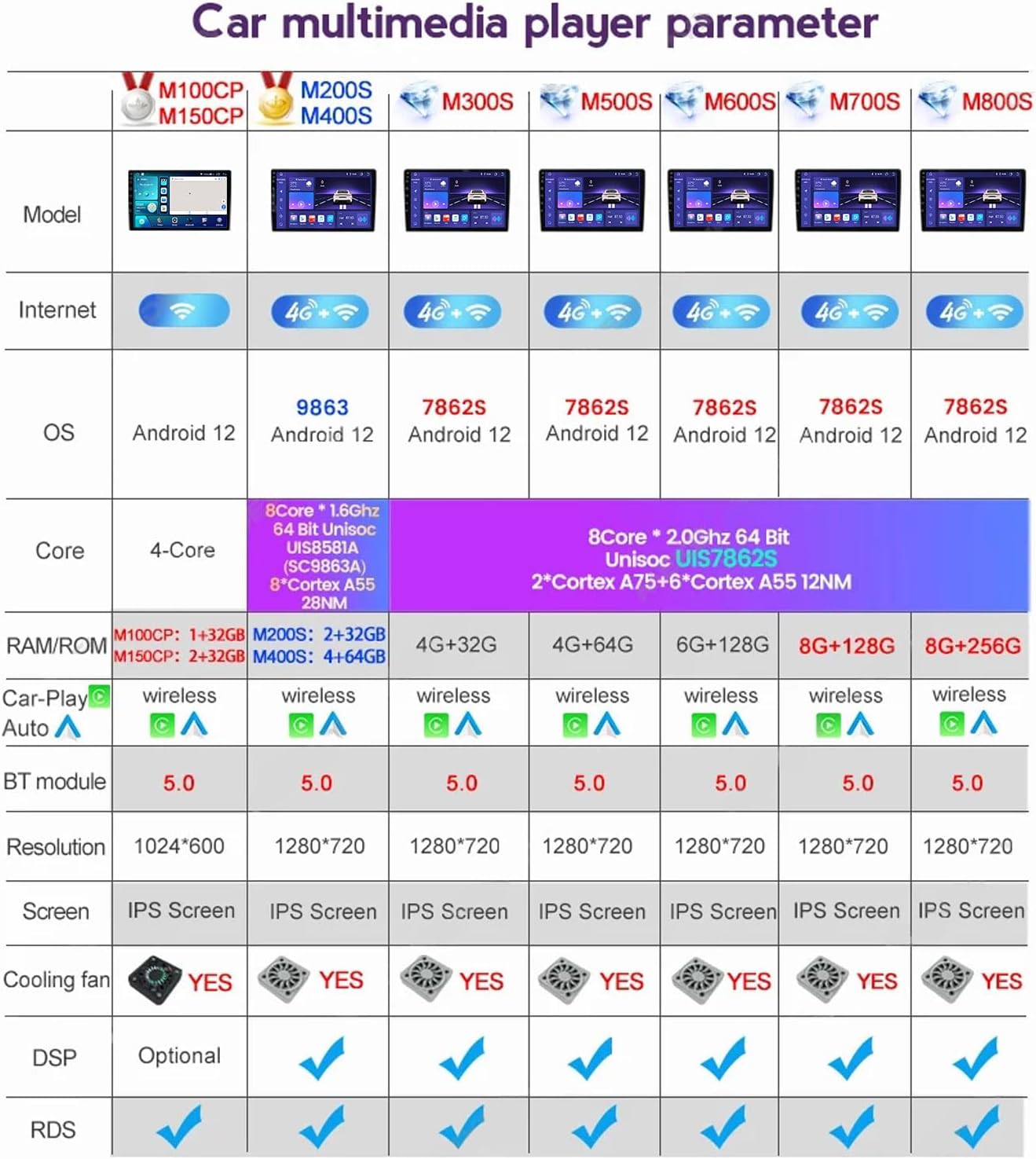
Image: Parameter table detailing specifications for different EsaSam car multimedia player models, including core count, RAM/ROM, OS, and features.
11. การรับประกันและการสนับสนุน
11.1 ข้อมูลการรับประกัน
This product is covered by a standard manufacturer's warranty. Please refer to your purchase documentation or contact the seller for specific warranty terms and duration. The warranty typically covers defects in materials and workmanship under normal use.
11.2 การสนับสนุนลูกค้า
If you require technical assistance, have questions about installation, or encounter any issues not covered in this manual, please contact EsaSam customer support through the retailer where you purchased the product. Provide your model number (4 core m100s 1g+32g) and a detailed description of the issue for efficient support.