
1. สินค้าหมดview
The LIORQUE Digital Kitchen Timer Model YGH5249 is a multi-functional device designed to assist with various timing needs. It features a large LCD display, adjustable alarm volume, and multiple placement options. This timer can function as a countdown timer, a count-up stopwatch, and a digital clock.

ภาพที่ 1.1: ด้านหน้า view of the LIORQUE Digital Kitchen Timer, highlighting its large LCD screen and control buttons.
คุณสมบัติหลัก:
- ฟังก์ชั่น 3-in-1: Timer, Stopwatch, and Clock modes.
- จอ LCD ขนาดใหญ่: Ensures clear readability of time.
- ระดับเสียงปลุกที่ปรับได้: Three levels (Mute, Low, High) to suit different environments.
- โหมดกำหนดเอง: Save frequently used countdown times for quick access.
- ตำแหน่งที่หลากหลาย: Magnetic back, foldable stand, and lanyard hole for flexible use.
- Delay Reminder: Automatically starts counting up after countdown finishes.
- Auto-Restore: Remembers the last set countdown time.

Image 1.2: Visual representation of the timer's main features and functions.
2. การตั้งค่าและการติดตั้งแบตเตอรี่
The timer requires 2 AAA batteries (included) for operation. Follow these steps to install them:
- หาฝาปิดช่องใส่แบตเตอรี่ที่ด้านหลังของตัวจับเวลา
- เลื่อนฝาเปิดออก
- ใส่แบตเตอรี่ AAA สองก้อน โดยตรวจสอบให้แน่ใจว่าขั้ว (+ และ -) ถูกต้องตามที่ระบุภายในช่องใส่
- ปิดฝาช่องใส่แบตเตอรี่ให้แน่น
The timer will power on automatically once batteries are installed.
3. คู่มือการใช้งาน
3.1 Switching Modes (Timer/Stopwatch/Clock)
The LIORQUE timer offers three modes: Timer (countdown), Stopwatch (count-up), and Clock. To switch between Timer mode and Clock mode, press and hold the เอสที/เอสพี button for 2 seconds. The timer will display the current time in Clock mode or the timer interface in Timer mode.

Image 3.1: Switching between Counting Mode and Clock Mode.
3.2 Setting Countdown Timer
- Ensure the timer is in Timer mode (displaying H:M:S).
- ใช้ 1H, 5M, 1M, และ 5S ปุ่มเหล่านี้ใช้สำหรับตั้งเวลาถอยหลังที่ต้องการ กดแต่ละครั้งจะเพิ่มเวลาตามที่กำหนด
- กดปุ่ม เอสที/เอสพี ปุ่มเพื่อเริ่มนับถอยหลัง
- หากต้องการหยุดการนับถอยหลัง ให้กดปุ่ม เอสที/เอสพี กดอีกครั้งเพื่อดำเนินการต่อ
- To reset the timer to zero, press the รีเซ็ต ปุ่ม.
- When the countdown reaches zero, the alarm will sound for 1 minute.
3.3 Using Stopwatch (Count-Up)
- Ensure the timer is in Timer mode and reset to 00:00:00.
- กดปุ่ม เอสที/เอสพี button to start counting up.
- ในการหยุดนาฬิกาจับเวลาชั่วคราวให้กด เอสที/เอสพี กดอีกครั้งเพื่อดำเนินการต่อ
- หากต้องการรีเซ็ตนาฬิกาจับเวลาเป็นศูนย์ ให้กดปุ่ม รีเซ็ต ปุ่ม.

Image 3.2: Illustration of Count-up and Countdown modes.
3.4 Shortcut Setting
The timer allows for quick setting of common intervals:
- กด 1H เป็นเวลา 1 ชั่วโมง.
- กด 5M เป็นเวลา 5 นาที.
- กด 1M เป็นเวลา 1 นาที.
- กด 5S เป็นเวลา 5 วินาที

ภาพที่ 3.3: อดีตamples of using shortcut buttons for quick time setting.
3.5 โหมดกำหนดเอง
The Custom Mode allows you to save a frequently used countdown time for instant recall.
- In Timer mode, set your desired countdown time using the 1H, 5M, 1M, และ 5S ปุ่ม
- กดปุ่มค้างไว้ กำหนดเอง button for 2 seconds. The timer will remember this setting.
- Each subsequent short press of the กำหนดเอง button will automatically load the saved time.

Image 3.4: Setting and recalling a custom timer value.
3.6 การปรับระดับเสียงเตือน
The timer features a 3-level alarm volume adjustment (Mute, Low, High). A switch on the side of the timer allows you to select the desired volume level.

Image 3.5: Volume adjustment switch and its three settings.
3.7 ตัวเลือกการจัดวาง
The LIORQUE timer offers flexible placement options:
- แม่เหล็ก: Attach the timer to metal surfaces like refrigerators using its strong magnetic back.
- ยืน: Use the integrated foldable stand to place the timer on any flat surface, such as a countertop or desk.
- รูเชือกเส้นเล็ก: Hang the timer using a rope through the designated lanyard hole.
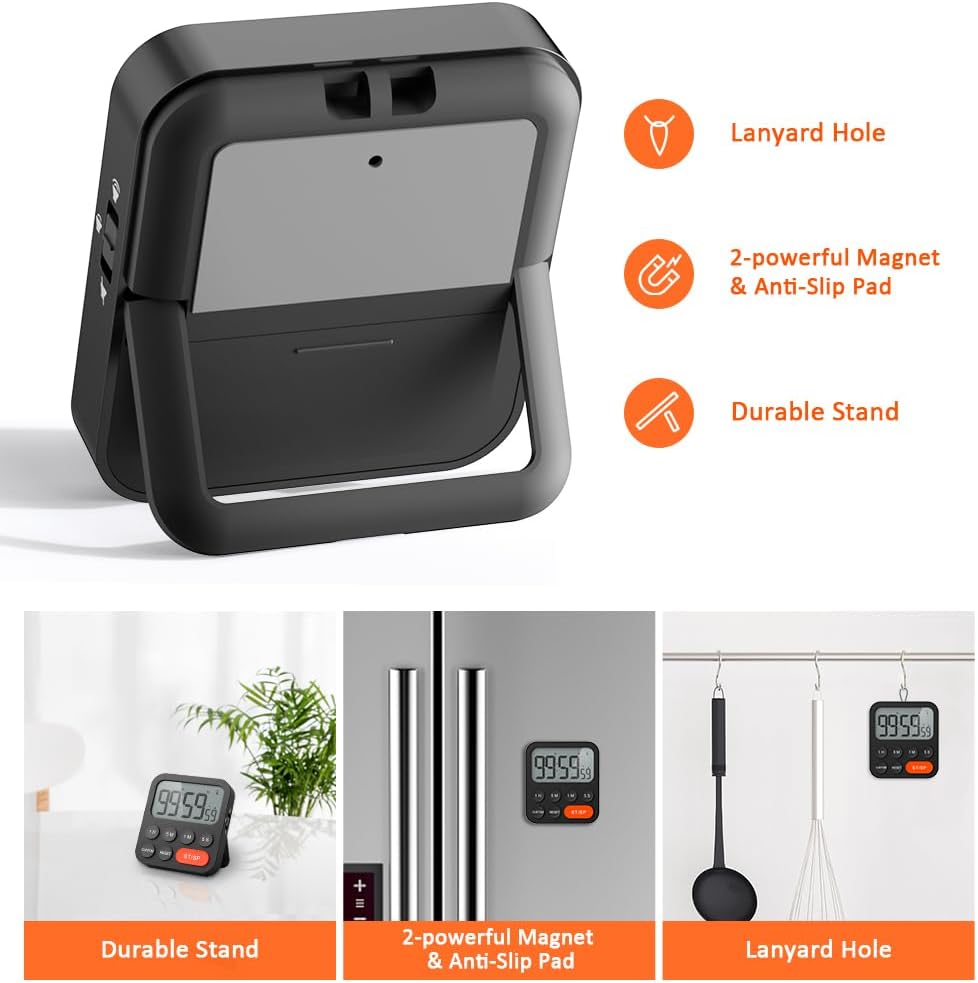
Image 3.6: Various ways to place and use the timer.
3.8 ฟังก์ชั่นเพิ่มเติม
- Delay Reminder: After a countdown finishes, the timer will automatically start counting up, indicating the elapsed time since the alarm.
- Auto-Restore: Once a countdown is complete and the alarm has sounded, pressing the เอสที/เอสพี button will restore the timer to the last set countdown time, making it convenient for repetitive tasks.

Image 3.7: Explanation of Delay Reminder and Auto-restore features.
4. การบำรุงรักษา
- Clean the timer with a soft, dry cloth. Do not use abrasive cleaners or immerse in water.
- Replace batteries when the display becomes dim or the timer functions erratically.
- ควรเก็บนาฬิกาจับเวลาไว้ในที่แห้งและเย็นเมื่อไม่ได้ใช้งานเป็นเวลานาน
5 การแก้ไขปัญหา
- ตัวจับเวลาไม่ตอบสนอง: ตรวจสอบว่าติดตั้งแบตเตอรี่อย่างถูกต้องและมีประจุเพียงพอ เปลี่ยนแบตเตอรี่หากจำเป็น
- Alarm too quiet/loud: Adjust the volume switch on the side of the timer to your preferred level.
- จอแสดงผลว่างเปล่า: Ensure batteries are installed and functional. If the issue persists, contact customer support.
6. ข้อมูลจำเพาะ
| คุณสมบัติ | รายละเอียด |
|---|---|
| ยี่ห้อ | ลิออร์ค |
| หมายเลขรุ่น | YGH5249 |
| สี | สีดำ |
| ขนาดสินค้า | 0.94"D x 0.94"H |
| น้ำหนักสินค้า | 4.2 ออนซ์ |
| แหล่งพลังงาน | แบตเตอรี่ AAA จำนวน 2 ก้อน (รวมอยู่ด้วย) |
| จำนวนการตั้งค่า | 3 (ระดับเสียง) |
| ขนาดหน้าจอ | 1E+1 เซนติเมตร |
7. การรับประกันและการสนับสนุน
For warranty information or technical support, please refer to the product packaging or contact LIORQUE customer service through their official webเว็บไซต์หรือร้านค้าที่คุณซื้อสินค้า โปรดเก็บใบเสร็จรับเงินไว้เพื่อใช้ในการเคลมประกัน