
1. บทนำ
This manual provides detailed instructions for the installation, operation, and maintenance of your Vrabocry Mini Bluetooth LED Controller SP621E USB. This controller is designed for use with addressable LED strips such as WS2811, WS2812B, and SK6812, offering versatile lighting control via a smartphone application.
2. สินค้าหมดview
2.1 คุณสมบัติหลัก
- Supports 5V WS2812B and 12V/24V WS2811 LED strips or chains.
- USB input for convenient power supply (5V-24V operating voltagจ).
- Compatible with iOS/Android app control via Bluetooth connection.
- Offers 18 music modes and 142 lighting effects.
- Music control timer function to synchronize lights with audio.
- Color calibration feature for consistent color display between app and LED strip.
- Certified by FCC, CE, RoHS, ensuring product quality and safety.
2.2 ข้อมูลจำเพาะ
| ยี่ห้อ | วราบ็อกรีย์ |
| หมายเลขรุ่น | SP621E |
| สไตล์ | ยูเอสบี |
| ปฏิบัติการฉบับที่tage | USB 5V ~ 24V |
| แม็กซ์ปัจจุบัน | 2.9 ก |
| อุณหภูมิในการทำงาน | -20℃ ~ 60℃ |
| ขนาด (ตัวควบคุม) | ขนาดโดยประมาณ 35 มม. x 14 มม. x 7 มม. (ยาว x กว้าง x สูง) |
| น้ำหนักสินค้า | 18.1 กรัม |
| สีอ่อน | RGB (Addressable Pixel) |
| ประเภทตัวควบคุม | ควบคุมผ่านแอป (บลูทูธ) |
| การใช้งานในร่ม/กลางแจ้ง | ในร่ม |
3. ข้อมูลด้านความปลอดภัย
โปรดอ่านและทำความเข้าใจคำแนะนำด้านความปลอดภัยทั้งหมดก่อนใช้ผลิตภัณฑ์นี้ การไม่ปฏิบัติตามคำแนะนำเหล่านี้อาจส่งผลให้เกิดไฟฟ้าช็อต ไฟไหม้ หรืออันตรายอื่นๆ
- ตรวจสอบแหล่งจ่ายไฟ voltage matches the requirements of your LED strip and controller (5V-24V).
- Do not exceed the maximum current rating of 2.9A for the controller. Overloading can cause damage or fire.
- This product is designed for indoor use only. Avoid exposure to moisture, water, or extreme temperatures.
- Do not attempt to open or modify the controller. This will void the warranty and may lead to safety risks.
- เก็บให้พ้นจากมือเด็ก
4. เนื้อหาบรรจุภัณฑ์
ในแพ็คเกจประกอบด้วย:
- 1 x Vrabocry Mini Bluetooth LED Controller SP621E USB
5. การตั้งค่า
5.1 การเชื่อมต่อฮาร์ดแวร์
- เชื่อมต่อแถบ LED: Identify the data (D), ground (G), and positive (+) wires on your addressable LED strip. Connect them to the corresponding pins on the SP621E controller's output connector. Ensure correct polarity.
- เชื่อมต่อพลังงาน: Plug the USB connector of the SP621E controller into a compatible USB power source (e.g., USB wall adapter, power bank, computer USB port) that provides 5V-24V.

Figure 1: Connection Diagram and Controller Dimensions. This image illustrates how to connect the USB power source to the controller and the controller to the LED light strip, along with the physical dimensions of the SP621E controller.
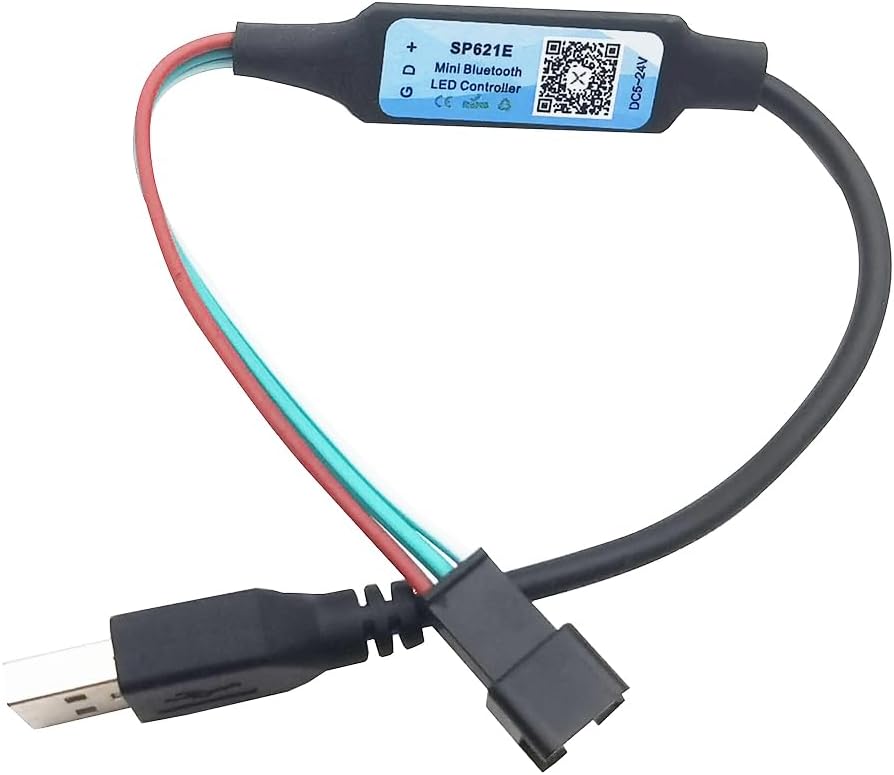
Figure 2: Vrabocry SP621E USB Controller. This image displays the compact design of the USB-powered LED controller with its input and output connectors.
5.2 การติดตั้งและการจับคู่แอป
- ดาวน์โหลดแอป: Scan the QR code on the controller or visit https://download.ledhue.com/page/scenex/ to download the compatible control application for your iOS or Android device.
- ติดตั้งแอพ: ปฏิบัติตามคำแนะนำบนหน้าจอเพื่อติดตั้งแอปพลิเคชันบนสมาร์ทโฟนของคุณ
- Pair with Controller:
- ตรวจสอบให้แน่ใจว่าได้เปิดใช้งาน Bluetooth บนสมาร์ทโฟนของคุณแล้ว
- Open the control application.
- The app should automatically detect and list available SP621E controllers. Select your controller from the list to pair.
- Once paired, the app interface will become active, allowing you to control your LED strip.
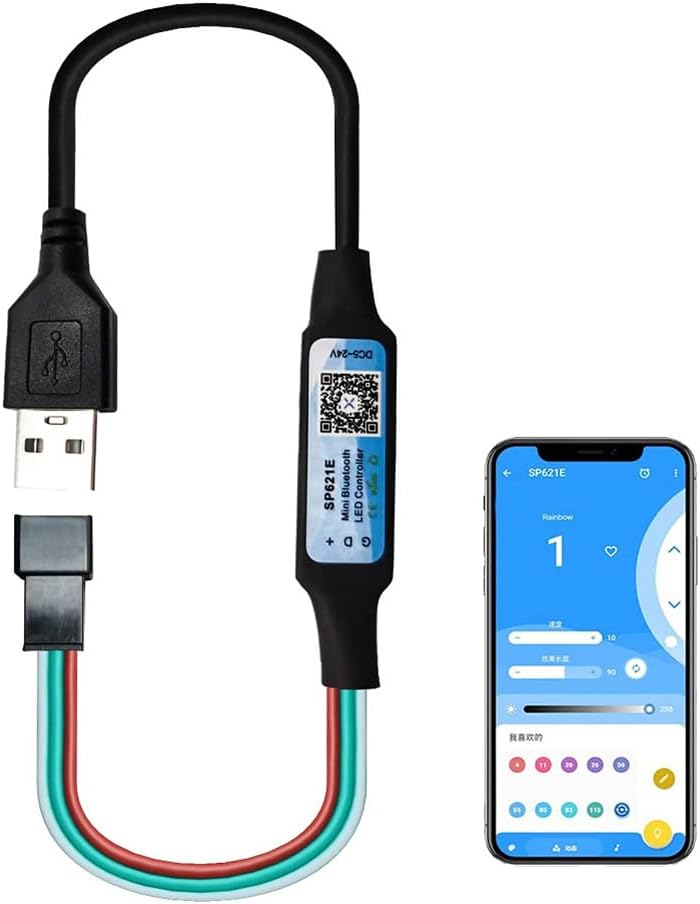
Figure 3: App Control Interface. This image shows the SP621E controller in operation, with a smartphone displaying the user interface of the control application, demonstrating how to manage lighting effects.
6. คู่มือการใช้งาน
6.1 การควบคุมขั้นพื้นฐาน
Once connected and paired, use the smartphone application to:
- เลือกเอฟเฟกต์: Browse through 142 pre-programmed lighting effects.
- ปรับความสว่าง/ความเร็ว: Modify the brightness and speed of the selected effects.
- เลือกสี: Select static colors or color palettes.
6.2 โหมดเพลง
The controller features 18 music modes that synchronize your LED lights with audio. To use this function:
- Select a music mode within the application.
- The app can utilize your phone's microphone to pick up ambient sound or integrate with your music player to create dynamic light patterns.
- Adjust sensitivity or other parameters if available in the app for optimal synchronization.
6.3 การสอบเทียบสี
If the colors displayed on your LED strip do not match the colors selected in the app, perform a color calibration:
- Navigate to the color calibration section within the app settings.
- The app will typically display a series of colors (e.g., Red, Green, Blue).
- Match the displayed color in the app to the actual color shown on your LED strip by selecting the correct option in the app. This ensures accurate color representation.
7. การบำรุงรักษา
To ensure the longevity and proper functioning of your Vrabocry SP621E controller:
- การทำความสะอาด: เช็ดทำความสะอาดตัวควบคุมเบาๆ ด้วยผ้าแห้งเนื้อนุ่ม ห้ามใช้น้ำยาทำความสะอาดหรือสารละลายใดๆ
- พื้นที่จัดเก็บ: ควรเก็บตัวควบคุมไว้ในที่แห้งและเย็น หลีกเลี่ยงแสงแดดโดยตรงและอุณหภูมิที่สูงหรือต่ำเกินไป เมื่อไม่ได้ใช้งาน
- การตรวจสอบ: ตรวจสอบการเชื่อมต่อเป็นระยะๆ เพื่อดูว่ามีร่องรอยการสึกหรอหรือความเสียหายใดๆ หรือไม่
8 การแก้ไขปัญหา
8.1 ปัญหาทั่วไปและแนวทางแก้ไข
- ไฟ LED ไม่ติด:
- Check if the USB power source is active and providing sufficient power (5V-24V).
- Verify that the LED strip is correctly connected to the controller (data, ground, positive).
- Ensure the LED strip is compatible with the SP621E (WS2811, WS2812B, SK6812).
- Confirm the app is paired and an effect is selected.
- Controller not pairing with app:
- ตรวจสอบให้แน่ใจว่าได้เปิดใช้งาน Bluetooth บนสมาร์ทโฟนของคุณแล้ว
- ตรวจสอบให้แน่ใจว่าตัวควบคุมเปิดอยู่
- รีสตาร์ทแอปแล้วลองจับคู่ใหม่อีกครั้ง
- ลองรีสตาร์ทสมาร์ทโฟนของคุณดู
- สีไม่ถูกต้องหรือไม่สอดคล้องกัน:
- Perform a color calibration as described in Section 6.3.
- Check the wiring of your LED strip for any loose connections or incorrect polarity.
- Music mode not responding:
- Ensure your phone's microphone is not blocked and has permission for the app.
- Adjust the sensitivity settings within the app.
9. การรับประกันและการสนับสนุน
The Vrabocry SP621E controller is certified by FCC, CE, and RoHS, indicating compliance with relevant safety and environmental standards.
For technical support or further inquiries, please refer to the product's official support channels or the application download page at https://download.ledhue.com/page/scenex/.
รายละเอียดการรับประกันอาจแตกต่างกันไปตามภูมิภาคและผู้ค้าปลีก โปรดเก็บหลักฐานการซื้อไว้เพื่อใช้ในการเรียกร้องการรับประกัน