
1. สินค้าหมดview
The ELECTROPRIME CAMSOY S20 is a compact 1080P WiFi action camera designed for security monitoring, pet monitoring, or as a baby monitor. It features two-way audio, IR night vision, and motion detection capabilities, making it a versatile solution for various surveillance needs. Its small size and 360-degree adjustable mount allow for flexible placement.
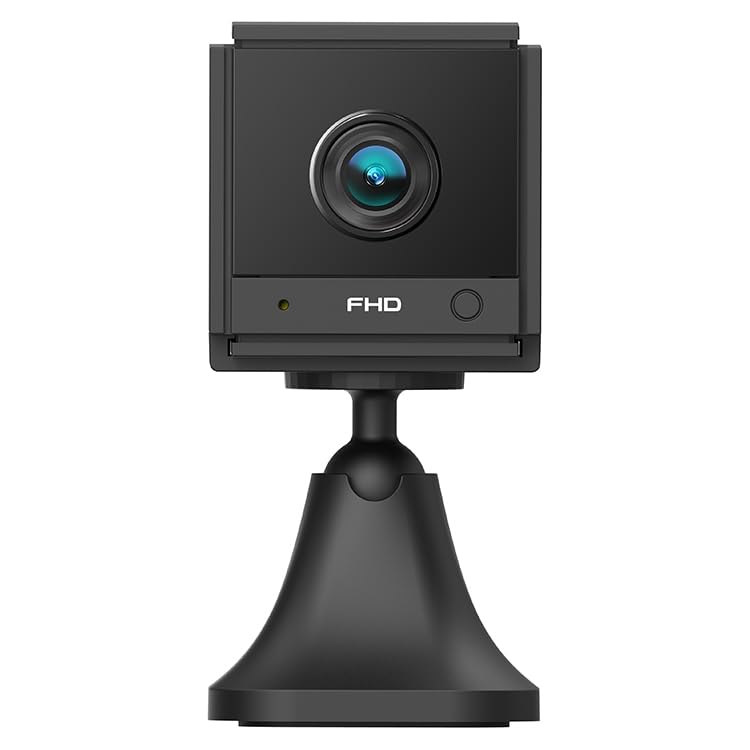
ภาพที่ 1.1: มุม view of the ELECTROPRIME CAMSOY S20 1080P WiFi Action Camera, showing the lens and adjustable mount.
2. เนื้อหาบรรจุภัณฑ์
กรุณาตรวจสอบแพ็คเกจสำหรับรายการต่อไปนี้:
- ELECTROPRIME CAMSOY S20 Action Camera
- ขายึดแบบปรับได้
- สายชาร์จ USB
- คู่มือการใช้งาน (เอกสารนี้)
- Built-in 800mAh Li-ion Battery (pre-installed)
3. คุณสมบัติของผลิตภัณฑ์
- Full 1080P HD Video: จับภาพวิดีโอที่ชัดเจนและมีรายละเอียด footage.
- IR ไนท์วิชั่น: Equipped with 6 infrared LEDs for clear vision up to 5-7 meters in low light or darkness.
- เสียงสองทาง: ไมโครโฟนและลำโพงในตัวสำหรับการสื่อสารทางไกล
- Motion Detection Alarm: Alerts you to detected movement.
- การเชื่อมต่อ Wi-Fi: Supports 2.4G WiFi (IEEE802.11b/g/n) for remote viewไอเอ็นจีและการควบคุม
- การออกแบบที่กะทัดรัด: Mini size allows for discreet placement.
- เมาท์แบบปรับได้: 360-degree free adjustable mount for flexible positioning.
- การจัดเก็บข้อมูลภายในเครื่อง: Supports Micro-SD Card up to 128GB (card not included).
- แบตเตอรี่ในตัว: 800mAh Li-ion battery provides backup power for 3-4 hours.
4. คู่มือการติดตั้ง
4.1 การชาร์จกล้อง
Before initial use, fully charge the camera. Connect the provided USB charging cable to the camera's Micro USB interface and plug the other end into a standard USB power adapter (not included) or a computer's USB port. The charging indicator light will show the charging status.
4.2 Installing a Micro-SD Card
The camera supports Micro-SD cards up to 128GB for local video storage. Locate the Micro-SD card slot on the camera. Gently insert the Micro-SD card with the gold contacts facing down until it clicks into place. To remove, push the card in again until it springs out.
4.3 การติดตั้งกล้อง
Attach the camera to the adjustable mounting bracket. The bracket allows for 360-degree rotation, enabling you to position the camera at the desired angle. Secure the bracket to a wall, ceiling, or flat surface using appropriate fasteners (not included).
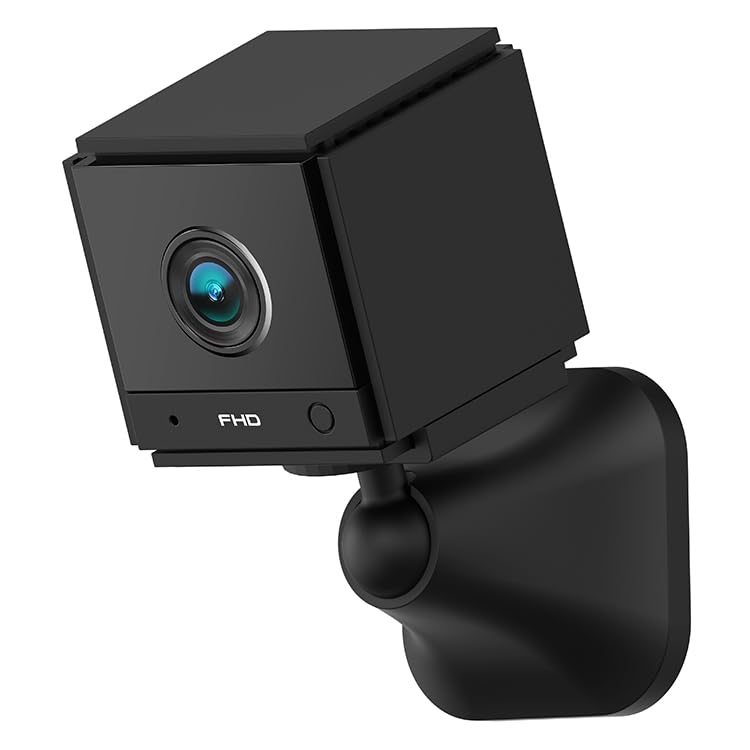
ภาพที่ 4.1: ด้านหน้า view of the ELECTROPRIME CAMSOY S20 camera, showing the lens and indicator lights.
4.4 การเชื่อมต่อ Wi-Fi และการตั้งค่าแอป
- ดาวน์โหลดแอป: ค้นหา the recommended camera application on your smartphone's app store (e.g., "CAMSOY" or a similar security camera app, refer to packaging for specific app name).
- เปิดเครื่อง: Press and hold the power button on the camera until the indicator light turns on.
- เพิ่มอุปกรณ์: Open the app, create an account if necessary, and select "Add Device" or a similar option.
- เลือกประเภทกล้อง: Follow the in-app instructions to select your camera model.
- เชื่อมต่อกับ Wi-Fi: The app will guide you through connecting the camera to your 2.4G Wi-Fi network. Ensure your Wi-Fi password is correct.
- การจับคู่: The camera will pair with your smartphone. Once connected, you can view the live feed and access settings.
Note: The camera supports both AP Mode (direct connection to phone) and WiFi Mode (connection via router). Refer to the app for specific mode selection and setup.
5. คู่มือการใช้งาน
5.1 เปิด/ปิดเครื่อง
- เปิดเครื่อง: กดปุ่มเปิด/ปิดค้างไว้ประมาณ 3 วินาที จนกว่าไฟแสดงสถานะจะสว่างขึ้น
- หมดแรง: กดปุ่มเปิด/ปิดค้างไว้ประมาณ 3 วินาที จนกระทั่งไฟแสดงสถานะดับ
5.2 สด View และการบันทึก
Once connected to the app, open the app to access the live video feed. From the live view อินเทอร์เฟซ คุณสามารถ:
- View วิดีโอแบบเรียลไทม์
- Manually start/stop video recording to the Micro-SD card or your phone.
- Take snapshots.
- การเข้าถึงที่บันทึกไว้ footage from the Micro-SD card.
5.3 เสียงสองทาง
ในไลฟ์สด view interface of the app, locate the microphone icon. Tap and hold the icon to speak through the camera's speaker. Release to listen through the camera's microphone.
5.4 การมองเห็นตอนกลางคืน
The camera automatically switches to IR night vision mode in low-light conditions. The 6 infrared LEDs provide clear black and white video up to 5-7 meters.
5.5 การตรวจจับการเคลื่อนไหวและการแจ้งเตือน
Enable motion detection in the camera settings within the app. You can set sensitivity levels and define detection zones. When motion is detected, the camera can:
- ส่งการแจ้งเตือนแบบพุชไปยังสมาร์ทโฟนของคุณ
- Start recording video to the Micro-SD card.
- Trigger a siren alarm (if enabled in settings).
6. การบำรุงรักษา
- การทำความสะอาด: ใช้ผ้านุ่มและแห้งเช็ดเลนส์และตัวกล้อง ห้ามใช้น้ำยาทำความสะอาดหรือวัสดุขัดถู
- การดูแลแบตเตอรี่ To prolong battery life, avoid extreme temperatures. If storing for extended periods, charge the battery to about 50% every few months.
- อัพเดตเฟิร์มแวร์: Check the camera app periodically for available firmware updates to ensure optimal performance and security.
- พื้นที่จัดเก็บ: เก็บกล้องไว้ในที่แห้งและเย็น หลีกเลี่ยงแสงแดดโดยตรงและความชื้นเมื่อไม่ได้ใช้งาน
7 การแก้ไขปัญหา
7.1 กล้องไม่เปิด
- Ensure the camera is fully charged. Connect it to a power source using the USB cable.
- กดปุ่มเปิดปิดค้างไว้อย่างน้อย 3 วินาที
7.2 ไม่สามารถเชื่อมต่อ Wi-Fi ได้
- Verify that your Wi-Fi network is 2.4GHz. The camera does not support 5GHz Wi-Fi.
- ตรวจสอบให้แน่ใจว่ารหัสผ่าน Wi-Fi ที่ป้อนในแอปถูกต้อง
- วางกล้องให้ใกล้กับเราเตอร์ Wi-Fi มากขึ้นระหว่างการตั้งค่า
- รีสตาร์ทเราเตอร์และกล้องของคุณ
- Reset the camera to factory settings (refer to app or camera for reset button location).
7.3 คุณภาพวิดีโอไม่ดี
- ตรวจสอบความแรงของสัญญาณ Wi-Fi สัญญาณอ่อนอาจส่งผลต่อคุณภาพการสตรีม
- ตรวจสอบให้แน่ใจว่าเลนส์กล้องสะอาดและปราศจากฝุ่นหรือคราบสกปรก
- Adjust the camera's position to avoid glare or strong backlighting.
7.4 Micro-SD Card Not Recording
- Ensure the Micro-SD card is inserted correctly and fully.
- Format the Micro-SD card through the camera app.
- Check if the Micro-SD card is full. Back up important footagและฟอร์แมตการ์ด
- Verify the Micro-SD card is not damaged and is within the supported capacity (up to 128GB).
8. ข้อมูลจำเพาะ
| หมายเลขรุ่น | NC0399B |
| ปณิธาน | 2MP / 1080P Full HD |
| View มุม | (H)110 degrees, (D)140 degrees |
| การมองเห็นตอนกลางคืน | 6pcs 940nm SMT IR Led, Range 5~7 meters, Built-in IR-CUT |
| ตัวแปลงสัญญาณวิดีโอ | H.264 / H.264 + |
| เครือข่าย | 2.4G WiFi IEEE802.11b/g/n |
| แบตเตอรี่ | Built-in 800mAh Li-ion Battery, lasts 3-4 hours (power cut off) |
| เสียง | ระบบเสียงสองทิศทาง (ไมโครโฟนและลำโพงในตัว) |
| อินเทอร์เฟซ | ไมโคร USB |
| โหมดการทำงาน | AP Mode, WiFi Mode, Motion Detection Alarm |
| พื้นที่จัดเก็บ | Micro-SD Card Max. 128GB (Class 10 recommended) |
| อุปกรณ์ที่รองรับ | สมาร์ทโฟน |
| สี | สีดำ |
| ผู้ผลิต | ELECTROGADGETSSTORE |
9. การรับประกันและการสนับสนุน
For warranty information and technical support, please refer to the documentation provided at the time of purchase or contact the seller/manufacturer directly. The manufacturer of this product is ELECTROGADGETSSTORE.
โปรดเก็บหลักฐานการซื้อไว้เพื่อใช้ในกรณีเรียกร้องการรับประกัน