
1. บทนำ
The Aubess Mini Smart Wi-Fi Switch 16A (Model WSM02) is designed to integrate seamlessly into your smart home ecosystem. This device enables remote control of connected appliances via your smartphone or tablet, offering convenience and enhanced energy management. It features an integrated energy monitor that provides real-time consumption data, helping you make informed decisions about your energy usage.
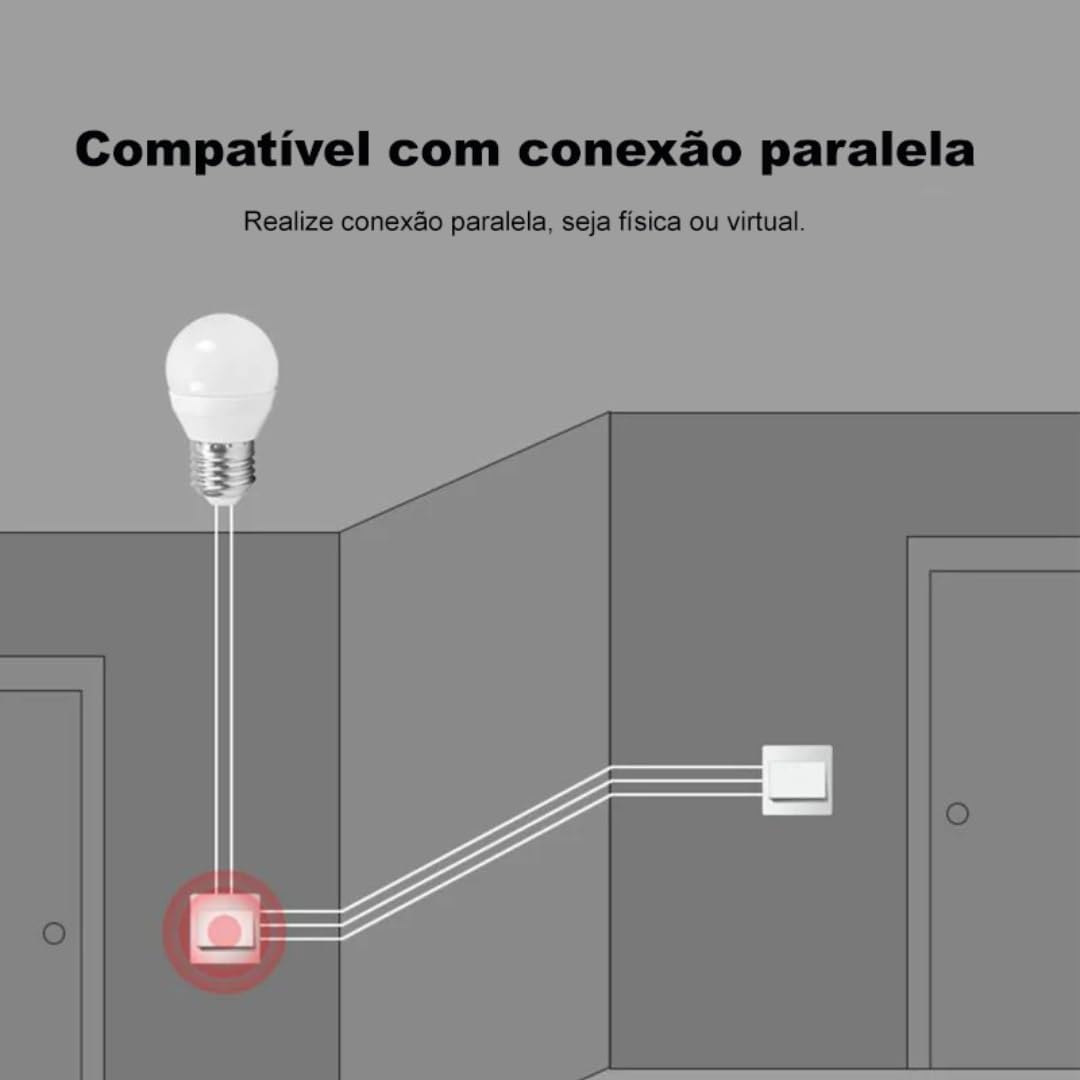
The switch is compatible with popular voice assistants such as Amazon Alexa and Google Home, and works with smart home platforms like Tuya Smart, Smart Life, and Home Assistant. Its compact design allows for simple and quick installation, including parallel installation with existing switches.
2. ข้อมูลด้านความปลอดภัย
คำเตือน: Electrical installation should only be performed by a qualified electrician to ensure safety and compliance with local electrical codes. Incorrect installation can lead to electric shock, fire, or device damage.
- ควรตัดกระแสไฟที่เบรกเกอร์ทุกครั้งก่อนทำการติดตั้งหรือบำรุงรักษา
- ตรวจสอบให้แน่ใจว่าได้ใช้งานอุปกรณ์ภายในระดับเสียงที่กำหนดไว้tage and current ratings (110V, 16A, 1600W).
- อย่าให้อุปกรณ์สัมผัสกับความชื้นหรืออุณหภูมิที่สูงเกินไป
- อุปกรณ์นี้ได้รับการออกแบบสำหรับใช้ภายในอาคารเท่านั้น
3. เนื้อหาบรรจุภัณฑ์
- 1 x Aubess Mini Smart Wi-Fi Switch
- 1 x คู่มือผู้ใช้
4. คุณสมบัติของผลิตภัณฑ์
- การเชื่อมต่อ Wi-Fi: Operates on 2.4GHz Wi-Fi networks for remote control.
- การตรวจสอบพลังงาน: Provides real-time and historical energy consumption data.
- การควบคุมด้วยเสียง: เข้ากันได้กับ Amazon Alexa และ Google Home เพื่อการใช้งานแบบแฮนด์ฟรี
- การควบคุมแอพ: Works with Tuya Smart and Smart Life applications for comprehensive management.
- High Power Rating: รองรับสูงสุด 16 Ampกำลังไฟ 1600 วัตต์
- การติดตั้งแบบขนาน: Designed to facilitate parallel wiring with existing traditional switches.
- การออกแบบที่กะทัดรัด: Small form factor for easy integration into electrical boxes.


5. ข้อมูลจำเพาะ
| ข้อมูลจำเพาะ | ค่า |
|---|---|
| โหมดการทำงาน | เปิด-ปิด |
| คะแนนปัจจุบัน | 16 Ampเอเรส |
| ปฏิบัติการฉบับที่tage | 110 โวลต์ |
| ประเภทการติดต่อ | ปิดปกติ |
| ประเภทขั้วต่อ | Clamp |
| ประเภทสวิตซ์ | สไลด์ |
| เทอร์มินัล | สกรู |
| ประเภทวงจร | 1 ทาง |
| ประเภทการติดตั้ง | ติดผนัง |
| จำนวนตำแหน่ง | 2 |
| คะแนนอุณหภูมิสูงสุด | 55 องศาเซลเซียส |
| ประเภทการควบคุม | Amazon Alexa, Push Button, Google Assistant |
| วิธีการควบคุม | Application, Remote, Touch, Voice |
| ประเภทการเชื่อมต่อ | ไวไฟ (2.4GHz) |
| พลัง | 1600 วัตต์ |
| สี | สีขาว |
| ขนาดรายการ | 41 x 20 x 41 มิลลิเมตร |
| จำนวนหน่วย | 1 หน่วย |
| จำนวนสินค้า | 1 |
| วัสดุ | พลาสติก |
| วัสดุติดต่อ | โลหะ |
| การให้คะแนนการคุ้มครองระหว่างประเทศ | IP00 |
| Compliant Specification | ซีอี, โรเอชเอส |
| ผู้ผลิต | อูเบส |
| หมายเลขชิ้นส่วน | ดับเบิ้ลยูเอสเอ็ม02 |
6. การตั้งค่าและการติดตั้ง
6.1 คำแนะนำในการเดินสายไฟ
สำคัญ: Ensure power is disconnected at the circuit breaker before proceeding with any wiring. Professional installation is highly recommended.
- ระบุสายไฟ: Locate the Live (L), Neutral (N), and Load (L1, L2, etc.) wires in your electrical box. The Aubess switch requires a Neutral wire for operation.
- เชื่อมต่อสายไฟ: Connect the Live wire from your power source to the 'L' terminal on the switch. Connect the Neutral wire to the 'N' terminal. Connect the Load wire(s) (to your light fixture or appliance) to the 'L1' (and 'L2' if applicable) terminal(s).
- การเชื่อมต่อที่ปลอดภัย: ตรวจสอบให้แน่ใจว่าการเชื่อมต่อสายไฟทั้งหมดมีความปลอดภัยและมีฉนวนหุ้มอย่างเหมาะสม
- สวิตช์ติดตั้ง: Carefully place the switch into the electrical box and secure it.
- คืนค่าพลัง: เมื่อการติดตั้งเสร็จสมบูรณ์และตรวจสอบแล้ว ให้จ่ายไฟคืนที่เบรกเกอร์
6.2 การจับคู่แอพ
To control your Aubess Mini Smart Wi-Fi Switch, you need to pair it with the Tuya Smart or Smart Life application.
- ดาวน์โหลดแอพ: ดาวน์โหลดแอป 'Tuya Smart' หรือ 'Smart Life' จากแอปสโตร์ของสมาร์ทโฟนของคุณ (iOS หรือ Android)
- ลงทะเบียน/เข้าสู่ระบบ: เปิดแอปและลงทะเบียนบัญชีใหม่หรือเข้าสู่ระบบหากคุณมีบัญชีอยู่แล้ว
- เพิ่มอุปกรณ์: แตะไอคอน '+' ที่มุมขวาบนของแอปเพื่อเพิ่มอุปกรณ์ใหม่
- เลือกประเภทอุปกรณ์: Choose 'Electrical Switch' or 'Switch (Wi-Fi)'.
- กรอกรายละเอียด Wi-Fi: ตรวจสอบให้แน่ใจว่าโทรศัพท์ของคุณเชื่อมต่อกับเครือข่าย Wi-Fi 2.4GHz แล้ว ป้อนรหัสผ่าน Wi-Fi ของคุณในแอป
- ตั้งค่าอุปกรณ์ให้อยู่ในโหมดจับคู่: Power on the switch. If the indicator light is not blinking rapidly, press and hold the reset button on the switch for 5-10 seconds until it blinks rapidly.
- ยืนยันการกะพริบ: ในแอป ตรวจสอบว่าไฟแสดงสถานะกำลังกะพริบเร็ว ๆ
- เชื่อมต่อ: The app will begin searching for the device. Once found, you can rename it and complete the setup.
7. คู่มือการใช้งาน
การควบคุมแอพ 7.1 ตัว
Once paired, you can control the switch from anywhere using the Tuya Smart or Smart Life app:
- เปิด/ปิด: Tap the switch icon in the app to turn the connected appliance on or off.
- การกำหนดตารางเวลา: Set schedules or timers for automatic operation.
- ฉาก: Create custom scenes to control multiple devices simultaneously.
7.2 การควบคุมด้วยเสียง (Alexa/Google Home)
To enable voice control, link your Tuya Smart/Smart Life account with Amazon Alexa or Google Home:
- เปิดแอป Alexa หรือ Google Home
- ไปที่ 'ทักษะและเกม' (สำหรับ Alexa) หรือ 'ใช้งานร่วมกับ Google' (สำหรับ Google Home)
- ค้นหา 'Tuya Smart' or 'Smart Life'.
- Enable the skill/service and link your account using your app credentials.
- Discover devices. You can now control your switch using voice commands like: "Alexa, turn on the living room light" or "Hey Google, turn off the fan."
7.3 การตรวจสอบพลังงาน
The integrated energy monitor allows you to track power consumption:
- In the Tuya Smart/Smart Life app, select your Aubess switch.
- Look for the 'Energy Monitoring' or 'Power Statistics' section.
- View real-time power usage (Watts), current (Amperes), and voltage (โวลต์)
- Access historical data, including daily, weekly, or monthly consumption graphs.

8. การบำรุงรักษา
- การทำความสะอาด: ใช้ผ้าแห้งนุ่มเช็ดทำความสะอาดอุปกรณ์ ห้ามใช้สารเคมีรุนแรงหรือน้ำยาทำความสะอาดที่มีฤทธิ์กัดกร่อน
- อัพเดตเฟิร์มแวร์: ตรวจสอบแอป Tuya Smart/Smart Life เป็นระยะเพื่อดูการอัปเดตเฟิร์มแวร์ที่มีให้ใช้งาน เพื่อให้มั่นใจได้ถึงประสิทธิภาพและความปลอดภัยสูงสุด
- สภาพแวดล้อม : Ensure the device is kept within its operating temperature range (max 55°C) and away from excessive humidity.
9 การแก้ไขปัญหา
- อุปกรณ์ไม่ตอบสนอง:
- ตรวจสอบว่าอุปกรณ์มีไฟเลี้ยงหรือไม่
- Verify your Wi-Fi network is active and stable (2.4GHz).
- Ensure your smartphone has an internet connection.
- Try restarting the switch by cycling its power at the circuit breaker.
- ไม่สามารถจับคู่ได้:
- Make sure the switch's indicator light is blinking rapidly (pairing mode). If not, reset it by holding the button for 5-10 seconds.
- โปรดตรวจสอบให้แน่ใจว่าเครือข่าย Wi-Fi ของคุณเป็น 2.4GHz เครือข่าย 5GHz ไม่ได้รับการสนับสนุน
- ตรวจสอบให้แน่ใจว่าคุณป้อนรหัสผ่าน Wi-Fi ถูกต้อง
- ขณะทำการจับคู่ ให้เลื่อนสวิตช์เข้าใกล้เราเตอร์ Wi-Fi มากขึ้น
- การควบคุมด้วยเสียงไม่ทำงาน:
- Verify that the Tuya Smart/Smart Life skill/service is enabled and linked correctly in your Alexa/Google Home app.
- Ensure the device name in the smart home app matches the name you are using in voice commands.
- Try rediscovering devices in your Alexa/Google Home app.
10. การรับประกันและการสนับสนุน
For warranty information, technical support, or service inquiries, please contact Aubess customer support through their official website or the contact information provided at the point of purchase. Please have your product model (WSM02) and purchase details ready when contacting support.