
1. บทนำ
This manual provides detailed instructions for the safe and effective use of your PTHTECHUS 4G Kids Smart Watch, Model LT49. Please read this manual thoroughly before operating the device and retain it for future reference. This smartwatch is designed to provide communication and entertainment features for children aged 4-12.
2. อะไรอยู่ในกล่อง
- PTHTECHUS 4G Kids Smart Watch (Model LT49)
- สายชาร์จ
- คู่มือการใช้งาน (เอกสารนี้)
- วงนาฬิกา

Image 2.1: The PTHTECHUS 4G Kids Smart Watch LT49, shown with its adjustable strap and a SpeedTalk Mobile SIM card, which is included for initial activation.
3. สินค้าหมดview
The PTHTECHUS 4G Kids Smart Watch LT49 features a high-definition touch screen and a durable design suitable for children. It integrates various functions to keep children connected and engaged.

ภาพที่ 3.1: โอเวอร์view of the smartwatch's features, including Pedometer, Alarm, Photo, Study Cards, Video, Audiobook, Camera, Player, Habit, Music, Calculator, Games, Setup, Timer, Wallpaper, Calendar, and Stopwatch.
3.1 ส่วนประกอบของอุปกรณ์

Image 3.2: A diagram highlighting key components of the smartwatch: HD Camera, SIM card slot, Mental Watch Case, Colorful Soft Band, SOS Button, and Power Button.
- กล้อง HD: Located at the top of the watch face, used for taking photos and videos.
- ช่องใส่ซิมการ์ด: Located on the side, for inserting a 4G Nano SIM card.
- ปุ่ม SOS: A dedicated button for emergency calls.
- ปุ่มเปิด/ปิด: ใช้สำหรับเปิด/ปิดอุปกรณ์ และปลุก/พักหน้าจอ
- หน้าจอสัมผัส: 1.69-inch HD display for navigation and interaction.
4. คำแนะนำในการตั้งค่า
4.1 การติดตั้งซิมการ์ด
The smartwatch requires a 4G Nano SIM card for calling and network features. A SpeedTalk Mobile SIM kit is included with the package.
- Ensure the watch is powered off.
- หาช่องใส่ซิมการ์ดที่ด้านข้างของนาฬิกา
- Carefully insert the 4G Nano SIM card into the slot in the correct orientation. Refer to the diagram on the watch or in the quick start guide for proper alignment.
- ปิดฝาช่องใส่ซิมการ์ดให้สนิท
4.2 การเปิดใช้งานซิมการ์ด
To enable calling and data features, the SpeedTalk Mobile SIM card must be activated.
- Visit the SpeedTalk Mobile webงาน (www.activatespeedtalk.com) to activate your SIM card.
- Follow the on-screen instructions for activation. The package includes 30 minutes calling, 30MB data, and 30 SMS free for one week.
- Monthly service plans start at $5.00.

Image 4.1: Visual guide for SIM card insertion and activation details for SpeedTalk Mobile service.
4.3 การเปิดเครื่องครั้งแรกและการตั้งค่าพื้นฐาน
- กดปุ่มเปิด/ปิดค้างไว้จนกว่าหน้าจอจะสว่างขึ้น
- ทำตามคำแนะนำบนหน้าจอเพื่อตั้งค่าภาษา เวลา และวันที่
- Ensure the watch is connected to a 4G network (indicated by the network icon on the screen).
5. คู่มือการใช้งาน
5.1 Two-Way Calling and SOS Function
Once the SIM card is active, the watch supports two-way calling with pre-set contacts.
- การโทร: Navigate to the 'Contact' or 'Dial' app on the watch. Select a contact or dial a number directly.
- รับสาย: เมื่อมีสายเรียกเข้า ให้แตะไอคอนรับสายสีเขียวบนหน้าจอ
- สายด่วนฉุกเฉิน SOS: In an emergency, press and hold the SOS button for 3 seconds. The watch will automatically dial up to 3 pre-set emergency contacts and send a text message.
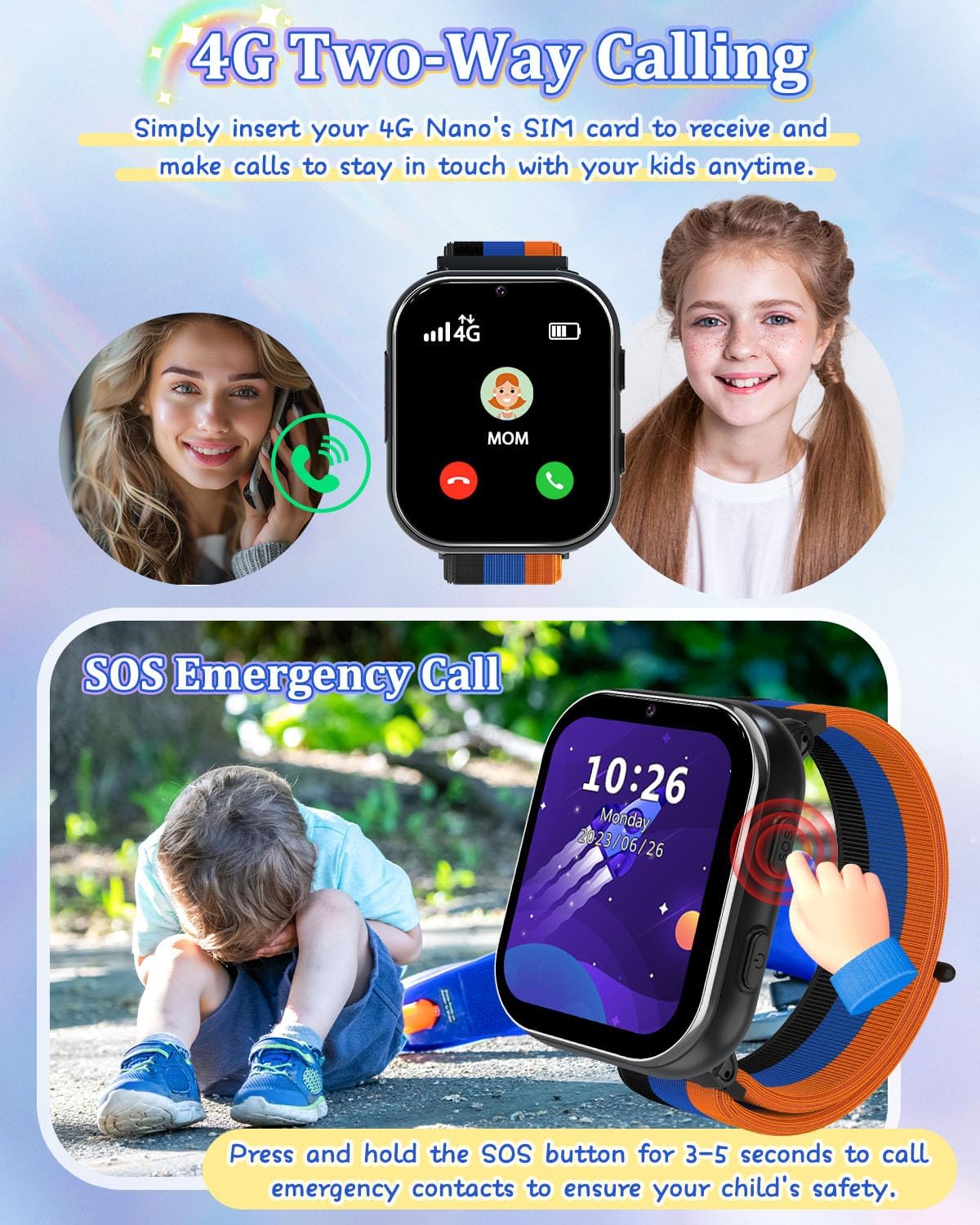
Image 5.1: Illustration of the two-way calling feature, showing a child receiving a call, and the SOS emergency call function being activated by pressing the side button.
5.2 การบันทึกกล้องและวิดีโอ
The built-in HD camera allows children to capture photos and videos.
- Open the 'Camera' app to take photos.
- Open the 'Video' app to record videos.
- รูปภาพและวิดีโอสามารถ viewed in the 'Photos' or 'Player' app.

Image 5.2: The smartwatch camera in action, showing a child taking a photo and various fun filters that can be applied to images.
5.3 Music Player and Audiobooks
The watch supports MP3 music playback and includes pre-loaded audio stories.
- ดนตรี: โอนไฟล์ MP3 files to the watch's internal storage via the charging cable. Access them through the 'Music' app.
- หนังสือเสียง: Access pre-loaded audio stories via the 'AudioBook' app.

Image 5.3: A child listening to an audiobook on the smartwatch, with icons representing various story options.
5.4 Games and Learning Cards
The watch includes 8 puzzle games and learning cards for educational engagement.
- เกม: Access the pre-installed games via the 'Games' app.
- การ์ดการเรียนรู้: Utilize the 'Learn Card' app for interactive learning content.

Image 5.4: Children playing puzzle games and listening to music on the smartwatch, showcasing the entertainment features.

Image 5.5: A child interacting with the learning cards feature on the smartwatch, displaying various categories like animals, plants, food, and vehicles.
5.5 Habit Tracker and Alarm Clock
The watch includes a habit tracker and multiple alarm clock modes to help children develop routines.
- เครื่องมือติดตามพฤติกรรม: Set up daily habits like 'Get Up', 'Brush Your Teeth', 'Breakfast', 'Go to School', 'Homework', 'Dinner', 'Go to Bed' via the 'Habit' app.
- นาฬิกาปลุก: Configure alarms for various activities.

Image 5.6: The habit tracker interface showing 13 alarm clock modes to help children establish good daily routines.

Image 5.7: A visual representation of the habit tracking feature, illustrating various daily activities children can track.
5.6 เครื่องนับก้าว
The built-in pedometer tracks daily steps.
- Access the 'Pedometer' app to view นับก้าว
5.7 Calculator and Calendar
Basic utility tools are available on the watch.
- เครื่องคิดเลข: Use the 'Calculator' app for basic arithmetic.
- ปฏิทิน: View the current date and month via the 'Calendar' app.

ภาพที่ 5.8: จบแล้วview of time tools including Calendar, Alarm clock, Stopwatch, and Timer, helping children manage their time.
5.8 Wallpaper Customization
Personalize the watch face with various wallpapers.
- Directly click on the screen to switch between available wallpapers.

Image 5.9: A selection of multiple wallpapers available for customizing the smartwatch display.
5.9 โหมดโรงเรียน
To prevent distractions during school hours, activate School Mode.
- School Mode temporarily disables game functions.
- Refer to the 'Settings' menu on the watch for School Mode activation and scheduling.
5.10 วิดีโอผลิตภัณฑ์อย่างเป็นทางการ
Video 5.1: An official product video from PTHTECHUS-US demonstrating the features of the Girls Smart Phone 4G Watch LT49, including wallpaper customization, SOS emergency calls, camera functions, and its suitability as a gift for children.
6. การบำรุงรักษา
6.1 การดูแลแบตเตอรี่
- The watch is equipped with a 700mAh Lithium Polymer battery.
- ใช้เฉพาะสายชาร์จที่ให้มาเท่านั้น
- เพื่อยืดอายุการใช้งานแบตเตอรี่ ควรหลีกเลี่ยงอุณหภูมิที่สูงหรือต่ำเกินไปขณะชาร์จและจัดเก็บ
- อย่าพยายามเปลี่ยนแบตเตอรี่ด้วยตนเอง หากมีปัญหาเกี่ยวกับแบตเตอรี่ โปรดติดต่อฝ่ายสนับสนุน
6.2 การทำความสะอาด
- เช็ดหน้าจอและตัวเรือนนาฬิกาด้วยผ้าแห้งเนื้อนุ่ม
- หลีกเลี่ยงการใช้สารเคมีรุนแรงหรือวัสดุที่มีฤทธิ์กัดกร่อน
- The watch is not waterproof; avoid submerging it in water.
7 การแก้ไขปัญหา
7.1 ปัญหาทั่วไปและแนวทางแก้ไข
- นาฬิกาไม่เปิดเครื่อง:
- ตรวจสอบให้แน่ใจว่านาฬิกาชาร์จเต็มแล้ว เสียบสายชาร์จและแหล่งจ่ายไฟอย่างน้อย 30 นาที
- Press and hold the Power Button for 10-15 seconds to attempt a forced restart. - ไม่สามารถโทรออก/รับสายได้:
- Verify that the 4G Nano SIM card is correctly inserted and activated.
- Check for network signal strength on the watch screen.
- Ensure the SIM card has an active service plan.
- Confirm that the contact numbers are correctly saved in the 'Contact' app. - หน้าจอไม่ตอบสนอง:
- Restart the watch by holding the Power Button.
- Ensure the screen is clean and dry. - แบตเตอรี่หมดเร็ว:
- ลดความสว่างหน้าจอลง
- Close unused applications.
- Limit frequent use of power-intensive features like video recording.
- Ensure the watch is not in an area with poor network coverage, as this can increase battery consumption. - Games are disabled:
- Check if 'School Mode' is active. Deactivate it through the 'Settings' menu if games are desired.
8. ข้อมูลจำเพาะ
| คุณสมบัติ | รายละเอียด |
|---|---|
| ชื่อรุ่น | LT49 |
| ยี่ห้อ | พีทีเอชเทคทัส |
| ขนาดหน้าจอ | 1.69 นิ้ว |
| รูปร่าง | สี่เหลี่ยม |
| จีพีเอส | ไม่มีจีพีเอส |
| ส่วนประกอบของเซลล์แบตเตอรี่ | ลิเธียมโพลีเมอร์ |
| เทคโนโลยีการเชื่อมต่อ | ยูเอสบี |
| ความจุของแบตเตอรี่ | 700 มิลลิวินาทีamp ชั่วโมง |
| คุณสมบัติพิเศษ | Alarm Clock, Camera, Music Player, Phone Call, SOS Button |
| ความจุของหน่วยความจำ | 3.3GB |
| น้ำหนักสินค้า | 60 กรัม (2.12 ออนซ์) |
| ผู้ผลิต | yangjiangshiyangdongquzhangtongjiayuankejico.LTD. |
| วันที่พร้อมใช้งานครั้งแรก | 18 กุมภาพันธ์ 2024 |
9. การรับประกันและการสนับสนุน
9.1 ข้อมูลการรับประกัน
PTHTECHUS is committed to providing high-quality products. For specific warranty details, please refer to the warranty card included with your product or contact PTHTECHUS customer support.
9.2 การสนับสนุนลูกค้า
If you have any questions, encounter issues, or require assistance with your PTHTECHUS 4G Kids Smart Watch LT49, please contact PTHTECHUS customer support. Contact information can typically be found on the product packaging, the official PTHTECHUS webไซต์หรือผ่านแพลตฟอร์มการซื้อของคุณ
คุณยังสามารถเยี่ยมชม PTHTECHUS Store on Amazon สำหรับทรัพยากรเพิ่มเติมและตัวเลือกการติดต่อ