
1. บทนำ
This manual provides essential instructions for the proper setup, operation, and maintenance of your DIGIQUEST Universal Remote Control, model TLC094. This remote is designed as an original replacement and is compatible with various DIGIQUEST devices, including DGQ700, DGQ800, DGQ790, DGQ890, DGQ960, DGQ990, SH, G, VOICE, and INVISIBLE series. Please read this manual thoroughly before use to ensure optimal performance and longevity of your device.
2. การตั้งค่า
2.1 การติดตั้งแบตเตอรี่
The remote control requires two AAA alkaline batteries (not included). Follow these steps to install them:
- ค้นหาฝาปิดช่องใส่แบตเตอรี่ที่ด้านหลังของรีโมทคอนโทรล
- Slide the cover downwards in the direction indicated by the arrow to open the compartment.
- Insert two AAA alkaline batteries, ensuring the positive (+) and negative (-) terminals align correctly with the markings inside the compartment.
- เลื่อนฝาปิดช่องใส่แบตเตอรี่กลับเข้าที่จนกระทั่งล็อคเข้าที่อย่างแน่นหนา
This image displays the rear of the remote control, highlighting the battery cover. An arrow indicates the direction to slide the cover for battery access. Below it, the crossed-out wheeled bin symbol signifies that the product should not be disposed of with household waste, promoting proper electronic waste recycling. The CE mark confirms compliance with European health, safety, and environmental protection standards.
2.2 การใช้งานเบื้องต้น
As an original replacement remote for specific DIGIQUEST models, the TLC094 is typically ready for use immediately after battery installation. Point the remote control directly at your DIGIQUEST device (e.g., TV, set-top box) and press the Power button to test functionality. If the device does not respond, ensure the remote has a clear line of sight to the device's infrared receiver.
3. คู่มือการใช้งาน
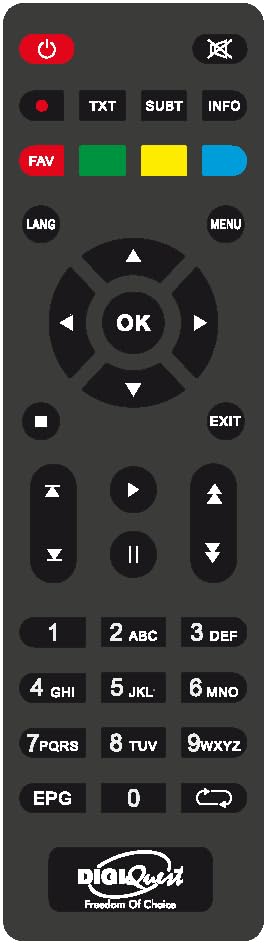
The DIGIQUEST TLC094 remote control features 20 buttons for comprehensive control of your compatible television. Below are the general functions:
- ปุ่มเปิด/ปิด: เปิดหรือปิดอุปกรณ์
- ปุ่มตัวเลข (0-9): For direct channel selection or inputting numerical values.
- ช่องขึ้น/ลง: Navigates through channels sequentially.
- เพิ่ม/ลดระดับเสียง: ปรับระดับเสียง
- ปุ่มปิดเสียง: ปิดเสียงเอาต์พุตเสียง
- ปุ่มเมนู/การตั้งค่า: Accesses the device's main menu or settings.
- Navigation Buttons (Up, Down, Left, Right, OK/Enter): ใช้สำหรับนำทางเมนูและยืนยันการเลือก
- ปุ่มย้อนกลับ/ออก: กลับไปยังหน้าจอที่แล้วหรือออกจากเมนู
- ปุ่มที่มา/อินพุต: Selects the input source (e.g., HDMI 1, AV).
- Other buttons may vary in function depending on the specific DIGIQUEST device model.
4. การบำรุงรักษา
4.1 การทำความสะอาด
ในการทำความสะอาดรีโมทคอนโทรล ให้ใช้ผ้านุ่มและแห้ง สำหรับคราบสกปรกฝังแน่น ให้เช็ดเบาๆampชุบผ้าด้วยน้ำหรือน้ำยาทำความสะอาดอ่อนๆ ที่ไม่ทำให้เกิดรอยขีดข่วน หลีกเลี่ยงการใช้สารเคมีรุนแรง ตัวทำละลาย หรือวัสดุที่มีฤทธิ์กัดกร่อน เพราะอาจทำให้พื้นผิวหรือส่วนประกอบภายในของรีโมทเสียหายได้
4.2 การเปลี่ยนแบตเตอรี่
Replace batteries when the remote's response becomes sluggish or stops working. Always replace both batteries at the same time with new AAA alkaline batteries. Do not mix old and new batteries, or different types of batteries. Dispose of used batteries according to local regulations; do not discard them with household waste.
4.3 พื้นที่จัดเก็บ
Store the remote control in a cool, dry place away from direct sunlight, extreme temperatures, and high humidity. If the remote will not be used for an extended period, remove the batteries to prevent leakage and potential damage.
5 การแก้ไขปัญหา
- รีโมตไม่ตอบสนอง:
- ตรวจสอบว่าใส่แบตเตอรี่ถูกต้องและขั้วถูกต้องหรือไม่
- เปลี่ยนแบตเตอรี่ด้วยแบตเตอรี่อัลคาไลน์ AAA ใหม่
- ตรวจสอบให้แน่ใจว่ามีเส้นทางการมองเห็นที่ชัดเจนระหว่างตัวส่งสัญญาณอินฟราเรดของรีโมทและตัวรับสัญญาณของอุปกรณ์ สิ่งกีดขวางอาจขัดขวางสัญญาณได้
- ตรวจสอบให้แน่ใจว่ารีโมทชี้ไปที่อุปกรณ์โดยตรง
- ปุ่มไม่ตอบสนองหรือกดค้าง:
- ทำความสะอาดรีโมทคอนโทรลตามที่อธิบายไว้ในส่วนการบำรุงรักษา
- หากการทำความสะอาดไม่สามารถแก้ไขปัญหาได้ อาจจำเป็นต้องเปลี่ยนรีโมทใหม่
- Remote controls some functions but not others:
- This remote is designed for specific DIGIQUEST models. Ensure your device is fully compatible.
- Some advanced functions might be specific to the original remote that came with your device.
6. ข้อมูลจำเพาะ
| ยี่ห้อ | DIGIQUEST |
| หมายเลขรุ่น | ทลค.094 |
| ผู้ผลิต | ดิจิเควส |
| คุณสมบัติพิเศษ | สากล |
| สี | สีดำ |
| จำนวนอุปกรณ์ที่รองรับสูงสุด | 1 |
| อุปกรณ์ที่รองรับ | โทรทัศน์ |
| เทคโนโลยีการเชื่อมต่อ | อินฟราเรด |
| จำนวนปุ่ม | 20 |
| ประเภทตัวควบคุม | ปุ่มควบคุม |
| คำอธิบายแบตเตอรี่ | อัลคาไลน์ (AAA) |
7. ข้อมูลการปฏิบัติตาม
This product bears the CE mark, indicating its conformity with European health, safety, and environmental protection standards. The crossed-out wheeled bin symbol on the product signifies that, at the end of its life, it should be disposed of separately from household waste. Please use designated collection points for electronic waste to ensure proper recycling and minimize environmental impact.
8. การรับประกัน
Specific warranty information for the DIGIQUEST TLC094 remote control may vary by region and retailer. Please refer to the purchase documentation or contact your point of sale for details regarding warranty coverage and terms. Keep your proof of purchase for any warranty claims.
9. การสนับสนุน
For further assistance, technical support, or inquiries regarding your DIGIQUEST Universal Remote Control TLC094, please visit the official DIGIQUEST webหรือติดต่อฝ่ายบริการลูกค้า โดยทั่วไปข้อมูลการติดต่อจะอยู่ในเว็บไซต์ของผู้ผลิต webบรรจุภัณฑ์ไซต์หรือผลิตภัณฑ์