
Outdoor Tech OT4800-B
Outdoor Tech Turtle Shell 4.0 Wireless Bluetooth Speaker User Manual
Model: OT4800-B
Brand: Outdoor Tech
การแนะนำ
The Outdoor Tech Turtle Shell 4.0 is a portable, rugged, and waterproof wireless Bluetooth speaker designed for outdoor adventures. It features 360-degree sound, a durable IPX7-rated construction, and an extended battery life, making it ideal for various environments from camping to poolside relaxation. This manual provides essential information for setting up, operating, and maintaining your speaker.

Figure 1: Turtle Shell 4.0 highlighting key features like waterproof, 18-hour battery, impressive sound, Siri/Power Bank, and simple controls.
มีอะไรอยู่ในกล่อง
- Turtle Shell 4.0 Wireless Bluetooth Speaker
- สายชาร์จ USB-C
- กระเป๋าใส่ของ
- Instructional manual (this document)
การตั้งค่า
1. ชาร์จลำโพง
Before first use, fully charge your Turtle Shell 4.0. The charging port has been upgraded to USB-C for faster and more efficient charging.
- เชื่อมต่อสายชาร์จ USB-C ที่ให้มากับพอร์ตชาร์จของลำโพง
- เชื่อมต่อปลายสายอีกด้านหนึ่งเข้ากับอะแดปเตอร์ไฟ USB ที่ใช้งานร่วมกันได้ (ไม่รวมอยู่ด้วย) หรือพอร์ต USB ของคอมพิวเตอร์
- A full charge takes approximately 3 hours. The LED indicator will change to show charging status (refer to LED indicator section for details).
2. การเปิด/ปิดเครื่อง
- วิธีเปิดเครื่อง: กดปุ่มเปิด/ปิดค้างไว้ (⏻) until you hear an audible cue or see the LED indicator light up.
- วิธีปิดเครื่อง: กดปุ่มเปิด/ปิดค้างไว้ (⏻) again until you hear an audible cue or the LED indicator turns off.
3. การจับคู่บลูทู ธ
The Turtle Shell 4.0 can be effortlessly paired with your smartphone or other Bluetooth-enabled devices from up to 65 feet away.
- Ensure the speaker is powered on and in pairing mode (the LED indicator will typically flash rapidly).
- บนอุปกรณ์ของคุณ ให้ไปที่การตั้งค่า Bluetooth
- Select "Turtle Shell 4.0" from the list of available devices.
- เมื่อเชื่อมต่อเสร็จแล้ว ไฟ LED จะสว่างขึ้น และคุณจะได้ยินเสียงยืนยัน
4. Daisy-Chaining Multiple Speakers
The Turtle Shell 4.0 features an upgraded daisy-chain function, allowing you to link up to 50 Shells together for a massive portable stereo sound experience.
- Ensure all speakers you wish to link are powered on and not currently paired to any device.
- Pair the first speaker (master speaker) to your device via Bluetooth as described above.
- On the master speaker, press the daisy-chain button (refer to button layout for specific icon).
- On the additional speakers, press their daisy-chain button. They will automatically connect to the master speaker.
- Repeat for up to 50 speakers.
คำแนะนำการใช้งาน
1. ปุ่มฟังก์ชัน

รูปที่ 2: ด้านข้าง view of the Turtle Shell 4.0 with visible control buttons.
| ปุ่ม | ฟังก์ชั่น (กดสั้น) | ฟังก์ชั่น (กดค้าง) |
|---|---|---|
| พลัง (⏻) | ตรวจสอบสถานะแบตเตอรี่ | เปิด/ปิดเครื่อง |
| ลดระดับเสียง (-) | ลดระดับเสียง | เพลงก่อนหน้า |
| Multi-function (Bigfoot icon) | เล่น/หยุดชั่วคราว, รับสาย/วางสาย | Activate Siri/Google Assistant, Reject Call, Daisy-chain pairing |
| เพิ่มระดับเสียง (+) | เพิ่มปริมาณเสียง | เพลงถัดไป |
2. 360-Degree Audio Experience
The Turtle Shell 4.0's patented Dual-Directional Sound technology produces an immersive 360-degree audio experience, ensuring powerful sound from all angles. This is achieved through two full-range drivers and a bass radiator housed within its unique polygonal design.
3. ความเข้ากันได้กับผู้ช่วยอัจฉริยะ
Activate your device's Siri or Google Assistant directly from the speaker by long-pressing the multi-function button (Bigfoot icon).
4. การโทรแบบแฮนด์ฟรี
With the built-in microphone, you can answer and end calls directly through the speaker. Short press the multi-function button to answer or end a call. Long press to reject an incoming call.
5. ฟังก์ชันการทำงานของพาวเวอร์แบงค์
The 4K mAh battery allows you to charge small devices while enjoying your music. Connect your device to the speaker's USB-A output port (located under the sealed port cover) using your device's charging cable.
6. ตัวเลือกการติดตั้ง
The Turtle Shell 4.0 includes a standard 1/4"-20 camera threading mount and custom strap mounts for multiple easy carry and transport options, allowing you to secure it to various surfaces or gear.

Figure 3: The Turtle Shell 4.0 is versatile for various outdoor activities including camping, general outdoor use, beach, and pool.
การซ่อมบำรุง
1. กันน้ำและทนทาน
The Turtle Shell 4.0 is IPX7-rated waterproof, dustproof, and shockproof. This means it can be submerged in water up to 1 meter for 30 minutes. Ensure all port covers are securely sealed before exposing the speaker to water or dusty environments.

Figure 4: The Turtle Shell 4.0 demonstrating its IP67 waterproof capability.
2. การทำความสะอาด
ในการทำความสะอาดลำโพง ให้เช็ดด้วยผ้านุ่มๆamp cloth. Do not use abrasive cleaners or solvents. If exposed to saltwater or chlorinated water, rinse thoroughly with fresh water and allow to air dry completely before charging or opening port covers.
3. การจัดเก็บ
Store the speaker in a cool, dry place away from direct sunlight and extreme temperatures. For long-term storage, ensure the battery is partially charged (around 50%) to preserve battery health.
การแก้ไขปัญหา
| ปัญหา | สาเหตุที่เป็นไปได้ | สารละลาย |
|---|---|---|
| ลำโพงไม่เปิดเครื่อง | แบตเตอรี่อ่อน | ชาร์จลำโพงอย่างน้อย 30 นาที |
| ไม่สามารถจับคู่ผ่านบลูทูธได้ | ลำโพงไม่ได้อยู่ในโหมดจับคู่ อุปกรณ์ Bluetooth ปิดอยู่ อยู่ไกลจากลำโพงเกินไป | Ensure speaker is in pairing mode (flashing LED). Turn device Bluetooth off and on. Move device closer to speaker (within 65 feet). Forget device on your phone and re-pair. |
| เสียงผิดเพี้ยนเมื่อเปิดเสียงดังมาก | Volume too high for audio source. | Reduce the volume on the speaker or your connected device. |
| Daisy-chaining not working. | Speakers not in correct mode; too many speakers. | Ensure all speakers are powered on and not paired to other devices before initiating daisy-chain. Confirm you are within the 50-speaker limit. |
| ลำโพงไม่ชาร์จ | Cable issue; port issue; power source issue. | ลองใช้สาย USB-C และอะแดปเตอร์แปลงไฟอันอื่น ตรวจสอบให้แน่ใจว่าพอร์ตชาร์จสะอาดและไม่มีเศษฝุ่น |
ข้อมูลจำเพาะ
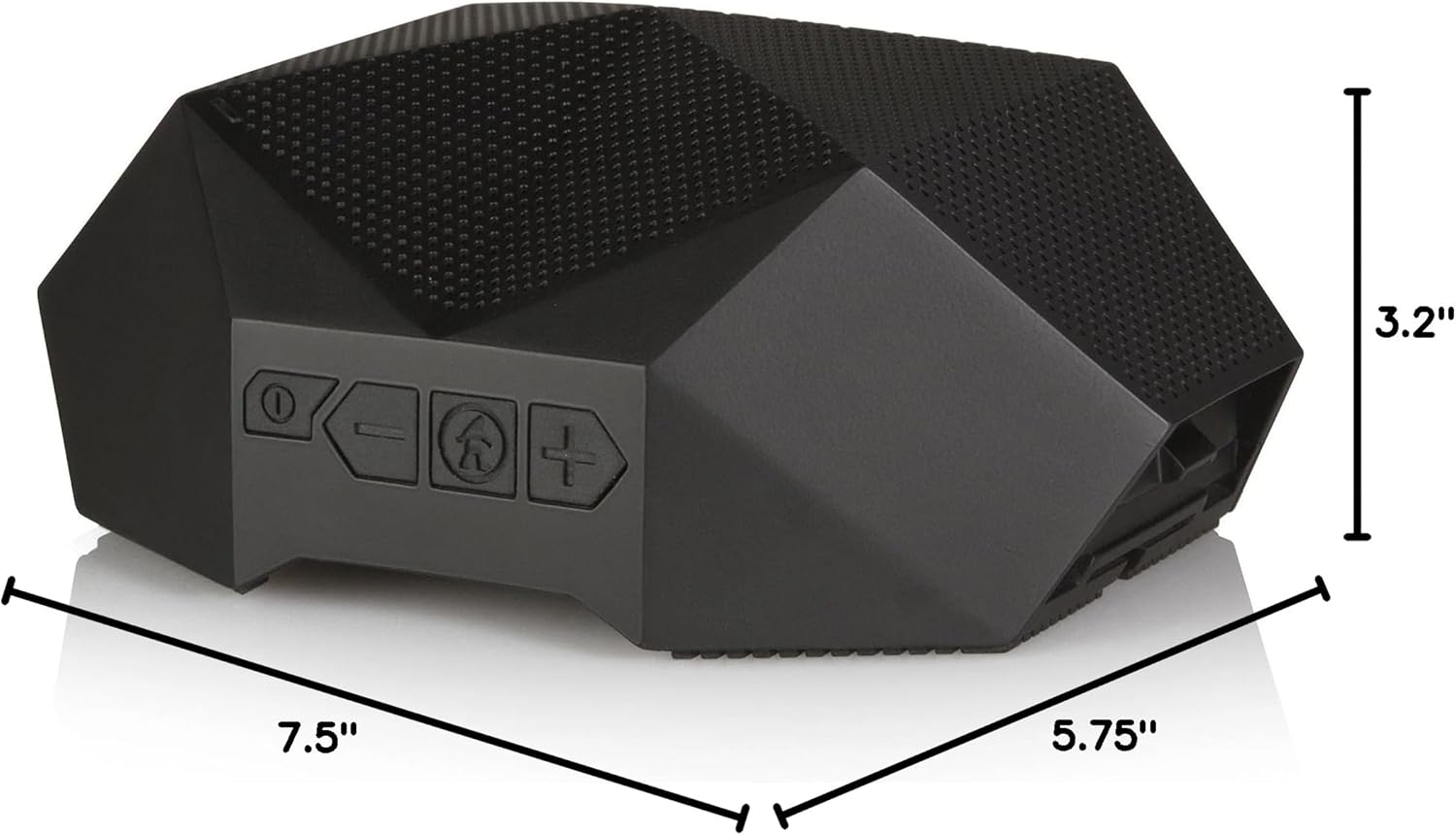
Figure 5: Physical dimensions of the Turtle Shell 4.0 speaker.
| คุณสมบัติ | รายละเอียด |
|---|---|
| ชื่อรุ่น | OT4800-B |
| ประเภทลำโพง | กลางแจ้ง |
| คุณสมบัติพิเศษ | กันน้ำ |
| การใช้ที่แนะนำ | ในร่ม/กลางแจ้ง |
| อุปกรณ์ที่รองรับ | สมาร์ทโฟน แท็บเล็ต แล็ปท็อป เดสก์ท็อป |
| ประเภทตัวควบคุม | การควบคุมด้วยเสียง |
| สี | สีดำ |
| อายุการใช้งานแบตเตอรี่ | นานถึง 18 ชั่วโมง |
| ส่วนประกอบที่รวมอยู่ | USB charging cable, carry pouch, instructional manual |
| ขนาดสินค้า | ลึก 7.5 นิ้ว x กว้าง 5.75 นิ้ว x สูง 3.2 นิ้ว |
| ระดับการกันน้ำ | IPX7 |
| ความจุของแบตเตอรี่ | 4000 มิลลิแอมป์ |
| เวลาในการชาร์จ | 3 ชั่วโมง |
| ช่วงบลูทูธสูงสุด | 65 ฟุต |
| น้ำหนักสินค้า | 1.37 ปอนด์ |
| เทคโนโลยีการเชื่อมต่อ | บลูทูธ |
| โหมดเอาต์พุตเสียง | สเตอริโอ |
| วัสดุ | Mixed Plastic/Silicone |
วิดีโอผลิตภัณฑ์อย่างเป็นทางการ
Watch this video to see the Turtle Shell speaker in action, demonstrating its ruggedness and suitability for outdoor activities like paddleboarding. Please note this video features the Turtle Shell 3.0, a previous model, but showcases similar core functionalities and durability relevant to the Turtle Shell 4.0.
Video 1: "SUP with the Turtle Shell 3.0 Speaker" by Outdoor Technology. This video demonstrates the speaker's use in a water environment.
การรับประกันและการสนับสนุน
Outdoor Tech products are designed for durability and performance. For warranty information and customer support, please visit the official Outdoor Tech webหรือติดต่อฝ่ายบริการลูกค้าโดยตรง โปรดเก็บหลักฐานการซื้อไว้เพื่อใช้ในกรณีที่ต้องการเคลมประกัน
หากต้องการความช่วยเหลือเพิ่มเติม คุณสามารถดูได้ที่ [แหล่งข้อมูลเพิ่มเติม] Outdoor Tech Store on Amazon.
Ask a question about this manual
Ask about setup, troubleshooting, compatibility, parts, safety, or missing instructions. Manuals+ will review the question and use this page’s manual context to help answer it.