
1. บทนำ
This manual provides detailed instructions for the installation, operation, and maintenance of your Hikvision D1 PRO Car Dash Camera. Please read this manual thoroughly before using the product to ensure proper function and safety.
เนื้อหาแพ็คเกจ:
- กล้องติดหน้ารถ
- สายเชื่อมต่อ
- แพ็คเกจอุปกรณ์เสริม
- เทป 3M
- คู่มือการใช้งาน (เอกสารนี้)
- สายไฟ
2. ข้อมูลด้านความปลอดภัย
- Do not operate the dash camera while driving. Adjustments should only be made when the vehicle is safely parked.
- Ensure the dash camera is securely mounted and does not obstruct the driver's view หรือรบกวนการควบคุมรถ
- Use only the provided power cord and accessories. Using unauthorized accessories may damage the device and void the warranty.
- หลีกเลี่ยงการให้เครื่องสัมผัสกับอุณหภูมิที่สูงหรือต่ำเกินไป แสงแดดโดยตรงเป็นเวลานาน หรือความชื้นที่มากเกินไป
- Do not attempt to disassemble or repair the dash camera yourself. Contact qualified service personnel for assistance.
- Insert and remove the Micro SD card only when the device is powered off to prevent data corruption.
3. สินค้าหมดview
The Hikvision D1 PRO Car Dash Camera is designed to record high-definition video of your journeys, providing security and evidence in case of incidents. It features a 2K 1440p HD camera with a wide field of view, G-Sensor for emergency recording, built-in Wi-Fi for smartphone connectivity, and voice recognition capabilities.

รูปที่ 3.1 : ด้านหน้า view of the Hikvision D1 PRO Car Dash Camera, showing the lens and brand logo.

Figure 3.2: The dash camera highlighting key features such as HD recording, built-in Wi-Fi, 360-degree rotation, up to 256GB storage, large aperture, and parking monitoring.
คุณสมบัติหลัก:
- 2K 1440p HD Resolution: Captures clear video with a 102° horizontal and 122° diagonal wide-angle view.
- เซ็นเซอร์ G ในตัว: Automatically detects collisions or sudden movements and locks emergency video footage.
- การมองเห็นตอนกลางคืน: Enhanced low-light performance with 3D denoising for clear night recordings.
- Wi-Fi ในตัว: Connects to a smartphone app for live viewรวมถึงการเล่นวิดีโอและการกำหนดค่าการตั้งค่า
- การจดจำเสียง: Supports commands like "Take Picture," "Open Recording," "Turn Off Recording," and "Lock The Video."
- การบันทึกแบบวนซ้ำ: บันทึกข้อมูลอย่างต่อเนื่อง โดยจะเขียนทับข้อมูลที่เก่าที่สุด files when the storage card is full.
- ไมโครโฟนและลำโพง: Integrated for audio acquisition and output.
- การหมุนที่ปรับได้: Offers 330° rotation for flexible viewมุมการเอียง
4. การตั้งค่า
4.1 การติดตั้งการ์ด Micro SD
The dash camera supports Micro SD cards from 16GB to 256GB. For optimal performance, use high-endurance Micro SD cards from reputable brands. Recommended cards include Samsung EVO Plus microSDXC UHS-1 A2 V30, HP (MicroSDXC mx310), WDD256G1P0C, Kingston (SDCS2/256GBIN), and Transcend (TS256USD350V).
- โปรดตรวจสอบให้แน่ใจว่ากล้องติดรถยนต์ปิดอยู่
- ค้นหาช่องเสียบการ์ด Micro SD บนอุปกรณ์
- ใส่การ์ด Micro SD ลงในช่องเสียบจนกระทั่งได้ยินเสียงคลิกเข้าที่
- ในการถอดออก ให้ดันการ์ดเบาๆ จนกระทั่งการ์ดเด้งออกมา
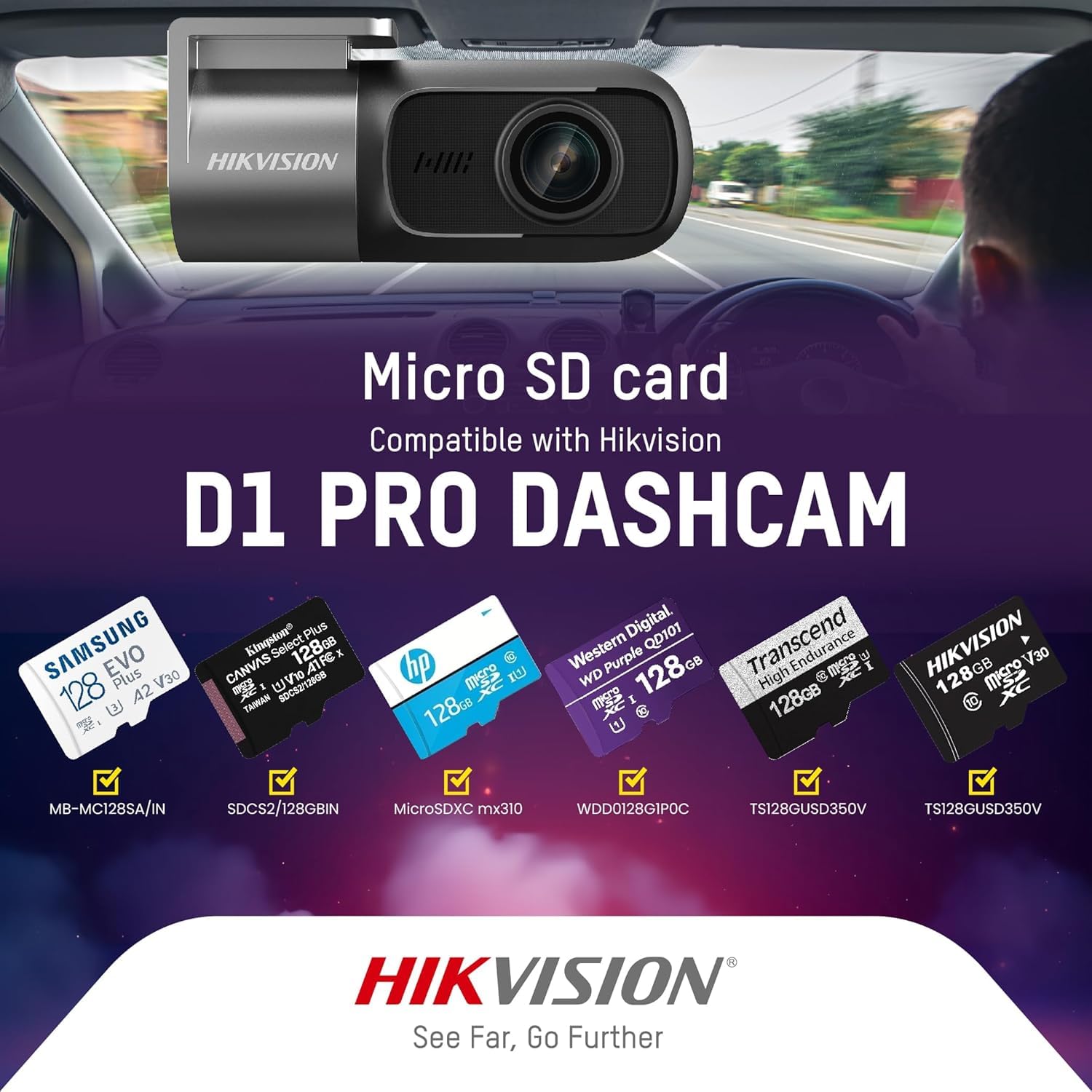
Figure 4.1: Various compatible Micro SD cards for the Hikvision D1 PRO Dashcam, including Samsung, Kingston, HP, Western Digital, and Transcend brands.
4.2 การติดตั้งกล้องติดรถยนต์
Use the provided 3M tape to securely mount the dash camera on your vehicle's windshield. Choose a location that does not obstruct your view กีดขวางถนนหรือรบกวนการทำงานของถุงลมนิรภัย
- ทำความสะอาดบริเวณที่เลือกบนกระจกหน้ารถให้สะอาดหมดจด
- Attach the 3M tape to the dash camera mount.
- Press the mount firmly onto the windshield for at least 30 seconds.
- Adjust the camera angle as needed. The camera offers 330° rotation for optimal positioning.

Figure 4.2: The dash camera illustrating its 330-degree rotation feature, allowing adjustment for interior or exterior views.
4.3 การเชื่อมต่อสายไฟ
Connect the dash camera to your vehicle's power source using the provided power cord. Route the cable neatly to avoid interference with driving.
- Plug one end of the power cord into the dash camera's power input port.
- Plug the other end into your vehicle's 12V power outlet (cigarette lighter socket).
- The dash camera will power on automatically when the vehicle starts.
5. คู่มือการใช้งาน
5.1 การบันทึกพื้นฐาน
Once powered on, the dash camera will automatically begin recording. It utilizes loop recording, meaning it continuously records video in segments. When the Micro SD card is full, the oldest unprotected fileไฟล์เสียง s จะถูกแทนที่ด้วยไฟล์เสียงบันทึกใหม่

Figure 5.1: Illustration of the loop recording function, showing how new recordings overwrite the oldest files when the SD card is full, while keeping protected recordings.
5.2 ฟังก์ชันการทำงานของเซ็นเซอร์ G
The built-in G-Sensor detects sudden impacts or vibrations (e.g., during a collision). When triggered, it automatically saves and locks the current video segment, preventing it from being overwritten by loop recording. These emergency videos are stored in a separate folder on the Micro SD card.
5.3 Wi-Fi and Mobile App Connection
The dash camera features built-in Wi-Fi, allowing you to connect it to your smartphone via a dedicated mobile application. This enables real-time video viewing, playback, and parameter configuration.
- Download the Hikvision Car Dash Camera app from your smartphone's app store.
- เปิดกล้องหน้ารถ
- On your smartphone, go to Wi-Fi settings and connect to the dash camera's Wi-Fi hotspot (SSID usually starts with "HIKVISION-").
- Open the Hikvision app. You should now be able to access live view, playback recorded videos, and adjust settings.

Figure 5.2: The dash camera wirelessly connected to a smartphone, displaying the app interface for photo, playback, and settings.

Figure 5.3: The mobile app interface showing video playback from the dash camera, with options for download and timeline navigation.

Figure 5.4: The dash camera and smartphone displaying the in-app control interface, allowing live view, record playback, and parameter configuration.
5.4 การจดจำเสียง
The dash camera supports specific voice commands for hands-free operation:
- "ถ่ายรูป"
- "เปิดการบันทึก"
- "Turn Off Recording"
- "Lock The Video"
Speak commands clearly and at a normal volume for best recognition.
5.5 การมองเห็นตอนกลางคืน
The dash camera is equipped with night vision technology and 3D denoising, which helps in capturing clear video footage even in low-light conditions or during night driving.
6. การบำรุงรักษา
- การทำความสะอาด: ใช้ผ้าแห้งเนื้อนุ่มเช็ดทำความสะอาดเลนส์และตัวกล้อง ห้ามใช้สารทำความสะอาดที่มีฤทธิ์กัดกร่อนหรือตัวทำละลาย
- การดูแลการ์ด SD: Regularly format the Micro SD card (e.g., once a month) using the dash camera's settings to maintain optimal performance and prevent data corruption. Back up any important footage ก่อนการจัดรูปแบบ
- อัพเดตเฟิร์มแวร์: Check the Hikvision website or mobile app periodically for firmware updates to ensure your dash camera has the latest features and bug fixes.
7 การแก้ไขปัญหา
- กล้องไม่เปิด: Ensure the power cord is securely connected to both the dash camera and the vehicle's 12V outlet. Check if the vehicle's 12V outlet is functioning.
- ปัญหาการบันทึก: Ensure a compatible Micro SD card is inserted correctly and has sufficient free space. Format the SD card if issues persist.
- ปัญหาการเชื่อมต่อ Wi-Fi: Make sure the dash camera's Wi-Fi is enabled. Restart both the dash camera and your smartphone. Ensure you are within range of the dash camera's Wi-Fi signal.
- ระบบไม่รู้จักคำสั่งเสียง: Speak clearly and ensure there is minimal background noise. Check the app settings to confirm voice recognition is enabled.
- คุณภาพวิดีโอไม่ดี: Clean the camera lens. Ensure the windshield area in front of the camera is clean. Check app settings for resolution configuration.
8. ข้อมูลจำเพาะ
| คุณสมบัติ | ข้อมูลจำเพาะ |
|---|---|
| หมายเลขรุ่น | AE-DC4018-D1PRO |
| ความละเอียดในการจับภาพวิดีโอ | 1440p (2K HD) |
| ที่ดินของ View | 102 Degrees (Horizontal), 122 Degrees (Diagonal) |
| เทคโนโลยีการเชื่อมต่อ | ไวไฟ |
| คุณสมบัติพิเศษ | G-Sensor, Night Vision, Voice Recognition |
| การสนับสนุนการจัดเก็บข้อมูล | Micro SD Card (16GB-256GB) |
| ประเภทการติดตั้ง | เมาท์กาว |
| น้ำหนักสินค้า | 200 กรัม |
| ขนาดสินค้า | 4 x 8 x 4 ซม. |
| ผู้ผลิต | Hangzhou HIKVISION Digital Technology Co. Ltd. |
| ประเทศต้นกำเนิด | จีน |
9. การรับประกันและการสนับสนุน
สำหรับข้อมูลการรับประกันและการสนับสนุนทางเทคนิค โปรดดูที่เว็บไซต์อย่างเป็นทางการของ Hikvision webหรือติดต่อฝ่ายบริการลูกค้าโดยตรง โปรดเก็บใบเสร็จรับเงินไว้เป็นหลักฐานการซื้อสำหรับการเรียกร้องการรับประกัน
ฮิควิชั่นอย่างเป็นทางการ Webเว็บไซต์: www.hikvision.com


