
1. บทนำ
The Minolta MND60V VLOG Camera Kit is designed for capturing high-quality photos and videos. This kit includes a 64MP camera capable of 4K Ultra HD video at 60 frames per second, along with essential accessories such as a tripod, external microphone, LED light, and wide-angle/macro lenses. This manual provides instructions for setting up, operating, and maintaining your camera kit to ensure optimal performance.

Image 1.1: The Minolta MND60V VLOG Camera Kit, showcasing its core capabilities for high-resolution photography and video recording.
2. เนื้อหาบรรจุภัณฑ์
ก่อนเริ่มต้น โปรดตรวจสอบให้แน่ใจว่าสิ่งของทั้งหมดที่ระบุไว้ด้านล่างนี้รวมอยู่ในแพ็คเกจของคุณแล้ว:
- Minolta MND60V Camera
- Accessory Mount Arms
- ไฟ LED สำหรับวิดีโอ
- กระเป๋าใส่อุปกรณ์
- Tripod Pouch
- ไมโครโฟนสเตอริโอ
- สายสะพายไหล่
- การ์ดหน่วยความจำ 32GB
- ขาตั้งกล้องพร้อมรีโมทคอนโทรล
- แบตเตอรี่ลิเธียมไอออน
- อะแดปเตอร์ AC
- Wide-angle + Macro Lens
- สาย USB
- คู่มือการใช้งาน (เอกสารนี้)
- บัตรรับประกัน

Image 2.1: All components included in the Minolta MND60V VLOG Camera Kit.
3. การตั้งค่า
3.1 การชาร์จแบตเตอรี่
- Insert the Lithium-Ion Battery into the camera.
- Connect the AC Adaptor to the camera's USB port and plug it into a power outlet.
- ไฟแสดงสถานะการชาร์จจะสว่างขึ้น เมื่อชาร์จเต็มแล้ว ไฟจะเปลี่ยนหรือดับลง
3.2 การใส่การ์ดหน่วยความจำ
The camera supports Micro SD cards. A 32GB card is included.
- Locate the memory card slot on the camera (refer to the camera diagram).
- ใส่การ์ด Micro SD โดยให้ด้านที่มีหน้าสัมผัสสีทองคว่ำลงจนล็อคเข้าที่
- ในการถอดออก ให้กดการ์ดเบาๆ จนกระทั่งการ์ดเด้งออกมา
3.3 การติดอุปกรณ์เสริม
The kit includes various accessories to enhance your recording experience.

Image 3.1: Minolta MND60V camera with all accessories mounted.
- ขาตั้งกล้อง: Attach the camera to the tripod's mounting screw. The tripod can be used as a stand, a selfie stick, or a power source with its built-in 2,500mAh battery.
- ไมโครโฟนภายนอก: Mount the stereo microphone onto one of the accessory mount arms and plug its cable into the camera's microphone input jack.
- ไฟ LED วิดีโอ: Mount the LED light onto another accessory mount arm. Ensure it is charged or has fresh batteries if applicable.
- Wide-angle + Macro Lens: Screw the desired lens onto the front of the camera's main lens.
4. การใช้งานกล้อง
4.1 เปิด/ปิดเครื่อง
กดปุ่มเปิด/ปิดที่อยู่บนตัวกล้องค้างไว้เพื่อเปิดหรือปิดกล้อง
4.2 Basic Photo and Video Recording
- การเลือกโหมด: Use the mode dial or menu to select between photo and video modes.
- กรอบ: Use the 3-inch LCD screen to compose your shot. The screen can be flipped for self-recording.
- การบันทึก/ชัตเตอร์: Press the dedicated record button for video or the shutter button for photos.
4.3 Using the LCD Screen
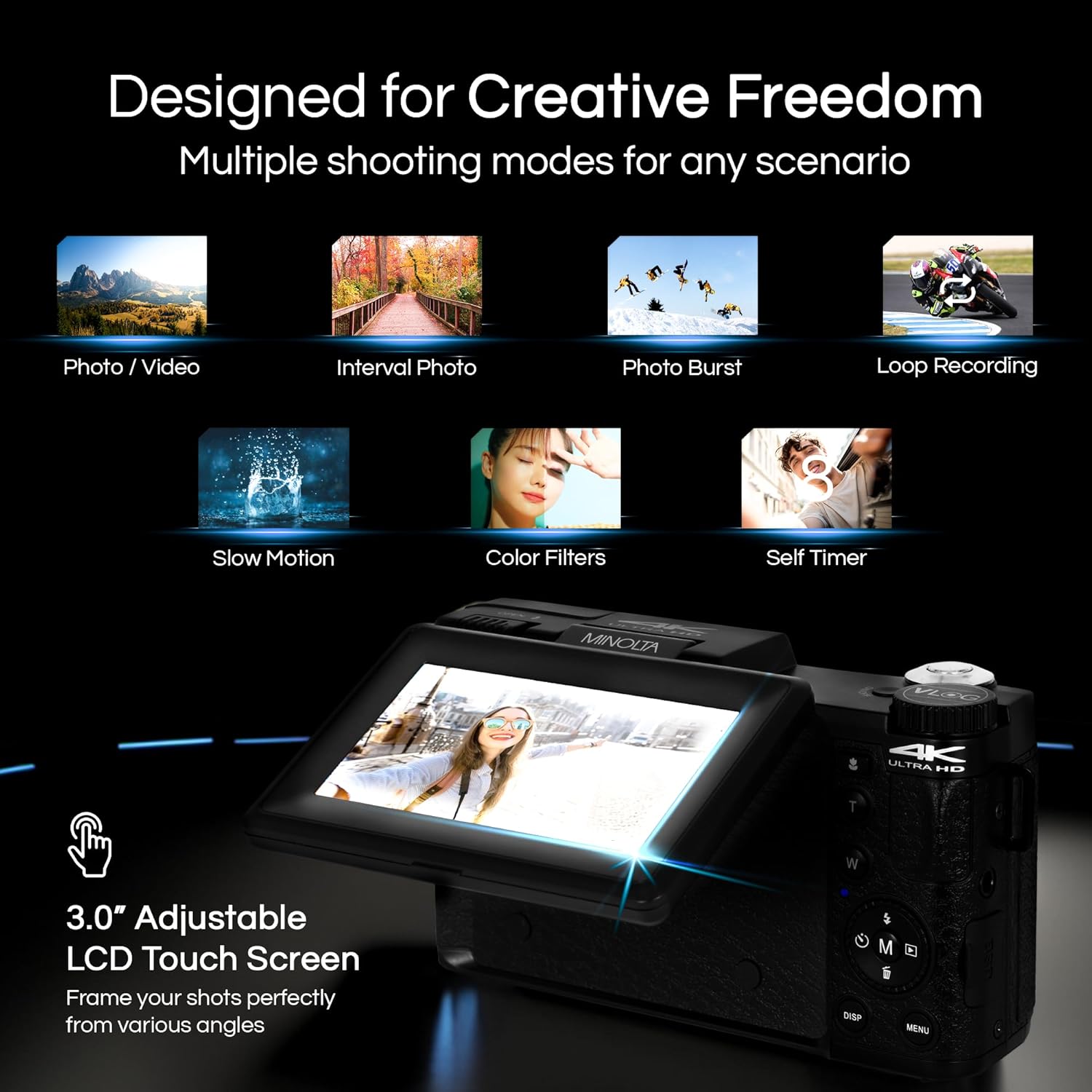
Image 4.1: The adjustable LCD screen showing various shooting modes.
The 3-inch LCD screen provides a live view, access to menus, and playback options. It can be rotated and flipped, making it suitable for vlogging and shooting from various angles. Navigate menus using the touch screen or physical buttons.
4.4 ฟังก์ชั่นซูม
The camera features 16x digital zoom. Use the zoom lever (often marked 'W' for Wide and 'T' for Telephoto) to adjust the focal length. Note that digital zoom may reduce image quality compared to optical zoom.

ภาพที่ 4.2: อดีตample of using digital zoom to capture distant details.
4.5 Special Features and Modes

Image 4.3: Icons illustrating the camera's creative modes.
The MND60V offers several creative modes:
- สโลว์โมชั่น: บันทึกวิดีโอด้วยอัตราเฟรมที่สูงขึ้นสำหรับการเล่นแบบสโลว์โมชั่น
- การบันทึกแบบวนซ้ำ: บันทึกวิดีโออย่างต่อเนื่อง โดยจะบันทึกทับไฟล์เก่าที่สุด fileเมื่อเมมโมรี่การ์ดเต็ม
- เวลาที่ล่วงเลย: Captures a series of photos at set intervals and combines them into a video.
- การเลือกฉาก: Pre-set modes optimized for specific shooting conditions (e.g., portrait, landscape).
- ตั้งเวลาถ่ายเอง: Delays the shutter release for a few seconds, allowing you to get into the shot.
4.6 การใช้รีโมทคอนโทรล
The included tripod features a built-in wireless remote. This allows you to start/stop recording or take photos from a distance, ideal for group shots or vlogging.
4.7 การโอนย้าย Files
Connect the camera to a computer using the provided USB cable. The camera will appear as a removable drive, allowing you to copy photos and videos to your computer.
5. การบำรุงรักษา
5.1 การทำความสะอาดกล้อง
- ใช้ผ้าแห้งนุ่มๆ เช็ดทำความสะอาดตัวกล้อง
- สำหรับการทำความสะอาดเลนส์ ให้ใช้ผ้าและน้ำยาทำความสะอาดเลนส์โดยเฉพาะ หลีกเลี่ยงการสัมผัสพื้นผิวเลนส์ด้วยนิ้วมือ
- อย่าใช้สารเคมีที่รุนแรงหรือวัสดุที่มีฤทธิ์กัดกร่อน
5.2 การดูแลแบตเตอรี่
- ชาร์จแบตเตอรี่ให้เต็มก่อนใช้งานครั้งแรก
- เก็บแบตเตอรี่ไว้ในที่เย็นและแห้งเมื่อไม่ได้ใช้งาน
- หลีกเลี่ยงการให้แบตเตอรี่สัมผัสกับอุณหภูมิที่สูงเกินไป
5.3 พื้นที่จัดเก็บ
When not in use, store the camera and its accessories in the provided carrying case to protect them from dust, moisture, and physical damage.
6 การแก้ไขปัญหา
If you encounter issues with your Minolta MND60V camera, refer to the following common problems and solutions:
| ปัญหา | สาเหตุที่เป็นไปได้ | สารละลาย |
|---|---|---|
| กล้องไม่สามารถเปิดได้ | แบตเตอรี่หมดหรือใส่ไม่ถูกต้อง | ตรวจสอบให้แน่ใจว่าแบตเตอรี่ชาร์จเต็มและใส่เข้าไปอย่างถูกต้อง |
| Photos/Videos are blurry. | Autofocus issue, insufficient light, or camera shake. | Ensure proper lighting. Allow camera to focus before capturing. Use the tripod for stability. Avoid excessive digital zoom in low light. |
| แบตเตอรี่หมดเร็วมาก | Frequent use of screen/LED light, cold environment, or aging battery. | Reduce screen brightness. Turn off LED light when not needed. Keep battery warm in cold conditions. Consider a replacement battery if performance significantly degrades. |
| ข้อผิดพลาดการ์ดหน่วยความจำ | การ์ดเต็ม เสียหาย หรือเข้ากันไม่ได้ | Format the memory card (this will erase all data). Try a different compatible Micro SD card. |
| No audio in video recordings. | External microphone not connected or faulty. | Ensure the external microphone is securely plugged into the camera's microphone input. Check microphone settings in the camera menu. |
7. ข้อมูลจำเพาะ
Key technical specifications for the Minolta MND60V VLOG Camera Kit:
| คุณสมบัติ | ข้อมูลจำเพาะ |
|---|---|
| หมายเลขรุ่น | MND60V |
| ความละเอียดของภาพนิ่งที่มีประสิทธิภาพ | 64 MP |
| ความละเอียดวิดีโอ | 4K (3840 Pixels Effective Video Resolution) |
| อัตราเฟรมวิดีโอ | 60 FPS (สำหรับ 4K) |
| เทคโนโลยีโฟโต้เซนเซอร์ | CMOS (2/3-inch Photo Sensor Size) |
| แสดง | หน้าจอ LCD 3 นิ้ว |
| ประเภทโฟกัส | โฟกัสอัตโนมัติ |
| ซูมดิจิตอล | 16 เท่า |
| ประเภทเลนส์ | Wide Angle (Minimum/Maximum Focal Length: 3.95 mm) |
| รูรับแสงสูงสุด | 1.8 ฟ. |
| ระบบป้องกันภาพสั่นไหว | ดิจิตอล |
| ประเภทหน่วยความจำแฟลช | ไมโคร SD |
| เทคโนโลยีการเชื่อมต่อ | ยูเอสบี |
| รูปแบบการจับภาพวิดีโอ | เอ็มพี 4 |
| รูปแบบเสียงที่รองรับ | เอเอซี |
| รูปแบบภาพที่รองรับ | เจพีเจ |
| แหล่งพลังงาน | Lithium-Ion Battery (1 AAA battery required for remote, included) |
| น้ำหนักสินค้า | 3.5 ปอนด์ |
| สี | สีดำ |
| คุณสมบัติ | Anti-Shake, Built-In Flash, Microphone Input, Remote Control, Slow Motion, Time Lapse, Timer |
8. ข้อมูลการรับประกัน
The Minolta MND60V VLOG Camera Kit comes with a Limited 1 Year Manufacturer Warrantyโปรดดูรายละเอียดข้อกำหนดและเงื่อนไขโดยละเอียด รวมถึงความคุ้มครอง ข้อจำกัด และวิธีการเรียกร้องค่าสินไหมทดแทน ในบัตรรับประกันที่แนบมาด้วย
9. การสนับสนุนลูกค้า
For further assistance, technical support, or inquiries regarding your Minolta MND60V VLOG Camera Kit, please visit the official Minolta website or contact their customer service department. Contact information can typically be found on the warranty card or the manufacturer's webเว็บไซต์.