
1. บทนำ
The Pronomic DX-50 USB MKII is a professional 4-channel DJ mixer designed for a wide range of applications, including discos, parties, restaurants, and presentations. Its user-friendly design ensures that both experienced and less experienced users can fully utilize its features. This manual provides detailed instructions for setting up, operating, and maintaining your mixer.
Key features include a recording function, integrated Bluetooth interface, USB player with transport controls, and multiple input channels.
2. คำแนะนำด้านความปลอดภัยที่สำคัญ
- อ่านคำแนะนำ: โปรดอ่านคำแนะนำด้านความปลอดภัยและการใช้งานทั้งหมดก่อนใช้ผลิตภัณฑ์
- เก็บรักษาคำแนะนำ: เก็บคำแนะนำด้านความปลอดภัยและการใช้งานไว้เพื่อใช้อ้างอิงในอนาคต
- คำเตือน: ปฏิบัติตามคำเตือนทั้งหมดเกี่ยวกับผลิตภัณฑ์และในคู่มือการใช้งาน
- ปฏิบัติตามคำแนะนำ: ปฏิบัติตามคำแนะนำการใช้งานและการใช้งานทั้งหมด
- น้ำและความชื้น: Do not use this apparatus near water (e.g., bathtub, washbowl, kitchen sink, laundry tub, wet basement, or swimming pool).
- การระบายอากาศ : อย่าปิดกั้นช่องระบายอากาศใดๆ ติดตั้งตามคำแนะนำของผู้ผลิต
- ความร้อน: ห้ามติดตั้งใกล้แหล่งความร้อน เช่น หม้อน้ำ เครื่องทำความร้อน เตา หรืออุปกรณ์อื่น ๆ (รวมถึง ampเครื่องให้ความร้อน) ที่ผลิตความร้อน
- แหล่งพลังงาน: Use only power sources specified by the manufacturer.
- การป้องกันสายไฟ: ปกป้องสายไฟไม่ให้ถูกเหยียบหรือถูกหนีบ โดยเฉพาะที่ปลั๊ก เต้ารับไฟฟ้า และจุดที่สายไฟออกจากเครื่อง
- การทำความสะอาด: ทำความสะอาดด้วยผ้าแห้งเท่านั้น
- การบริการ: ห้ามพยายามซ่อมบำรุงผลิตภัณฑ์นี้ด้วยตนเอง เนื่องจากการเปิดหรือถอดฝาครอบอาจทำให้คุณสัมผัสกับสารอันตรายได้tagหรืออันตรายอื่นๆ ให้แจ้งบริการทั้งหมดให้เจ้าหน้าที่บริการที่มีคุณสมบัติเหมาะสมทราบ
3. เนื้อหาบรรจุภัณฑ์
Please check that all items listed below are included in your package. If any items are missing or damaged, contact your dealer immediately.
- Pronomic DX-50 USB MKII DJ Mixer
- อะแดปเตอร์แปลงไฟ (AC 12V)
- USB Stick (32 GB, if included in your specific bundle)
- คู่มือการใช้งาน (เอกสารนี้)
4. สินค้าหมดview
Familiarize yourself with the various controls and connections on your DX-50 USB MKII mixer.
4.1 แผงควบคุมด้านหน้า
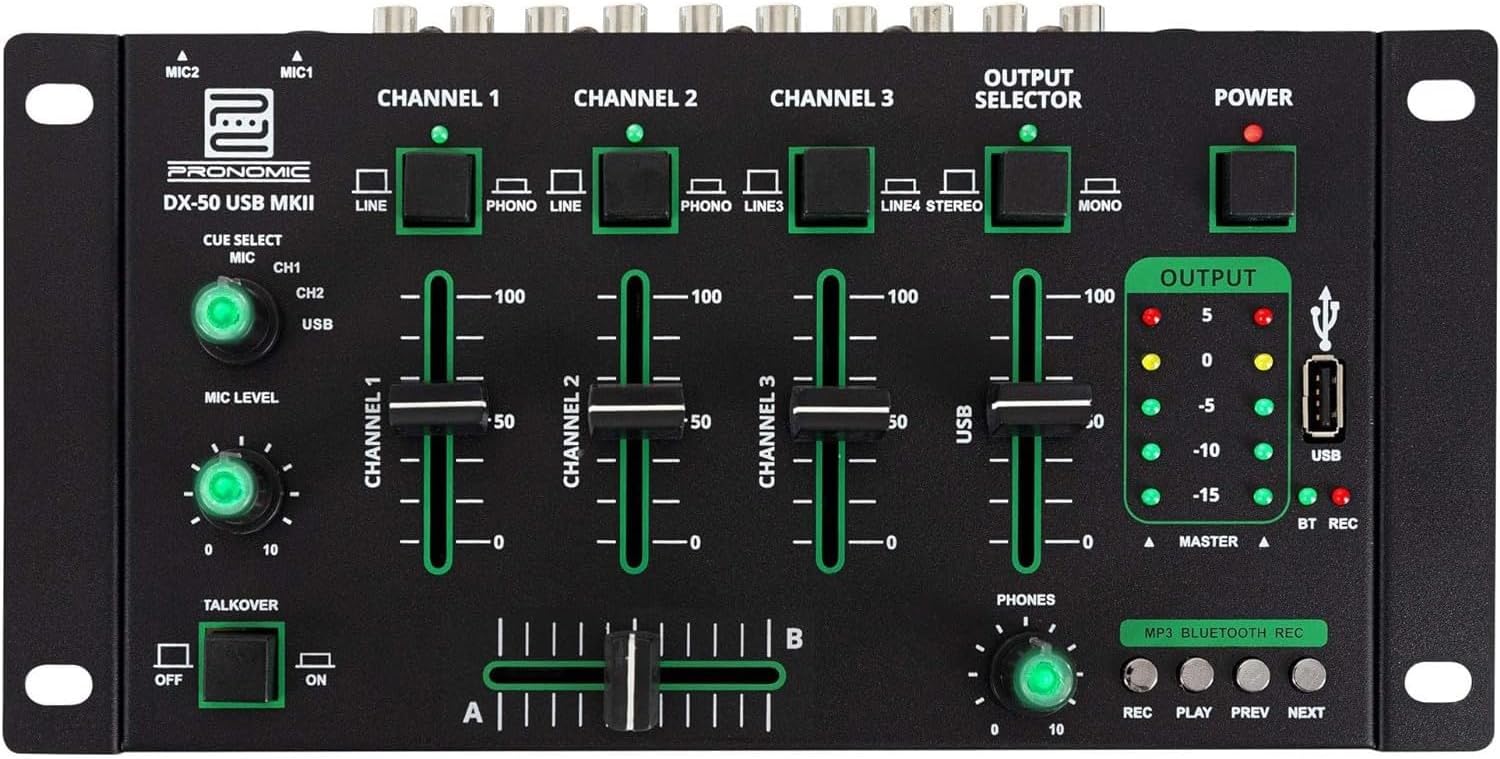
- MIC 1/2 Inputs: เชื่อมต่อไมโครโฟน
- Channel 1-4 Input Selectors: Switch between LINE, PHONO, or USB/Bluetooth inputs for each channel.
- Channel Fader: ปรับระดับเสียงสำหรับแต่ละช่องสัญญาณ
- CUE Select Buttons: Route specific channels to the headphone output for monitoring.
- ปุ่มปรับระดับเสียงไมโครโฟน: Adjust the volume of the microphone inputs.
- สวิตช์ Talkover: Activates the talkover function, which automatically lowers music volume when speaking into the microphone.
- Output Selector: Choose between Stereo or Mono master output.
- สวิตช์ไฟ: เปิด/ปิดเครื่องผสมอาหาร
- เครื่องวัดระดับเอาต์พุต: LED indicators showing the master output level.
- พอร์ต USB: Connect a USB drive for MP3 playback and recording.
- MP3/Bluetooth/REC Player Controls: Buttons for Play/Pause, Previous, Next, and Record functions for the integrated player.
- ปุ่มปรับระดับเสียงโทรศัพท์: ปรับระดับเสียงเอาต์พุตหูฟัง
- ครอสเฟดเดอร์ (A/B): Blends between channels assigned to A and B.
4.2 การเชื่อมต่อแผงด้านหลัง

- อินพุตไฟ AC 12V: เชื่อมต่ออะแดปเตอร์ไฟฟ้าที่ให้มาที่นี่
- เอาต์พุตโทรศัพท์: แจ็ค 6.3 มม. สำหรับเชื่อมต่อหูฟัง
- MASTER OUT L/R (RCA): Connect to your main ampเครื่องขยายเสียงหรือลำโพงที่มีกำลังขยาย
- Channel 1 & 2 Inputs (RCA Line/Phono): Connect turntables (Phono) or other line-level devices (CD players, media players). Use the front panel selector to switch.
- Channel 3 & 4 Inputs (RCA Line): Connect line-level devices.
- MIC 1 & 2 Inputs (6.3mm Jack): เชื่อมต่อไมโครโฟน
5. การตั้งค่า
Follow these steps to set up your Pronomic DX-50 USB MKII mixer:
- การเชื่อมต่อไฟฟ้า: Ensure the mixer's power switch is in the OFF position. Connect the supplied AC 12V power adapter to the "AC 12V" input on the rear panel of the mixer. Plug the adapter into a suitable power outlet.
- Master Output Connection: Connect the "MASTER OUT L/R" RCA outputs on the rear panel to the inputs of your ampเครื่องขยายเสียงหรือลำโพงที่มีกำลังขยาย
- การเชื่อมต่ออุปกรณ์อินพุต:
- เครื่องเล่นแผ่นเสียง: Connect turntables to the "CHANNEL 1" or "CHANNEL 2" RCA inputs. Set the corresponding input selector on the front panel to "PHONO".
- CD Players/Line Devices: Connect CD players, media players, or other line-level devices to "CHANNEL 1", "CHANNEL 2", "CHANNEL 3", or "CHANNEL 4" RCA inputs. Set the corresponding input selector on the front panel to "LINE".
- ไมโครโฟน: Connect microphones to the "MIC 1" or "MIC 2" 6.3mm jack inputs on the rear panel.
- การเชื่อมต่อหูฟัง: Connect your headphones to the "PHONES" 6.3mm jack on the rear panel.
- USB Drive (Optional): If using a USB drive for playback or recording, insert it into the "USB" port on the front panel.
- เปิดเครื่อง: Once all connections are made, switch the mixer's power switch to the ON position. The power indicator LED will illuminate.
6. คู่มือการใช้งาน
6.1 การผสมพื้นฐาน
- เลือกอินพุต: For each channel, use the input selector switch (LINE/PHONO/USB/BT) to choose the desired audio source.
- ปรับระดับเสียงของช่องสัญญาณ: Use the vertical faders for each channel to adjust its individual volume level.
- เอาต์พุตหลัก: Monitor the "OUTPUT" LED meters and adjust the master volume knob (if present, otherwise rely on channel faders and amplifier volume) to achieve a suitable overall output level without clipping.
- ครอสเฟเดอร์: Use the crossfader to smoothly transition between channels assigned to A and B. Channels 1 and 2 are typically assigned to the crossfader.
6.2 การใช้งานไมโครโฟน
- Connect your microphone to one of the MIC inputs on the rear panel.
- Adjust the "MIC LEVEL" knob on the front panel to control the microphone's volume.
- Talkover Function: Activate the "TALKOVER" switch to automatically reduce the volume of the music when you speak into the microphone. This is useful for announcements.
6.3 การเล่นและบันทึก USB
- การเล่น USB: ใส่ไดรฟ์ USB ที่มีไฟล์ MP3 files into the "USB" port. Select "USB" as the input source for the dedicated USB channel. Use the "PLAY/PAUSE", "PREV", and "NEXT" buttons to control playback.
- การบันทึก USB: Press the "REC" button to start recording the master output to the connected USB drive. Press "REC" again to stop recording. Ensure your USB drive has sufficient free space and is formatted correctly (FAT32 is commonly supported).
6.4 การเชื่อมต่อบลูทูธ
- เปิดใช้งานบลูทูธ: Select "BT" as the input source for the dedicated Bluetooth channel. The mixer will enter pairing mode.
- จับคู่อุปกรณ์: On your Bluetooth-enabled device (smartphone, tablet, etc.), search for available Bluetooth devices. Select "Pronomic DX-50 USB MKII" (or similar name) from the list to pair.
- เล่นเสียง: Once paired, you can play audio from your device through the mixer. Control playback from your device or using the mixer's transport controls (if supported by your device).
6.5 การตรวจสอบด้วยหูฟัง
- Connect headphones to the "PHONES" output.
- Use the "CUE SELECT" buttons to choose which channels you want to monitor in your headphones without affecting the main output.
- Adjust the "PHONES" level knob to set your desired headphone volume.
7. การบำรุงรักษา
- การทำความสะอาด: ถอดปลั๊กไฟก่อนทำความสะอาด ใช้ผ้าแห้งนุ่มเช็ดทำความสะอาดพื้นผิวของเครื่องผสมอาหาร ห้ามใช้น้ำยาทำความสะอาด สเปรย์ หรือตัวทำละลาย
- พื้นที่จัดเก็บ: เก็บเครื่องผสมไว้ในที่แห้งและเย็น หลีกเลี่ยงแสงแดดโดยตรงและอุณหภูมิที่สูงหรือต่ำเกินไป
- Fader and Knob Care: Avoid excessive force when operating faders and knobs. Periodically check for dust or debris accumulation around moving parts.
- การจัดการสายเคเบิล: Ensure cables are not kinked or strained, which can lead to damage.
8 การแก้ไขปัญหา
| ปัญหา | สาเหตุที่เป็นไปได้ | สารละลาย |
|---|---|---|
| ไม่มีไฟฟ้า | Power adapter not connected; Power switch off; Faulty power outlet. | Check power adapter connection; Ensure power switch is ON; Try a different power outlet. |
| No sound from main output | Master volume too low; Amplifier/speakers off or disconnected; Incorrect input selection; Channel faders down. | Increase master volume; Check amplifier/speaker connections and power; Verify correct input selected for channels; Raise channel faders. |
| ไม่มีเสียงออกจากหูฟัง | Headphone volume too low; Headphones not connected; No CUE selected. | Increase PHONES level; Connect headphones properly; Press CUE button for desired channel. |
| บลูทูธไม่จับคู่ | Mixer not in pairing mode; Device too far; Interference. | Ensure BT input is selected; Bring device closer; Restart mixer and device. |
| การเล่น USB ไม่ทำงาน | USB drive not inserted correctly; Incorrect file format; USB drive not formatted correctly. | เสียบไดรฟ์ USB กลับเข้าไปใหม่; ตรวจสอบให้แน่ใจ files are MP3; Format USB drive to FAT32. |
9. ข้อมูลจำเพาะ
| แบบอย่าง | Pronomic DX-50 USB MKII |
| จำนวนช่องสัญญาณ | 4 |
| เทคโนโลยีการเชื่อมต่อ | บลูทูธ, ยูเอสบี |
| อินพุตเสียง | RCA (line/phono), 6.3mm microphone, Bluetooth, USB |
| ประเภทขั้วต่อเอาท์พุต | RCA (Master Out), 6.3mm (Phones) |
| แหล่งพลังงาน | Electric Cable (AC 12V adapter) |
| Dimensions (without corner brackets and controls) | 222 x 129 x 28 มม. (กว้าง x ลึก x สูง) |
| Total Dimensions (with corner brackets and controls) | 267 x 136 x 51 มม. (กว้าง x ลึก x สูง) |
| น้ำหนัก | 790 กรัม |
10. การรับประกันและการสนับสนุน
สำหรับข้อมูลการรับประกันและการสนับสนุนทางเทคนิค โปรดดูเอกสารประกอบที่ให้มาพร้อมกับสินค้าที่คุณซื้อ หรือติดต่อตัวแทนจำหน่าย โปรดเก็บหลักฐานการซื้อไว้เพื่อใช้ในกรณีที่ต้องการเคลมประกัน
For further assistance, you may also visit the official Pronomic webเว็บไซต์หรือติดต่อฝ่ายบริการลูกค้าของพวกเขา