
1. บทนำและเรื่องอื่นๆview
The HERTZ DBA 201F is an 8-inch (200mm) super-flat active under-seat subwoofer system designed to enhance the bass response in your vehicle's audio system. This compact unit features an internal Class D amplifier, providing powerful low-frequency output while maintaining a slim profile เพื่อตัวเลือกการติดตั้งที่ยืดหยุ่น
คุณสมบัติหลัก:
- High performance in a super-flat design.
- Internal 440-watt peak Class D ampชีวิต.
- Compatible with various car audio systems.
- Plug & Play connection for simplified installation.
- Comprehensive set of controls for fine-tuning in-car audio performance.

รูปที่ 1 : ด้านหน้า view of the HERTZ DBA 201F active under-seat subwoofer.
2. ข้อมูลด้านความปลอดภัย
Please read all safety instructions carefully before installing and operating the DBA 201F subwoofer. Failure to follow these guidelines may result in injury, damage to the product, or damage to your vehicle.
- การเชื่อมต่อไฟฟ้า: Ensure all power connections are made correctly and securely. Disconnect the vehicle's battery before starting any electrical work. Use appropriate gauge wiring and fuses as specified.
- การติดตั้ง: Securely mount the subwoofer to prevent it from becoming a projectile during sudden stops or accidents. Avoid mounting in locations that obstruct vehicle controls or airbags.
- การระบายอากาศ : Ensure adequate ventilation around the unit to prevent overheating. Do not cover the subwoofer with carpets or other materials that may impede airflow.
- การป้องกันการได้ยิน: Prolonged exposure to high sound pressure levels can cause permanent hearing damage. Adjust volume to a safe level.
- การติดตั้งโดยมืออาชีพ: หากคุณไม่แน่ใจเกี่ยวกับขั้นตอนการติดตั้งใดๆ โปรดปรึกษาผู้เชี่ยวชาญด้านเครื่องเสียงรถยนต์ที่มีคุณสมบัติเหมาะสม
3. อะไรอยู่ในกล่อง
ตรวจสอบว่าส่วนประกอบทั้งหมดมีอยู่ก่อนเริ่มการติดตั้ง
- HERTZ DBA 201F Active Subwoofer Unit
- ชุดสายไฟ (ไฟเลี้ยง, กราวด์, รีโมท, อินพุตระดับลำโพง)
- Remote Bass Level Control with Cable
- Mounting Hardware (screws, brackets if applicable)
- คู่มือการใช้งาน (เอกสารนี้)

Figure 2: Included accessories: remote control and wiring harness.
4. การตั้งค่าและการติดตั้ง
การติดตั้งอย่างถูกต้องเป็นสิ่งสำคัญอย่างยิ่งต่อประสิทธิภาพและความปลอดภัยสูงสุด
4.1 การเลือกตำแหน่งการติดตั้ง
The DBA 201F is designed for under-seat installation due to its super-flat profile. Consider locations that:
- Provide sufficient clearance for the unit and its wiring.
- จัดให้มีการระบายอากาศเพียงพอ
- Do not interfere with seat movement, vehicle controls, or safety systems.
- Offer a secure mounting surface.

Figure 3: Dimensions of the DBA 201F for placement consideration.
4.2 การเชื่อมต่อสายไฟ
Refer to the wiring diagram on the unit and in the full manual for specific connections. General steps include:
- กำลังไฟ (B+): Connect the main power wire (typically red) to the positive terminal of the vehicle's battery. Ensure an in-line fuse (not supplied, typically 15A as per product specifications, but verify with the unit's fuse holder) is installed close to the battery.
- กราวด์ (GND): Connect the ground wire (typically black) to a clean, unpainted metal surface of the vehicle chassis. Ensure a solid electrical connection.
- การเปิดใช้งานระยะไกล (REM): Connect the remote turn-on wire (typically blue or yellow) to the remote output of your head unit. This signal turns the subwoofer on and off with your car stereo.
- อินพุตเสียง:
- ช่องรับสัญญาณ RCA (ระดับต่ำ): If your head unit has RCA pre-outs, connect them to the RCA inputs on the subwoofer.
- อินพุตระดับลำโพง (ระดับสูง): If your head unit does not have RCA outputs, connect the speaker wires from your head unit directly to the speaker level inputs on the subwoofer's wiring harness.
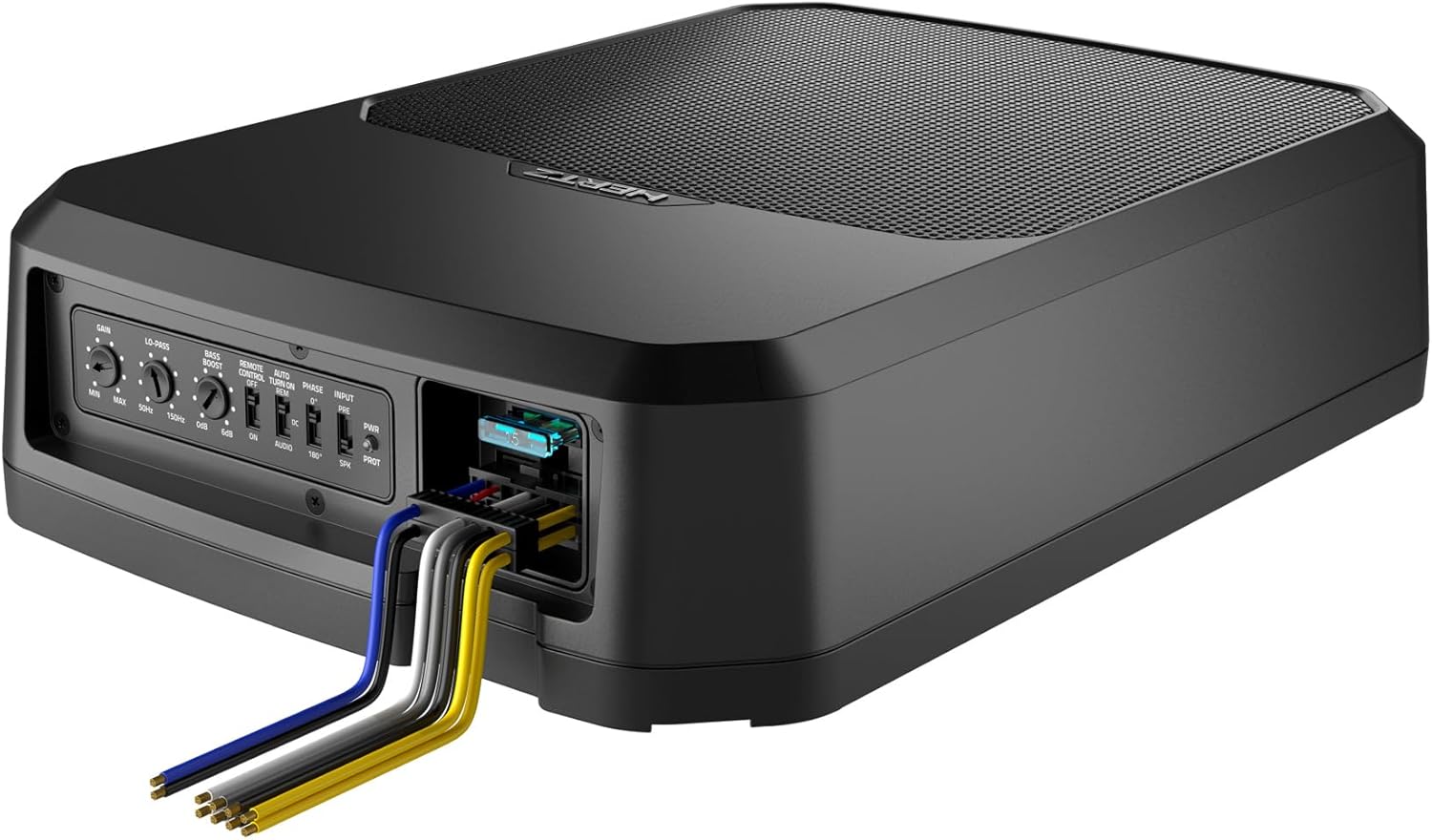
รูปที่ 4: การเชื่อมต่อและปุ่มควบคุมที่แผงด้านหลัง

Figure 5: Subwoofer with wiring harness connected.
5. คู่มือการใช้งาน
หลังจากติดตั้งเสร็จแล้ว ให้ปรับการตั้งค่าซับวูฟเฟอร์เพื่อให้ได้เสียงที่กลมกลืนกับระบบเสียงในรถของคุณอย่างเหมาะสมที่สุด
5.1 การปรับแต่งแผงควบคุม
The DBA 201F features several controls on its rear panel (refer to Figure 4 and Figure 6):
- ได้รับ: ปรับความไวอินพุตของ amplifier. Start with the gain at minimum and slowly increase it until the subwoofer output matches the rest of your system without distortion.
- LO-PASS (Low-Pass Filter): Sets the upper frequency limit for the subwoofer. Frequencies above this setting will be filtered out. Typically set between 50Hz and 100Hz, depending on your main speakers.
- เพิ่มเสียงเบส: Provides an adjustable boost to bass frequencies, usually around 45Hz. Use sparingly to avoid distortion.
- เฟส: Allows you to adjust the phase of the subwoofer output (0° or 180°) to match the phase of your main speakers. Adjust this setting to achieve the most coherent bass response.
- REMOTE CONTROL TURN ON: Switch between DC (DC offset detection for high-level input) or AUDIO (audio signal detection for high-level input) for automatic turn-on, or ON for remote wire turn-on.
- อินพุต: Selects between PRE (RCA/low-level input) and SPK (speaker/high-level input).

รูปที่ 6: รายละเอียด view ของแผงควบคุม
5.2 Remote Bass Level Control
The included remote bass level control allows for convenient adjustment of the subwoofer's output level from the driver's seat. Connect it to the designated port on the subwoofer.
6. การบำรุงรักษา
The HERTZ DBA 201F requires minimal maintenance.
- การทำความสะอาด: ใช้ผ้าแห้งนุ่มเช็ดทำความสะอาดภายนอกตัวเครื่อง ห้ามใช้สารเคมีรุนแรงหรือน้ำยาทำความสะอาดที่มีฤทธิ์กัดกร่อน
- การตรวจสอบ: Periodically check all wiring connections to ensure they are secure and free from corrosion. Inspect the unit for any signs of damage or overheating.
- การระบายอากาศ : Ensure that the area around the subwoofer remains clear to allow for proper heat dissipation.
7 การแก้ไขปัญหา
If you experience issues with your DBA 201F, refer to the following common problems and solutions.
| ปัญหา | สาเหตุที่เป็นไปได้ | สารละลาย |
|---|---|---|
| No Power / Unit does not turn on |
|
|
| ไม่มีเสียง |
|
|
| เสียงผิดเพี้ยน |
|
|
| ซับวูฟเฟอร์เสียงขาดๆ หายๆ เป็นช่วงๆ |
|
|
Note regarding fuses: The DBA 201F is designed with a 15A fuse. If this fuse repeatedly blows, it may indicate an underlying electrical issue, a short circuit, or the unit being driven beyond its intended limits. Ensure proper wiring and consult a professional if the issue persists.
8. ข้อมูลจำเพาะ
Technical specifications for the HERTZ DBA 201F active subwoofer.
| ยี่ห้อ | เฮิรตซ์ |
| หมายเลขรุ่น | DBA-201F |
| ขนาดลำโพง | 8 นิ้ว (200มม.) |
| กำลังขับสูงสุดของลำโพง | 440 วัตต์ (พีค) |
| การตอบสนองความถี่ | 32 เฮิรตซ์ (ขีดจำกัดล่าง) |
| เทคโนโลยีการเชื่อมต่อ | มีสาย |
| โหมดเอาต์พุตเสียง | ล้อมรอบ |
| ประเภทการติดตั้ง | Under-seat / Tabletop Mount |
| คุณสมบัติเพิ่มเติม | Bass Boost, Remote Control |
| ประเภทตัวควบคุม | Remote Control, Touch (on unit) |
| อิมพีแดนซ์ | 0.4 โอห์ม |
| แหล่งพลังงาน | Corded Electric (Vehicle 12V) |
| อินพุต Voltage | 6 Volts (likely referring to signal input sensitivity) |
| ขนาดสินค้า (ลึก x กว้าง x สูง) | ขนาด 13.58 นิ้ว (ลึก) x 9.64 นิ้ว (กว้าง) x 3.11 นิ้ว (สูง) (345 มม. x 245 มม. x 79 มม.) |
| น้ำหนักสินค้า | 10 ปอนด์ |
| อุปกรณ์ที่รองรับ | ระบบเครื่องเสียงรถยนต์ |
| ประเภทรถที่ใช้งานร่วมกันได้ | SUVs, Select Cars, Trucks |
9. ข้อมูลการรับประกัน
The HERTZ DBA 201F is covered by a การรับประกันจากผู้ผลิต 1 ปี. This warranty typically covers defects in materials and workmanship under normal use.
To claim warranty service, please retain your proof of purchase and contact the authorized HERTZ dealer or the manufacturer's customer support. The warranty does not cover damage caused by improper installation, accident, misuse, abuse, negligence, or unauthorized modification.
10. การสนับสนุน
For further assistance, technical support, or service inquiries regarding your HERTZ DBA 201F, please contact your authorized HERTZ dealer or visit the official HERTZ webไซต์สำหรับข้อมูลติดต่อฝ่ายสนับสนุนลูกค้า