
1. บทนำ
This manual provides essential information for the safe and efficient operation of your Sharp GX-BT190 Portable Bluetooth Speaker. Please read it thoroughly before using the device and retain it for future reference.
2. ข้อมูลด้านความปลอดภัย
- ห้ามให้ลำโพงสัมผัสกับอุณหภูมิที่สูงหรือต่ำเกินไป แสงแดดโดยตรง หรือความชื้นสูง
- ห้ามถอดประกอบ ซ่อมแซม หรือดัดแปลงลำโพง การกระทำดังกล่าวอาจทำให้การรับประกันเป็นโมฆะและก่อให้เกิดความเสี่ยงด้านความปลอดภัย
- โปรดตรวจสอบให้แน่ใจว่าฝาปิดช่องชาร์จปิดสนิทเมื่อใช้งานลำโพงใกล้กับน้ำ เพื่อรักษามาตรฐานการกันน้ำระดับ IP67
- ใช้เฉพาะสายชาร์จที่ให้มาหรือที่เทียบเท่าที่ได้รับการรับรองเท่านั้น
- เก็บลำโพงให้ห่างจากเด็กและสัตว์เลี้ยง
- หลีกเลี่ยงการฟังในระดับเสียงสูงเป็นเวลานานเพื่อป้องกันความเสียหายต่อการได้ยิน
3. เนื้อหาบรรจุภัณฑ์
- Sharp GX-BT190 Portable Bluetooth Speaker
- สายชาร์จ USB
- สายคล้องคอ
- คู่มือการใช้งาน
4. สินค้าหมดview

ด้านหน้า view of the Sharp GX-BT190 speaker, showing the central speaker grille with the Sharp logo and the LED light ring.

ด้านข้าง view of the Sharp GX-BT190 speaker, highlighting the textured speaker grille and the integrated lanyard.
หลัง view of the Sharp GX-BT190 speaker, showing the control buttons and the sealed charging port cover.
การควบคุมและตัวบ่งชี้:
- ปุ่มเปิด/ปิด: กดค้างไว้เพื่อเปิด/ปิด
- ปุ่มเพิ่มเสียง / ปุ่มเล่นเพลงถัดไป (+): กดสั้นเพื่อเพิ่มระดับเสียง กดยาวเพื่อเล่นเพลงถัดไป
- ปุ่มลดเสียง / ปุ่มเล่นเพลงก่อนหน้า (-): กดสั้นเพื่อลดระดับเสียง กดยาวเพื่อเล่นเพลงก่อนหน้า
- ปุ่มเล่น/หยุดชั่วคราว / โทร (►||): Short press to play/pause, answer/end calls. Long press to reject calls.
- Mode / Light Button (M): Short press to cycle through LED light modes. Long press to turn off LED lights.
- พอร์ตชาร์จ USB-C: For charging the speaker. Ensure the rubber cover is sealed when not charging.
- ไฟแสดงสถานะ LED: แสดงสถานะการชาร์จและสถานะการจับคู่บลูทูธ
5. การตั้งค่า
5.1 การชาร์จลำโพง
- Open the rubber cover on the back of the speaker to access the USB-C charging port.
- เชื่อมต่อสายชาร์จ USB ที่ให้มากับพอร์ต USB-C ของลำโพง
- เชื่อมต่อปลายอีกด้านหนึ่งของสาย USB เข้ากับอะแดปเตอร์ไฟ USB (ไม่รวมอยู่ด้วย) หรือพอร์ต USB ของคอมพิวเตอร์
- ไฟ LED จะสว่างขึ้นขณะชาร์จและจะดับลงเมื่อชาร์จเต็มแล้ว
- Close the rubber cover securely after charging to maintain the speaker's waterproof rating.
5.2 การเปิด/ปิดเครื่อง
- การเปิดเครื่อง: Press and hold the Power button for approximately 3 seconds. You will hear an audible prompt, and the LED indicator will flash.
- วิธีปิดเครื่อง: Press and hold the Power button for approximately 3 seconds. You will hear an audible prompt, and the LED indicator will turn off.
5.3 การจับคู่บลูทูธ
- Ensure the speaker is powered on and the LED indicator is flashing, indicating it is in pairing mode.
- บนอุปกรณ์มือถือของคุณ เปิดใช้งาน Bluetooth และค้นหาอุปกรณ์ที่มีอยู่
- Select "GX-BT190" from the list of devices.
- เมื่อจับคู่สำเร็จแล้ว ไฟ LED จะหยุดกะพริบและติดสว่างคงที่ และคุณจะได้ยินเสียงยืนยัน
- ลำโพงจะเชื่อมต่อกับอุปกรณ์ที่จับคู่ไว้ล่าสุดโดยอัตโนมัติเมื่อเปิดเครื่อง หากอุปกรณ์อยู่ในระยะและเปิดใช้งาน Bluetooth ไว้
การจับคู่ระบบเสียงสเตอริโอไร้สาย 5.4 True Wireless Stereo (TWS)
TWS allows you to pair two GX-BT190 speakers together for a stereo audio experience.

Two Sharp GX-BT190 speakers, one red and one blue, positioned together, illustrating the True Wireless Stereo (TWS) pairing feature.
- โปรดตรวจสอบให้แน่ใจว่าลำโพง GX-BT190 ทั้งสองตัวเปิดใช้งานอยู่ และไม่ได้เชื่อมต่อกับอุปกรณ์บลูทูธใดๆ
- On one of the speakers (this will be the primary speaker), double-press the Power button. The speaker will enter TWS pairing mode.
- The two speakers will automatically search for and connect to each other. You will hear a confirmation tone once TWS pairing is successful.
- Once TWS paired, connect your mobile device to the primary speaker via Bluetooth as described in section 5.3.
- หากต้องการตัดการเชื่อมต่อ TWS ให้กดปุ่มเปิด/ปิดสองครั้งที่ลำโพงตัวใดตัวหนึ่ง
6. ปฏิบัติการ
6.1 การเล่นเสียง
- เล่น/หยุดชั่วคราว: กดปุ่มเล่น/หยุดชั่วคราว
- ปรับระดับเสียงขึ้น: กดปุ่ม '+' สั้นๆ
- ลดเสียงลง: กดปุ่ม '-' สั้นๆ
- เพลงถัดไป: กดปุ่ม '+' ค้างไว้
- แทร็กก่อนหน้า: กดปุ่ม '-' ค้างไว้
6.2 การโทรแบบแฮนด์ฟรี
- รับสาย: กดปุ่มเล่น/หยุดชั่วคราวสั้นๆ เมื่อมีสายเรียกเข้า
- วางสาย: กดปุ่มเล่น/หยุดชั่วคราวสั้นๆ ในระหว่างการโทร
- ปฏิเสธสาย: กดปุ่มเล่น/หยุดชั่วคราวค้างไว้เมื่อมีสายเรียกเข้า
6.3 LED Mood Lights
- Short press the 'M' (Mode/Light) button to cycle through the 6 available LED mood light modes.
- Long press the 'M' button to turn off the LED lights.
6.4 การใช้งานกันน้ำและกันฝุ่น (IP67)

The Sharp GX-BT190 speaker partially submerged in water, demonstrating its IP67 waterproof and dustproof capabilities.
The GX-BT190 speaker is rated IP67, meaning it is protected from dust ingress and can withstand immersion in water up to 1 meter for 30 minutes. To ensure this protection:
- Always ensure the rubber cover for the charging port is fully and securely sealed before exposing the speaker to water or dust.
- ห้ามจุ่มลำโพงลงในน้ำเป็นเวลานานหรือเกินระดับความลึกที่กำหนดไว้โดยเจตนา
- หลังจากโดนน้ำ ให้เช็ดลำโพงให้แห้งด้วยผ้านุ่มก่อนชาร์จ
7. การบำรุงรักษา
7.1 การทำความสะอาด
- เช็ดลำโพงด้วย d . นุ่มๆamp ผ้า.
- ห้ามใช้สารทำความสะอาดที่มีฤทธิ์กัดกร่อน แอลกอฮอล์ หรือตัวทำละลายเคมี
- Ensure the speaker is dry before charging or storing.
7.2 พื้นที่จัดเก็บ
- เก็บลำโพงไว้ในที่แห้งและเย็น หลีกเลี่ยงแสงแดดโดยตรงและอุณหภูมิที่สูงหรือต่ำเกินไป
- If storing for an extended period, charge the battery periodically (e.g., every 3 months) to maintain battery health.
8 การแก้ไขปัญหา
| ปัญหา | สารละลาย |
|---|---|
| ลำโพงไม่เปิดเครื่อง | ตรวจสอบให้แน่ใจว่าแบตเตอรี่ชาร์จเต็มแล้ว เชื่อมต่อลำโพงเข้ากับแหล่งจ่ายไฟโดยใช้สาย USB |
| ไม่สามารถจับคู่ผ่านบลูทูธได้ | Ensure the speaker is in pairing mode (LED flashing). Turn off and on Bluetooth on your device. Move the speaker closer to your device. Clear previous Bluetooth connections on your device. |
| ไม่มีเสียงหรือเสียงเบา | เพิ่มระดับเสียงทั้งบนลำโพงและอุปกรณ์ที่เชื่อมต่อ ตรวจสอบให้แน่ใจว่าลำโพงจับคู่ได้อย่างถูกต้องแล้ว |
| คุณภาพเสียงไม่ดี | Move the speaker closer to your device. Ensure there are no obstructions between the speaker and your device. Try playing a different audio source. |
| การจับคู่ TWS ล้มเหลว | Ensure both speakers are GX-BT190 models and are not connected to any other Bluetooth device. Try powering both speakers off and on, then re-attempt TWS pairing. |
9. ข้อมูลจำเพาะ

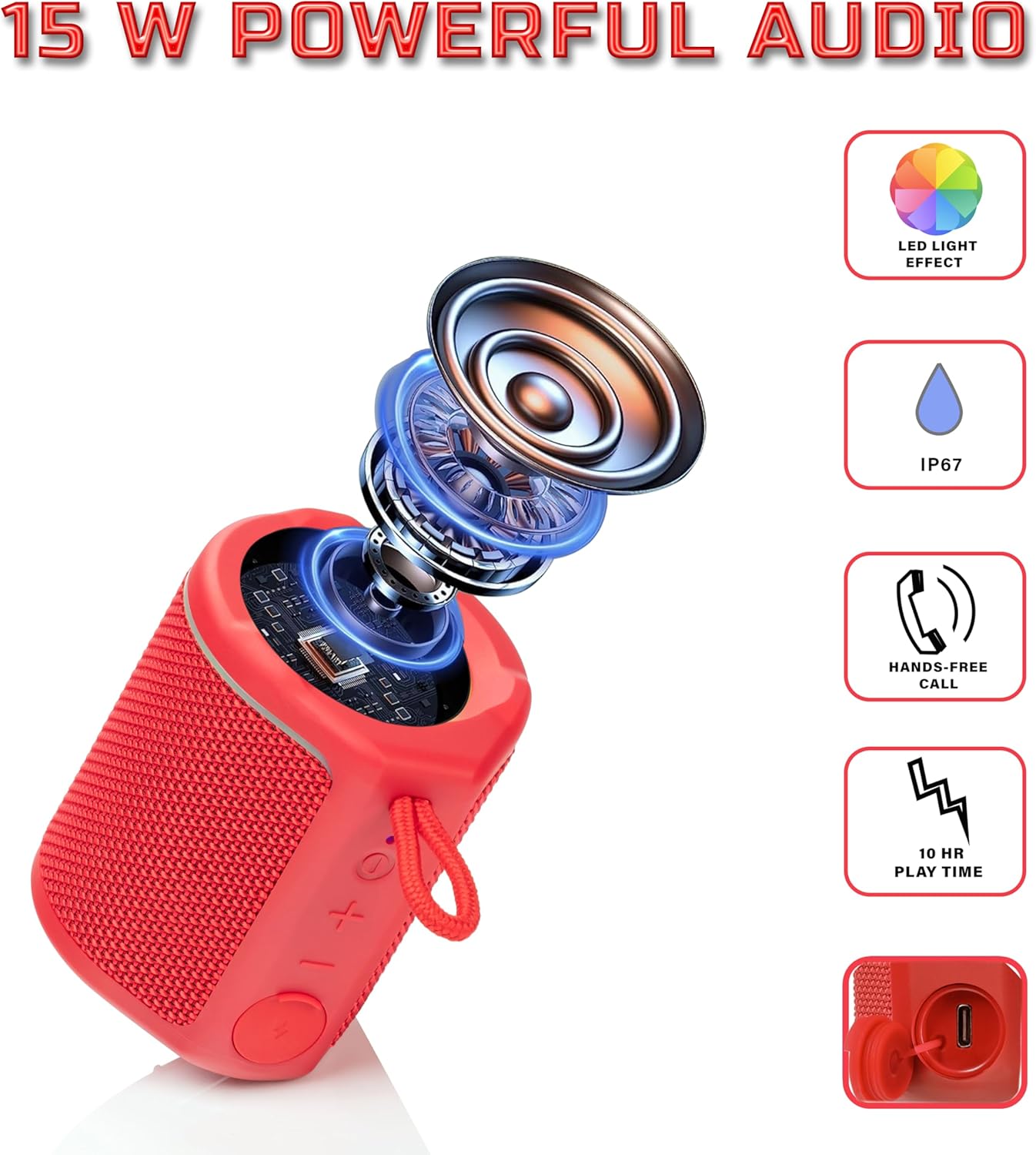
Diagram illustrating the internal components of the Sharp GX-BT190 speaker, including the speaker driver, and highlighting features like LED light effect, IP67 rating, hands-free call function, and battery life.
| คุณสมบัติ | รายละเอียด |
|---|---|
| หมายเลขรุ่น | GX-BT190 |
| เทคโนโลยีการเชื่อมต่อ | บลูทูธ |
| กำลังขับสูงสุดของลำโพง | 10 วัตต์ |
| ระดับการกันน้ำ | IP67 |
| อายุการใช้งานแบตเตอรี่ | นานถึง 15 ชั่วโมง |
| ประเภทแบตเตอรี่ | ลิเธียมไอออน 1 อัน (รวมอยู่ด้วย) |
| ความจุของแบตเตอรี่ | 1200 มิลลิแอมป์ |
| ขนาดสินค้า (ลึก x กว้าง x สูง) | 7.5 x 7.5 x 7.5 ซม. (โดยประมาณ) |
| น้ำหนักสินค้า | 226.8 กรัม (8 ออนซ์) |
| ช่วงสาย | สูงถึง 33 ฟุต |
| คุณสมบัติเพิ่มเติม | LED Light, True Wireless Stereo (TWS), Hands-Free Calling |
10. การรับประกัน
The Sharp GX-BT190 Portable Bluetooth Speaker comes with a 1-Year Limited Warranty from the date of purchase. This warranty covers manufacturing defects under normal use. It does not cover damage caused by misuse, accidents, unauthorized modifications, or normal wear and tear. Please retain your proof of purchase for warranty claims.
11. การสนับสนุน
For technical assistance, warranty inquiries, or further information regarding your Sharp GX-BT190 speaker, please contact Sharp Inc. customer support:
- ติดต่อผู้ผลิต: Sharp Inc
- โทรศัพท์: 1-800-BE-ชาร์ป