
การแนะนำ
ยินดีต้อนรับสู่คู่มือผู้ใช้สำหรับสมาร์ทวอทช์สำหรับเด็ก iTech Jr พร้อมหูฟังบลูทูธแบบครอบหู อุปกรณ์นี้ออกแบบมาเพื่อมอบประสบการณ์ที่สนุกสนานและโต้ตอบได้สำหรับเด็ก ๆ โดยมีทั้งกล้อง เกม เพลง และอื่น ๆ อีกมากมาย พร้อมหูฟังนุ่มสบายเพื่อประสบการณ์เสียงที่สมจริง คู่มือนี้ให้ข้อมูลสำคัญเกี่ยวกับวิธีการตั้งค่า การใช้งาน และการบำรุงรักษาผลิตภัณฑ์ของคุณ
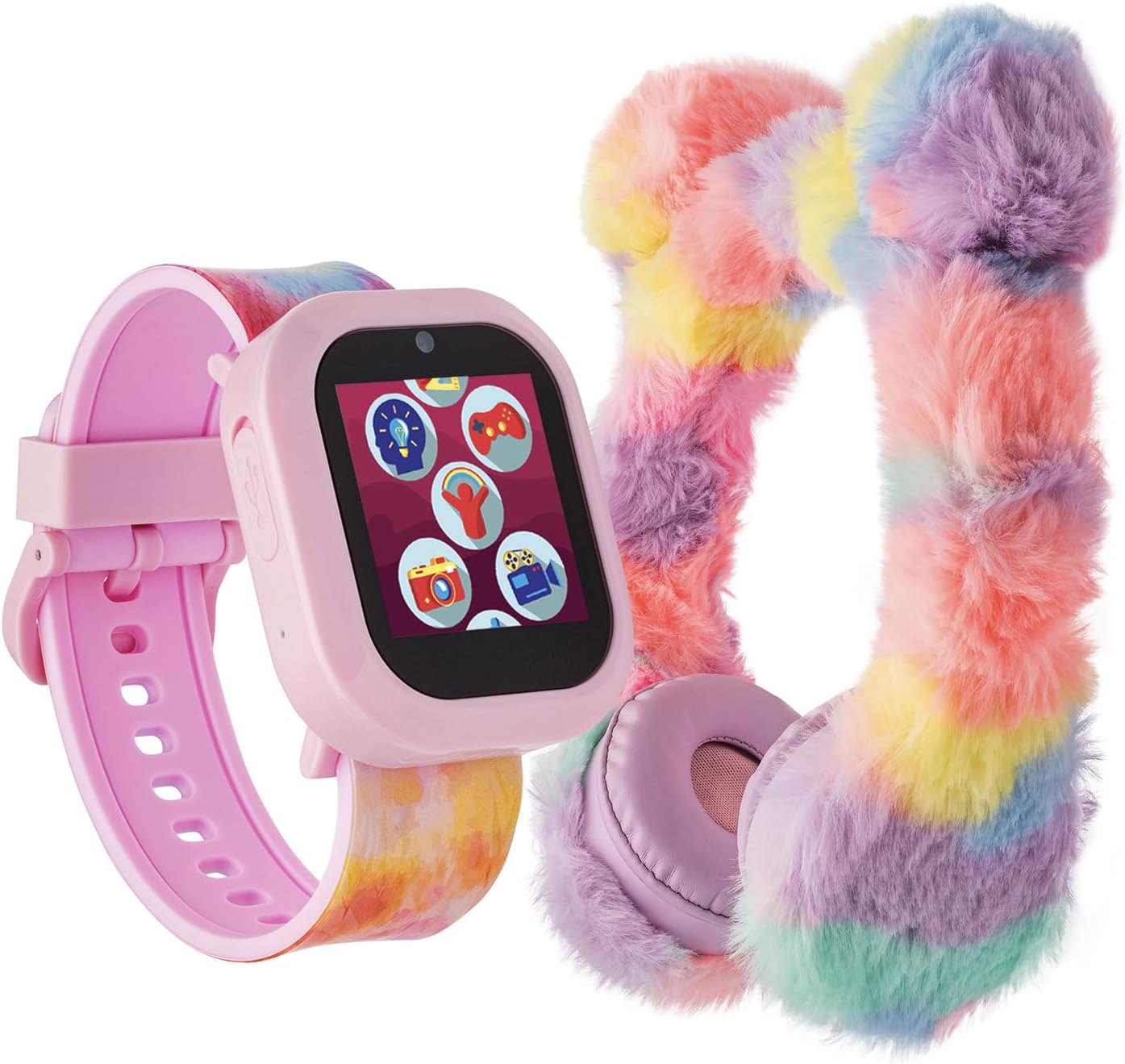
ภาพ: นาฬิกาสมาร์ทวอทช์สำหรับเด็ก iTech Jr ตัวเรือนสีชมพูasinและสายคล้องสีสันสดใสแบบมัดย้อม จัดแสดงควบคู่ไปกับหูฟังบลูทูธแบบครอบหูสีพาสเทลขนปุยที่เข้าชุดกัน ภาพนี้แสดงให้เห็นถึงบรรจุภัณฑ์ของผลิตภัณฑ์ทั้งหมด
มีอะไรอยู่ในกล่อง
- iTech Jr Kids สมาร์ทวอทช์
- หูฟังบลูทูธแบบครอบหู
- สายชาร์จ USB (สำหรับสมาร์ทวอทช์)
- คู่มือการใช้งาน (เอกสารนี้)
สินค้าเกินview
ทำความรู้จักกับส่วนประกอบหลักของสมาร์ทวอทช์ iTech Jr ของคุณให้ดี

ภาพ: ภาพระยะใกล้ view ภาพประกอบแสดงส่วนประกอบต่างๆ ของนาฬิกาอัจฉริยะ iTech Jr โดยเน้นคุณสมบัติหลักๆ ป้ายกำกับชี้ไปยังไฟฉาย LED, พอร์ต Micro USB (สำหรับชาร์จและถ่ายโอนข้อมูล), ปุ่มกล้อง (สำหรับถ่ายภาพและวิดีโอ) และปุ่ม Home/Power
- ไฟฉาย LED: ไฟแสดงสถานะที่อยู่ด้านข้างของนาฬิกาจะช่วยให้มองเห็นได้ชัดเจนขึ้น
- พอร์ตไมโครยูเอสบี: ใช้สำหรับชาร์จสมาร์ทวอทช์ ดาวน์โหลดรูปภาพ และอัปโหลดเพลง
- ปุ่มกล้อง: เปิดใช้งานฟังก์ชันกล้องเพื่อถ่ายภาพและวิดีโอ
- ปุ่มโฮม / ปุ่มเปิด/ปิด: ใช้สำหรับเปิด/ปิดนาฬิกาและกลับไปยังหน้าจอหลัก
- จอแสดงผลแบบสัมผัส: ส่วนติดต่อหลักสำหรับการใช้งานฟังก์ชันต่างๆ ของนาฬิกา
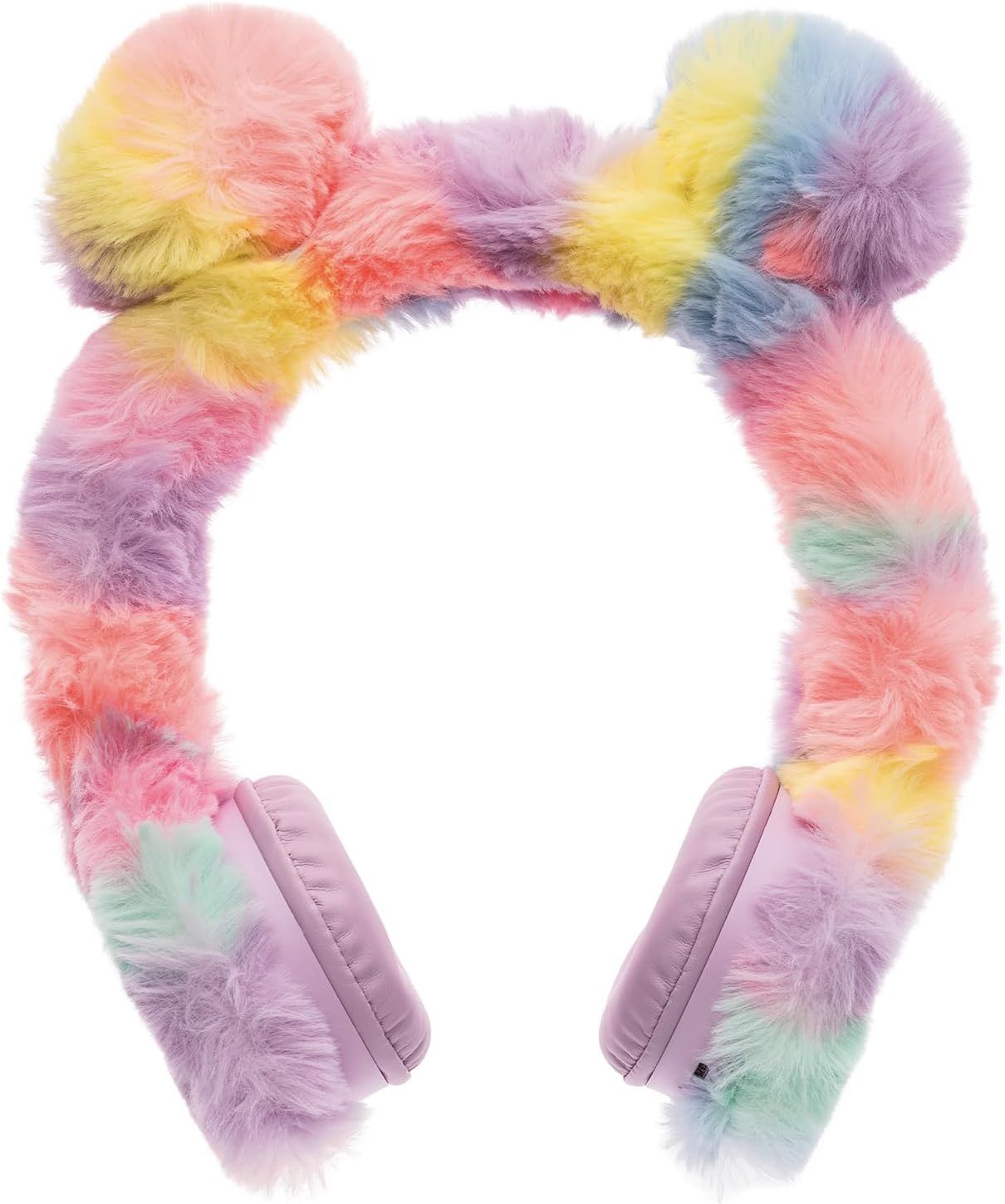
ภาพ: หูฟังบลูทูธแบบครอบหูสีพาสเทลเนื้อนุ่ม มีแถบคาดศีรษะสีรุ้งและที่ครอบหูแบบนุ่ม หูฟังเหล่านี้ออกแบบมาเพื่อการฟังที่สบายและการเชื่อมต่อแบบไร้สาย
- แถบคาดศีรษะปรับได้: เพื่อให้สวมใส่สบาย
- ที่ครอบหูแบบนุ่ม: ออกแบบมาเพื่อความสบายในการใช้งานต่อเนื่องเป็นเวลานาน
- ปุ่มเปิด/ปิดเครื่อง: ปุ่มเปิด/ปิด และเริ่มการจับคู่บลูทูธ อยู่บนหูฟังข้างใดข้างหนึ่ง
- การควบคุมระดับเสียง: ปุ่มปรับระดับเสียงอยู่บนตัวหูฟัง
การตั้งค่า
1. การชาร์จสมาร์ทวอทช์
- ค้นหาพอร์ต Micro USB ที่ด้านข้างของสมาร์ทวอทช์
- เชื่อมต่อสายชาร์จ USB ที่ให้มากับสมาร์ทวอทช์และแหล่งจ่ายไฟ USB ที่ใช้งานร่วมกันได้ (เช่น พอร์ต USB ของคอมพิวเตอร์ อะแดปเตอร์ติดผนัง)
- หน้าจอแสดงผลของนาฬิกาจะแสดงสถานะการชาร์จ โปรดรอประมาณ 2-3 ชั่วโมงเพื่อให้ชาร์จเต็มก่อนใช้งานครั้งแรก
2. การเปิด/ปิดเครื่อง
- การเปิดเครื่อง: กดปุ่ม Home/Power ค้างไว้จนกว่าหน้าจอจะสว่างขึ้น
- วิธีปิดเครื่อง: กดปุ่ม Home/Power ค้างไว้จนกว่าตัวเลือกปิดเครื่องจะปรากฏบนหน้าจอ จากนั้นยืนยัน
3. การเชื่อมต่อหูฟังบลูทูธ
- โปรดตรวจสอบให้แน่ใจว่าสมาร์ทวอทช์เปิดอยู่
- เปิดใช้งานหูฟังบลูทูธโดยกดปุ่มเปิด/ปิดค้างไว้จนกว่าไฟแสดงสถานะจะกะพริบ ซึ่งแสดงว่าอยู่ในโหมดจับคู่
- บนสมาร์ทวอทช์ ให้ไปที่การตั้งค่าบลูทูธ (โดยปกติจะอยู่ในเมนูการตั้งค่า)
- เลือก 'ค้นหา เลือก 'อุปกรณ์' หรือ 'จับคู่อุปกรณ์ใหม่'
- เมื่อหูฟังปรากฏในรายการ (เช่น 'iTech Jr Headphones') ให้แตะเพื่อเชื่อมต่อ ข้อความยืนยันจะปรากฏบนอุปกรณ์ทั้งสองเมื่อจับคู่สำเร็จ
การใช้งานสมาร์ทวอทช์
1. ระบบนำทางด้วยหน้าจอสัมผัส
ปัดหน้าจอไปทางซ้ายหรือขวาเพื่อเรียกดูแอปพลิเคชันและฟีเจอร์ต่างๆ แตะไอคอนเพื่อเปิดแอปพลิเคชัน แตะปุ่มโฮม/เปิด/ปิดเพื่อกลับไปยังหน้าปัดนาฬิกา

ภาพ: หน้าจอของสมาร์ทวอทช์ iTech Jr แสดงไอคอนแอปพลิเคชันต่างๆ ในรูปแบบตาราง ได้แก่ กล้องและแกลเลอรี, กิจกรรมและเกมสนุกๆ, เครื่องคิดเลขและการวัด, หนังสือเสียงและนิทาน, เวลา, นาฬิกาปลุกและนาฬิกาจับเวลา, การบันทึกเสียง, ICE (ในกรณีฉุกเฉิน) และเพลงและการร้องเพลง
2. ฟังก์ชั่นกล้องและวิดีโอ
สมาร์ทวอทช์รุ่นนี้มีกล้องในตัวสำหรับถ่ายภาพและวิดีโอ
- ถ่ายรูป: แตะไอคอนกล้องบนหน้าจอหลัก กดปุ่มกล้องด้านข้างของนาฬิกา หรือแตะปุ่มชัตเตอร์บนหน้าจอเพื่อถ่ายภาพ
- การบันทึกวิดีโอ: ในแอปกล้อง ให้เปลี่ยนเป็นโหมดวิดีโอ กดปุ่มกล้องหรือแตะไอคอนบันทึกเพื่อเริ่ม/หยุดบันทึก
- แกลเลอรี่: เข้าถึงรูปภาพและวิดีโอที่คุณถ่ายไว้ได้ผ่านแอปแกลเลอรี
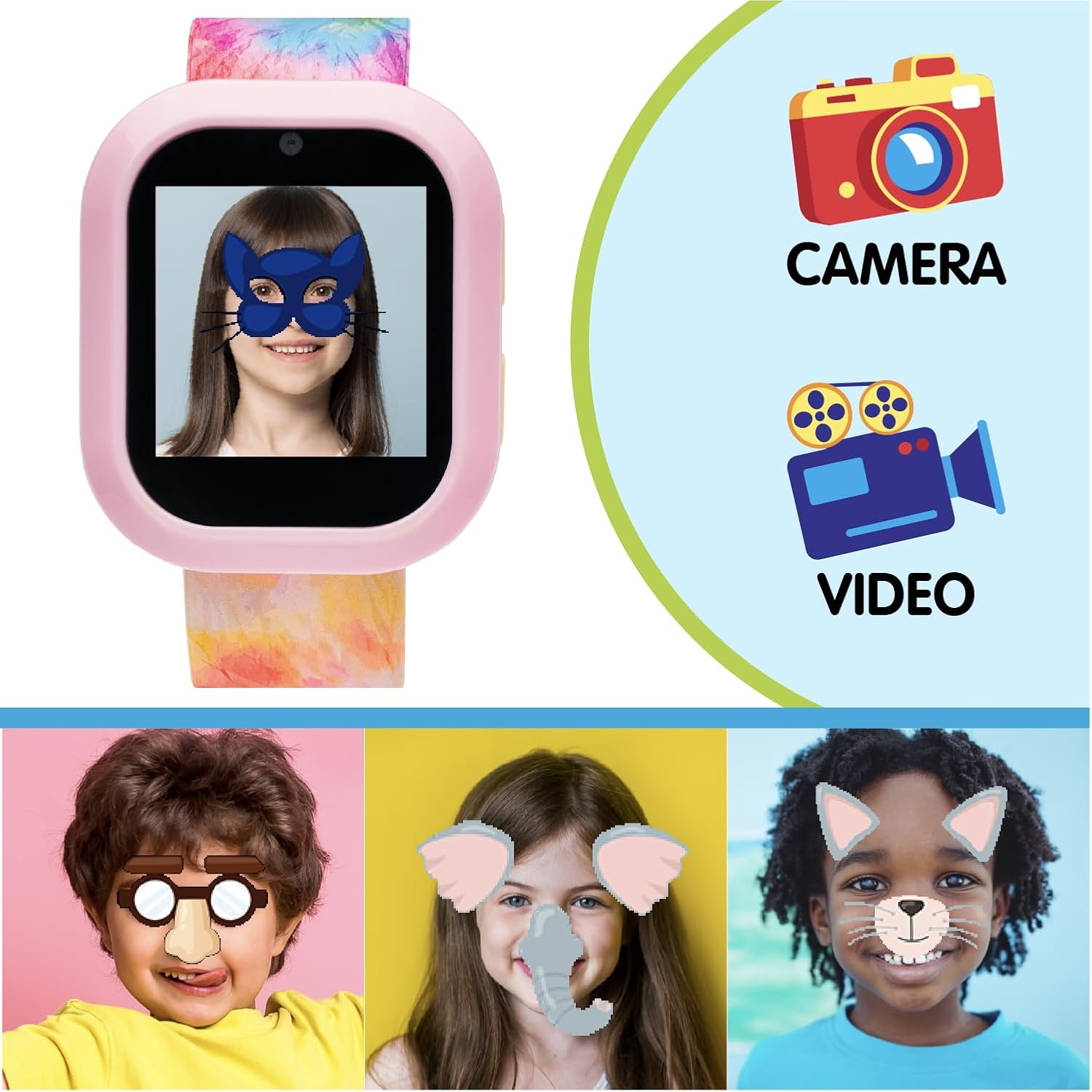
ภาพ: นาฬิกาอัจฉริยะ iTech Jr แสดงภาพใบหน้าเด็กที่สวมหน้ากากดิจิทัล เพื่อสาธิตความสามารถของฟิลเตอร์สนุกๆ ในกล้อง ข้างๆ นาฬิกามีไอคอนสำหรับ 'กล้อง' และ 'วิดีโอ' เพื่อเน้นฟังก์ชันเหล่านี้ ด้านล่างแสดงภาพใบหน้าเด็กสามคนที่มีฟิลเตอร์ดิจิทัลต่างๆ กัน เพื่อสาธิตคุณสมบัติการถ่ายภาพแบบโต้ตอบ
3. เกมและกิจกรรม
สนุกไปกับเกมการศึกษาและเกมสนุกๆ มากมายที่ติดตั้งไว้ล่วงหน้า
- แตะไอคอน 'กิจกรรมและเกมสนุกๆ' เพื่อเรียกดูและเลือกเกม
- เกมต่างๆ ประกอบด้วยโจทย์ท้าทายด้านวิทยาศาสตร์ เทคโนโลยี วิศวกรรมศาสตร์ และคณิตศาสตร์ (STEM) ปริศนา และอื่นๆ อีกมากมาย
4. ดนตรีและหนังสือเสียง
เพลิดเพลินกับเนื้อหาเสียงที่โหลดไว้ล่วงหน้า หรืออัปโหลดเพลงของคุณเอง
- ดนตรี: แตะไอคอน 'เพลงและร้องตาม' เพื่อเล่นเพลง เชื่อมต่อหูฟังบลูทูธเพื่อประสบการณ์การฟังส่วนตัว
- หนังสือเสียง: เข้าถึงเรื่องราวและหนังสือเสียงได้ผ่านไอคอน 'หนังสือเสียงและเรื่องราว'
- การอัพโหลดเพลง: เชื่อมต่อสมาร์ทวอทช์กับคอมพิวเตอร์โดยใช้สาย USB นาฬิกาจะปรากฏเป็นไดรฟ์แบบถอดได้ ลากและวางไฟล์เสียงที่เข้ากันได้ fileคัดลอกไฟล์ไปยังโฟลเดอร์เพลงที่กำหนดไว้

ภาพ: ภาพประกอบแสดงasinแสดงคุณสมบัติต่างๆ ของสมาร์ทวอทช์ iTech Jr ส่วนบนแสดง 'หนังสือเสียงมากกว่า 10 เล่ม' พร้อมปกนิทานเด็กยอดนิยม ส่วนตรงกลางเน้น 'เกม STEM สนุกๆ มากกว่า 25 เกม' พร้อมตัวอย่างampส่วนต่างๆ เช่น 'แบบทดสอบเวลา' และ 'หาตัวที่แตกต่าง' จะแสดง 'หน้าปัดนาฬิกามากกว่า 10 แบบ' ที่มีดีไซน์นาฬิกาดิจิตอลแตกต่างกัน
5. เวลา, นาฬิกาปลุก และนาฬิกาจับเวลา
- การตั้งเวลา: สามารถตั้งเวลาด้วยตนเองได้ผ่านเมนู 'การตั้งค่า'
- เตือน: แตะไอคอน 'เวลา, นาฬิกาปลุก และนาฬิกาจับเวลา' เพื่อตั้งนาฬิกาปลุกหลายรายการ
- นาฬิกาจับเวลา ใช้ฟังก์ชันนาฬิกาจับเวลาเพื่อจับเวลาในการทำกิจกรรมต่างๆ
6. การบันทึกเสียง
บันทึกและเล่นข้อความเสียงสั้นๆ โดยใช้แอป 'บันทึกเสียง'
7. ไฟฉาย LED
เปิดใช้งานไฟฉาย LED จากเมนูการตั้งค่าด่วนหรือไอคอนแอปเฉพาะ เพื่อใช้เป็นแหล่งกำเนิดแสงที่สะดวกสบาย
8. ICE (ในกรณีฉุกเฉิน)
ตั้งค่าข้อมูลติดต่อฉุกเฉินในแอป 'ICE' คุณสมบัตินี้ช่วยให้เข้าถึงรายละเอียดสำคัญได้อย่างรวดเร็วในสถานการณ์ฉุกเฉิน
9. หน้าปัดนาฬิกา
ปรับแต่งรูปลักษณ์ของสมาร์ทวอทช์ของคุณโดยการเปลี่ยนหน้าปัดนาฬิกา เข้าถึงตัวเลือกนี้ได้ผ่านเมนู 'การตั้งค่า' หรือโดยการกดหน้าปัดนาฬิกาค้างไว้
การซ่อมบำรุง
1. การทำความสะอาด
- สมาร์ทวอทช์: เช็ดหน้าจอแล้วคasinเช็ดด้วยผ้าแห้งนุ่มๆ ที่ไม่มีขน หลีกเลี่ยงการใช้สารเคมีรุนแรงหรือวัสดุที่มีฤทธิ์กัดกร่อน
- หูฟัง: ค่อยๆ แปรงขนด้านนอกเพื่อกำจัดฝุ่น ใช้แปรงขนนุ่มเล็กน้อยamp ใช้ผ้าเช็ดทำความสะอาดที่ครอบหูหากจำเป็น เพื่อป้องกันไม่ให้ความชื้นเข้าไปในตะแกรงลำโพง
2. การจัดเก็บ
ควรเก็บสมาร์ทวอทช์และหูฟังไว้ในที่แห้งและเย็น หลีกเลี่ยงแสงแดดโดยตรงและอุณหภูมิที่สูงหรือต่ำเกินไป เมื่อไม่ได้ใช้งาน
3. การดูแลแบตเตอรี่
- ควรชาร์จสมาร์ทวอทช์เป็นประจำเพื่อรักษาอายุการใช้งานของแบตเตอรี่
- หลีกเลี่ยงการระบายแบตเตอรี่จนหมดบ่อยครั้ง
- หากจะเก็บรักษาเป็นเวลานาน ควรชาร์จแบตเตอรี่ให้ได้ประมาณ 50% ก่อนเก็บรักษา
การแก้ไขปัญหา
- นาฬิกาไม่เปิดเครื่อง: ตรวจสอบให้แน่ใจว่านาฬิกาชาร์จเต็มแล้ว เสียบนาฬิกาเข้ากับที่ชาร์จอย่างน้อย 30 นาที จากนั้นลองเปิดเครื่องอีกครั้ง
- นาฬิกาไม่ชาร์จ: ตรวจสอบสาย USB และแหล่งจ่ายไฟ ตรวจสอบให้แน่ใจว่าสายเชื่อมต่อกับนาฬิกาและอะแดปเตอร์แปลงไฟอย่างแน่นหนา ลองใช้พอร์ต USB หรืออะแดปเตอร์อื่นดู
- หูฟังไม่จับคู่: ตรวจสอบให้แน่ใจว่าทั้งนาฬิกาและหูฟังอยู่ในโหมดจับคู่แล้ว และตรวจสอบให้แน่ใจว่าอุปกรณ์ทั้งสองอยู่ใกล้กัน ปิดและเปิดอุปกรณ์ทั้งสองอีกครั้ง จากนั้นลองทำการจับคู่ใหม่อีกครั้ง
- ปัญหาเรื่องเสียง: ตรวจสอบระดับเสียงทั้งบนสมาร์ทวอทช์และหูฟัง ตรวจสอบให้แน่ใจว่าหูฟังเชื่อมต่อผ่านบลูทูธอย่างถูกต้องแล้ว
- หน้าจอไม่ตอบสนอง: ลองรีสตาร์ทสมาร์ทวอทช์โดยกดปุ่ม Home/Power ค้างไว้ หากปัญหายังคงอยู่ โปรดตรวจสอบให้แน่ใจว่าหน้าจอสะอาดและแห้ง
ข้อมูลจำเพาะ
| คุณสมบัติ | รายละเอียด |
|---|---|
| ขนาดสินค้า | 9 x 1.06 x 0.47 นิ้ว |
| น้ำหนักสินค้า | 1.23 ปอนด์ |
| หมายเลขรุ่น | ไอเจ302บี-เอ็น01 |
| ขนาดการแสดงผลหน้าจอยืน | 1.06 นิ้ว |
| คุณสมบัติพิเศษ | กล้อง |
| เทคโนโลยีการเชื่อมต่อ | บลูทูธ |
| มาตรฐานการสื่อสารไร้สาย | บลูทูธ |
| จีพีเอส | ไม่มีจีพีเอส |
| รูปร่าง | สี่เหลี่ยมผืนผ้า |
| ประเภทจอภาพ | ดิจิตอล |
| อุปกรณ์ที่รองรับ | สมาร์ทโฟน (สำหรับถ่ายโอน/ซิงค์ข้อมูล) |
| ผู้ผลิต | ไอเทค |
การรับประกันและการสนับสนุน
ผลิตภัณฑ์ iTech Jr นี้มาพร้อมกับการรับประกันจากผู้ผลิต โปรดดูรายละเอียดเงื่อนไขและข้อกำหนดเฉพาะ รวมถึงระยะเวลาการรับประกันและรายละเอียดความคุ้มครองได้จากบัตรรับประกันที่อยู่ในบรรจุภัณฑ์ของผลิตภัณฑ์
สำหรับการขอรับการสนับสนุนทางเทคนิค ความช่วยเหลือในการแก้ไขปัญหา หรือการเรียกร้องการรับประกัน โปรดติดต่อฝ่ายบริการลูกค้าของ iTech โดยปกติแล้ว ข้อมูลการติดต่อจะพบได้ในเว็บไซต์อย่างเป็นทางการของผู้ผลิต webไซต์หรือบนบรรจุภัณฑ์ผลิตภัณฑ์