
Topyond Topyondmk5ab4yn86
Topyond SW900 Ebike LCD Display User Manual
Universal Ebike LCD Display Control Panel for Electric Bikes and Scooters
1. บทนำ
This user manual provides detailed instructions for the installation, operation, and maintenance of your Topyond SW900 LCD Display. Designed for universal compatibility with 24V, 36V, 48V, and 60V electric bikes and scooters, this display enhances your riding experience by providing essential information and control functions.
2. สินค้าหมดview
The Topyond SW900 LCD Display is a versatile and user-friendly control panel for electric bicycles and scooters. It offers a comprehensive interface to monitor your bike's performance and manage various functions. Crafted from high-quality ABS material, it is designed for durability and reliability in outdoor conditions.
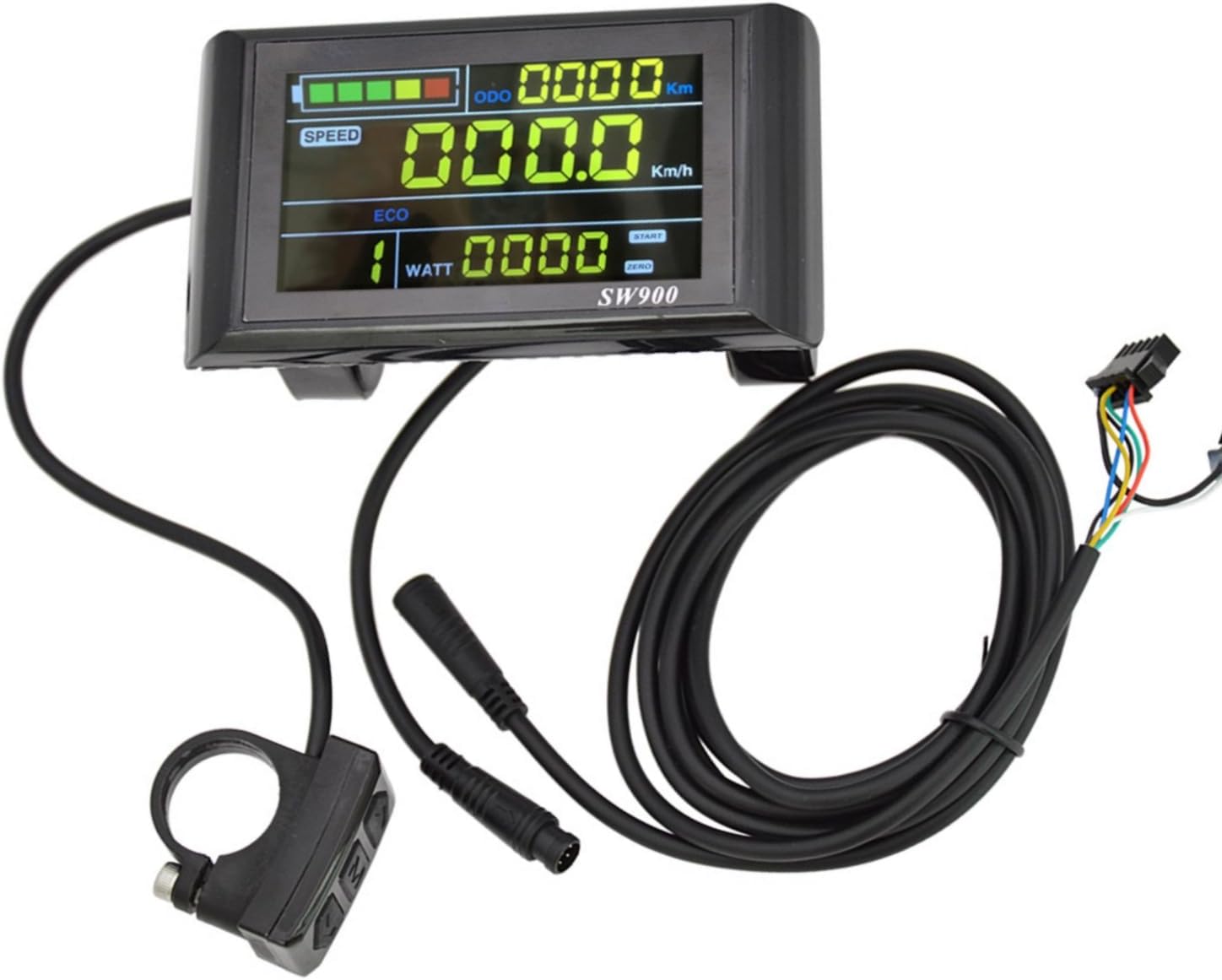
Figure 2.1: Topyond SW900 LCD Display and Control Panel components.
Key features include switch buttons, light controls, battery power display, speed tracking, assist gear adjustment, power indication, and fault prompts. Its compact design ensures minimal space consumption, making it an ideal accessory for various electric vehicles.
3. คุณสมบัติ
- Versatile and User-friendly: Provides switch buttons, light controls, battery power display, and other essential information for convenient riding.
- ทนทานและเชื่อถือได้: Constructed from high-quality ABS material for toughness and protection of internal circuits, ensuring long-lasting performance.
- Enhanced Display Functions: Features speed display, assist gear display, power indicator, fault prompt, total mileage, and single mileage.
- ขนาดกะทัดรัดและพกพาสะดวก: Sleek design minimizes space, making it easy to carry and store for electric bikes, scooters, and similar vehicles.
- การประยุกต์ใช้ที่กว้าง: Standardized 22.2mm installation diameter ensures seamless integration with a broad range of electric bikes and scooters. Compatible with 24V, 36V, 48V, and 60V systems.

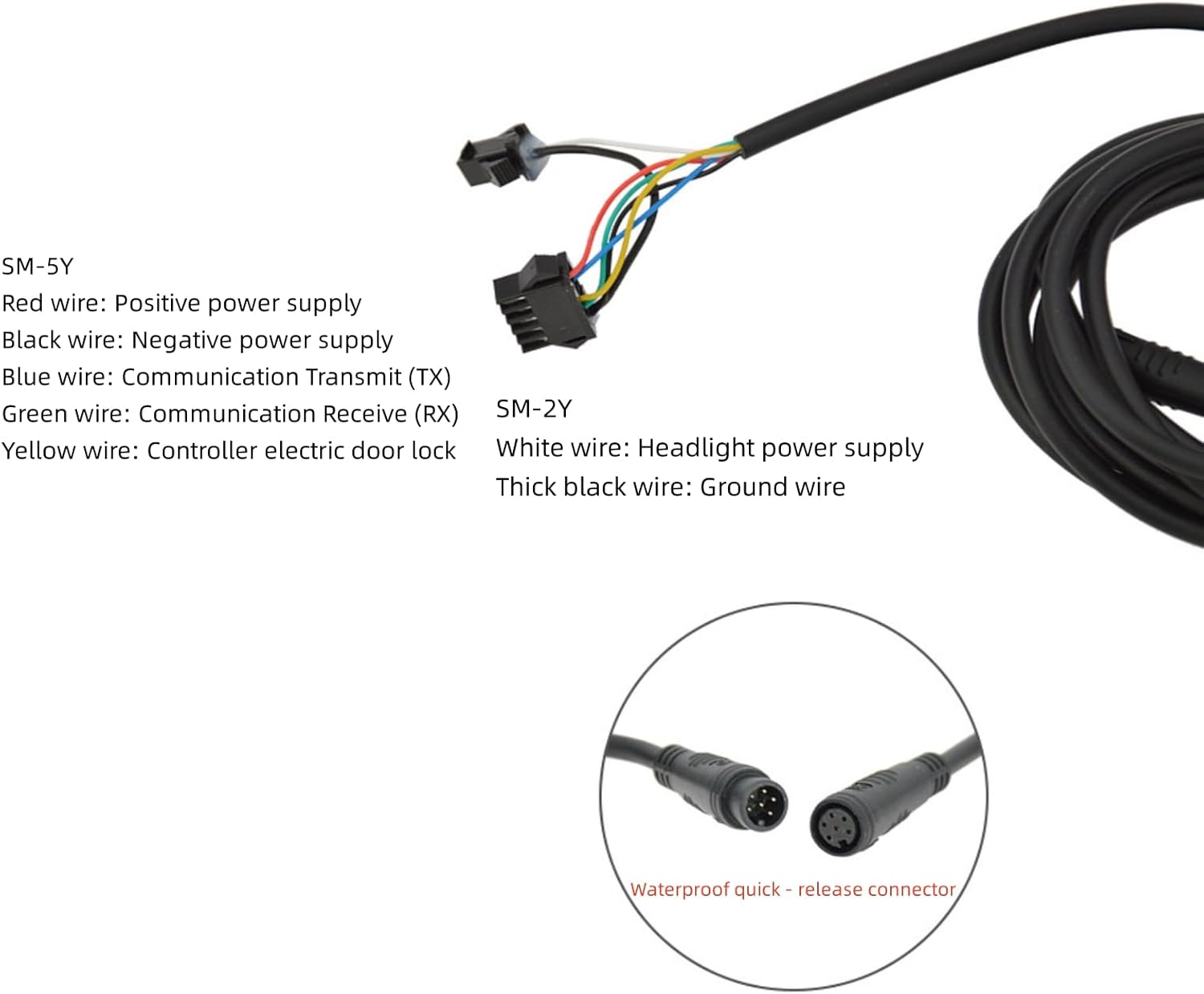
Figure 3.1: The SW900 LCD Display integrated with an electric scooter and an electric bicycle, demonstrating its compact size and wide application.
4. ข้อมูลจำเพาะ
| คุณลักษณะ | ค่า |
|---|---|
| ชื่อยี่ห้อ | Topyond |
| หมายเลขรุ่น | Topyondmk5ab4yn86 (SW900) |
| ขนาดบรรจุภัณฑ์สินค้า กว้าง x ยาว x สูง | 5.2 x 3.46 x 3.31 นิ้ว |
| น้ำหนักสินค้า | 0.26 กิโลกรัม |
| น้ำหนักแพ็คเกจ | 0.27 กิโลกรัม |
| ส่วนประกอบที่รวมอยู่ | Sensor, Mounting Base |
| เส้นผ่านศูนย์กลางการติดตั้ง | 22.2mm (Standard) |
| เล่มที่tagความเข้ากันได้ | 24V, 36V, 48V, 60V Universal |
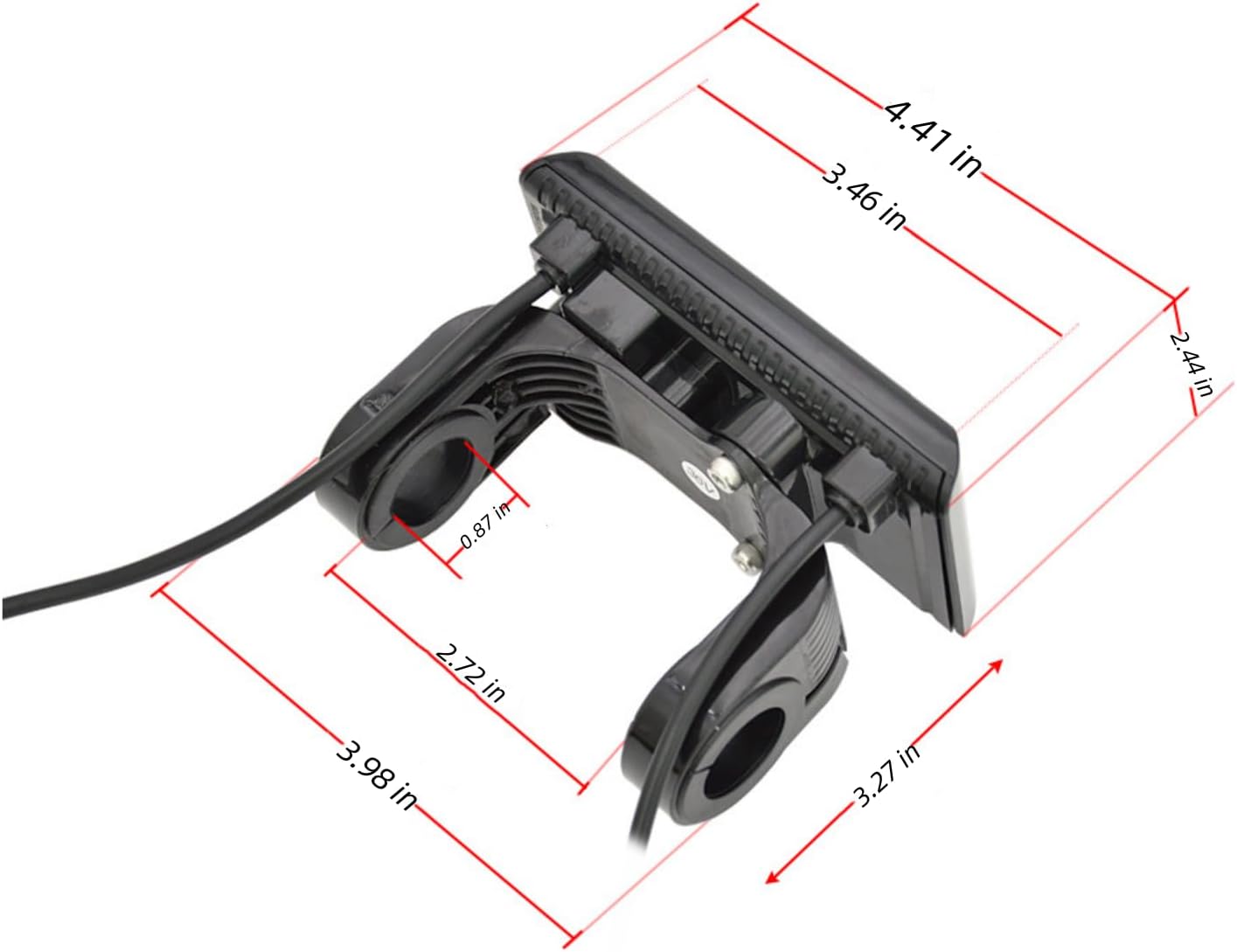
Figure 4.1: Detailed dimensions of the SW900 LCD Display for installation planning.
5. การตั้งค่าและการติดตั้ง
The SW900 LCD Display is designed for straightforward installation with a standard 22.2mm handlebar diameter. Follow these steps for proper setup:
- การติดตั้ง: Securely attach the display and control panel to your electric bike or scooter's handlebar using the provided mounting base. Ensure it is positioned for easy viewการเข้าถึงและใช้งานปุ่มต่างๆ
- การเชื่อมต่อสายไฟ: Connect the display's wiring harness to your e-bike's controller. Refer to the wiring diagram below for correct pin assignments. Ensure all connections are secure and waterproof.
- เปิดเครื่อง: Once connected, turn on your e-bike's power. The display should illuminate and show initial readings.
แผนผังการเดินสายไฟ
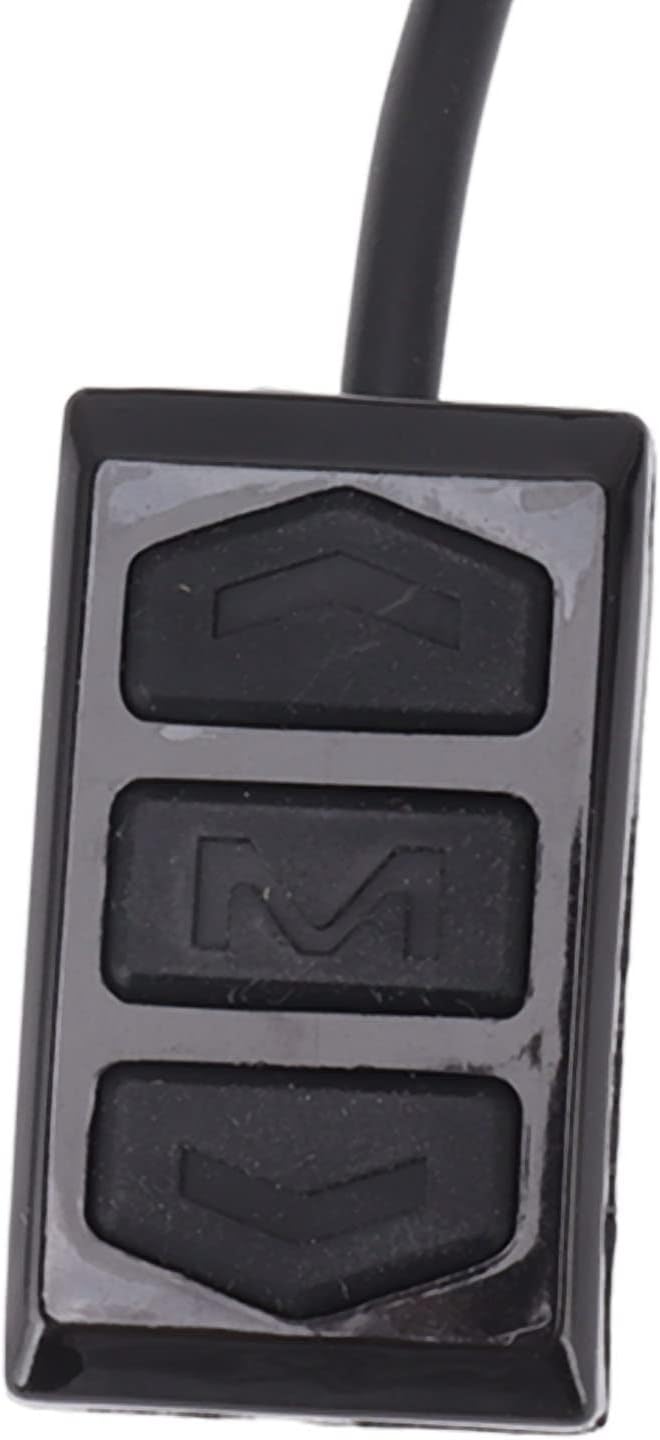
Figure 5.1: Wiring connections for the SW900 LCD Display. Ensure correct polarity and pin matching.
- SM-5Y Connector:
- สายสีแดง: แหล่งจ่ายไฟบวก
- สายสีดำ: แหล่งจ่ายไฟเชิงลบ
- สายสีน้ำเงิน: Communication Transmit (TX)
- สายสีเขียว: Communication Receive (RX)
- สายสีเหลือง: Controller electric door lock
- SM-2Y Connector:
- ลวดสีขาว: Headlight power supply
- Thick black wire: สายดิน
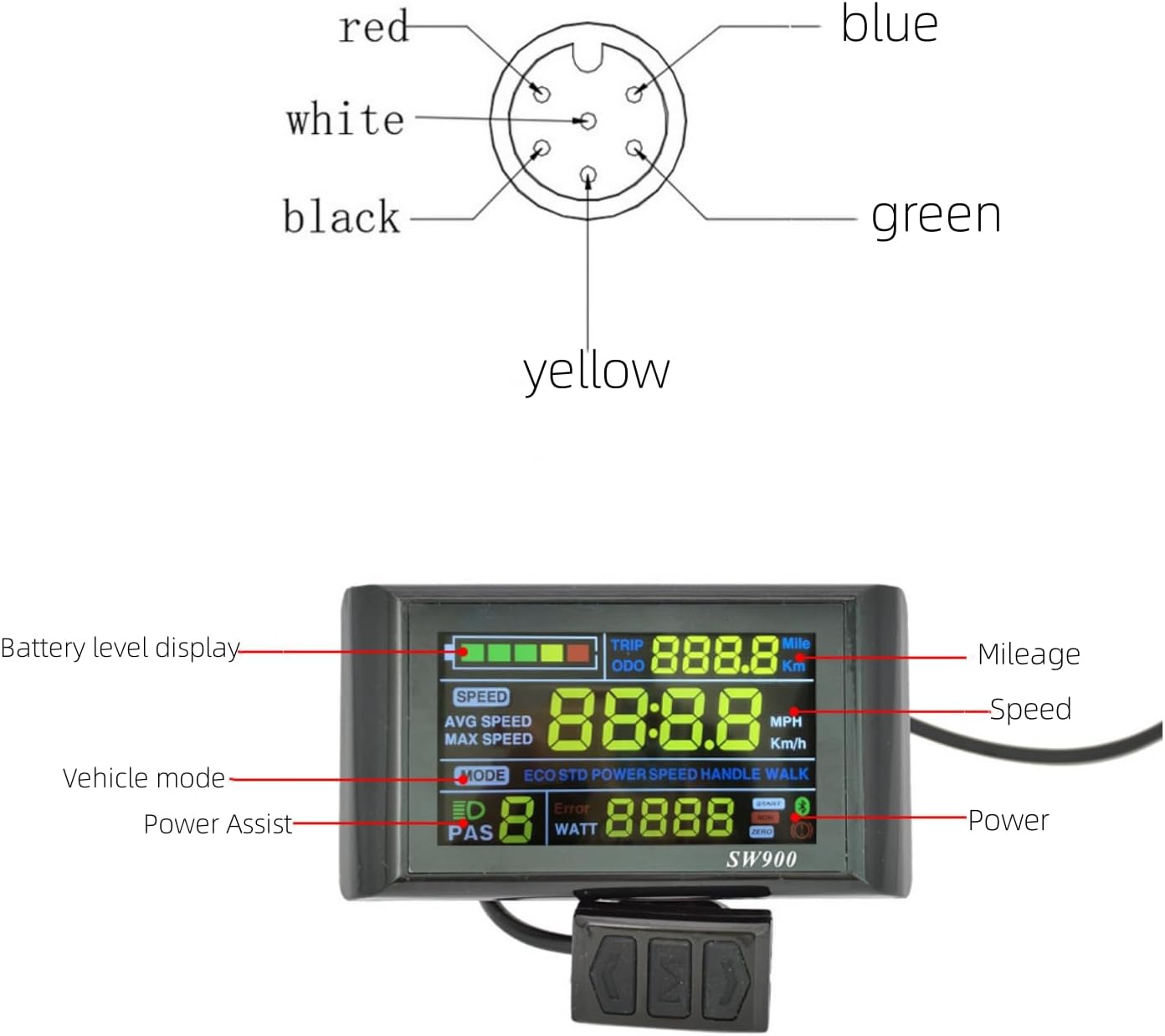
Figure 5.2: Visual representation of the 5-pin connector pinout.
6. คู่มือการใช้งาน
The SW900 LCD Display provides intuitive control over your e-bike's functions. Familiarize yourself with the display layout and button operations.

Figure 6.1: SW900 LCD Display with key functions labeled: Battery level, Speed, Mileage (TRIP/ODO), Vehicle mode, Power Assist (PAS), and Power (WATT).
ปุ่มฟังก์ชั่น
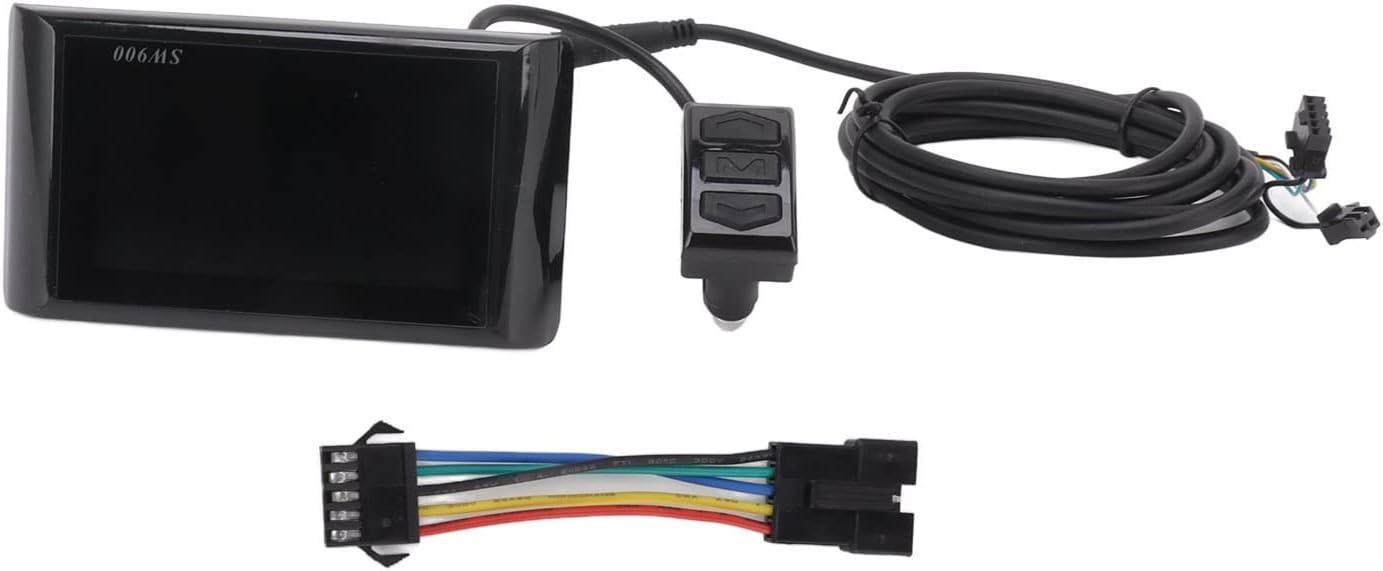
Figure 6.2: The control buttons: Up, Mode (M), and Down.
- เปิด/ปิดเครื่อง: กดปุ่มค้างไว้ โหมด (M) button to turn the display on or off.
- Change Display Mode: กดปุ่มสั้นๆ โหมด (M) button to cycle through different display modes (e.g., ODO, TRIP).
- ปรับระดับการช่วยเหลือ: ใช้ Up และ ลง buttons to increase or decrease the pedal assist level (PAS).
- การตั้งค่าการเข้าถึง: To enter the parameter settings menu, press and hold the Up และ ลง ปุ่มพร้อมกัน
Parameter Settings (P-Codes)
Within the settings menu, you can adjust various parameters. Use the Up และ ลง buttons to change values and the โหมด (M) button to confirm and move to the next parameter.
| รหัสพารามิเตอร์ | คำอธิบาย | Typical Range/Notes |
|---|---|---|
| P01 | ความสว่างของแสงไฟ | 1 (dimmest) to 3 (brightest) |
| P02 | หน่วยไมล์ | 0: Kilometers (Km), 1: Miles (MPH) |
| P03 | เล่มที่tagอี ระดับ | 24V, 36V, 48V, 60V (Set to match your battery) |
| P04 | เวลานอน | 0: No sleep, 1-60: Minutes until auto-off |
| P05 | การตั้งค่าระดับ PAS | 0: 3 levels, 1: 5 levels, 2: 9 levels |
| P06 | เส้นผ่านศูนย์กลางล้อ | Set in inches (e.g., 26.0, 29.0) |
| P07 | หมายเลขแม่เหล็กความเร็ว | Number of magnets in motor (e.g., 46) |
| P08 | จำกัดความเร็ว | Set maximum speed (e.g., 25 km/h or 15.5 mph) |
| P09 | Zero/Non-Zero Start | 0: Zero start, 1: Non-zero start |
| P10 | การตั้งค่าโหมดไดรฟ์ | 0: Pedal Assist only, 1: Throttle only, 2: Both |
| P11 | ความไว PAS | 1-24 (Higher value = more sensitive) |
| P12 | PAS สตาร์ทสเตรงท์ | 0-5 (Higher value = stronger initial assist) |
| P13 | PAS Magnet Number | 5, 8, 12 (Number of magnets in PAS sensor) |
| P14 | ขีดจำกัดปัจจุบัน | Set controller current limit (e.g., 12A) |
| P15 | ภายใต้ฉบับtagค่าคุ้มครอง e | Set battery low voltage ตัดออก |
| P16 | รีเซ็ต ODO | Press and hold Up button for 5 seconds to reset ODO |
| P17 | ระบบควบคุมความเร็วอัตโนมัติ | 0: ปิด, 1: เปิด |
| P18 | Speed Ratio Display | Adjust speed display accuracy |
| P19 | 0-Start Mode | 0: No, 1: Yes (for specific controllers) |
| P20 | โปรโตคอลการสื่อสาร | 0: Protocol 1, 1: Protocol 2, 2: Protocol 3 (Default: 2) |
สำคัญ: Incorrect parameter settings can affect performance or cause errors. If unsure, consult a professional or refer to your e-bike's controller manual.
Demonstration Video: Display Operation and Settings
Video 6.1: A demonstration of how to power on the SW900 LCD Display, navigate through its various display modes, and access and adjust the parameter settings (P-codes) using the control buttons. This video also shows how to remove the protective film from the screen.
7. การบำรุงรักษา
Proper maintenance ensures the longevity and optimal performance of your SW900 LCD Display.
- การทำความสะอาด: Regularly wipe the display screen with a soft, damp ผ้า หลีกเลี่ยงการใช้น้ำยาทำความสะอาดที่มีฤทธิ์กัดกร่อนหรือตัวทำละลายที่อาจทำให้หน้าจอหรือตัวเครื่องเสียหายได้asing.
- การป้องกัน: While the display is durable, avoid direct impacts or excessive force. Ensure the protective film (if present) is removed carefully after installation for clear visibility.
- การเชื่อมต่อ: Periodically check all wiring connections to ensure they are secure and free from corrosion or damage.
- พื้นที่จัดเก็บ: If storing your e-bike for an extended period, ensure the display is clean and stored in a dry environment.
8 การแก้ไขปัญหา
If you encounter issues with your SW900 LCD Display, refer to the common problems and solutions below. The display's fault prompt feature can also indicate specific errors.
| ปัญหา | สาเหตุที่เป็นไปได้ | สารละลาย |
|---|---|---|
| หน้าจอไม่แสดงผล | No power from battery, loose connection, faulty wiring. | Check battery charge. Verify all wiring connections are secure and correct according to the diagram. Ensure the e-bike's main power is on. |
| Speed reading is incorrect or zero. | Incorrect wheel diameter (P06) or speed magnet number (P07) setting. Faulty speed sensor. | Verify P06 and P07 settings match your e-bike's specifications. Check the speed sensor and its connection for damage or misalignment. |
| Assist levels not working or stuck. | Incorrect PAS level setting (P05). PAS sensor issue. | Check P05 setting. Inspect the PAS sensor for damage or proper installation. |
| Display shows "ER" (Error Code). | Indicates a system error. Specific error codes (e.g., ER01, ER02) correspond to different issues. | Consult your e-bike controller's manual for specific error code meanings. Common errors relate to motor, controller, or battery communication. Check all connections. |
| ปุ่มต่างๆ ไม่ตอบสนอง | Loose connection to control panel, internal fault. | Check the connection of the control panel to the display. If the issue persists, contact support. |
If troubleshooting steps do not resolve the issue, it is recommended to contact Topyond customer support or a qualified e-bike technician.
9. การรับประกันและการสนับสนุน
For warranty information, product support, or technical assistance, please refer to the documentation provided with your purchase or contact Topyond customer service directly. Keep your purchase receipt as proof of purchase for any warranty claims.
While this product may be offered with optional protection plans, specific warranty terms and conditions are provided by the manufacturer at the time of purchase.
Ask a question about this manual
Ask about setup, troubleshooting, compatibility, parts, safety, or missing instructions. Manuals+ will review the question and use this page’s manual context to help answer it.