
Della 9000 BTU - 115V - 24 SEER2 (Model: 048-TP-9K1V-23S-I+O)
คู่มือการใช้งานเครื่องปรับอากาศแบบแยกส่วน DELLA Hyper Heat 9,000 BTU
ยี่ห้อ: Della | แบบอย่าง: 9000 BTU - 115V - 24 SEER2 (048-TP-9K1V-23S-I+O)
1. ข้อมูลด้านความปลอดภัยที่สำคัญ
โปรดอ่านคำแนะนำทั้งหมดอย่างละเอียดก่อนการติดตั้งและการใช้งาน การไม่ปฏิบัติตามคำแนะนำเหล่านี้อาจส่งผลให้เกิดความเสียหายต่อทรัพย์สิน การบาดเจ็บ หรือเสียชีวิตได้
- This system mandates professional installation. It is not a DIY mini split AC.
- Line set vacuuming is required during installation.
- No refrigerant adjustment is needed if the tube is under 25 ft; over 25 ft requires adjustment according to the manual.
- Ensure proper electrical connections. Maximum fuse size is 20A.
- ผลิตภัณฑ์นี้อาจมีสารเคมีที่รัฐแคลิฟอร์เนียระบุว่าอาจก่อให้เกิดมะเร็ง ความพิการแต่กำเนิด หรืออันตรายต่อระบบสืบพันธุ์ (คำเตือนตามข้อเสนอ 65)
2. สินค้าหมดview & ส่วนประกอบ
The DELLA Hyper Heat Mini Split system provides efficient cooling and heating for spaces up to 400 sq. ft. It features a durable and stylish indoor unit and a robust outdoor unit, designed for optimal performance and energy savings.

Figure 2.1: Main Components of the DELLA Mini Split System
ส่วนประกอบที่รวมอยู่:
| หมายเลขสินค้า | ส่วนประกอบ |
|---|---|
| 1 | หน่วยในร่ม |
| 2 | หน่วยภายนอก |
| 3 | Refrigerant Pipe (16.4ft pre-flared and insulated copper line set) |
| 4 | Drain Lines (6.56ft drainage extension) |
| 5 | รีโมทคอนโทรล |
| 6 | ขายาง |
| 7 | ฉนวนโฟม |
| 8 | แผ่นยึด |
| 9 | ถ่าน AAA 2 ก้อน |
| 10 | ข้อศอกระบาย |
| 11 | แขนติดผนัง |
| 12 | Plasticine Putty |
| 13 | สกรู |
| 14 | สมอ |
| 15 | ฝาผนัง |
| 16 | พลาสติกห่ออาหาร |
| 17 | สายสื่อสาร |
| 18 | แม่แบบวงเล็บ |
3. การตั้งค่าและการติดตั้ง
Installation of the DELLA Mini Split AC unit requires specialized knowledge and tools. It is strongly recommended that installation be performed by a certified HVAC professional to ensure proper function, safety, and warranty validity.
ข้อควรพิจารณาในการติดตั้งที่สำคัญ:
- การเลือกไซต์: เลือกตำแหน่งติดตั้งทั้งยูนิตภายในและภายนอกอาคารที่เหมาะสม เพื่อให้มีการระบายอากาศ การระบายน้ำ และการเข้าถึงเพื่อการบำรุงรักษาได้สะดวก
- การติดตั้ง: Securely mount the indoor unit to a wall using the provided mounting plate and the outdoor unit on a stable surface or wall bracket.
- การเชื่อมต่อชุดสาย: Connect the pre-flared and insulated copper line set between the indoor and outdoor units. Ensure all connections are tight to prevent refrigerant leaks.
- การดูดฝุ่น: A vacuum pump must be used to evacuate the air and moisture from the refrigerant lines before releasing refrigerant. This is a critical step for system efficiency and longevity.
- สายไฟฟ้า: Connect the power supply and communication cable according to local electrical codes and the wiring diagram in the full user manual.
- การระบายน้ำ: Ensure the drainage hose from the indoor unit is properly sloped to allow for continuous condensate removal.
For detailed step-by-step installation instructions, please refer to the comprehensive User Manual available for download from the product page or the manufacturer's webเว็บไซต์.
4. คู่มือการใช้งาน
The DELLA Mini Split offers multiple ways to control your comfort, including a remote control, a mobile app, and voice commands.
การทำงานของรีโมทคอนโทรล:

รูปที่ 4.1: แผนผังและการทำงานของรีโมทคอนโทรล
- เปิด/ปิด: เปิดหรือปิดเครื่อง
- โหมด: Cycle through 6 modes: Cooling, Heating, Dry, Auto, Dehumidifying, and Fan.
- เพิ่ม/ลดอุณหภูมิ: ปรับอุณหภูมิตามต้องการ
- ความเร็วพัดลม: Select from 7 wind speeds (Quiet, Low, Mid Low, Mid, Mid High, High, Turbo).
- แกว่ง: Control vertical and horizontal airflow direction (4D airflow).
- โหมด ECO: เปิดใช้งานโหมดประหยัดพลังงาน
- โหมดสลีป: Adjusts temperature automatically for comfortable sleep.
- ตัวจับเวลา: Set a schedule for the unit to turn on or off automatically.
- โหมดความรู้สึก: Senses the temperature at the remote's location for precise comfort.
Della+ App & WiFi Connectivity:
Control your mini split from anywhere using the free Della+ app on your smartphone. The unit supports WiFi connectivity for seamless remote management.

Figure 4.2: Della+ App Interface for Comprehensive Control
- รีโมทคอนโทรล: Adjust settings, change modes, and set schedules from your phone.
- ระบบระบุตำแหน่งทางภูมิศาสตร์อัจฉริยะ: The app can automatically turn your AC unit on or off based on your location, providing hands-free control while driving.
- Schedules & Timer: Create custom schedules for daily or weekly operation to optimize energy usage.
ความเข้ากันได้ของการควบคุมด้วยเสียง:
The DELLA Mini Split seamlessly integrates with Amazon Alexa and Google Assistant, allowing for convenient voice commands.
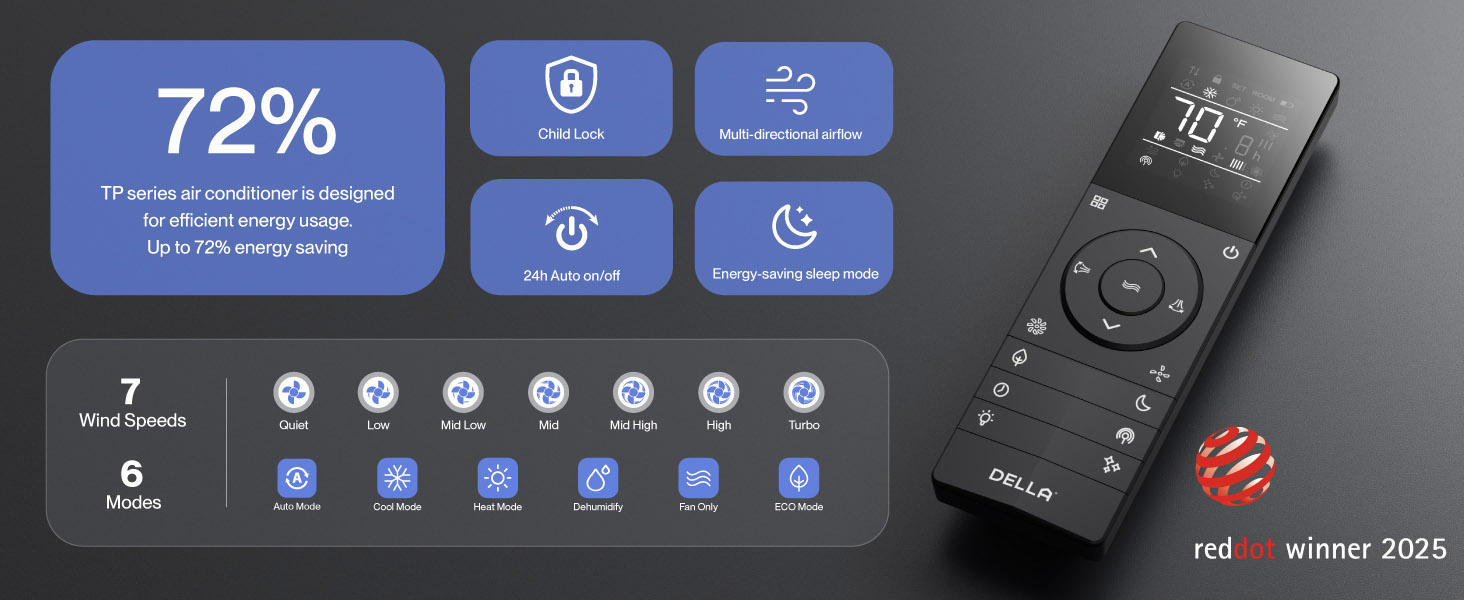
Figure 4.3: Voice Control Integration with Smart Home Devices
Simply use voice commands like "Alexa, turn on the air conditioner" to control your unit.
5. การบำรุงรักษา
Regular maintenance ensures optimal performance and longevity of your DELLA Mini Split system.
- การทำความสะอาดตัวกรอง: Regularly clean the air filters in the indoor unit to maintain air quality and efficiency. Refer to the full manual for frequency and procedure.
- PureClean Technology: The unit features PureClean tech that helps stop dust buildup and defrosts your indoor unit, contributing to cleaner air and advanced sterilization.
- Gold Plated FIN Technology: The gold plated FIN technology in the outdoor unit prevents freezing and rust corrosion, enhancing durability and boosting heat efficiency, even in extreme temperatures down to -13°F (-25°C).

Figure 5.1: PureClean Technology for Cleaner Air

Figure 5.2: Gold Plated FIN Technology for Enhanced Durability
6 การแก้ไขปัญหา
If you encounter issues with your DELLA Mini Split, refer to the following common troubleshooting tips. For more detailed solutions, consult the full user manual.
- หน่วยไม่เปิด: ตรวจสอบแหล่งจ่ายไฟ เบรกเกอร์ และตรวจสอบให้แน่ใจว่าแบตเตอรี่ของรีโมทคอนโทรลไม่หมด
- การทำความเย็น/ทำความร้อนไม่เพียงพอ: Verify correct mode selection, temperature setting, and ensure air filters are clean. Check for obstructions around indoor and outdoor units.
- เสียงที่ผิดปกติ: Some operational noises are normal (e.g., refrigerant flow). If noises are loud or unusual, consult the manual or contact support.
- ปัญหาการเชื่อมต่อ Wi-Fi: If the unit occasionally loses connection with Wi-Fi, try resetting the unit by cycling power at the breaker. Ensure your Wi-Fi network is stable.
- รหัสข้อผิดพลาด: If an error code appears on the display, note the code and refer to the troubleshooting section in the comprehensive user manual for specific instructions.
If problems persist after attempting these solutions, please contact DELLA customer support.
7. ข้อมูลจำเพาะ
Key technical specifications for the DELLA Hyper Heat 9,000 BTU Mini Split.

รูปที่ 7.1: ขนาดผลิตภัณฑ์และข้อมูลจำเพาะหลัก
| ข้อมูลจำเพาะ | ค่า |
|---|---|
| หมายเลขรุ่น | 048-TP-9K1V-23S-I+O |
| ความสามารถในการทำความเย็น | 9000 บีทียู/ชั่วโมง (0.75 ตัน) |
| ความสามารถในการให้ความร้อน | 10000 บีทียู/ชม. |
| แหล่งจ่ายไฟ | 115V~/60Hz/1PH |
| กำลังไฟฟ้าเข้าสูงสุด | 730 วัตต์ |
| ปริมาณการไหลของอากาศ | 554 ม³/ชม. |
| สูงสุด ขนาดฟิวส์ | 20เอ |
| เรตติ้ง SEER2 | 24 |
| คะแนน HSPF2 | 10 |
| อุณหภูมิในการทำงาน (การทำความร้อน) | Functional up to -13°F (-25°C) |
| ระดับเสียง (ตัวเครื่องภายใน) | ต่ำถึง 30 dB(A) |
| ขนาดห้องที่แนะนำ | พื้นที่สูงสุดถึง 400 ตร.ฟุต |
| การรับรอง | Energy Star, ETL listed, AHRI certified |

Figure 7.2: Energy Efficiency Comparison (24 SEER2)
8. การรับประกันและการสนับสนุน
DELLA is committed to providing exceptional product quality and customer service.
รับประกันตลอดอายุการใช้งาน:
The DELLA Hyper Heat Mini Split is backed by a lifetime warranty, offering unmatched support and peace of mind. This warranty covers manufacturing defects and ensures long-term reliability without additional costs.

Figure 8.1: Lifetime Coverage and Support
การสนับสนุนลูกค้า:
For any inquiries, technical assistance, or warranty claims, please contact DELLA customer support:
- การสนับสนุนทางโทรศัพท์: Available Monday - Friday, 6 AM - 4 PM PST.
- แชทสด: พร้อมให้บริการตลอด 24 ชั่วโมง เพื่อความช่วยเหลืออย่างทันท่วงที

Figure 8.2: Della Customer Support Options
You can also find the full User Manual (PDF) and User Guide (PDF) for this product at the following links:
Ask a question about this manual
Ask about setup, troubleshooting, compatibility, parts, safety, or missing instructions. Manuals+ will review the question and use this page’s manual context to help answer it.