
STF Kronos Trek Smartwatch User Manual
Model: ST-W78527
1. บทนำ
Thank you for choosing the STF Kronos Trek Smartwatch. This manual provides essential information for setting up, operating, maintaining, and troubleshooting your device. Please read it carefully to ensure optimal performance and longevity of your smartwatch.
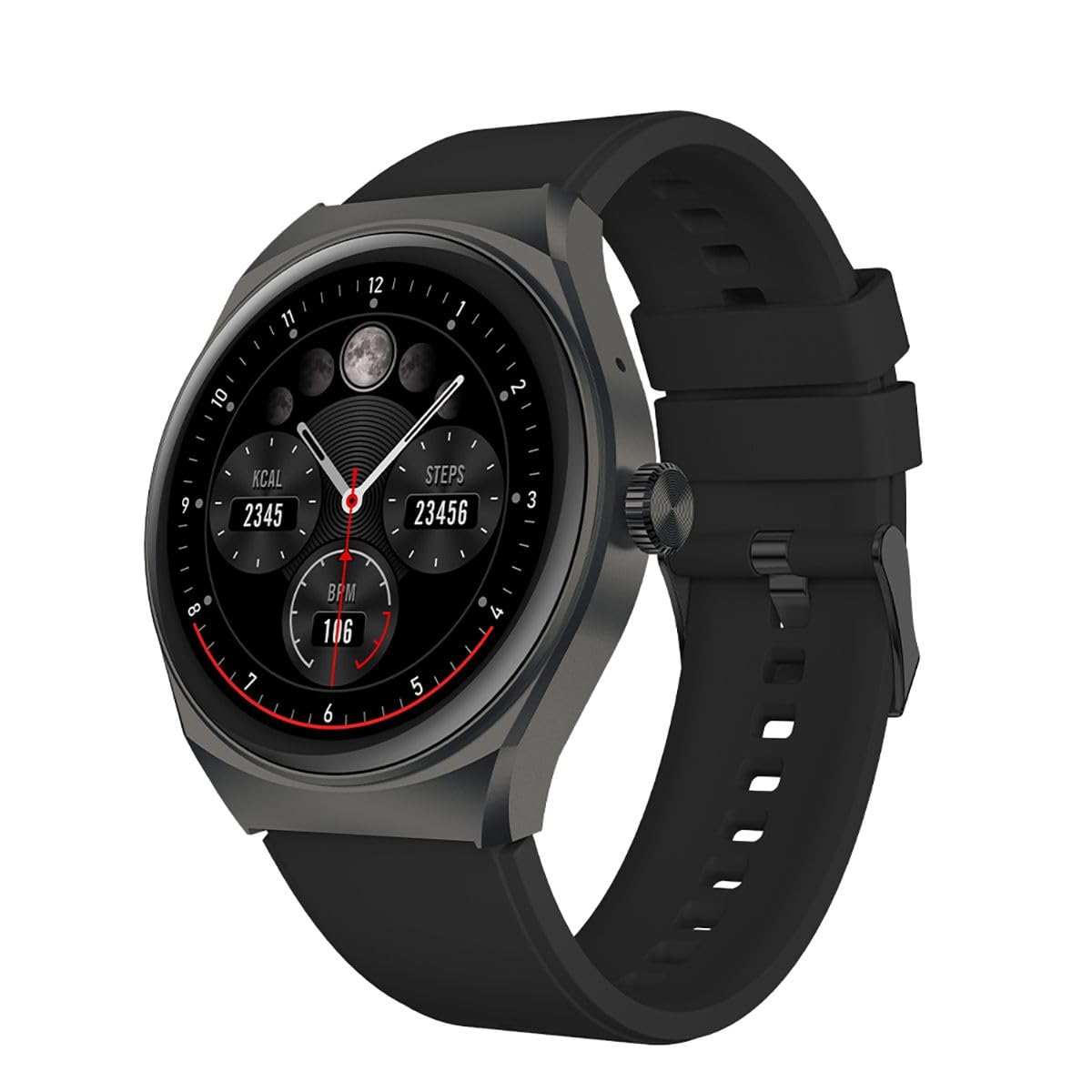
ภาพที่ 1.1: ด้านหน้า view of the STF Kronos Trek Smartwatch.
2. เนื้อหาบรรจุภัณฑ์
- STF Kronos Trek Smartwatch
- สายชาร์จ
- คู่มือการใช้งาน (เอกสารนี้)
3. อุปกรณ์โอเวอร์view
The STF Kronos Trek Smartwatch features a 1.38-inch IPS display and a durable design. It includes various sensors for health monitoring and supports multiple sports modes.

Image 3.1: Smartwatch display showing health metrics like calories, steps, and BPM.

ภาพที่ 3.2: ด้านหลัง view of the smartwatch, highlighting the health sensors and charging contacts.
4. การตั้งค่า
4.1 การชาร์จสมาร์ทวอทช์
- เสียบสายชาร์จเข้ากับขั้วชาร์จด้านหลังของสมาร์ทวอทช์
- Plug the USB end of the charging cable into a compatible USB power adapter (not included) or a computer's USB port.
- The smartwatch display will indicate charging status.
- Allow approximately 2-3 hours for a full charge. A full charge provides up to 7 days of battery life under normal usage.
4.2 การจับคู่กับสมาร์ทโฟนของคุณ
- Download the official STF companion application from your smartphone's app store (iOS or Android).
- ตรวจสอบให้แน่ใจว่าได้เปิดใช้งาน Bluetooth บนสมาร์ทโฟนของคุณแล้ว
- Open the STF companion application and follow the on-screen instructions to create an account or log in.
- In the app, select 'Add Device' or 'Pair New Device' and choose 'Kronos Trek' from the list of available devices.
- ยืนยันคำขอจับคู่บนทั้งสมาร์ทวอทช์และสมาร์ทโฟนของคุณ
Note: For optimal performance, keep the smartwatch and smartphone within Bluetooth range during initial setup and regular use.
5. คู่มือการใช้งาน
5.1 การนำทางพื้นฐาน
- หน้าจอสัมผัส: ปัดไปทางซ้าย ขวา ขึ้น หรือลง เพื่อเลื่อนดูเมนูและฟีเจอร์ต่างๆ แตะเพื่อเลือกตัวเลือก
- ปุ่มด้านข้าง: กดปุ่มด้านข้างเพื่อกลับไปยังหน้าจอหลักหรือปลุกอุปกรณ์
Video 5.1: Demonstrates basic interaction with the STF Kronos Trek Smartwatch, including screen navigation and multi-sport mode selection. This video highlights how to stay active and healthy by tracking your workouts.
5.2 การโทรออกและรับสาย
The Kronos Trek Smartwatch allows you to answer calls directly from your wrist when connected to your smartphone via Bluetooth.
- การรับสายโทรศัพท์: When a call comes in, tap the green icon on the smartwatch screen.
- โทรออก: Access the dialer or contact list through the smartwatch menu to initiate a call.

Image 5.2: The smartwatch screen indicating the ability to answer calls directly.
5.3 โหมดมัลติสปอร์ต
The smartwatch supports over 100 multi-sport modes to track various physical activities. To access:
- Swipe on the home screen to find the 'Sports' or 'Workout' icon.
- แตะไอคอนเพื่อ view the list of available sports modes (e.g., running, walking, cycling, swimming).
- Select your desired activity to start tracking. The watch will record duration, calories burned, and other relevant metrics.

ภาพที่ 5.3: จบแล้วview of the multi-sport mode feature with various activity icons.
Video 5.4: Illustrates how to use the multi-sport mode to time efforts and record progress during workouts. This video focuses on the male user's experience.
5.4 การตรวจติดตามสุขภาพ
The Kronos Trek Smartwatch includes sensors to monitor various health metrics:
- อัตราการเต้นของหัวใจ: ตรวจสอบอัตราการเต้นของหัวใจของคุณอย่างต่อเนื่องตลอดทั้งวัน
- การติดตามการนอนหลับ: วิเคราะห์รูปแบบการนอนของคุณ รวมถึงการนอนหลับลึก การนอนหลับตื้น และเวลาตื่น
- การติดตามกิจกรรม: บันทึกจำนวนก้าว ระยะทาง และปริมาณแคลอรีที่เผาผลาญ
Note: The health monitoring features are for general fitness and wellness purposes only and are not intended for medical diagnosis or treatment.
5.5 การแจ้งเตือน
Receive notifications from your smartphone directly on your smartwatch. Ensure the companion app is running in the background and notification permissions are granted.
5.6 ความต้านทานน้ำ (IP67)
The smartwatch is rated IP67, meaning it is resistant to dust and can withstand immersion in water up to 1 meter for 30 minutes. It is suitable for daily use and light water activities but not recommended for diving or high-pressure water exposure.

Image 5.5: Icon representing the IP67 water resistance feature.
6. การบำรุงรักษา
6.1 การทำความสะอาด
- เช็ดทำความสะอาดสมาร์ทวอทช์และสายรัดเป็นประจำด้วยผ้าเนื้อนุ่มและแห้งamp ผ้า.
- หลีกเลี่ยงการใช้สารเคมีรุนแรง น้ำยาทำความสะอาดที่มีฤทธิ์กัดกร่อน หรือตัวทำละลาย
- ตรวจสอบให้แน่ใจว่าหน้าสัมผัสการชาร์จสะอาดและแห้งก่อนชาร์จ
6.2 การสัมผัสน้ำ
- After exposure to water, especially saltwater, rinse the smartwatch with fresh water and dry it thoroughly.
- ห้ามกดปุ่มหรือใช้งานหน้าจอสัมผัสใต้น้ำ
6.3 การดูแลแบตเตอรี่
- Avoid extreme temperatures when charging or storing the device.
- อย่าปล่อยให้แบตเตอรี่หมดเกลี้ยงเป็นเวลานาน
7 การแก้ไขปัญหา
7.1 อุปกรณ์ไม่เปิด
- Ensure the smartwatch is fully charged. Connect it to the charger for at least 30 minutes.
- กดปุ่มด้านข้างค้างไว้ 10-15 วินาทีเพื่อลองรีสตาร์ทเครื่องแบบบังคับ
7.2 ปัญหาการจับคู่
- โปรดตรวจสอบให้แน่ใจว่าได้เปิดใช้งานบลูทูธบนสมาร์ทโฟนและสมาร์ทวอทช์ของคุณแล้ว
- รีสตาร์ททั้งสมาร์ทโฟนและสมาร์ทวอทช์ของคุณ
- Try unpairing the device from your smartphone's Bluetooth settings and then re-pairing through the STF companion app.
- Ensure the STF companion app is updated to the latest version.
7.3 ข้อมูลสุขภาพที่ไม่ถูกต้อง
- ตรวจสอบให้แน่ใจว่าสวมสมาร์ทวอทช์กระชับกับข้อมือ แต่ไม่แน่นเกินไป
- ทำความสะอาดเซ็นเซอร์ที่ด้านหลังของนาฬิกา
- ปัจจัยด้านสิ่งแวดล้อมและสรีรวิทยาของแต่ละบุคคลสามารถส่งผลต่อความแม่นยำของเซ็นเซอร์ได้
7.4 อายุการใช้งานแบตเตอรี่สั้น
- ลดความสว่างหน้าจอ
- ปิดการตรวจสอบอัตราการเต้นของหัวใจอย่างต่อเนื่องหากไม่จำเป็น
- จำกัดจำนวนการแจ้งเตือนที่ได้รับ
- Ensure the smartwatch is not constantly searching for a Bluetooth connection.
8. ข้อมูลจำเพาะ
| คุณสมบัติ | ข้อมูลจำเพาะ |
|---|---|
| ชื่อรุ่น | ST-W78527 |
| ขนาดจอแสดงผล | 1.38 นิ้ว |
| ประเภทจอภาพ | ดิจิตอล |
| ปณิธาน | 240 x 240 |
| เทคโนโลยีการเชื่อมต่อ | บลูทูธ |
| มาตรฐานการสื่อสารไร้สาย | บลูทูธ |
| อายุการใช้งานแบตเตอรี่ (เฉลี่ย) | 168 ชั่วโมง (7 วัน) |
| ความจุของแบตเตอรี่ | 300 มิลลิแอมป์ |
| ส่วนประกอบของเซลล์แบตเตอรี่ | ลิเธียมโพลีเมอร์ |
| ความต้านทานต่อน้ำ | IP67 |
| คุณสมบัติพิเศษ | Notifications, Multi-sport Mode, Health Monitors |
| อินพุตอินเทอร์เฟซมนุษย์ | หน้าจอสัมผัส |
| ขนาดสินค้า | 25 x 3 x 2 ซม.; 210 กรัม |
9. การรับประกันและการสนับสนุน
For warranty information and customer support, please refer to the documentation provided with your purchase or visit the official STF website. You may also contact the seller, Stuffactory, for assistance.
This product is eligible for a 30-day free return policy through Amazon. Please check Amazon's return policy for details.