1. บทนำ
This manual provides essential information for the safe and efficient operation of your Sunny Boy Smart Energy (SBSE-US) Hybrid Inverter. This device integrates photovoltaic (PV) and battery inverter functionalities into a single unit, designed for residential solar energy systems. It delivers up to 1900 W of power, ensuring energy supply to essential home loads.
The SBSE-US inverter features a 208/240 VAC single-phase output and a 60 Hz AC grid frequency range, enabling seamless integration with solar panels and battery storage. Key features include ShadeFix optimization, SunSpec RSD transmitter, and SMA Arc Fix, all contributing to optimized system performance.
2. ข้อมูลด้านความปลอดภัย
คำแนะนำด้านความปลอดภัยที่สำคัญ: Read all instructions carefully before installation and operation. Failure to follow these instructions may result in electric shock, fire, or severe injury.
- การติดตั้งและการบำรุงรักษาจะต้องดำเนินการโดยบุคลากรที่มีคุณสมบัติเท่านั้น
- ห้ามเปิดหรือซ่อมแซมอินเวอร์เตอร์ด้วยตนเอง โปรดส่งต่อให้ช่างผู้ชำนาญการเป็นผู้ดำเนินการซ่อมบำรุง
- Ensure the inverter is disconnected from all power sources (PV array, battery, and grid) before performing any service or maintenance.
- ควรสวมอุปกรณ์ป้องกันส่วนบุคคล (PPE) ที่เหมาะสมเมื่อทำงานกับระบบไฟฟ้า
- ควรกันเด็กและบุคคลที่ไม่ได้รับอนุญาตให้เข้าใกล้เครื่องแปลงกระแสไฟฟ้า
- Do not install the inverter in areas with flammable materials or explosive gases.
This inverter contains high voltage components. Always exercise extreme caution.
3. สินค้าหมดview
The Sunny Boy Smart Energy inverter is designed for high efficiency and ease of use. Its modern design features a curved, easy-open cover for accessibility.
3.1 คุณสมบัติหลัก
- เทคโนโลยีไฮบริด: Combines PV and battery inverter functions.
- ประสิทธิภาพสูง: Up to 97.5% maximum efficiency.
- ShadeFix Optimization: Maximizes energy yield even with partial shading, utilizing 3 MPPTs.
- Integrated System Manager: For streamlined monitoring and control.
- Rapid Commissioning: Via the SMA 360° app.
- SunSpec Certified RSD Transmitter: For rapid shutdown compliance.
- เพิ่มขยาย: 200% DC/AC design capability, hybrid and AC coupling options.
3.2 ส่วนประกอบของอินเวอร์เตอร์

รูปที่ 1: ด้านหน้า view of the Sunny Boy Smart Energy Hybrid Inverter. This image shows the inverter's clean, white casing with the SMA logo prominently displayed in the center, indicating its operational status and brand.

รูปที่ 2: ด้านข้าง view of the Sunny Boy Smart Energy Hybrid Inverter. This perspective highlights the ventilation grilles and connection points on the side of the unit, essential for heat dissipation and system integration.
The inverter unit typically includes: connection terminals for PV input, battery connection, AC grid output, communication interfaces, and status indicators. Refer to the detailed wiring diagrams provided with the product packaging for specific terminal locations.
4. การตั้งค่าและการติดตั้ง
Installation of the Sunny Boy Smart Energy inverter requires specialized knowledge and should only be performed by a certified electrician or qualified solar installer. Incorrect installation can lead to equipment damage, injury, or void the warranty.
4.1 การตรวจสอบก่อนการติดตั้ง
- Verify the inverter model (SBSE-US) matches your system requirements.
- ตรวจสอบให้แน่ใจว่าสถานที่ติดตั้งเป็นไปตามข้อกำหนดด้านสิ่งแวดล้อม (อุณหภูมิ ความชื้น การระบายอากาศ)
- Confirm all necessary tools and safety equipment are available.
- Review ระเบียบและข้อบังคับด้านไฟฟ้าในท้องถิ่น
4.2 การติดตั้งอินเวอร์เตอร์

รูปที่ 3: The Sunny Boy Smart Energy-US inverter mounted on a wall, showcasing its compact design and integration into a residential setting. This image illustrates the inverter's aesthetic appeal and how it appears when installed.
- Select a suitable wall location, ensuring adequate clearance for ventilation and access.
- Mount the inverter securely using the provided mounting bracket and hardware.
- Ensure the mounting surface can support the inverter's weight (Product Dimensions: 19.7 x 23.1 x 9.3 inches).
4.3 การเชื่อมต่อทางไฟฟ้า
- Connect the DC input from the PV array to the designated terminals.
- Connect the battery storage system to the battery terminals (if applicable).
- Connect the AC output to the main electrical panel or designated load center.
- ตรวจสอบให้แน่ใจว่าการเชื่อมต่อทั้งหมดแน่นหนาและหุ้มฉนวนอย่างเหมาะสม
- Ground the inverter according to local electrical codes.
4.4 Commissioning with SMA 360° App
The inverter features rapid commissioning via the SMA 360° app. Download the app on your smartphone or tablet and follow the on-screen instructions to configure the inverter, connect to your network, and activate the system. This process includes setting up monitoring and enabling features like ShadeFix optimization.
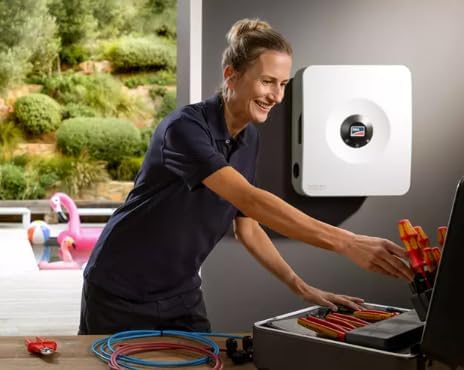
รูปที่ 4: A qualified installer performing setup or maintenance on the Sunny Boy Smart Energy inverter. This image emphasizes the professional nature of the installation process and the ease of access to the inverter's components.
5. คู่มือการใช้งาน
Once commissioned, the Sunny Boy Smart Energy inverter operates largely automatically, converting solar DC power to AC power for your home and managing battery charging/discharging.
5.1 การตรวจสอบระบบ
Monitor your system's performance using the SMA 360° app or other compatible SMA monitoring platforms. The app provides real-time data on energy production, consumption, battery status, and grid interaction. It also allows for quick adjustments and diagnostics.
5.2 การจัดการการไหลของพลังงาน
The inverter intelligently manages power flow:
- Prioritizes powering home loads directly from solar PV.
- Charges the connected battery with excess solar energy.
- Discharges the battery to power loads when solar production is low or during grid outages (Backup Secure function, if enabled).
- Draws power from the grid if solar and battery are insufficient.
ในกรณีที่เกิดกริดยูtage, the inverter can provide up to 1900 W of power to essential loads, ensuring uninterrupted energy supply.
6. การบำรุงรักษา
การบำรุงรักษาอย่างสม่ำเสมอจะช่วยให้เครื่องแปลงกระแสไฟฟ้าของคุณมีอายุการใช้งานยาวนานและทำงานได้อย่างมีประสิทธิภาพสูงสุด ควรตัดการเชื่อมต่อแหล่งจ่ายไฟทั้งหมดก่อนทำการบำรุงรักษาทุกครั้ง
6.1 การตรวจสอบตามปกติ
- การตรวจสอบด้วยภาพ (รายไตรมาส): Check for any visible damage, loose connections, or signs of corrosion. Ensure ventilation openings are clear of dust and debris.
- Performance Monitoring (Monthly): Regularly check the system's performance via the SMA 360° app to identify any anomalies.
- Cleaning (Annually): ค่อยๆ เช็ดทำความสะอาดภายนอกของอินเวอร์เตอร์ด้วยผ้าเนื้อนุ่มและแห้งamp ผ้า ห้ามใช้สารทำความสะอาดที่มีฤทธิ์กัดกร่อนหรือตัวทำละลาย
6.2 การให้บริการอย่างมืออาชีพ
It is recommended to have a qualified technician perform a comprehensive system check annually. This includes verifying electrical connections, checking firmware updates, and assessing overall system health.
7 การแก้ไขปัญหา
If your inverter is not operating as expected, refer to the following troubleshooting guide. For persistent issues, contact technical support.
| ปัญหา | สาเหตุที่เป็นไปได้ | สารละลาย |
|---|
| อินเวอร์เตอร์ไม่จ่ายไฟ | No solar input, grid outage, DC/AC disconnect open, internal fault. | Check PV array connections, verify grid status, ensure disconnects are closed. Check error codes on the inverter or via the SMA 360° app. |
| เอาต์พุตพลังงานต่ำ | Partial shading, dirty PV panels, system fault, high temperature derating. | Check for shading, clean PV panels, monitor temperatures. The ShadeFix optimization should mitigate most shading issues. |
| ข้อความแสดงข้อผิดพลาดบนหน้าจอ/แอป | ความผิดพลาดของระบบเฉพาะ | Note the error code and consult the detailed error code list in the full technical manual or contact support with the code. |
| Communication issues with app | Network connectivity problems, app outdated. | Check Wi-Fi/Ethernet connection, restart router, update SMA 360° app. |
For advanced diagnostics, utilize the SMA 360° app which provides detailed system insights and troubleshooting assistance.
8. ข้อมูลจำเพาะ
| พารามิเตอร์ | ค่า |
|---|
| ชื่อรุ่น | SBSE-US |
| วัดtage | 3.8 กิโลวัตต์ |
| แหล่งพลังงาน | ใช้พลังงานแสงอาทิตย์และแบตเตอรี่ |
| การใช้ที่แนะนำ | บ้านสำนักงาน |
| ยี่ห้อ | Generic (Manufacturer: SMA US) |
| ขนาดสินค้า (กว้าง x ยาว x สูง) | 19.7 x 23.1 x 9.3 นิ้ว |
| ประสิทธิภาพสูงสุด | 97.5% |
| เอาท์พุตไฟฟ้ากระแสสลับ | 208/240 VAC Single-Phase, 60 Hz |
| MPPT Channels | 3 |
| DC/AC Design Capability | 200% |
9. การรับประกันและการสนับสนุน
9.1 ข้อมูลการรับประกัน
The Sunny Boy Smart Energy inverter comes with a รับประกัน 10 ปี, which is extendable to 25 years. Please refer to the official warranty document included with your product for full terms and conditions, including registration requirements for warranty extension.
9.2 การสนับสนุนด้านเทคนิค
For technical assistance, troubleshooting, or warranty claims, please contact SMA US customer support. Utilize the SMA 360° app for initial diagnostics and to access support resources. Ensure you have your inverter's model number (SBSE-US) and serial number ready when contacting support.
Additional resources may be available on the official SMA US webเว็บไซต์.


