
1. บทนำ
Thank you for choosing the Generic Monster Open Ear AC500 Bluetooth Earbuds. This manual provides essential information for setting up, operating, and maintaining your new earbuds. Please read this manual thoroughly before use to ensure optimal performance and longevity of your device.
2. สินค้าหมดview
เนื้อหาแพ็คเกจ:
- Monster Open Ear AC500 Bluetooth Earbuds (Left and Right)
- เคสชาร์จไฟ
- สายชาร์จ USB
- คู่มือการใช้งาน
คุณสมบัติหลัก:
- 13mm Large Unit & Composite Titanium Diaphragm: ให้เสียงที่ทรงพลังและคมชัด
- การส่งผ่านเสียงแบบทิศทาง: Ensures minimal sound leakage for private listening.
- Ergonomic Curved Ear Clip Design: Provides a stable and comfortable fit for extended wear.
- ระบบลดเสียงรบกวนการโทรอัจฉริยะ AI: Effectively reduces environmental noise during calls.
- กันน้ำและกันเหงื่อระดับ IPX5: Resists sweat and light splashes, ideal for sports.
- อายุการใช้งานแบตเตอรี่ที่ยาวนานขึ้น: Approximately 6 hours of playback per charge, with up to 30 hours total with the charging case.
- Bluetooth 5.3: เพื่อการเชื่อมต่อไร้สายที่เสถียรและมีประสิทธิภาพ
- ENC Denoising & HiFi Sound: Enhances audio clarity and quality.

Image: The Monster Open Ear AC500 Bluetooth Earbuds shown with their sleek charging case. The earbuds feature an open-ear design with a secure ear clip.
3. การตั้งค่า
3.1 การชาร์จหูฟังและเคส
- วางหูฟังลงในกล่องชาร์จ โดยให้แน่ใจว่าใส่เข้าที่อย่างถูกต้อง
- เสียบสายชาร์จ USB เข้ากับพอร์ตชาร์จบนเคส และเสียบปลายอีกด้านหนึ่งเข้ากับอะแดปเตอร์แปลงไฟ USB (ไม่ได้รวมอยู่ในชุด) หรือพอร์ต USB ของคอมพิวเตอร์
- ไฟแสดงสถานะบนเคสจะแสดงสถานะการชาร์จ เมื่อชาร์จเต็มแล้ว ไฟจะระบุว่าชาร์จเต็มหรือดับลง
- A full charge provides approximately 6 hours of playback for the earbuds, with the charging case extending total battery life to about 30 hours.

Image: An illustration highlighting the extended battery life of the earbuds, showing 1 hour charging duration, 6 hours playback duration, and 30 hours standby time with the charging case.
3.2 การจับคู่บลูทูธ
- ตรวจสอบให้แน่ใจว่าได้ชาร์จเอียร์บัดแล้ว
- เปิดกล่องชาร์จ หูฟังจะเข้าสู่โหมดจับคู่โดยอัตโนมัติ ซึ่งจะแสดงด้วยไฟกระพริบบนหูฟัง
- บนอุปกรณ์ของคุณ (สมาร์ทโฟน แท็บเล็ต ฯลฯ) ไปที่การตั้งค่าบลูทูธ
- ค้นหา new devices and select "Monster AC500" (or similar name) from the list of available devices.
- Once connected, the earbud indicator light will stop flashing, and you will hear a confirmation tone.
- เมื่อนำเอียร์บัดออกจากเคส เอียร์บัดจะเชื่อมต่อกับอุปกรณ์ที่จับคู่ไว้ครั้งล่าสุดโดยอัตโนมัติ หากเปิดใช้งาน Bluetooth บนอุปกรณ์
4. คู่มือการใช้งาน
4.1 เปิด/ปิดเครื่อง
- เปิดเครื่อง: เปิดกล่องชาร์จ หูฟังจะเปิดโดยอัตโนมัติ
- หมดแรง: ใส่หูฟังกลับเข้าไปในกล่องชาร์จและปิดฝา หูฟังจะปิดโดยอัตโนมัติและเริ่มชาร์จ
4.2 การเล่นเพลง
- เล่น/หยุดชั่วคราว: แตะหูฟังเอียร์บัดข้างใดข้างหนึ่งหนึ่งครั้ง
- เพลงถัดไป: แตะสองครั้งที่หูฟังเอียร์บัดด้านขวา
- แทร็กก่อนหน้า: แตะสองครั้งที่หูฟังเอียร์บัดด้านซ้าย
- ปรับระดับเสียงขึ้น: แตะหูฟังเอียร์บัดด้านขวาสามครั้ง
- ลดเสียงลง: แตะหูฟังเอียร์บัดด้านซ้ายสามครั้ง
4.3 การจัดการการโทร
- รับ/วางสาย: แตะหูฟังเอียร์บัดข้างใดข้างหนึ่งหนึ่งครั้ง
- ปฏิเสธสาย: กดเอียร์บัดข้างใดข้างหนึ่งค้างไว้ 2 วินาที
4.4 ผู้ช่วยเสียง
- เปิดใช้งาน Voice Assistant: กดหูฟังข้างใดข้างหนึ่งค้างไว้ 3 วินาที (เช่น ใช้กับ Siri หรือ Google Assistant)
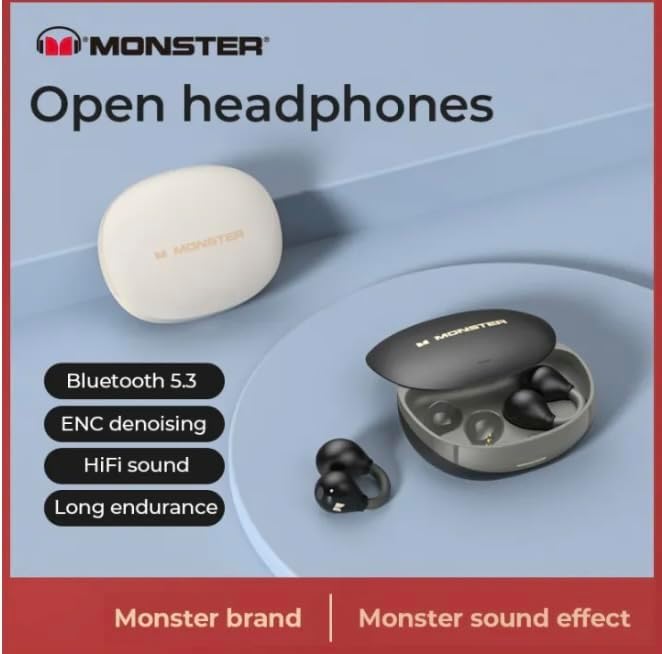
Image: A graphic highlighting key features such as Bluetooth 5.3, ENC denoising, HiFi sound, and long endurance, emphasizing the 'Monster' brand experience.

Image: An illustration demonstrating the AI intelligent noise reduction algorithm, which effectively reduces ambient noise and wind noise using a double microphone array beamforming technology.

Image: A detailed diagram showing the internal components responsible for pure original sound, including the 13mm super large unit, composite titanium metal diaphragm, and OFC high-purity multi-track voice coil.

Image: A woman wearing the Monster Open Ear AC500 Bluetooth Earbuds, demonstrating their secure and comfortable fit during physical activity.
5. การบำรุงรักษา
5.1 การทำความสะอาด
- เช็ดหูฟังและกล่องชาร์จเบาๆ ด้วยผ้าแห้งนุ่มที่ไม่เป็นขุย
- ห้ามใช้สารทำความสะอาดที่มีฤทธิ์กัดกร่อน แอลกอฮอล์ หรือตัวทำละลายเคมี
- ตรวจสอบให้แน่ใจว่าหน้าสัมผัสการชาร์จบนหูฟังทั้งสองข้างและเคสสะอาดและแห้ง
5.2 พื้นที่จัดเก็บ
- เก็บหูฟังเอียร์บัดไว้ในกล่องชาร์จเมื่อไม่ได้ใช้งานเพื่อปกป้องและชาร์จอยู่เสมอ
- หลีกเลี่ยงการเก็บในอุณหภูมิที่สูงหรือต่ำเกินไป (ร้อนหรือเย็นเกินไป) หรือในสภาพแวดล้อมที่มีความชื้นสูง
5.3 ความต้านทานน้ำ (IPX5)
The earbuds are IPX5 waterproof, meaning they are protected against low-pressure water jets from any direction. They are resistant to sweat and light rain, but are not designed for submersion in water or use during swimming. Ensure the earbuds are dry before placing them back into the charging case.

Image: A visual representation of the IPX5 professional waterproof performance, indicating the highly sealed body effectively resists invasion from water, rainwater, and makeup water.
6 การแก้ไขปัญหา
- หูฟังไม่จับคู่:
ตรวจสอบให้แน่ใจว่าหูฟังชาร์จแบตเตอรี่เต็มแล้ว ปิดและเปิดบลูทูธบนอุปกรณ์ของคุณ ลบอุปกรณ์ออกจากรายการบลูทูธแล้วลองจับคู่ใหม่อีกครั้ง - ไม่มีเสียงจากหูฟังข้างหนึ่ง:
Place both earbuds back into the charging case, close the lid, wait a few seconds, then take them out again. Check if both are connected. - ปัญหาการชาร์จ:
Ensure the charging cable is securely connected. Check if the charging contacts on both earbuds and case are clean and free of debris. Try a different USB port or power adapter. - ระดับเสียงต่ำหรือคุณภาพเสียงไม่ดี:
Adjust the volume on both your device and the earbuds. Ensure the earbuds are properly seated in your ears.
7. ข้อมูลจำเพาะ
| คุณสมบัติ | คำอธิบาย |
|---|---|
| ยี่ห้อ | ทั่วไป |
| หมายเลขรุ่น | 001 |
| ASIN | B0CTD15YT8 |
| การวางตำแหน่งหู | หูเปิด |
| ฟอร์มแฟกเตอร์ | บนหู |
| การควบคุมเสียงรบกวน | Active Noise Cancellation (AI Intelligent Call Noise Reduction) |
| เวอร์ชันบลูทูธ | 5.3 |
| ความต้านทานต่อน้ำ | IPX5 |
| เวลาการเล่น | ประมาณ 6 ชั่วโมง (หูฟัง), 30 ชั่วโมง (เมื่อใช้ร่วมกับเคสชาร์จ) |
| ขนาดไดร์เวอร์ | 13มม. |
| ผู้ผลิต | mezone |
| สี | สีดำ |
| วันที่พร้อมใช้งานครั้งแรก | 26 มกราคม 2024 |
8. การรับประกันและการสนับสนุน
ผลิตภัณฑ์นี้อยู่ภายใต้การรับประกันของผู้ผลิต สำหรับเงื่อนไขและข้อกำหนดการรับประกันโดยละเอียด โปรดดูเอกสารที่ให้ไว้ ณ เวลาที่ซื้อ หรือติดต่อผู้ค้าปลีกของคุณ
For technical support, troubleshooting assistance, or warranty claims, please contact the seller or manufacturer directly. Please have your product model number (001) and ASIN (B0CTD15YT8) ready when contacting support.