
1. บทนำ
This manual provides detailed instructions for the safe and effective use of your iJoy Disney Winnie The Pooh Wireless Bluetooth Speaker. Please read this manual thoroughly before operating the device and retain it for future reference.
2. อะไรอยู่ในกล่อง
Carefully unpack your speaker and ensure all items are present:
- iJoy Disney Winnie The Pooh Wireless Bluetooth Speaker
- สายชาร์จ USB
- สาย AUX สำรอง
- คู่มือผู้ใช้งาน (เอกสารฉบับนี้)

Image: The speaker shown next to its retail packaging, illustrating the product and its box.
3. สินค้าหมดview
3.1 ปุ่มควบคุม
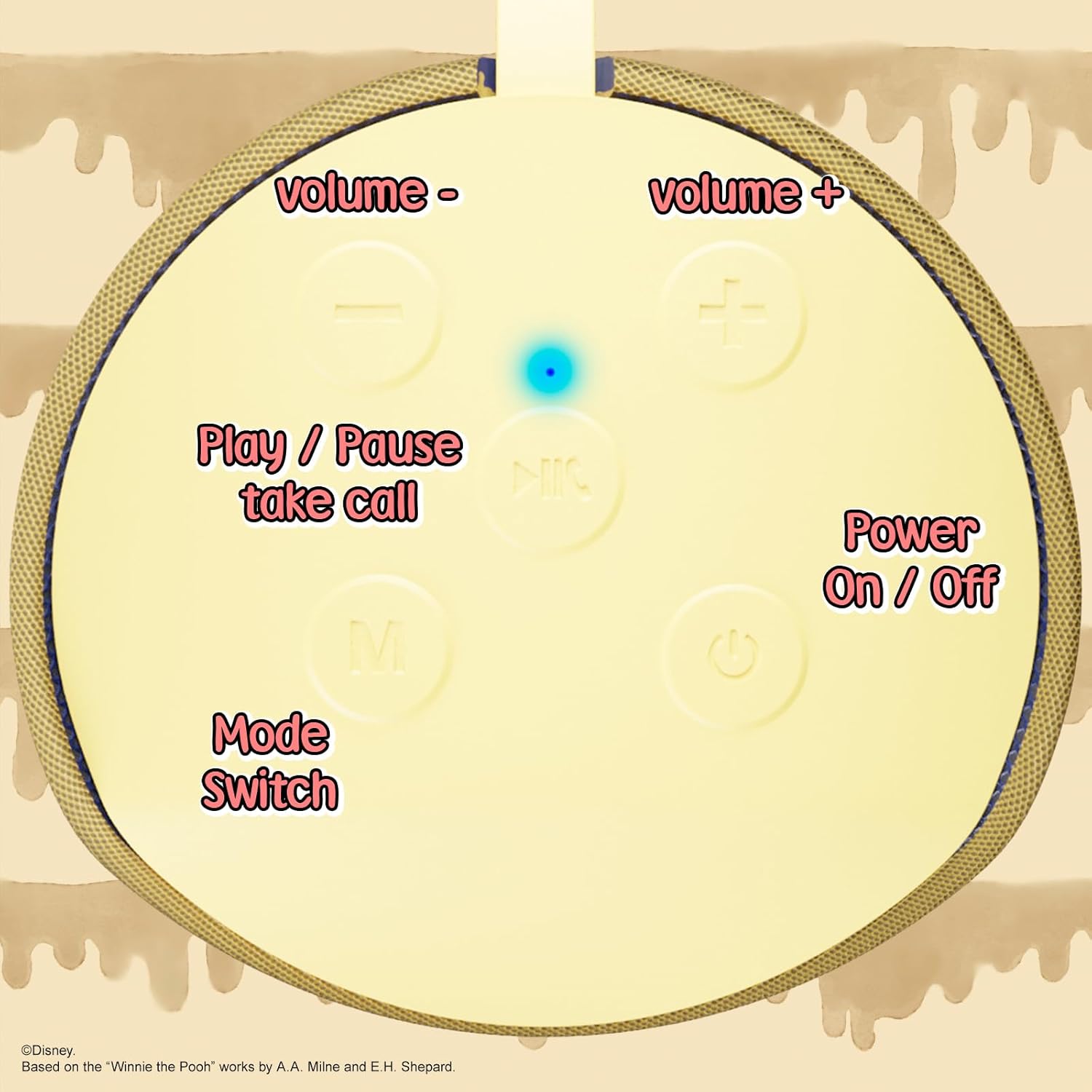
Image: A close-up of the speaker's top panel, displaying the control buttons.
- ปุ่มเปิด/ปิด: กดค้างไว้เพื่อเปิดหรือปิดลำโพง
- ปุ่มเล่น/หยุดชั่วคราว: Press to play or pause audio. Also used to answer or end phone calls.
- ปุ่มเพิ่มระดับเสียง (+): กดเพื่อเพิ่มระดับเสียง กดค้างไว้เพื่อข้ามไปยังเพลงถัดไป
- ปุ่มลดระดับเสียง (-): กดเพื่อลดระดับเสียง กดค้างไว้เพื่อไปยังแทร็กก่อนหน้า
- Mode Switch (M) Button: Press to switch between Bluetooth, FM Radio, SD Card, and USB modes.
3.2 พอร์ตและตัวชี้วัด

ภาพ: รายละเอียด view of the speaker's rear panel, highlighting the AUX port, SD card slot, USB port, and Micro USB charging port.
- พอร์ต AUX: For connecting external audio devices via the provided 3.5mm AUX cable.
- ช่องเสียบการ์ด SD: Insert a microSD card for direct audio playback.
- พอร์ต USB: เสียบแฟลชไดรฟ์ USB เพื่อเล่นเสียงโดยตรง
- พอร์ตชาร์จ Micro USB: เชื่อมต่อสายชาร์จ USB ที่นี่เพื่อชาร์จลำโพง
- ไฟแสดงสถานะ LED: Indicates charging status and Bluetooth pairing status.
4. การตั้งค่า
4.1 การชาร์จลำโพง
- เสียบปลาย Micro USB ของสายชาร์จเข้ากับพอร์ตชาร์จ Micro USB ของลำโพง
- เชื่อมต่อปลายสาย USB มาตรฐานเข้ากับอะแดปเตอร์แปลงไฟ USB (ไม่ได้รวมอยู่ในชุด) หรือพอร์ต USB ของคอมพิวเตอร์
- The LED indicator light will illuminate during charging and turn off once fully charged.
- โดยทั่วไปการชาร์จเต็มจะใช้เวลาประมาณ 2 ชั่วโมง
4.2 การจับคู่บลูทูธ
- ตรวจสอบให้แน่ใจว่าลำโพงชาร์จเต็มแล้ว
- Press and hold the Power On/Off button to turn on the speaker. You will hear an audible prompt, and the LED indicator will flash, indicating it's in pairing mode.
- บนอุปกรณ์พกพาของคุณ (สมาร์ทโฟน แท็บเล็ต ฯลฯ) ให้เปิดใช้งานบลูทูธ
- ค้นหา available Bluetooth devices. The speaker will appear as "iJoy Winnie The Pooh Speaker" or similar.
- Select the speaker from the list to pair. Once successfully paired, you will hear a confirmation sound, and the LED indicator will stop flashing and remain solid.
- ลำโพงจะเชื่อมต่อกับอุปกรณ์ที่จับคู่ล่าสุดโดยอัตโนมัติเมื่อเปิดเครื่อง หากบลูทูธของอุปกรณ์นั้นเปิดใช้งานอยู่และอยู่ในระยะทำการ
5. คู่มือการใช้งาน
5.1 โหมดบลูทู ธ
After successful pairing, you can stream audio wirelessly from your device to the speaker. Use your device's controls or the speaker's Play/Pause, Volume Up/Down buttons to manage playback.
โหมดวิทยุ FM 5.2
- กดปุ่มโหมด (M) เพื่อเปลี่ยนเป็นโหมดวิทยุ FM
- กดปุ่มเล่น/หยุดชั่วคราวเพื่อสแกนและบันทึกสถานีวิทยุ FM ที่ใช้งานได้โดยอัตโนมัติ
- ใช้ปุ่มเพิ่มเสียง (+) และลดเสียง (-) (กดสั้นๆ) เพื่อเลื่อนดูสถานีที่บันทึกไว้
5.3 SD Card / USB Playback
- Insert a microSD card into the SD card slot or a USB flash drive into the USB port.
- The speaker will automatically switch to the corresponding mode and begin playing audio files. If not, press the Mode (M) button to select the correct mode.
- Use the speaker's Play/Pause, Volume Up/Down buttons to control playback.
5.4 โหมด AUX
- Connect one end of the provided 3.5mm AUX cable to the speaker's AUX port.
- เชื่อมต่อปลายอีกด้านเข้ากับแจ็คหูฟังของอุปกรณ์ออดิโอของคุณ
- The speaker will automatically switch to AUX mode. If not, press the Mode (M) button.
- Control playback and volume primarily from your connected audio device.
5.5 การโทรแบบแฮนด์ฟรี
เมื่อเชื่อมต่อกับสมาร์ทโฟนผ่านบลูทูธ:
- รับสาย: กดปุ่มเล่น/หยุดชั่วคราวหนึ่งครั้ง
- วางสาย: กดปุ่มเล่น/หยุดชั่วคราวหนึ่งครั้งระหว่างการโทร
- ปฏิเสธสาย: กดปุ่มเล่น/หยุดชั่วคราว
6. การบำรุงรักษา
- ทำความสะอาดลำโพงด้วยผ้านุ่มและแห้ง ห้ามใช้น้ำยาทำความสะอาดหรือสารละลายที่มีฤทธิ์กัดกร่อน
- The speaker is IPX4 splashproof, meaning it can withstand splashes of water. Do not submerge it in water.
- เก็บลำโพงไว้ในที่เย็นและแห้งเมื่อไม่ได้ใช้งาน
- ควรหลีกเลี่ยงการวางลำโพงไว้ในที่ที่มีอุณหภูมิสูงหรือต่ำเกินไป แสงแดดโดยตรง หรือความชื้นสูง
7 การแก้ไขปัญหา
| ปัญหา | สาเหตุที่เป็นไปได้ | สารละลาย |
|---|---|---|
| ลำโพงไม่เปิด | แบตเตอรี่ต่ำ | ชาร์จลำโพงให้เต็ม |
| ไม่สามารถจับคู่ผ่านบลูทูธได้ | Speaker not in pairing mode / Device Bluetooth off / Too far from device | Ensure speaker is in pairing mode (flashing LED). Turn on Bluetooth on your device. Move speaker closer to device (within 30 feet). |
| ไม่มีเสียง | Volume too low / Incorrect mode / Device not playing audio | Increase speaker and device volume. Press 'M' button to select correct mode. Ensure audio is playing on your connected device. |
| การรับสัญญาณวิทยุ FM ไม่ดี | Weak signal / Interference | Move the speaker to a different location. The AUX cable can act as an antenna; try connecting it. |
8. ข้อมูลจำเพาะ

Image: The speaker with visual indicators showing its height of 6.3 inches and width of 2.9 inches.
| คุณสมบัติ | รายละเอียด |
|---|---|
| หมายเลขรุ่น | SS-KH7C-FS4O |
| เทคโนโลยีการเชื่อมต่อ | บลูทูธ |
| ช่วงการสื่อสารไร้สาย | สูงถึง 30 ฟุต (10 เมตร) |
| ประเภทลำโพง | หอคอย |
| กำลังขับสูงสุดของลำโพง | 20 วัตต์ |
| โหมดเอาต์พุตเสียง | โมโน |
| ความจุของแบตเตอรี่ | 800 มิลลิวินาทีamp ชั่วโมง |
| เวลาในการชาร์จ | ประมาณ 2 ชั่วโมง |
| เวลาเล่น | Up to 3 Hours (depending on volume and usage) |
| ระดับความต้านทานต่อน้ำ | IPX4 (ป้องกันน้ำกระเซ็น) |
| ขนาดสินค้า | ลึก 3 นิ้ว x กว้าง 3 นิ้ว x สูง 6 นิ้ว (ลึก 7.62 ซม. x กว้าง 7.62 ซม. x สูง 15.24 ซม.) |
| น้ำหนักสินค้า | 8 ออนซ์ (226.8 กรัม) |
| ส่วนประกอบที่รวมอยู่ | Bluetooth Speaker, USB Charging Cable, Backup AUX Cable, Owners Manual |
| คุณสมบัติพิเศษ | Built-in Microphone, LED Indicator Lights, Portable, SD Card Slot, USB Port, FM Radio |
9. การรับประกันและการสนับสนุน
9.1 ข้อมูลการรับประกัน
This iJoy Disney Winnie The Pooh Wireless Bluetooth Speaker comes with a 90-day manufacturer's warranty from the date of purchase. This warranty covers manufacturing defects and workmanship under normal use. It does not cover damage caused by misuse, accidents, unauthorized modifications, or normal wear and tear.
9.2 การสนับสนุนลูกค้า
For technical assistance, warranty claims, or further inquiries, please contact iJoy customer support through their official website or the retailer where the product was purchased. Please have your model number (SS-KH7C-FS4O) and proof of purchase ready.