
1. สินค้าหมดview
The Kungfuking Wall Mount Power Strip with USB is designed to provide convenient power access and charging capabilities for multiple devices. This unit features 3 standard AC outlets, 2 USB-A ports with QC 3.0 fast charging, and 1 USB-C port with 18W power delivery. It includes surge protection and a 6-foot extension cord, making it suitable for various mounting applications such as under desks, on walls, or on tabletops.
คุณสมบัติหลัก:
- เต้ารับไฟฟ้ากระแสสลับ 3 ช่อง: Provides standard power connections for electronic devices (100V-125V, 12A=1500W).
- 3 พอร์ต USB: Includes 2 QC 3.0 USB-A ports and 1 18W USB-C port for fast charging of compatible devices.
- การป้องกันไฟกระชาก: ปกป้องอุปกรณ์ที่เชื่อมต่อจากไฟกระชาก
- การออกแบบที่ติดตั้งได้: Features mounting holes for secure installation on various surfaces (walls, desks, table legs).
- 6-Foot Extension Cord: เปิดโอกาสให้เลือกตำแหน่งงานได้อย่างยืดหยุ่น
- UL จดทะเบียน: Certified for safety standards.

รูปที่ 1 : ด้านหน้า view of the Kungfuking Wall Mount Power Strip, showing 3 AC outlets, 2 USB-A ports, 1 USB-C port, an on/off switch, and the coiled 6-foot power cord.
2. คำแนะนำด้านความปลอดภัยที่สำคัญ
Please read and follow all safety instructions carefully before using this product to prevent injury or damage.
- ห้ามใช้เกินกำลังรับโหลดสูงสุด 12A / 1500W
- This product is for indoor use only. Do not expose to moisture or use in wet environments.
- ห้ามถอดประกอบหรือดัดแปลงปลั๊กไฟ ควรส่งซ่อมโดยช่างผู้ชำนาญการเท่านั้น
- เก็บให้ห่างจากเด็กและสัตว์เลี้ยง
- Ensure the power cord is fully inserted into a grounded wall outlet.
- Avoid running the power cord under carpets or in areas where it can be tripped over or damaged.
- If the power strip shows signs of damage, discontinue use immediately.
- The surge protector feature protects against power surges; however, it is not a substitute for proper grounding or protection against direct lightning strikes.
3. การตั้งค่าและการติดตั้ง
The Kungfuking Wall Mount Power Strip offers flexible installation options. Choose the method that best suits your needs.
คำแนะนำในการติดตั้ง:
- เลือกสถานที่: Choose a flat, stable surface for mounting, such as a wall, under a desk, or on table legs. Ensure the location is dry and free from obstructions.
- ทำเครื่องหมายจุดยึด: Position the power strip in the desired location. Use a pencil to mark the positions of the four mounting holes located on the flanges at each end of the power strip.
- เจาะรูนำร่อง (ถ้าจำเป็น): Depending on the mounting surface material, you may need to drill small pilot holes at the marked points. Use an appropriate drill bit size for the screws provided (or suitable screws for your surface).
- Secure the Power Strip: Align the mounting holes on the power strip with the pilot holes (or marks) and secure the unit using screws. Ensure the power strip is firmly attached and does not wobble.
- เชื่อมต่อกับพลังงาน: Plug the 6-foot extension cord into a standard grounded wall outlet.

Figure 2: Illustration of the power strip's mounting holes for secure installation.

รูปที่ 3: อดีตamples of mounting locations: tabletop, under desk, and table legs.
4. คู่มือการใช้งาน
Once installed and connected to power, the power strip is ready for use.
เปิด/ปิดเครื่อง:
- Locate the red ON/OFF switch on the power strip.
- Press the switch to the "ON" position to supply power to the outlets and USB ports. The switch will illuminate when power is active.
- Press the switch to the "OFF" position to cut power to all connected devices.
การใช้เต้ารับไฟฟ้ากระแสสลับ:
- Plug your electronic devices directly into the 3 AC outlets.
- Ensure that the total power consumption of all connected devices does not exceed 1500W.
การใช้งานพอร์ตชาร์จ USB:
- USB-A Ports (QC 3.0): Connect compatible devices using a USB-A cable for fast charging. These ports support Quick Charge 3.0 for accelerated charging speeds.
- USB-C Port (18W): Connect compatible devices using a USB-C cable for 18W power delivery. This port is suitable for charging smartphones, tablets, and other USB-C powered devices.
- The USB ports provide power automatically when a device is connected and the power strip is on.
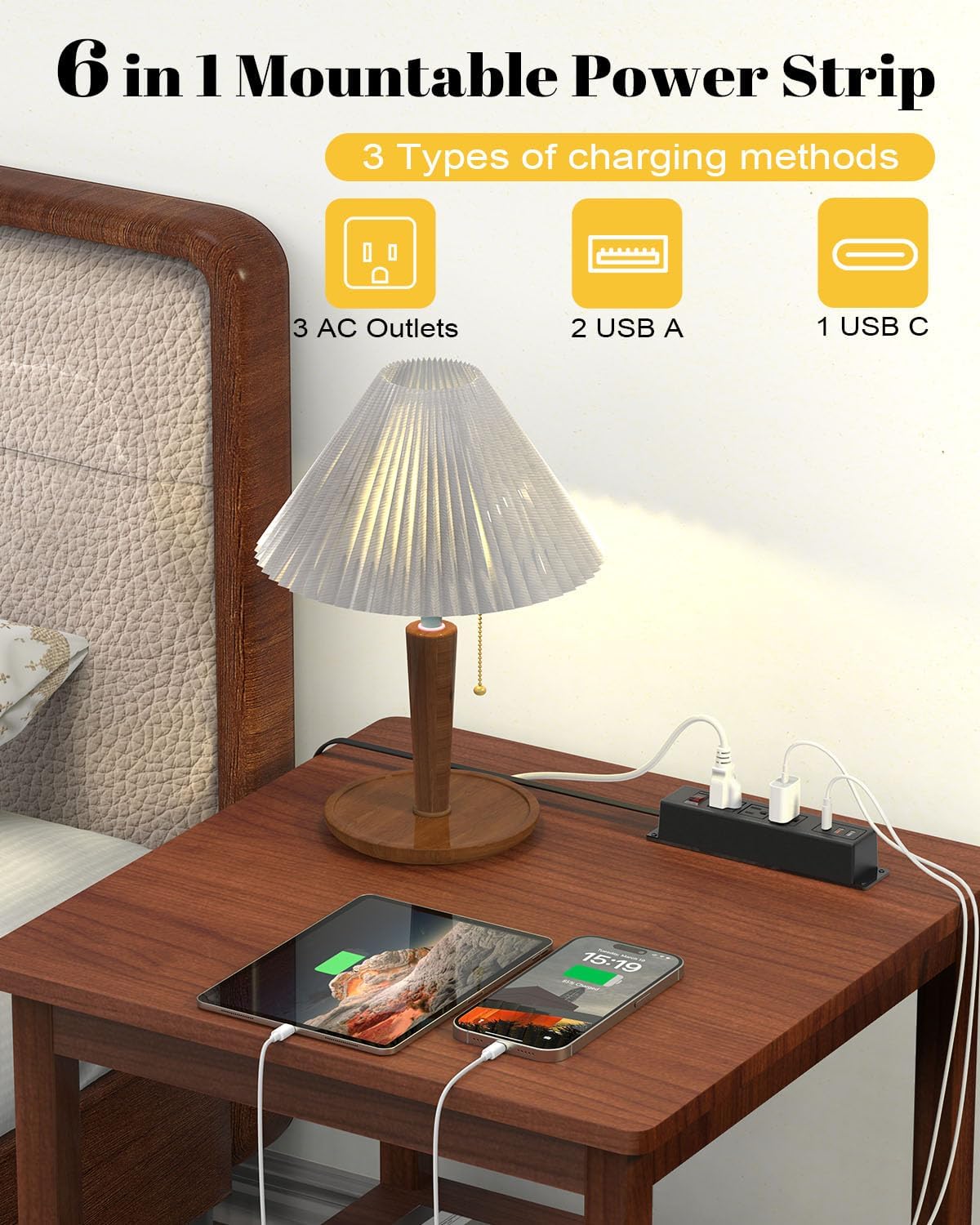
Figure 4: The power strip providing power to a lamp, phone, and tablet via AC and USB ports.

Figure 5: A device charging rapidly via the 18W USB-C port.
5. การบำรุงรักษา
Proper maintenance ensures the longevity and safe operation of your power strip.
- การทำความสะอาด: Disconnect the power strip from the wall outlet before cleaning. Use a dry, soft cloth to wipe the exterior. Do not use liquid cleaners or aerosols.
- การตรวจสอบ: Periodically inspect the power cord and the power strip for any signs of damage, such as frayed wires, cracks, or loose connections. If damage is found, discontinue use and replace the unit.
- พื้นที่จัดเก็บ: If storing the power strip, ensure it is disconnected from power and stored in a dry, cool place away from direct sunlight.
6 การแก้ไขปัญหา
หากคุณพบปัญหาเกี่ยวกับปลั๊กพ่วง โปรดดูปัญหาและวิธีแก้ไขที่พบบ่อยต่อไปนี้:
| ปัญหา | สาเหตุที่เป็นไปได้ | สารละลาย |
|---|---|---|
| ไม่มีไฟเข้าปลั๊กไฟ/พอร์ต USB |
|
|
| อุปกรณ์ไม่สามารถชาร์จผ่าน USB ได้ |
|
|
| ปลั๊กไฟให้ความรู้สึกอบอุ่น |
|
|
7. ข้อมูลจำเพาะ
| คุณสมบัติ | รายละเอียด |
|---|---|
| ยี่ห้อ | กังฟูกิง |
| แบบอย่าง | B0CT5QM5KD |
| AC Outlets AC | 3 |
| พอร์ต USB | 2 x USB-A (QC 3.0), 1 x USB-C (18W) |
| เล่มที่tage เรตติ้ง | 100V-125V |
| เอาท์พุตไฟฟ้ากระแสสลับ | 12A / 1500W (สูงสุด) |
| ความยาวสายไฟต่อ | 6 ฟุต |
| น้ำหนักสินค้า | 15.8 ออนซ์ |
| ขนาด (แพ็คเกจ) | 9.21 x 3.62 x 2.87 นิ้ว |
| คุณสมบัติพิเศษ | Desk Mount, Wall Mount, On/Off Switch, USB Slot, Surge Protection |
| การรับรอง | ได้รับการรับรองจาก UL |
8. การรับประกันและการสนับสนุน
For warranty information or technical support, please contact Kungfuking customer service. You can find more information and contact details on the official Kungfuking store page: