
1. บทนำ
This manual provides detailed instructions for the installation, operation, and maintenance of your G.SKILL MD1 Mid-Tower ATX PC Case. Please read this manual thoroughly before beginning assembly to ensure proper setup and to maximize the lifespan of your components.
The G.SKILL MD1 is designed for compatibility with ATX, mATX, and mini-ITX motherboards, offering a versatile foundation for various PC builds. It features a 4mm tempered glass side panel and front/top mesh panels for optimal airflow and component visibility.
2. คุณสมบัติของผลิตภัณฑ์
- ATX PC Case: Compatible with ATX, mATX, and mini-ITX motherboard sizes.
- แผงด้านข้างกระจกนิรภัย: 4mm thick tempered glass for clear internal component visibility.
- Front/Top Mesh Design: Engineered for enhanced airflow and cooling performance.
- รองรับหม้อน้ำ: Supports up to a 360mm AIO radiator for advanced cooling solutions.
- GPU Length Support: รองรับการ์ดจอที่มีความยาวสูงสุด 404 มม.
- Storage Drive Bays: Includes 2x 2.5" bays and 2x 3.5" bays for ampที่เก็บของ
- Tool-less Side Panel: Hinge design for easy access and maintenance.
- พอร์ต I/O ด้านหน้า: 2x USB 3.0, 1x USB Type-C, 1x Audio-Out, 1x Mic-In for convenient connectivity.
3. เนื้อหาบรรจุภัณฑ์
โปรดตรวจสอบว่ามีส่วนประกอบทั้งหมดที่ระบุไว้ด้านล่างนี้อยู่ในกล่องของคุณ:
- G.SKILL MD1 Mid-Tower ATX PC Case
- กล่องอุปกรณ์เสริม (สกรู, สายรัด, สแตนด์ออฟ)
- คู่มือการใช้งาน (เอกสารนี้)
4. การตั้งค่าและการติดตั้ง
4.1. การเตรียมคดี
Before installing components, ensure the case is placed on a stable, flat surface. Remove the tempered glass side panel by gently pulling it open from the rear hinge, then lifting it off. The opposite side panel can be removed by unscrewing the thumb screws at the rear and sliding the panel backward.

รูปที่ 1: ระเบิด view showing the removal of the front panel, top panel, and side panels.
4.2. การติดตั้งเมนบอร์ด
Install the appropriate standoffs for your motherboard size (ATX, mATX, or mini-ITX). Carefully place your motherboard into the case, aligning it with the standoffs, and secure it with screws. Ensure the I/O shield is properly seated before installing the motherboard.
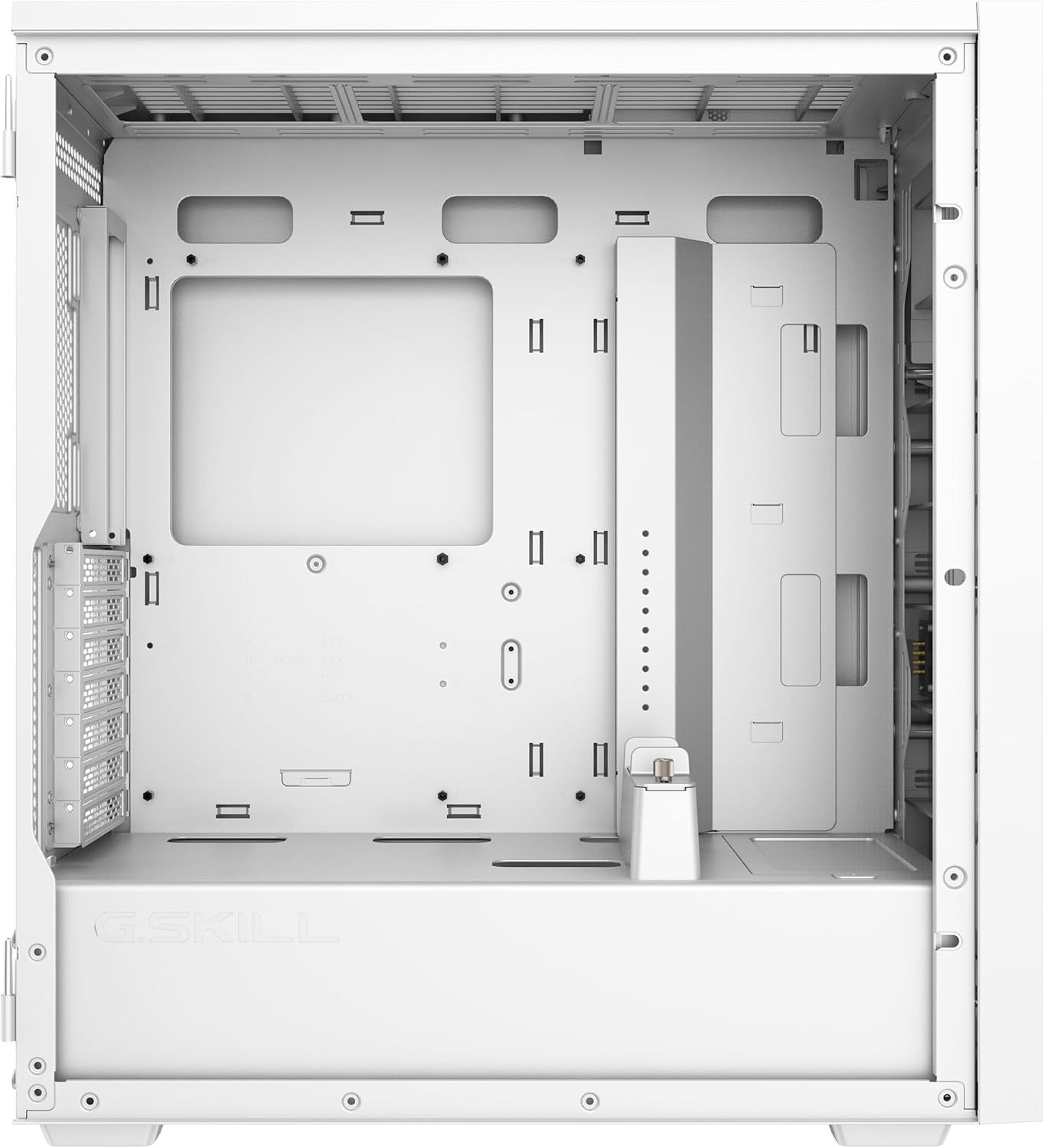
Figure 2: Main internal compartment of the G.SKILL MD1 case, illustrating the motherboard mounting area.
4.3. การติดตั้งไดรฟ์จัดเก็บข้อมูล
The case supports 2x 2.5" drives and 2x 3.5" drives. Locate the drive bays and secure your SSDs or HDDs using the provided screws. Ensure proper cable management for power and data connections.

รูปที่ 3: ด้านหลังภายใน view of the G.SKILL MD1 case, highlighting the 2.5" and 3.5" drive bays behind the motherboard tray.
4.4. การติดตั้งการ์ดจอ (GPU)
Install your graphics card into the appropriate PCIe slot on your motherboard. The case supports GPUs up to 404mm in length. Secure the GPU with the retention clip and any necessary screws. An included GPU support bracket can be used to prevent sag for longer cards.

รูปที่ 4: ภายใน view of the G.SKILL MD1 case with a graphics card installed, demonstrating the use of the GPU support bracket.
4.5. การเชื่อมต่อ I/O แผงด้านหน้า
Connect the front panel cables (USB 3.0, USB Type-C, Audio-Out, Mic-In, Power, Reset) to their corresponding headers on your motherboard. Refer to your motherboard manual for exact header locations.

Figure 5: Close-up of the G.SKILL MD1 case's front panel I/O, showing USB 3.0, USB Type-C, Audio-Out, Mic-In, Power, and Reset buttons.
5. คู่มือการใช้งาน
Once all components are securely installed and connected, replace the side panels. Connect your power supply to a wall outlet and press the power button on the front panel to start your system.

รูปที่ 6 : ด้านหน้า view of the G.SKILL MD1 case, showcasing the mesh panel and G.SKILL branding.
6. การบำรุงรักษา
Regular maintenance helps ensure optimal performance and longevity of your PC components. The G.SKILL MD1 case features mesh panels that act as dust filters.
6.1. การทำความสะอาดแผ่นกรองฝุ่น
Periodically clean the front and top mesh panels to prevent dust buildup, which can restrict airflow and lead to overheating. These panels can be removed for easy cleaning with compressed air or a soft brush.
6.2. การทำความสะอาดภายใน
With the side panels removed, use compressed air to clear dust from internal components such as CPU coolers, GPU fans, and power supply vents. Ensure the system is powered off and unplugged before performing any interior cleaning.
7 การแก้ไขปัญหา
If you encounter issues with your PC build within the G.SKILL MD1 case, consider the following common troubleshooting steps:
- ระบบไม่เปิดเครื่อง:
- Check all power connections, including the 24-pin ATX, 8-pin CPU, and GPU power cables.
- ตรวจสอบให้แน่ใจว่าสวิตช์จ่ายไฟอยู่ในตำแหน่ง 'เปิด'
- ตรวจสอบการเชื่อมต่อของปุ่มเปิด/ปิดเครื่องที่แผงด้านหน้ากับเมนบอร์ด
- ชิ้นส่วนที่ร้อนเกินไป:
- ทำความสะอาดแผ่นกรองฝุ่นและชิ้นส่วนภายใน
- Ensure case fans are properly installed and functioning, directing airflow efficiently.
- Verify CPU cooler and GPU cooler are correctly seated and making good contact.
- ไม่มีการแสดงผล:
- Ensure the monitor cable is connected to the graphics card, not the motherboard (if a dedicated GPU is installed).
- ติดตั้งการ์ดจอและโมดูล RAM ใหม่
8. ข้อมูลจำเพาะ
| คุณสมบัติ | รายละเอียด |
|---|---|
| ยี่ห้อ | จี.สกิล |
| หมายเลขรุ่น | GC-AWGW1-MD1 |
| ประเภทเคส | มิดทาวเวอร์ |
| ความเข้ากันได้ของเมนบอร์ด | ATX, mATX, mini-ITX |
| แผงด้านข้าง | 4mm Tempered Glass (Hinged) |
| แผงด้านหน้า | การออกแบบตาข่าย |
| แผงด้านบน | การออกแบบตาข่าย |
| ความยาวสูงสุดของ GPU | 404มม. |
| ฐานรองหม้อน้ำ | Up to 360mm (AIO) |
| ช่องไดรฟ์ขนาด 2.5 นิ้ว | 2 |
| ช่องไดรฟ์ขนาด 3.5 นิ้ว | 2 |
| พอร์ต I / O ด้านหน้า | 2x USB 3.0, 1x USB Type-C, 1x Audio-Out, 1x Mic-In |
| ขนาด (กxยxส) | 19.84 x 8.7 x 17.7 นิ้ว |
| น้ำหนักสินค้า | 19.91 ปอนด์ (9.05 กก.) |

Figure 7: Diagram illustrating the dimensions of the G.SKILL MD1 Mid-Tower ATX PC Case.
9. การรับประกันและการสนับสนุน
For warranty information and technical support, please refer to the official G.SKILL webหรือติดต่อฝ่ายบริการลูกค้าโดยตรง โปรดเก็บหลักฐานการซื้อไว้เพื่อใช้ในการเคลมประกัน
G.SKILL Official Webเว็บไซต์: www.gskill.com