
1. บทนำ
The ATTACK SHARK X3PRO is a high-performance lightweight wireless gaming mouse designed for precision and responsiveness. Featuring tri-mode connectivity, a flagship optical sensor, and durable switches, it offers an exceptional gaming experience for PC and Mac users.

Figure 1: ATTACK SHARK X3PRO Wireless Gaming Mouse (Red)
2. คุณสมบัติของผลิตภัณฑ์
- 4K/8K Wireless Gaming Mouse: Equipped with wireless 4K polling and wired 8K polling, the X3PRO sends signals to the computer 4 to 8 times faster than standard gaming mice, ensuring best-in-class precision and responsiveness.
- Pixart PAW3395 Flagship Sensor: Utilizes a Pixart 3395 optical sensor, offering 6 adjustable DPI levels (800/1600/2400/3200/5000/26000), 650 IPS tracking speed, 4000/8000Hz response speed, and 50G acceleration limit for precise positioning.
- การเชื่อมต่อสามโหมด: Supports USB-C wired mode, 2.4G wireless mode, and Bluetooth 5.2 mode for versatile use across different scenarios and up to 4 devices simultaneously.
- Kailh GM8.0 Switch & TTC Encoder: Features high-end Kailh Black Mamba GM8.0 Micro switches for crisp clicks, fast rebound, and quick trigger, with an 80 million click lifespan. The TTC scroll wheel encoder provides precise positioning.
- 60g Ultralight & Ergonomic Design: Weighing only 49g, the X3PRO's ergonomic design ensures a natural grip, reducing fatigue during extended gaming sessions and providing agility.
- ปุ่มตั้งโปรแกรมได้ 5 ปุ่ม: Total of 5 programmable buttons allow customization of DPI, polling rate, LOD, shortcuts, and macros via the dedicated driver software.
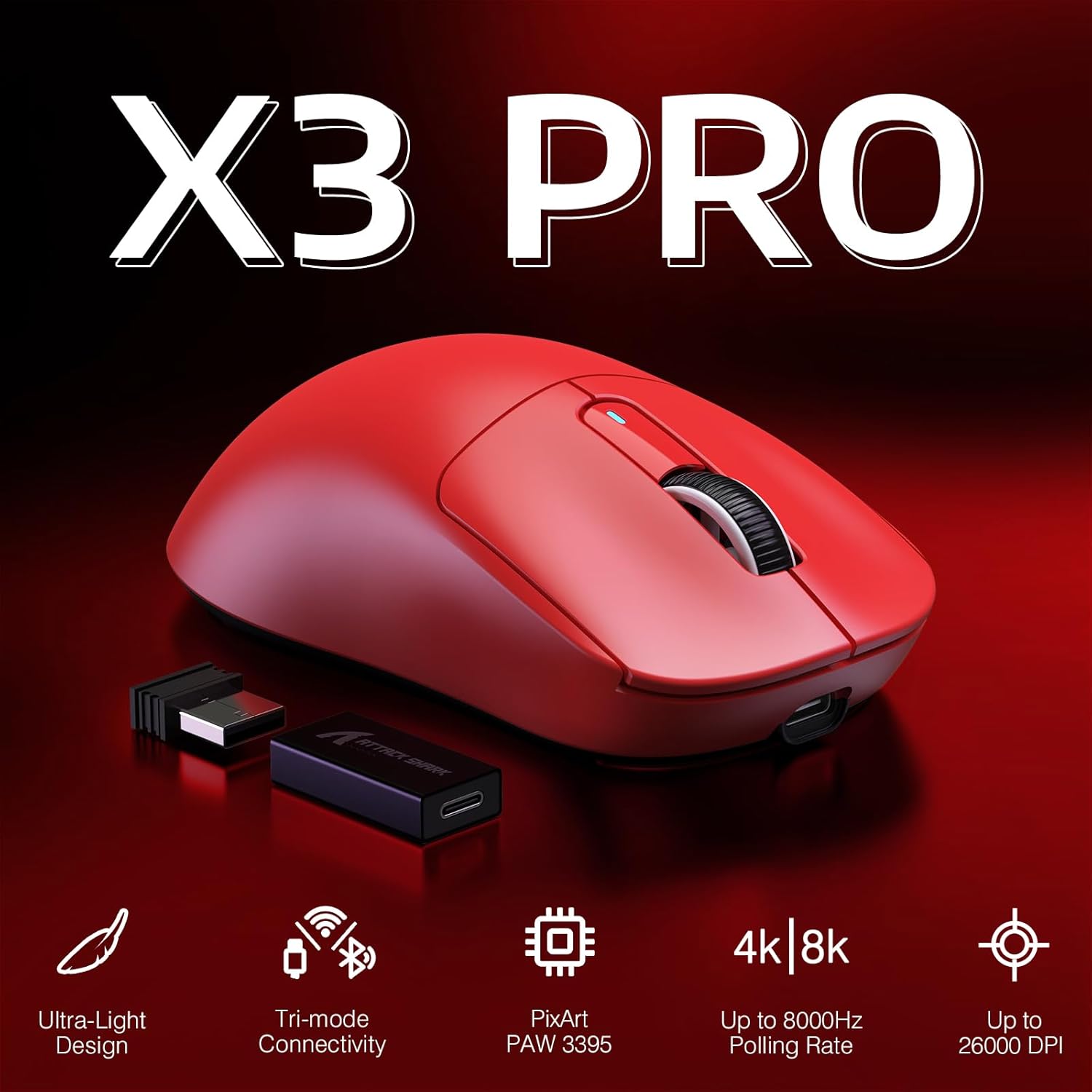
Figure 2: Key Features of the X3PRO Mouse

Figure 3: Ultra-Light Design for Effortless Action
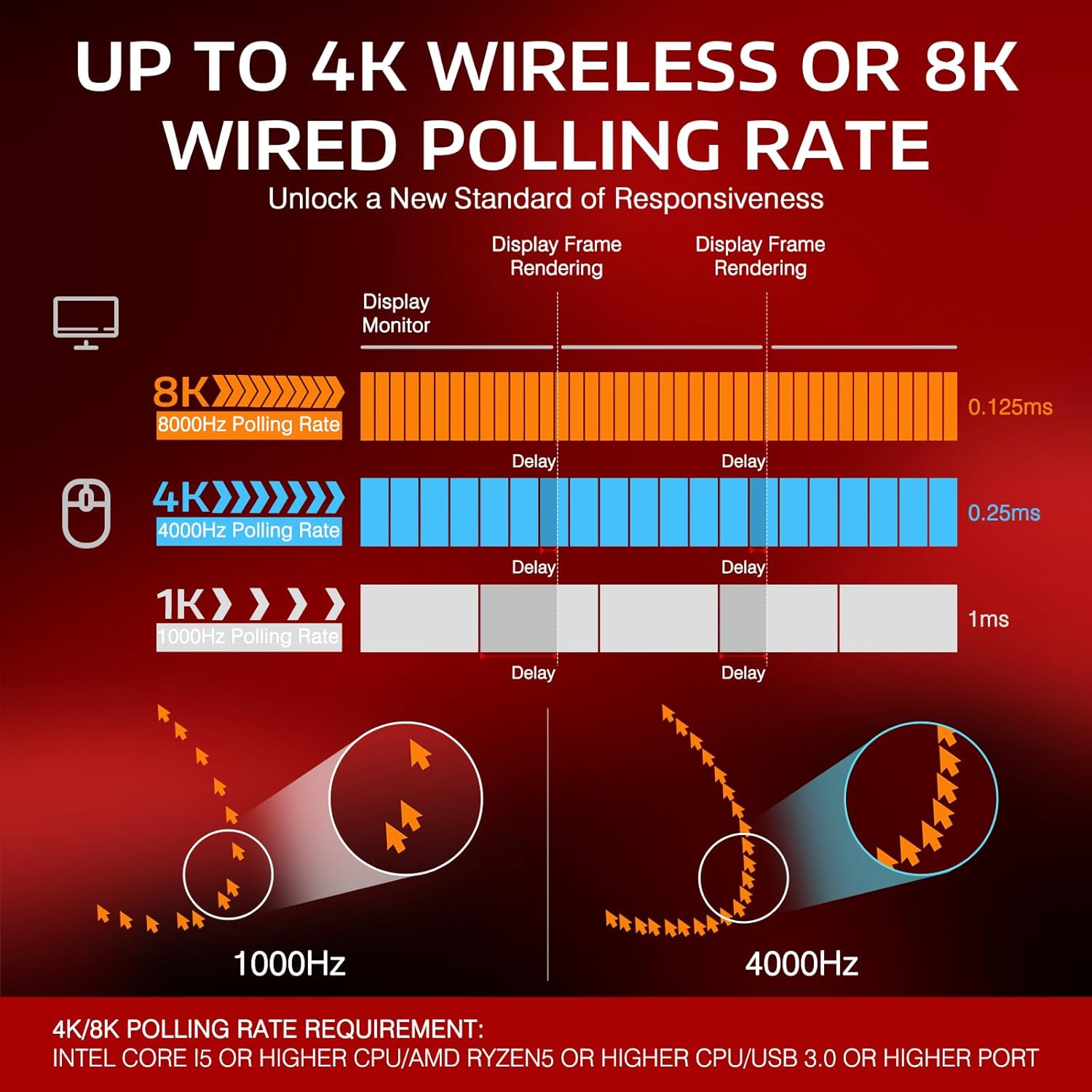
Figure 4: Polling Rate Comparison (1K, 4K, 8K)

Figure 5: Pixart PAW3395 Flagship Sensor

Figure 6: Kailh GM8.0 Switches & TTC Encoder
สินค้าเกินview วีดีโอ
วิดีโอนี้ให้ข้อมูลที่ครอบคลุมview of the ATTACK SHARK X3PRO 4K/8K Lightweight Wireless Gaming Mouse, highlighting its key features and benefits.
3. เนื้อหาบรรจุภัณฑ์
โปรดตรวจสอบให้แน่ใจว่ามีสินค้าทั้งหมดอยู่ในแพ็คเกจ:
- ATTACK SHARK X3PRO Wireless Gaming Mouse
- USB Receiver (located at the bottom of the mouse)
- USB-C Charging Cable (Flexible Paracord Cable)
- Type-C to USB A Adapter

Figure 7: Product Parameters and Components
4. การตั้งค่า
4.1. การเชื่อมต่อเมาส์
The X3PRO mouse offers three connection modes:
- โหมดไร้สาย 2.4G:
- Locate the USB receiver on the bottom of the mouse. Open the cover and take out the receiver.
- Plug the USB receiver into an available USB port on your computer. For optimal performance, use a USB 3.0 or higher port.
- Switch the mode selector on the bottom of the mouse to '2.4G'. The mouse will automatically connect.
- โหมดบลูทูธ 5.2:
- สลับตัวเลือกโหมดที่ด้านล่างของเมาส์ไปที่ 'บลูทูธ'
- บนคอมพิวเตอร์ของคุณ ไปที่การตั้งค่าบลูทูธและค้นหาอุปกรณ์ใหม่
- Select 'ATTACK SHARK X3PRO' from the list of available devices to pair.
- โหมดสาย USB-C:
- เชื่อมต่อสาย USB-C ที่ให้มาเข้ากับพอร์ตด้านหน้าของเมาส์
- Connect the other end of the USB-C cable (or use the Type-C to USB A adapter if needed) to an available USB port on your computer.
- Switch the mode selector on the bottom of the mouse to 'OFF' or leave it in '2.4G'/'BT' mode; the mouse will function as a wired device and charge simultaneously.

Figure 8: Flashspeed Connectivity Modes
4.2. การติดตั้งไดรเวอร์/ซอฟต์แวร์
To unlock the full potential of your X3PRO mouse, including programmable buttons, DPI settings, polling rate adjustments, and macro functions, please download and install the official ATTACK SHARK driver software from the manufacturer's website. The software is compatible with Windows XP / VISTA / 7 / 8 / 10 / MAC.
5. คู่มือการใช้งาน
5.1. การปรับ DPI
The mouse features 6 adjustable DPI levels. You can cycle through these levels using the dedicated DPI button on the bottom of the mouse or customize them via the driver software. The default DPI levels are 800/1600/2400/3200/5000/26000.
5.2. การปรับอัตราการโพล
The polling rate can be adjusted to 4000Hz (wireless) or 8000Hz (wired) for maximum responsiveness. This setting is typically adjusted within the driver software.
5.3. การปรับแต่งปุ่ม
The X3PRO has 5 programmable buttons. Use the ATTACK SHARK driver software to assign custom functions, macros, or shortcuts to these buttons according to your preferences and gaming needs.
5.4. การชาร์จเมาส์
The mouse is equipped with a long-lasting lithium battery. To charge, connect the USB-C charging cable to the mouse and a USB power source (e.g., computer USB port, wall adapter). The mouse can be used while charging in wired mode.

รูปที่ 9: อายุการใช้งานแบตเตอรี่ที่เพิ่มขึ้น
6. การบำรุงรักษา
To ensure the longevity and optimal performance of your ATTACK SHARK X3PRO mouse, follow these maintenance guidelines:
- การทำความสะอาด: เช็ดพื้นผิวเมาส์ด้วยผ้าแห้งนุ่มๆ เป็นประจำ สำหรับคราบสกปรกฝังแน่น ให้ใช้ผ้าชุบน้ำหมาดๆ เช็ดเบาๆampชุบผ้าด้วยน้ำ หลีกเลี่ยงการใช้สารเคมีรุนแรงหรือวัสดุที่มีฤทธิ์กัดกร่อน
- การดูแลเซ็นเซอร์: รักษาเซ็นเซอร์ออปติคัลที่ด้านล่างของเมาส์ให้สะอาด ปราศจากฝุ่นหรือเศษผง ใช้สำลีก้านหรือลมอัดหากจำเป็น
- ฟุตเทฟล่อน: The mouse features 100% virgin grade PTFE feet for consistent glide. Avoid scratching or damaging them. Replacement feet may be available from the manufacturer if worn.
- พื้นที่จัดเก็บ: เมื่อไม่ได้ใช้งานเป็นเวลานาน ควรเก็บเมาส์ไว้ในที่แห้งและเย็น หลีกเลี่ยงแสงแดดโดยตรงและอุณหภูมิที่สูงหรือต่ำเกินไป

Figure 10: 100% Virgin Grade PTFE Feet
7 การแก้ไขปัญหา
If you encounter issues with your ATTACK SHARK X3PRO mouse, please refer to the following common troubleshooting steps:
- เมาส์ไม่ตอบสนอง:
- Ensure the mouse is charged. Connect it via USB-C cable to charge and test in wired mode.
- Check the mode switch on the bottom of the mouse (2.4G, BT, OFF) and ensure it's set to the desired connection type.
- สำหรับระบบไร้สาย 2.4G โปรดตรวจสอบให้แน่ใจว่าตัวรับสัญญาณ USB เสียบเข้ากับพอร์ต USB ที่ใช้งานได้แน่นสนิท ลองใช้พอร์ต USB อื่นดู
- For Bluetooth, ensure Bluetooth is enabled on your computer and the mouse is paired correctly. Try unpairing and re-pairing the device.
- รีสตาร์ทเครื่องคอมพิวเตอร์ของคุณ
- Intermittent Disconnections (2.4G/Bluetooth):
- Ensure the mouse is within range of the receiver/Bluetooth adapter and there are no significant obstructions.
- หลีกเลี่ยงการรบกวนทางแม่เหล็กไฟฟ้าที่รุนแรงจากอุปกรณ์ไร้สายอื่นๆ
- ตรวจสอบให้แน่ใจว่าแบตเตอรี่ของเมาส์ไม่เหลือน้อยมากจนน่าเป็นห่วง
- Update your computer's USB or Bluetooth drivers.
- If using 2.4G, try connecting the USB receiver to a different USB port, preferably a USB 3.0 or higher port.
- DPI/Polling Rate Issues:
- Ensure the ATTACK SHARK driver software is installed and up to date.
- Verify settings within the software.
- ปุ่มใช้งานไม่ได้:
- ตรวจสอบการกำหนดปุ่มในซอฟต์แวร์ไดรเวอร์
- ตรวจสอบให้แน่ใจว่าไม่มีซอฟต์แวร์อื่นที่ขัดแย้งกับฟังก์ชันปุ่มเมาส์
If the issue persists after trying these steps, please contact ATTACK SHARK customer support for further assistance.
8. ข้อมูลจำเพาะ
| คุณสมบัติ | ข้อมูลจำเพาะ |
|---|---|
| ยี่ห้อ | โจมตีฉลาม |
| แบบอย่าง | เอ็กซ์ทูโปร |
| เทคโนโลยีการเชื่อมต่อ | บลูทูธ, USB (แบบมีสาย, ไร้สาย 2.4G, BT 5.2) |
| เทคโนโลยีตรวจจับการเคลื่อนไหว | ออปติคัล (เซ็นเซอร์ PAW3395) |
| ระดับ DPI | 800/1600/2400/3200/5000/26000 (Adjustable) |
| อัตราการสำรวจความคิดเห็น | Up to 4000Hz (Wireless), Up to 8000Hz (Wired) |
| สวิตซ์ | สวิตช์ขนาดเล็ก Kailh GM8.0 (80 ล้านคลิก) |
| ตัวเข้ารหัส | ตัวเข้ารหัสล้อเลื่อน TTC |
| ปุ่มที่สามารถตั้งโปรแกรมได้ | 5 |
| น้ำหนักสินค้า | 1.73 ออนซ์ (ประมาณ 49 กรัม) |
| ขนาดแพ็คเกจ | 6.5 x 4.53 x 1.77 นิ้ว |
| ความเข้ากันได้ | Windows XP / VISTA / 7 / 8 / 10 / MAC |
9. การรับประกันและการสนับสนุน
For warranty information and technical support regarding your ATTACK SHARK X3PRO gaming mouse, please refer to the official ATTACK SHARK webหรือติดต่อฝ่ายบริการลูกค้าโดยตรง โปรดเก็บใบเสร็จรับเงินไว้เป็นหลักฐานการซื้อสำหรับการเรียกร้องการรับประกันใดๆ
ATTACK SHARK US Store: เยี่ยมชมร้านค้า