
การแนะนำ
This manual provides essential information for the installation, operation, maintenance, and troubleshooting of the Cisco Catalyst C9300L-24P-4X-E Network Essentials Switch. This device is designed for enterprise-grade access, offering 24 Gigabit PoE+ ports and four 10 Gbps SFP+ uplinks for robust network connectivity.
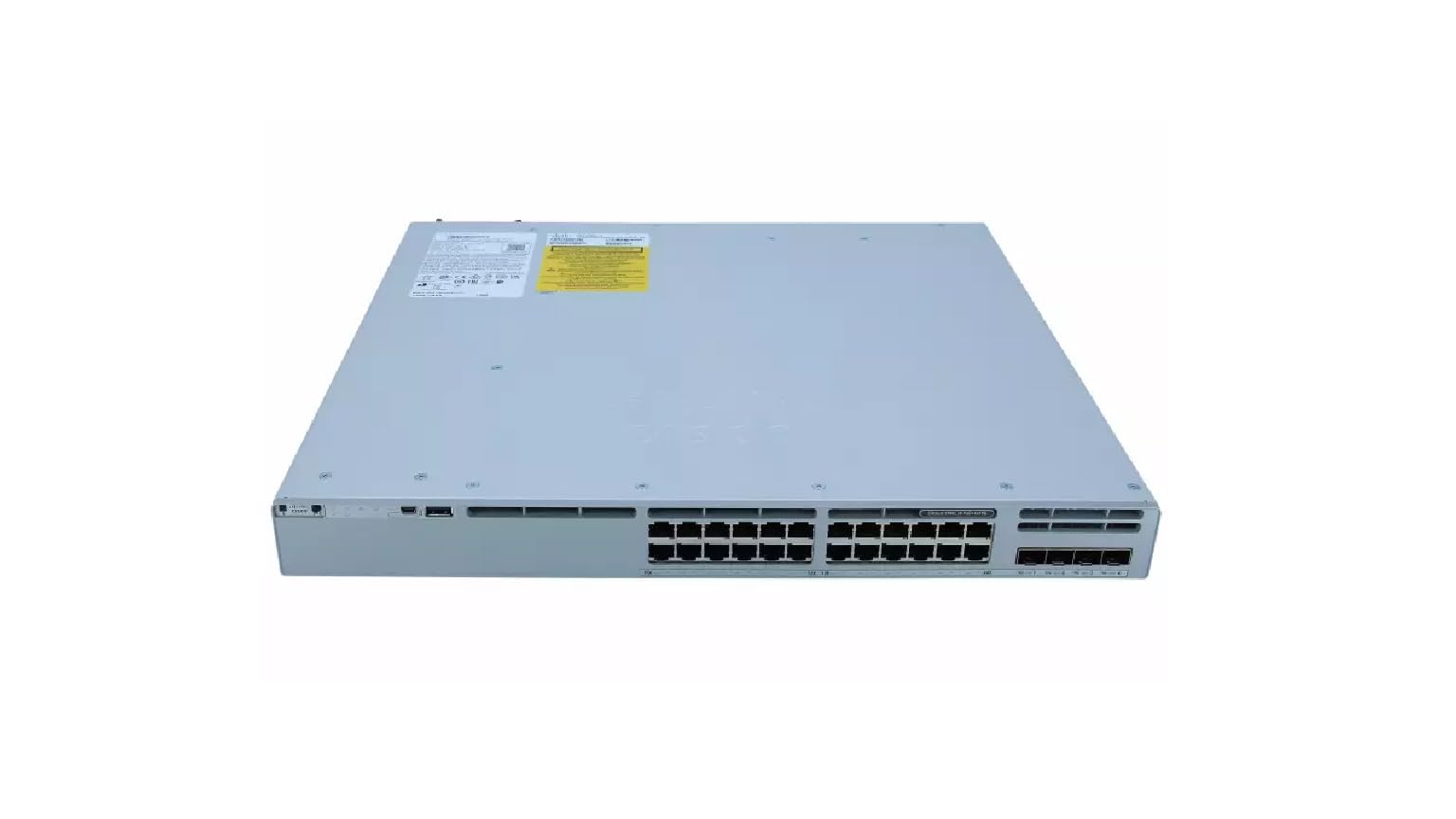
This image displays the rear panel of the Cisco Catalyst C9300L-24P-4X-E switch, highlighting the various ports, cooling fans, and the power supply unit.
ข้อมูลด้านความปลอดภัย
ปฏิบัติตามข้อควรระวังด้านความปลอดภัยต่อไปนี้เพื่อป้องกันการบาดเจ็บและความเสียหายต่ออุปกรณ์:
- ตรวจสอบให้แน่ใจว่ามีการต่อสายดินอย่างถูกต้องก่อนจะต่อไฟฟ้า
- ห้ามใช้งานสวิตช์ในสภาพแวดล้อมที่เปียกชื้นหรือมีความชื้นสูงเกินไป
- ใช้เฉพาะสายไฟและอุปกรณ์เสริมที่ได้รับการรับรองเท่านั้น
- ตรวจสอบให้แน่ใจว่ามีการระบายอากาศเพียงพอเพื่อป้องกันความร้อนสูงเกินไป
- โปรดตัดกระแสไฟก่อนดำเนินการบำรุงรักษาหรือติดตั้งใดๆ
เนื้อหาแพ็คเกจ
ตรวจสอบว่าแพ็คเกจของคุณมีรายการต่อไปนี้:
- Cisco Catalyst C9300L-24P-4X-E Switch
- สายไฟ
- ชุดติดตั้งบนแร็ค (ถ้ามี)
- สายเคเบิลคอนโซล (RJ-45 ถึง DB-9)
- เอกสารประกอบ (คู่มือเริ่มต้นใช้งานฉบับย่อ, ข้อมูลด้านความปลอดภัย)
ลักษณะทางกายภาพ
The Cisco Catalyst C9300L-24P-4X-E switch features a robust design for network deployments. The rear panel includes:
- 24 Gigabit Ethernet PoE+ Ports: For connecting network devices and providing power over Ethernet.
- 4x 10Gbps SFP+ Uplink Ports: For high-speed connections to the distribution or core layer.
- พอร์ตคอนโซล: For command-line interface access.
- พอร์ต USB: สำหรับ file management and system configuration.
- Modular Power Supply Bay: For installing power supply units.
- พัดลมระบายความร้อน: เพื่อการจัดการความร้อน
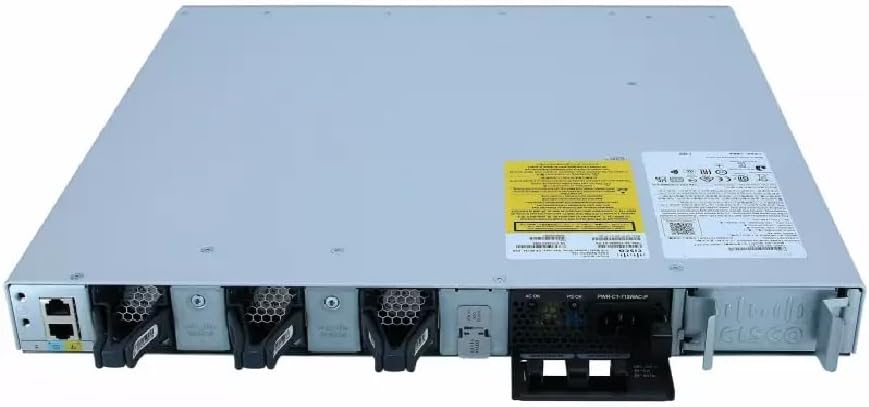
รายละเอียด view of the rear panel of the Cisco Catalyst C9300L-24P-4X-E switch, illustrating the 24 Gigabit PoE+ ports, four 10Gbps SFP+ uplink ports, and the modular power supply bay.
การตั้งค่า
1. การเปิดออกและการตรวจสอบ
Carefully remove the switch from its packaging. Inspect the device for any signs of physical damage. If damage is found, contact your supplier immediately.
2. การติดตั้งสวิตช์
The switch can be mounted in a standard 19-inch equipment rack or placed on a desktop.
- การติดตั้งแบบ Rack-Mount: Attach the provided rack-mount brackets to the sides of the switch using the screws. Secure the switch into the rack using appropriate rack screws.
- การติดตั้งเดสก์ท็อป: Ensure the surface is flat, stable, and allows for adequate ventilation around the switch. Attach the rubber feet (if provided) to the bottom of the switch.
3. การเชื่อมต่อพลังงาน
Insert the power cord into the AC power connector on the rear of the switch. Connect the other end of the power cord to a grounded electrical outlet. Ensure the power supply is properly seated in its bay.
4. การเชื่อมต่อเครือข่าย
- พอร์ต PoE+: Connect Ethernet cables from your network devices (e.g., IP phones, access points, surveillance cameras) to the 24 Gigabit PoE+ ports. These ports will provide both data connectivity and power.
- พอร์ตอัปลิงก์ SFP+: Insert compatible SFP+ transceivers into the four 10Gbps SFP+ uplink ports. Connect fiber optic cables from these transceivers to your distribution or core network devices.
- พอร์ตคอนโซล: For initial configuration or troubleshooting, connect a console cable from your management workstation to the console port on the switch.
การใช้งานสวิตช์
1. เปิดเครื่องครั้งแรก
After connecting power, the switch will automatically power on. Observe the system LED indicators for boot status. The system LED should turn green once the boot process is complete.
2. การกำหนดค่าพื้นฐาน
The Cisco Catalyst C9300L-24P-4X-E runs on Cisco IOS XE. Initial configuration can be performed via the console port using a command-line interface (CLI) or through a web-based graphical user interface (GUI) if enabled. Refer to Cisco's official documentation for detailed configuration guides.
3. ไฟ LED
The switch features various LED indicators to provide status information:
- ไฟ LED ระบบ: Indicates overall system status (e.g., green for normal operation, amber for warning).
- LED PoE: แสดงสถานะการจ่ายไฟผ่านสายอีเธอร์เน็ต (Power over Ethernet) สำหรับพอร์ตต่างๆ
- ไฟ LED แสดงสถานะพอร์ต: ระบุสถานะการเชื่อมต่อและกิจกรรมสำหรับพอร์ตเครือข่ายแต่ละพอร์ต
การซ่อมบำรุง
การบำรุงรักษาอย่างสม่ำเสมอจะช่วยให้สวิตช์ของคุณทำงานได้อย่างมีประสิทธิภาพสูงสุดและมีอายุการใช้งานยาวนาน:
- การทำความสะอาด: ควรทำความสะอาดภายนอกของสวิตช์เป็นระยะด้วยผ้าแห้งเนื้อนุ่ม ตรวจสอบให้แน่ใจว่าช่องระบายอากาศปราศจากฝุ่นและสิ่งสกปรก ห้ามใช้น้ำยาทำความสะอาดโดยตรงกับตัวเครื่อง
- อัพเดตเฟิร์มแวร์: Keep the switch firmware updated to the latest version provided by Cisco. This ensures access to new features, security patches, and performance improvements.
- การควบคุมสิ่งแวดล้อม: Maintain the operating environment within specified temperature and humidity ranges to prevent hardware failure.
- การจัดการสายเคเบิล: Ensure all cables are neatly organized and properly secured to prevent accidental disconnections or damage.
การแก้ไขปัญหา
หากคุณพบปัญหาเกี่ยวกับสวิตช์ โปรดลองทำตามขั้นตอนการแก้ไขปัญหาต่อไปนี้:
- ไม่มีไฟฟ้า: Verify the power cord is securely connected to both the switch and the power outlet. Check the power source and any circuit breakers. Ensure the power supply unit is correctly installed.
- ไม่มีการเชื่อมต่อเครือข่าย: Check the link status LEDs on the affected ports. Ensure Ethernet cables are properly connected and undamaged. Verify connected devices are powered on and functioning correctly.
- อุปกรณ์ PoE ไม่เปิดเครื่อง: Confirm the PoE+ port is enabled and the device is PoE compatible. Check the PoE budget and ensure it's not exceeded.
- ประสิทธิภาพการทำงานช้า: Check for network congestion, duplex mismatches, or errors on ports. Ensure uplink bandwidth is sufficient.
- Accessing the Switch: If unable to access via network, try connecting directly to the console port for CLI access.
ข้อมูลจำเพาะ
| คุณสมบัติ | รายละเอียด |
|---|---|
| ยี่ห้อ | ซิสโก้ |
| หมายเลขรุ่น | C9300L-24P-4X-E |
| จำนวนพอร์ต | 24 Gigabit PoE+ ports, 4x 10Gbps SFP+ uplinks |
| อินเทอร์เฟซ | PoE, SFP+ |
| อัตราการถ่ายโอนข้อมูล | 1 Gigabits Per Second (Gigabit Ethernet), 10 Gigabits Per Second (Uplinks) |
| เล่มที่tage | 240 โวลต์ (AC) |
| ประเภทสวิตซ์ | Managed, Fixed, PoE+, Layer 2 |
| ประเภทวัสดุตัวเรือน | พลาสติก |
| อุปกรณ์ที่รองรับ | Desktop, Laptop, Printer (and other network devices) |
ข้อมูลการรับประกัน
ผลิตภัณฑ์นี้มาพร้อมกับ รับประกันจำกัด 90 วัน. Please refer to the warranty documentation provided with your purchase for specific terms and conditions. For warranty claims, contact your reseller or the manufacturer's support channels.
การสนับสนุนด้านเทคนิค
For further assistance, technical support, or advanced configuration guidance, please refer to the official Cisco documentation available on their website. You may also contact your authorized Cisco reseller or support provider for specialized assistance.
ฝ่ายสนับสนุนของซิสโก้ Webเว็บไซต์: https://www.cisco.com/c/en/us/support/index.html