
IXITAB FS8233Pro
FS8233Pro Touch Smart Digital Multimeter User Manual
Model: FS8233Pro | Brand: IXITAB
1. บทนำ
The IXITAB FS8233Pro is an advanced, automatic smart digital multimeter designed for professional electricians and DIY enthusiasts. Featuring an intelligent sensing touch screen, this device offers convenient operation and clear display for various electrical measurements. Its rechargeable lithium battery ensures long-lasting performance without the need for frequent battery replacements. The FS8233Pro is equipped with intelligent anti-burning fuse protection and a durable silicone protective case, enhancing both safety and hardware longevity. This manual provides comprehensive instructions for safe and effective use of your multimeter.
2. ข้อมูลด้านความปลอดภัย
Always adhere to safety precautions when operating electrical testing equipment. Failure to do so may result in injury or damage to the device.
- ห้ามป้อนค่าเกินค่าสูงสุดที่กำหนดไว้สำหรับแต่ละช่วงการวัด
- ตรวจสอบให้แน่ใจว่าสายวัดอยู่ในสภาพดีและเชื่อมต่ออย่างถูกต้องก่อนทำการวัด
- Avoid using the multimeter in wet environments or with wet hands.
- อย่าพยายามวัดปริมาตรtage or current on circuits exceeding the device's rated capacity.
- ควรตัดกระแสไฟออกจากวงจรทุกครั้งก่อนทำการวัดค่าความต้านทาน ความจุ หรือความต่อเนื่อง
- โปรดใช้ความระมัดระวังเมื่อทำงานกับวงจรไฟฟ้าที่มีกระแสไฟอยู่
- Refer to local electrical codes and safety standards.
3. เนื้อหาบรรจุภัณฑ์
ตรวจสอบว่ามีรายการทั้งหมดอยู่ในแพ็คเกจของคุณ:
- 1 x FS8233Pro Digital Multimeter
- 1 x คู่มือการใช้งาน
- สายชาร์จ (USB) 1 เส้น
- สายทดสอบ 1 คู่

Image: The FS8233Pro multimeter shown with its standard accessories, including the red and black test leads and a USB charging cable.
4. สินค้าหมดview
The FS8233Pro features a large, clear LCD display and intuitive touch controls for ease of use.

ภาพ: ภาพระยะใกล้ view of the FS8233Pro's front panel, highlighting its large digital display and touch-sensitive buttons for various functions like HOLD, AUTO, NCV, Live, and input jacks.
4.1 คุณสมบัติที่สำคัญ:
- Intelligent Sensing Touch Screen: For convenient operation and clear display.
- แบตเตอรี่ลิเธียมแบบชาร์จไฟได้: Long life, USB charging.
- การตรวจจับอัตโนมัติ: Eliminates the need for manual gear shifting.
- Intelligent Anti-Burning Fuse: Enhanced safety protection.
- Silicone Protective Case: Prevents shock and protects hardware.
- แสงไฟด้านหลัง: ช่วยให้ชัดเจน viewการอยู่ในสภาวะที่มืด
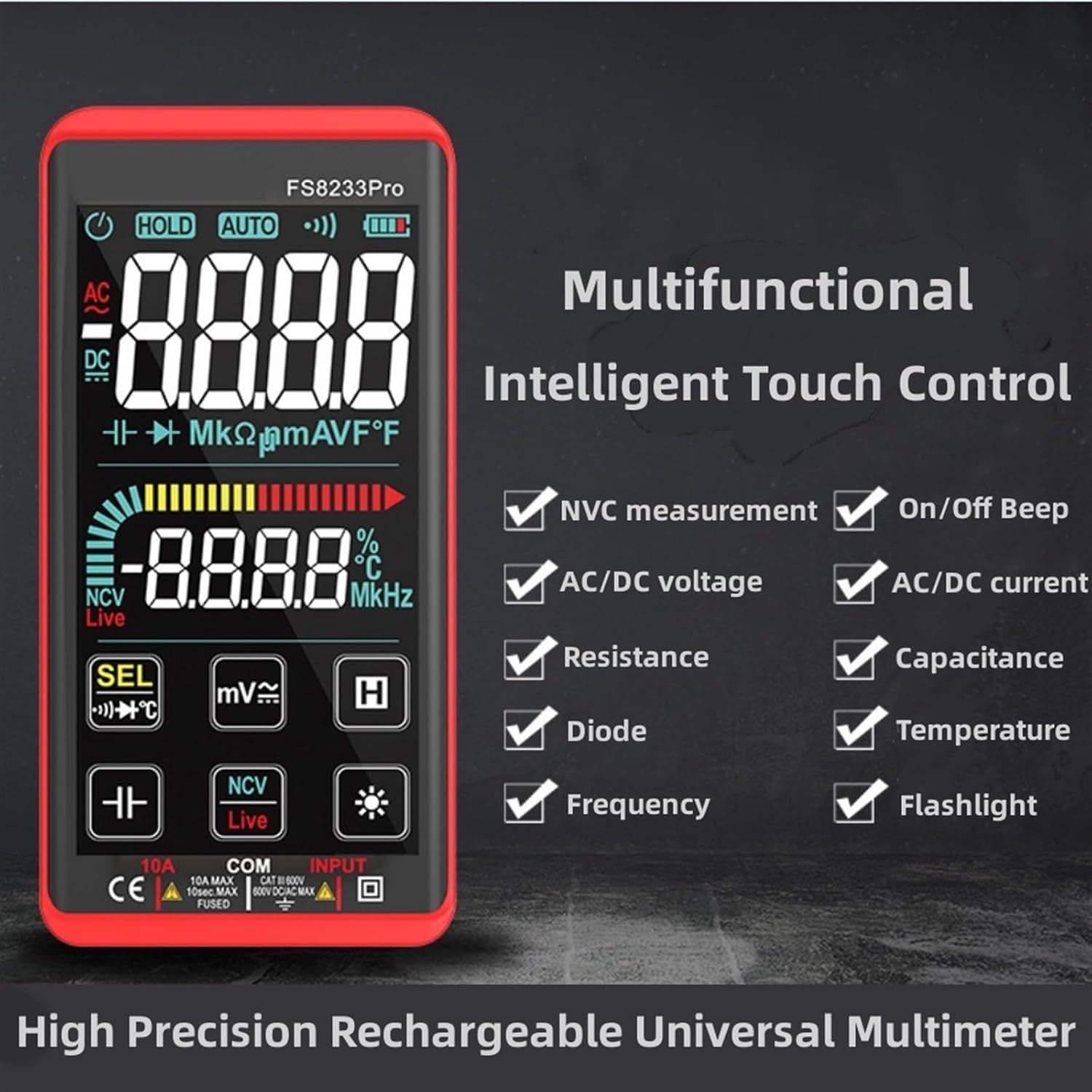
Image: A promotional image showcasing the multifunctional intelligent touch control features of the FS8233Pro, including NVC measurement, AC/DC voltage, resistance, diode, frequency, on/off beep, AC/DC current, capacitance, temperature, and flashlight.
5. การตั้งค่า
5.1 การชาร์จเริ่มต้น
Before first use, fully charge the multimeter's internal lithium battery. Connect the provided USB charging cable to the multimeter's charging port and to a standard USB power adapter (not included) or a computer USB port. The battery indicator on the display will show charging status.
5.2 การเชื่อมต่อสายทดสอบ
Insert the red test lead into the "INPUT" jack and the black test lead into the "COM" (common) jack. Ensure they are securely inserted.
6. คู่มือการใช้งาน
The FS8233Pro features automatic detection, simplifying measurement selection. Simply turn on the device and it will automatically identify the measurement type for most common functions.

Image: A hand interacting with the touch-sensitive display of the FS8233Pro multimeter, demonstrating its "Intelligent Movement Touch Sensing" for sensitive and fast measurements.
6.1 เปิด/ปิดเครื่อง
Press the power button (usually indicated by a power symbol) to turn the multimeter on or off. The device will automatically shut down after approximately 15 minutes of inactivity to conserve battery life.
6.2 AC โวลtagการวัดค่า e (ACV)
- ต่อสายทดสอบแบบขนานเข้ากับแรงดันไฟฟ้ากระแสสลับtagแหล่งที่มา
- มัลติมิเตอร์จะตรวจจับแรงดันไฟฟ้ากระแสสลับโดยอัตโนมัติtage.
- Range: 0.5V-750V (Accuracy: 1%+5)
6.3 DC ฉบับที่tagการวัด e (DCV)
- ต่อสายทดสอบแบบขนานเข้ากับแรงดันไฟฟ้ากระแสตรงtage source, observing polarity.
- มัลติมิเตอร์จะตรวจจับแรงดันไฟฟ้ากระแสตรงโดยอัตโนมัติtage.
- Range: 0.5V-1000V (Accuracy: 0.5%+3)
6.4 การวัดความต้านทาน
- ตรวจสอบให้แน่ใจว่าวงจรถูกตัดพลังงานก่อนที่จะวัดความต้านทาน
- เชื่อมต่อสายทดสอบข้ามส่วนประกอบที่ต้องการวัด
- Range: 0.1Ω-99.999MΩ (Accuracy: 1%+3)
6.5 การวัดความถี่
- เชื่อมต่อสายทดสอบเข้ากับแหล่งสัญญาณ
- Range: 40Hz-10000Hz (Accuracy: 0.5%+3)
6.6 การวัดความจุ
- ตรวจสอบให้แน่ใจว่าได้คายประจุตัวเก็บประจุแล้วก่อนทำการวัด
- ต่อสายวัดทดสอบเข้ากับขั้วของตัวเก็บประจุ
- Range: 10nF-60000μF (Accuracy: 4.5%+5)
6.7 การวัดอุณหภูมิ
- Use the appropriate temperature probe (if included, or purchased separately) and connect it to the multimeter.
- Range: -40°C to 1000°C (Accuracy: 2%+5)
6.8 On & Off Beep (Continuity)
- เชื่อมต่อสายทดสอบข้ามวงจรหรือส่วนประกอบ
- If the resistance of the tested circuit is less than 50Ω, the auxiliary buzzer will sound, indicating continuity.
6.9 การทดสอบไดโอด
- Connect the test leads across the diode.
- The display will show the approximate diode forward voltagมูลค่าอี
6.10 NCV (เครื่องวัดปริมาณสารแบบไม่สัมผัส)tagจ) การตรวจจับ
- เลือกฟังก์ชัน NCV
- Bring the top of the multimeter close to the AC voltagแหล่งที่มา
- There are three alarm modes (visual and audible) according to the detected voltagความแข็งแกร่ง
6.11 Live Line Identification
- Select the Live function.
- Insert the red test lead into the suspected live line.
- If it is a live line, "Live" will appear on the screen, and an alarm sound will be emitted.
7. การบำรุงรักษา
7.1 การทำความสะอาด
เช็ดทำความสะอาดมัลติมิเตอร์asinจีกับโฆษณาamp ใช้ผ้าเช็ดทำความสะอาดเท่านั้น ห้ามใช้สารทำความสะอาดที่มีฤทธิ์กัดกร่อนหรือตัวทำละลาย ตรวจสอบให้แน่ใจว่าอุปกรณ์ปิดอยู่และถอดปลั๊กออกจากแหล่งจ่ายไฟก่อนทำความสะอาด
7.2 พื้นที่จัดเก็บ
Store the multimeter in a cool, dry place, away from direct sunlight and extreme temperatures. If storing for extended periods, ensure the battery is partially charged (around 50%) to prolong its lifespan.
7.3 การดูแลแบตเตอรี่
The built-in lithium battery is designed for long life. Avoid fully discharging the battery frequently. Recharge as needed. If the device will not be used for a long time, charge it every 3 months to maintain battery health.
8 การแก้ไขปัญหา
| ปัญหา | สาเหตุที่เป็นไปได้ | สารละลาย |
|---|---|---|
| มัลติมิเตอร์ไม่เปิดใช้งาน | แบตเตอรี่หมด | Charge the multimeter using the provided USB cable. |
| การอ่านที่ไม่ถูกต้อง | Incorrect measurement mode; Damaged test leads; Environmental interference. | Ensure correct mode is selected (though often automatic); Check test leads for damage; Move away from strong electromagnetic fields. |
| ไม่มีเสียงบี๊บแสดงความต่อเนื่อง | Resistance is too high; Test leads not making good contact. | Ensure resistance is below 50Ω; Re-seat test leads firmly. |
| Automatic shutdown occurs too quickly. | Inactivity timer. | The device is designed to shut down after approximately 15 minutes of inactivity. This is normal operation. |
9. ข้อมูลจำเพาะ
| พารามิเตอร์ | ช่วง / มูลค่า | ความแม่นยำ |
|---|---|---|
| ฉบับ ACtagอี (ACV) | 0.5V-750V | (1% + 5) |
| DC ฉบับที่tagอี (DCV) | 0.5V-1000V | (0.5% + 3) |
| ความต้านทาน | 0.1Ω-99.999MΩ | (1% + 3) |
| ความถี่ | 40Hz-10000Hz | (0.5% + 3) |
| ความจุ | 10nF-60000μF | (4.5% + 5) |
| อุณหภูมิ | -40°C ถึง 1000°C | (2% + 5) |
| Continuity Beep Threshold | < 50Ω | ไม่มีข้อมูล |
| ปิดเครื่องอัตโนมัติ | ประมาณ 15 นาทีของการไม่มีการใช้งาน | ไม่มีข้อมูล |
| แหล่งพลังงาน | แบตเตอรี่ลิเธียมแบบชาร์จไฟได้ | ไม่มีข้อมูล |
| ผู้ผลิต | IXITAB | ไม่มีข้อมูล |
| แบบอย่าง | FS8233Pro | ไม่มีข้อมูล |
10. การรับประกันและการสนับสนุน
For warranty information and technical support, please refer to the contact details provided by your retailer or visit the official IXITAB webไซต์ โปรดเก็บใบเสร็จรับเงินไว้เป็นหลักฐานการซื้อสำหรับการเรียกร้องการรับประกัน
For additional assistance, you may contact the seller directly through the platform where the product was purchased.
Ask a question about this manual
Ask about setup, troubleshooting, compatibility, parts, safety, or missing instructions. Manuals+ will review the question and use this page’s manual context to help answer it.