
1. บทนำ
The NVX XDSP28 is an advanced 8-channel Digital Signal Processor (DSP) designed to enhance your car audio system. It features a 15-band parametric equalizer, adjustable high and low-pass filters, and various crossover types for precise sound customization. With 2 RCA inputs and 8 RCA outputs, built-in Bluetooth for audio streaming, and a remote level controller, the XDSP28 provides comprehensive control over your vehicle's sound environment. This manual provides detailed instructions for installation, operation, and troubleshooting to ensure optimal performance of your device.
2. ข้อมูลด้านความปลอดภัย
- อ่านคำแนะนำทั้งหมดอย่างละเอียดก่อนการติดตั้งและใช้งาน
- Disconnect the vehicle's negative battery terminal before making any electrical connections.
- ตรวจสอบให้แน่ใจว่ามีสายดินที่เหมาะสมเพื่อป้องกันอันตรายจากไฟฟ้า
- อย่าวางอุปกรณ์ไว้ในที่ชื้นหรืออุณหภูมิที่สูงหรือต่ำเกินไป
- Mount the unit securely to prevent movement during vehicle operation.
- ปรึกษาผู้ติดตั้งเครื่องเสียงรถยนต์มืออาชีพหากคุณไม่แน่ใจเกี่ยวกับขั้นตอนการติดตั้งใดๆ
3. เนื้อหาบรรจุภัณฑ์
ตรวจสอบว่ามีรายการทั้งหมดอยู่ในแพ็คเกจ:
- NVX XDSP28 Digital Signal Processor Unit
- Remote Level Controller with Cable
- คู่มือการใช้งาน
- อุปกรณ์สำหรับติดตั้ง (สกรู ฯลฯ)
4. สินค้าหมดview
Familiarize yourself with the components and controls of the NVX XDSP28.

Figure 4.1: NVX XDSP28 Front Panel with Labeled Components
- Remote Out Sequencer: Activates other devices in sequence through a remote connection.
- อินพุตระยะไกล (REM IN): เปลี่ยนเป็น amplifier on automatically with the radio or player.
- Ground Connector (GND): Connect to the battery's negative terminal.
- Positive Power Connector (+BAT): Connect to the battery's positive terminal.
- จอแสดงผล LCD: Displays information and allows interaction with the processor.
- แผงควบคุมหลัก: A rotating knob to adjust processor system settings and navigate menus.
- Input LED Indicator: Shows when the channel's limiter is active or output is saturated.
- Remote Level Input: Connects the external remote level controller. Controls all eight outputs simultaneously.
- Audio Input (Inputs A, B): Independent RCA connectors for channels A and B.
- Audio Output (Outputs 1-8): RCA connectors for outputting processed audio.
- ไฟ LED แสดงสถานะเอาต์พุต: Signals when the input signal is at maximum level.
- การเลือกเอาต์พุต: Quickly press to adjust output channels or hold to mute.

รูปที่ 4.2: ด้านบน view of the NVX XDSP28 unit, showing the main control knob, LCD display, and input/output connections.

รูปที่ 4.3: ด้านหลัง view of the NVX XDSP28, highlighting the power and remote connections.
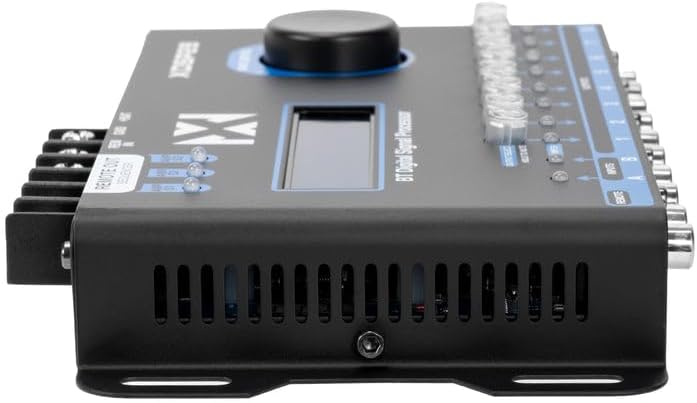
Figure 4.4: The remote level controller for the NVX XDSP28, used for simultaneous output control.
5. การตั้งค่าและการติดตั้ง
การติดตั้งอย่างถูกต้องเป็นสิ่งสำคัญอย่างยิ่งต่อประสิทธิภาพการทำงานสูงสุด โปรดปฏิบัติตามขั้นตอนเหล่านี้อย่างระมัดระวัง:
- การติดตั้ง: Select a secure, dry location in your vehicle, away from heat sources and moisture. Use the provided mounting hardware to firmly attach the DSP unit.
- การเชื่อมต่อสายไฟ:
- เชื่อมต่อ +ค้างคาว terminal to the vehicle's positive battery terminal (or a constant 12V source) using appropriate gauge wire and an inline fuse (not included).
- เชื่อมต่อ ก.ย.ด. terminal to a clean, unpainted metal surface on the vehicle chassis, ensuring a solid ground connection.
- เชื่อมต่อ REM ใน terminal to the remote turn-on output of your head unit or ignition switch.
- การเชื่อมต่ออินพุตเสียง: เชื่อมต่อเอาต์พุต RCA ของเครื่องเล่นในรถของคุณเข้ากับ... Inputs A และ B on the XDSP28.
- การเชื่อมต่อเอาต์พุตเสียง: เชื่อมต่อ เอาท์พุต 1-8 of the XDSP28 to the RCA inputs of your amplifiers. Ensure correct channel assignment for your speaker configuration.
- Remote Level Controller: Plug the remote level controller cable into the ระยะไกล port on the DSP unit. Mount the controller in an accessible location for easy adjustment.
- การเพิ่มพลังเริ่มต้น: Reconnect the vehicle's negative battery terminal. The DSP should power on, and the LCD display will illuminate.
6. การดำเนินการ
The NVX XDSP28 offers extensive control over your audio system. All settings are adjusted via the Main Control knob and the LCD display.
6.1 การนำทางเมนู
- หมุน การควบคุมหลัก knob to scroll through menu options.
- กดปุ่ม การควบคุมหลัก knob to select an option or confirm a setting.
- กดปุ่มค้างไว้ การควบคุมหลัก knob to exit a menu or return to the previous screen.
6.2 การปรับสมดุล (EQ)
The XDSP28 features a 15-band parametric equalizer for precise frequency adjustments.
- Graphic EQ Presets: Select from 12 pre-defined graphic equalization presets such as Rock, Hip Hop, Pop, Vocal, and more.
- พารามิเตอร์ EQ: Manually adjust gain, frequency, and Q-factor for each of the 15 bands on both input and output channels.
6.3 Crossover Function
Configure high-pass and low-pass filters for each output channel to optimize speaker performance.
- Adjust cut frequencies for high-pass and low-pass filters.
- Select various crossover types and filter slopes (e.g., Butterworth, Linkwitz-Riley).
6.4 Time Alignment and Phase
Achieve perfect sound staging by adjusting the delay for each output channel.
- Adjust time delays in 0.02 ms increments.
- Set phase adjustments to 0° or 180° for each output.
6.5 Independent Gain and Limiter
- Independent Gain: Adjust the gain level for each output channel individually.
- ตัวจำกัด: The integrated Limiter with Dynamic Attack-Release system protects your amplifiers and speakers from over-excursion and clipping.
6.6 เครื่องกำเนิดเสียง
Utilize the built-in audio tone generator for precise tuning and system diagnostics.
- Generate frequency sweeps.
- Generate pink noise for RTA (Real-Time Analyzer) measurements.
6.7 การเชื่อมต่อบลูทูธ
The XDSP28 features built-in Bluetooth for wireless audio streaming from your mobile device.
- Pair your device with the XDSP28 via Bluetooth settings on your phone.
- Bluetooth is for audio playback only; it does not support app-based control of DSP settings.
6.8 Remote Level Controller
The external remote level controller allows for convenient, simultaneous adjustment of all eight output levels.
7. การบำรุงรักษา
- Keep the unit clean and free of dust. Use a soft, dry cloth for cleaning.
- หลีกเลี่ยงการใช้สารเคมีรุนแรงหรือน้ำยาทำความสะอาดที่มีฤทธิ์กัดกร่อน
- Ensure all connections remain secure. Periodically check wiring for any signs of wear or damage.
8 การแก้ไขปัญหา
| ปัญหา | สาเหตุที่เป็นไปได้ | สารละลาย |
|---|---|---|
| No power to the DSP. | Incorrect power wiring; Blown fuse; Loose ground connection. | Check +BAT, GND, and REM IN connections. Verify fuse integrity. Ensure a solid ground connection. |
| ไม่มีเสียงออก | Incorrect input/output connections; DSP muted; Amplifier not powered on; Incorrect source selection. | Verify all RCA connections. Check DSP mute status (Output Select button). Ensure amplifiers are receiving remote turn-on signal. Confirm correct input source (A, B, or A+B). |
| คุณภาพเสียงผิดเพี้ยนหรือไม่ดี | Incorrect EQ settings; Improper crossover settings; Input signal too high/low; Limiter engaged excessively. | Adjust EQ settings. Review crossover frequencies and slopes. Check input gain levels. Monitor Input LED indicators for clipping. |
| ปัญหาการเชื่อมต่อบลูทูธ | อุปกรณ์ไม่อยู่ในโหมดจับคู่; มีสัญญาณรบกวน; เชื่อมต่อกับอุปกรณ์อื่นอยู่แล้ว | Ensure Bluetooth is enabled on your device and the DSP. Disconnect from other Bluetooth devices. Move closer to the DSP. |
| Main Control knob is overly sensitive. | Characteristic of the control mechanism. | Exercise caution and precision when rotating and pressing the knob for menu navigation and setting adjustments. |
| Remote Level Controller causes input glitches. | Potential unit-specific issue or interference. | Ensure the remote cable is securely connected and not damaged. If issues persist, try operating without the remote controller to isolate the problem. Contact support if necessary. |
9. ข้อมูลจำเพาะ
| คุณสมบัติ | ข้อมูลจำเพาะ |
|---|---|
| แบบอย่าง | NVX XDSP28 |
| จำนวนช่องสัญญาณ | 8 (เอาต์พุต) |
| ช่องใส่ | อาร์ซีเอ 2 |
| ช่องสัญญาณขาออก | 8 RCA (up to 2 Volts output) |
| อีควอไลเซอร์ | 15 Parametric EQ |
| อัตราส่วนสัญญาณต่อเสียงรบกวน | > 94 เดซิเบล |
| ความเพี้ยนฮาร์มอนิกรวม (THD) | 0.01% |
| Time Adjustment Increments | 0.02 มิลลิวินาที |
| การปรับเฟส | 0° หรือ 180° |
| Graphic EQ Presets | 12 (Rock, Hip Hop, Pop, Vocal, etc.) |
| ปริมาณอุปทานขั้นต่ำtage | 10 โวลต์ (กระแสตรง) |
| ปริมาณอุปทานสูงสุดtage | 16 โวลต์ (กระแสตรง) |
| ขนาด (กว้าง x ยาว x สูง) | 7.87" x 3.98" x 1.46" (200 มม. x 101 มม. x 37 มม.) |
| น้ำหนักสินค้า | 0.7 กิโลกรัม |
| บลูทูธ | Built-in (for audio streaming) |
| Remote Level Controller | Included, for simultaneous output control |
10. การรับประกันและการสนับสนุน
NVX products are designed for reliability and performance. For specific warranty details, please refer to the warranty card included with your product or contact the retailer where the product was purchased. Keep your proof of purchase for warranty claims.
For technical assistance, troubleshooting beyond this manual, or service inquiries, please contact NVX customer support or the authorized dealer. Contact information can typically be found on the manufacturer's official webเว็บไซต์หรือผ่านผู้ค้าปลีกของคุณ