
1. บทนำ
Thank you for choosing the TECLAST Mini PC N15. This compact and powerful mini computer is designed for a wide range of applications, from home entertainment and office tasks to creative work and light gaming. Featuring an Intel N5095 processor, 16GB DDR4 RAM, and a 512GB PCI-e 3.0 SSD, it offers efficient performance in a small form factor. This manual provides essential information for setting up, operating, maintaining, and troubleshooting your device.
2. เนื้อหาบรรจุภัณฑ์
Please verify that all items listed below are included in your package. If any items are missing or damaged, please contact TECLAST customer support.
- 1x TECLAST N15 Mini PC
- 1x คู่มือผู้ใช้
- สาย HDMI 1x
- 1x ขาตั้ง VESA
- อะแดปเตอร์ไฟฟ้า 1x
- สายไฟ 1 เส้น

Image: Package contents of the TECLAST N15 Mini PC.
3. สินค้าหมดview
3.1. คุณสมบัติหลัก
- โปรเซสเซอร์: Intel N5095 (4 Cores, 4 Threads, up to 2.9GHz Turbo Frequency)
- กราฟิก: กราฟิก Intel UHD
- หน่วยความจำ: แรม DDR16 4GB
- พื้นที่จัดเก็บ: 512GB PCI-e 3.0 SSD
- การเชื่อมต่อ: Dual 2.5GbE RJ45 Ethernet, Wi-Fi (2.4G+5G ac), Bluetooth 4.2
- เอาท์พุตวิดีโอ: Supports up to three 4K displays (HDMI, DisplayPort, Full-Function Type-C)
- พอร์ต: Multiple USB 3.2, USB 2.0, Full-Function Type-C, DisplayPort, HDMI, COM Port, Micro SD Card Reader, Headphone Output, Microphone Input
- ออกแบบ: Compact (0.53L volume, 400g weight), Aluminum Body, VESA Mountable

Image: Intel N5095 Processor specifications and architecture.
3.2. พอร์ตและอินเทอร์เฟซ
The TECLAST N15 Mini PC offers a comprehensive set of ports for versatile connectivity:
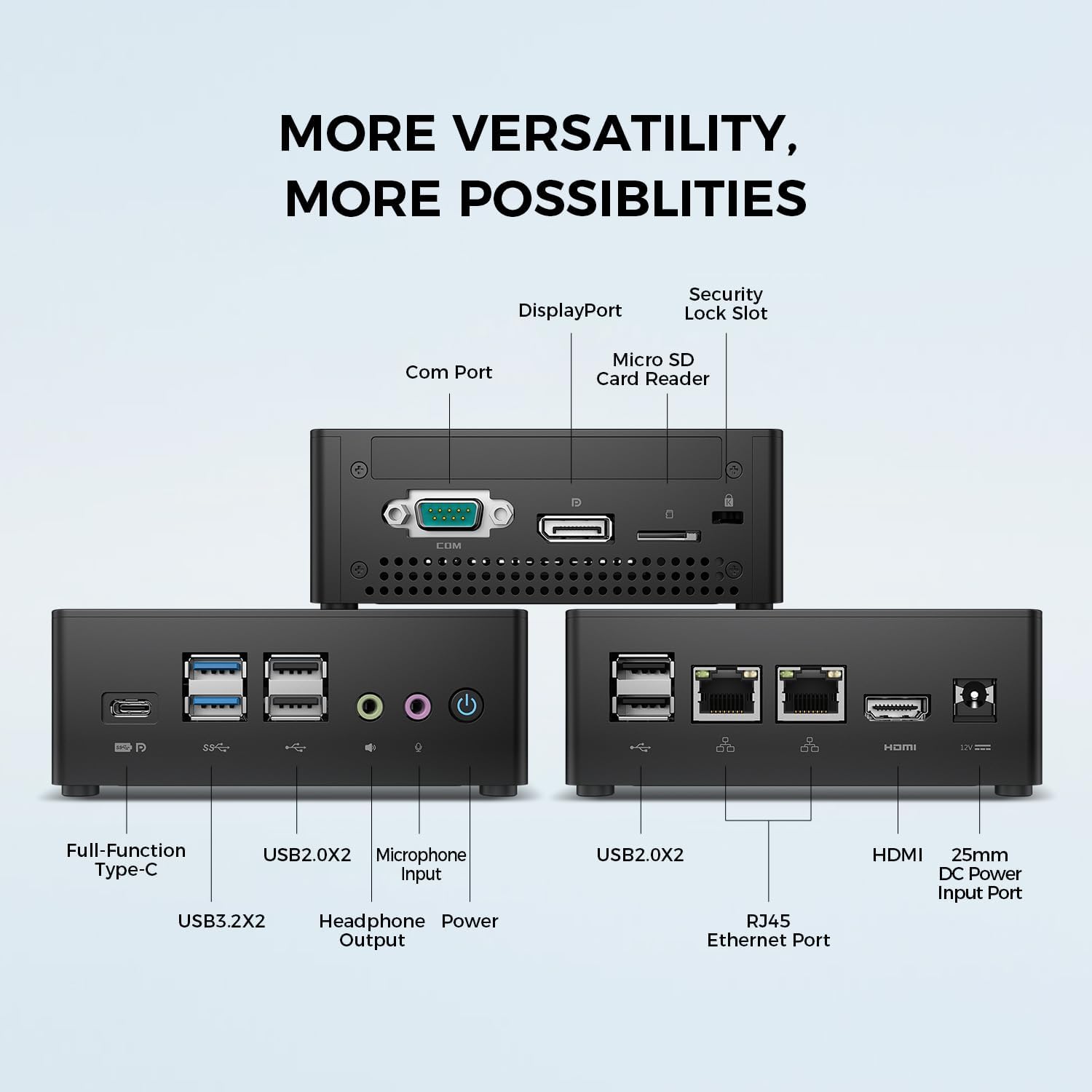
ภาพ: รายละเอียด view of the TECLAST N15 Mini PC's front, side, and rear ports.
- แผงด้านหน้า: Full-Function Type-C (supports charging, data, video, audio), 2x USB 3.2, 2x USB 2.0, Headphone Output, Microphone Input, Power Button.
- แผงด้านข้าง: COM Port, DisplayPort, Micro SD Card Reader, Security Lock Slot.
- แผงด้านหลัง: 2x USB 2.0, 2x RJ45 Ethernet Ports (2.5GbE), HDMI, DC Power Input.

Image: Dual 2.5GbE RJ45 Ethernet Ports for high-speed networking.
3.3. ระบบระบายความร้อน
The N15 Mini PC is designed for efficient heat dissipation to ensure stable and quiet operation. It features a 15W TDP, nickel-plated heat pipe, and a turbo fan, providing over 16000mm² of heat dissipation area.

Image: Internal cooling system design for quiet and efficient operation.
3.4. การออกแบบที่กะทัดรัด
With a compact volume of approximately 0.53L and a weight of 400g, the N15 Mini PC is highly portable and can be easily integrated into any workspace. Its aluminum body ensures durability.

Image: Compact size and lightweight design of the Mini PC.
4. คำแนะนำในการตั้งค่า
4.1. การเชื่อมต่ออุปกรณ์ต่อพ่วง
- เชื่อมต่อจอภาพ: Use the provided HDMI cable to connect your monitor to the HDMI port on the Mini PC. Alternatively, use a DisplayPort cable or a Full-Function Type-C cable for compatible monitors.
- เชื่อมต่อคีย์บอร์ดและเมาส์: Plug your USB keyboard and mouse into any available USB ports on the Mini PC.
- เชื่อมต่อกับเครือข่าย (ทางเลือก): For a wired connection, connect an Ethernet cable from your router or modem to one of the RJ45 ports on the Mini PC. For wireless, ensure your Wi-Fi network is available during initial setup.
- เชื่อมต่อพลังงาน: Connect the power adapter to the DC Power Input port on the Mini PC, then plug the power cable into a wall outlet.
4.2. การเปิดเครื่องและการตั้งค่าเริ่มต้น
- กดปุ่มเปิด/ปิดที่ด้านหน้าของมินิพีซี
- The system will boot up. If it's the first time, it will guide you through the Windows operating system setup process. Follow the on-screen instructions to configure language, region, network, and user accounts.
- ตรวจสอบให้แน่ใจว่าได้ติดตั้งไดรเวอร์ทั้งหมดแล้ว โดยทั่วไป Windows Update จะจัดการเรื่องนี้โดยอัตโนมัติ
5. คู่มือการใช้งาน
5.1. การทำงานพื้นฐาน
Once setup is complete, your TECLAST N15 Mini PC functions like a standard desktop computer. You can launch applications, browse the internet, and manage files using your connected keyboard and mouse.
5.2. การตั้งค่าจอแสดงผลหลายจอ
The Mini PC supports connecting up to three 4K displays simultaneously, enhancing productivity and entertainment experiences.
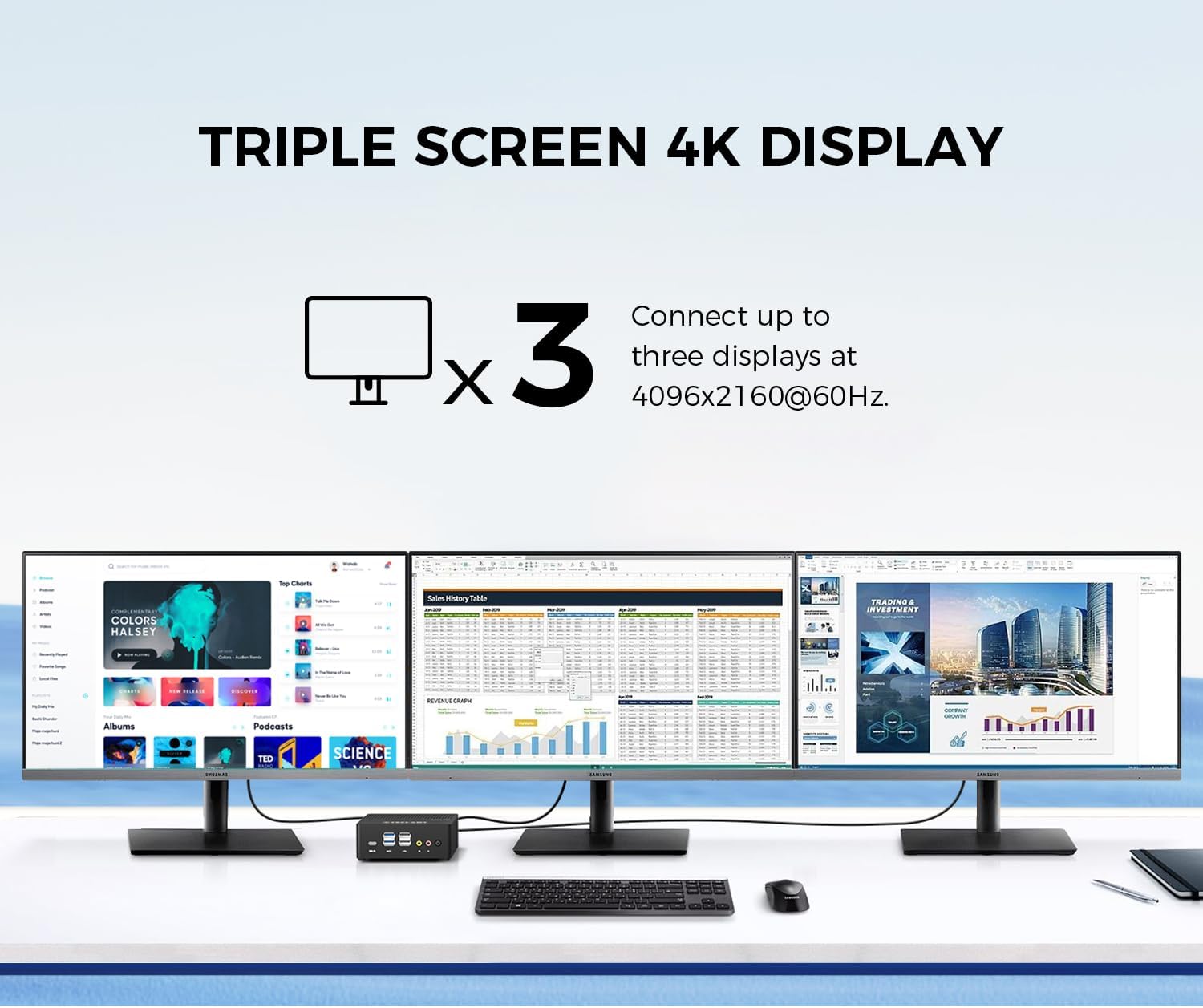
Image: Triple screen 4K display setup with the Mini PC.
- Connect your primary monitor via HDMI.
- Connect a second monitor via DisplayPort.
- Connect a third monitor via the Full-Function Type-C port (requires a compatible Type-C to DisplayPort/HDMI adapter or monitor).
- In Windows, right-click on the desktop and select "Display settings" to configure your multiple displays (extend, duplicate, or show only on one).
5.3. การเชื่อมต่อไร้สาย
The Mini PC supports 2.4G+5G ac Wi-Fi and Bluetooth 4.2 for wireless connections.
- ไวไฟ : Access Wi-Fi settings in Windows to connect to your preferred wireless network.
- บลูทูธ: Pair Bluetooth devices like keyboards, mice, or headphones through Windows Bluetooth settings.
6. การบำรุงรักษา
การบำรุงรักษาอย่างสม่ำเสมอจะช่วยให้มินิพีซีของคุณมีอายุการใช้งานยาวนานและทำงานได้อย่างมีประสิทธิภาพสูงสุด
- การทำความสะอาด: ใช้ผ้าแห้งเนื้อนุ่มเช็ดทำความสะอาดภายนอก หากมีฝุ่นสะสมในช่องระบายอากาศ ให้ใช้ลมเป่าทำความสะอาด ตรวจสอบให้แน่ใจว่าได้ปิดเครื่องและถอดปลั๊กออกก่อนทำความสะอาด
- การอัปเดตซอฟต์แวร์: ตรวจสอบและติดตั้งการอัปเดต Windows และการอัปเดตไดรเวอร์เป็นประจำ เพื่อรักษาความปลอดภัยและประสิทธิภาพของระบบ
- การจัดการพื้นที่เก็บข้อมูล: ทำความสะอาดสิ่งที่ไม่จำเป็นเป็นระยะๆ files and applications to free up storage space and improve system responsiveness.
- การระบายอากาศ : Ensure the Mini PC is placed in a well-ventilated area and that its vents are not obstructed to prevent overheating.
7 การแก้ไขปัญหา
If you encounter issues with your TECLAST N15 Mini PC, refer to the following common troubleshooting steps:
| ปัญหา | วิธีแก้ปัญหาที่เป็นไปได้ |
|---|---|
| ไม่มีการแสดงผลบนจอภาพ | Check all cable connections (HDMI, DisplayPort, Type-C). Ensure the monitor is powered on and set to the correct input source. Try a different cable or monitor if possible. |
| มินิพีซีเปิดไม่ติด | Verify the power adapter is securely connected to both the Mini PC and a working power outlet. Try a different power outlet. |
| ไม่มีการเชื่อมต่ออินเทอร์เน็ต (Wi-Fi) | ตรวจสอบว่าเปิดใช้งาน Wi-Fi ในการตั้งค่า Windows แล้วหรือไม่ ตรวจสอบให้แน่ใจว่าคุณเชื่อมต่อกับเครือข่ายที่ถูกต้องและป้อนรหัสผ่านถูกต้องแล้ว รีสตาร์ทเราเตอร์/โมเด็มของคุณ |
| No internet connection (Wired) | Ensure the Ethernet cable is securely connected to both the Mini PC and your router/modem. Check the network status in Windows. Restart your router/modem. |
| ประสิทธิภาพการทำงานช้า | Close unnecessary applications. Check for background processes consuming resources. Ensure sufficient free storage space. Run a system scan for malware. |
| Peripheral devices not recognized | Try connecting the device to a different USB port. Ensure device drivers are installed. Restart the Mini PC. |
If the issue persists after trying these steps, please contact TECLAST customer support for further assistance.
8. ข้อมูลจำเพาะ
Detailed technical specifications for the TECLAST N15 Mini PC:
| คุณสมบัติ | ข้อมูลจำเพาะ |
|---|---|
| ยี่ห้อ | เทคลัสท์ |
| หมายเลขรุ่น | N15 |
| รุ่นซีพียู | อินเทล เซเลรอน N5095 |
| ความเร็วซีพียู | Up to 2.9 GHz (Turbo Frequency) |
| จำนวนโปรเซสเซอร์ | 4 |
| ติดตั้งหน่วยความจำ RAM แล้ว | แรม 16GB DDR4 |
| ขนาดสูงสุดของหน่วยความจำ RAM | 16GB |
| ความจุของหน่วยความจำ | 512 GB PCI-e 3.0 SSD |
| โคโปรเซสเซอร์กราฟิก | กราฟิก Intel UHD |
| ความละเอียดการแสดงผลสูงสุด | 3840 x 2160 พิกเซล (4K) |
| อินเทอร์เฟซเอาต์พุตวิดีโอ | HDMI, DisplayPort, Type-C |
| เทคโนโลยีการเชื่อมต่อ | Ethernet (Dual RJ45 2.5GbE), HDMI, LAN, Wi-Fi (802.11ac), Bluetooth 4.2 |
| พอร์ต USB รวม | 6 (2x USB 3.2, 4x USB 2.0) |
| น้ำหนักสินค้า | 400 กรัม |
| การใช้พลังงาน | 15 วัตต์ |
| วิธีการทำความเย็น | Air (with Turbo Fan and Nickel-Plated Heat Pipe) |
| สี | สีดำ |
9. การรับประกันและการสนับสนุน
TECLAST products are designed for quality and reliability. For any product-related inquiries, technical support, or warranty claims, please contact TECLAST customer service. Most questions are answered within 24 hours.
For further assistance, please visit the official TECLAST webเข้าชมเว็บไซต์หรือติดต่อช่องทางการสนับสนุนของพวกเขาโดยตรง
10. วิดีโอผลิตภัณฑ์
ชมวิดีโอผลิตภัณฑ์อย่างเป็นทางการนี้เพื่อดูภาพรวมview of the TECLAST N15 Mini PC's features and connectivity.
วิดีโอ: จบแล้วview of the TECLAST N15 Mini PC, showcasing its design, ports, and internal components.