
1. บทนำ
The BoxWave AllReader SD Card Reader is a versatile and compact device designed for easy file transfer between various digital devices and SD or microSD cards. It features multiple interfaces to ensure broad compatibility with smartphones, tablets, laptops, and desktop PCs. This manual provides instructions for setting up, operating, and maintaining your AllReader SD Card Reader.
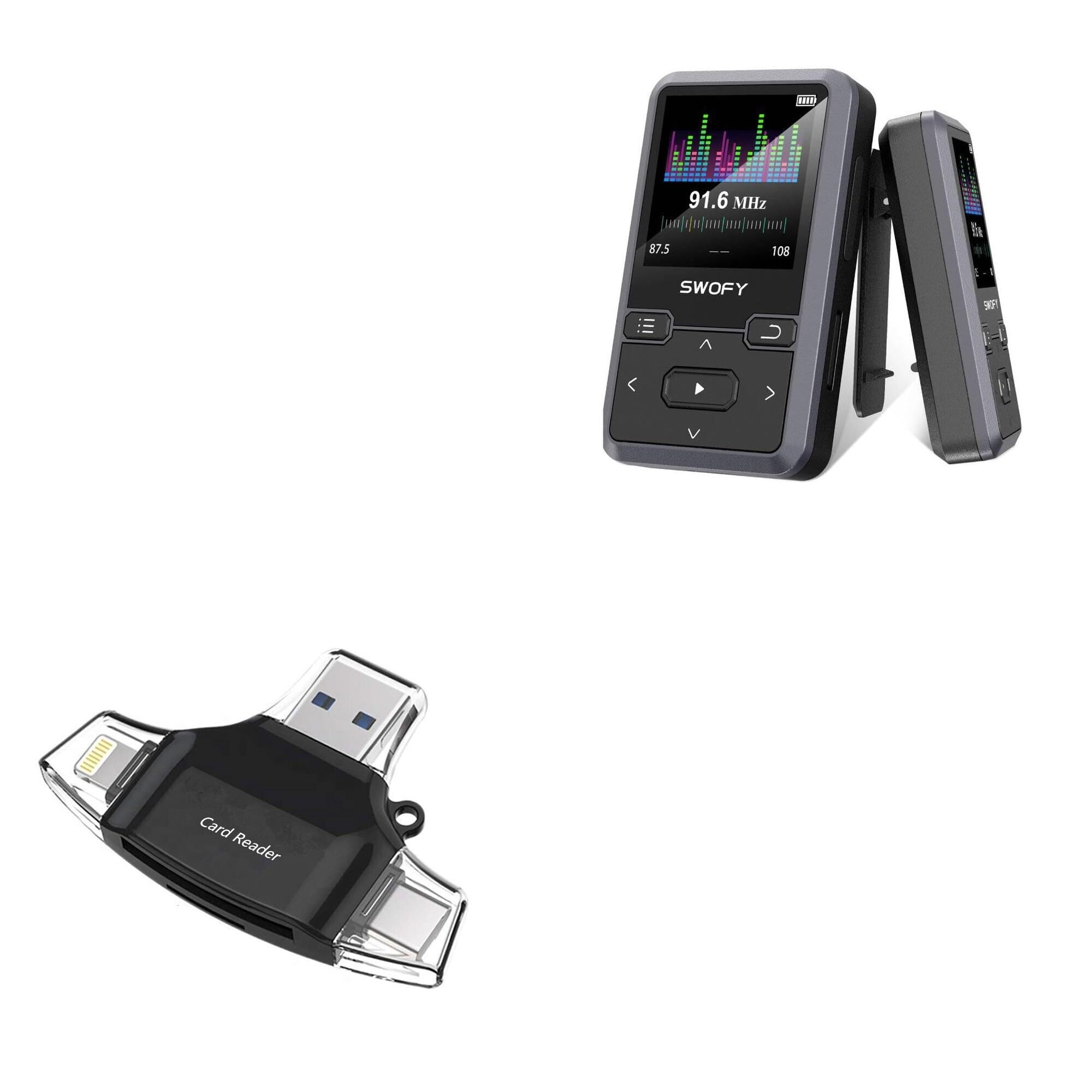
Image: The BoxWave AllReader SD Card Reader, showcasing its compact design and various connector types.
2. คุณสมบัติของผลิตภัณฑ์
- Four Interfaces: Equipped with USB-C, USB-A, Micro-USB, and Apple/Lightning connectors for maximum device compatibility.
- ง่าย File โอน: Facilitates quick and straightforward transfer of photos, videos, music, and other files between your memory cards and devices.
- ปลั๊กแอนด์เพลย์: No drivers or complex software installation required. Simply connect and use.
- การออกแบบที่กะทัดรัด: Small and portable, designed to fit easily in your pocket, bag, or purse.
- ใช้งานร่วมกับการ์ดได้ทุกรุ่น: Supports both standard SD cards and microSD cards.

ภาพ: รายละเอียด view of the four distinct interfaces on the AllReader SD Card Reader.
3. คู่มือการติดตั้ง
Setting up your BoxWave AllReader SD Card Reader is a simple plug-and-play process.
- ใส่การ์ดหน่วยความจำ: Gently insert your SD card or microSD card into the appropriate slot on the AllReader. Ensure the card is fully seated.
- เชื่อมต่อกับอุปกรณ์: Select the correct connector (USB-C, USB-A, Micro-USB, or Apple/Lightning) for your smartphone, tablet, laptop, or desktop PC. Plug the AllReader into your device's port.
- เข้าถึง Files: Your device should automatically detect the AllReader and the inserted memory card. You can then navigate to the card's contents through your device's file ผู้จัดการหรือแอปพลิเคชันรูปภาพ

Image: The AllReader connected to a tablet with an SD card, illustrating the ease of setup and file เข้าถึง.
4. คู่มือการใช้งาน
Once connected, the AllReader allows for seamless data management.
- File การเรียกดู: On most devices, the inserted memory card will appear as an external storage device. Open your device's file manager (e.g., "Files" บน iOS, "ของฉัน Files" on Android, "File Explorer" on Windows, "Finder" on macOS) to browse the contents of the card.
- การโอนย้าย Files: การถ่ายโอน files, simply copy and paste or drag and drop files between the memory card and your device's internal storage or other connected storage.
- การกำจัดอย่างปลอดภัย: Before disconnecting the AllReader from your computer, always safely eject the device through your operating system to prevent data corruption. For mobile devices, simply unplugging is generally safe after file transfers are complete.

Image: The AllReader facilitating file transfers across various devices including smartphones, tablets, laptops, and desktop PCs.
5. การบำรุงรักษา
To ensure the longevity and optimal performance of your BoxWave AllReader SD Card Reader, follow these maintenance guidelines:
- รักษาความสะอาด: ใช้ผ้าแห้งเนื้อนุ่มเช็ดทำความสะอาดภายนอกของอุปกรณ์ หลีกเลี่ยงการใช้น้ำยาทำความสะอาดหรือสารละลาย
- ป้องกันขั้วต่อ: Keep the connectors free from dust and debris. Avoid touching the metal contacts directly.
- จัดเก็บอย่างถูกต้อง: เมื่อไม่ใช้งาน ควรเก็บเครื่องอ่านบัตรไว้ในที่แห้งและเย็น หลีกเลี่ยงแสงแดดโดยตรงและอุณหภูมิที่สูงหรือต่ำเกินไป
- จัดการด้วยความระมัดระวัง: ควรหลีกเลี่ยงการทำอุปกรณ์ตกหรือกระแทกอย่างแรง เพราะอาจทำให้ชิ้นส่วนภายในเสียหายได้
6 การแก้ไขปัญหา
If you encounter issues with your AllReader SD Card Reader, consider the following troubleshooting steps:
- ไม่รู้จักอุปกรณ์:
- Ensure the AllReader is firmly plugged into your device's port.
- Try connecting to a different port on your device or a different device altogether to rule out port issues.
- รีสตาร์ทอุปกรณ์ของคุณและลองอีกครั้ง
- ไม่พบการ์ดหน่วยความจำ:
- Ensure the SD or microSD card is correctly and fully inserted into the AllReader.
- Try using a different memory card to determine if the issue is with the card or the reader.
- Check the memory card for physical damage or a locked switch (for SD cards).
- ความเร็วในการถ่ายโอนข้อมูลช้า:
- Transfer speeds can vary based on the memory card's speed class and the device's USB port version.
- Ensure your device's USB port is functioning correctly.
If these steps do not resolve the issue, please contact BoxWave customer support.
7. ข้อมูลจำเพาะ
| คุณสมบัติ | รายละเอียด |
|---|---|
| ชื่อสินค้า | BoxWave AllReader SD Card Reader |
| หมายเลขรุ่น | B0CS4HCWLK |
| อินเทอร์เฟซ | USB-C, USB-A, Micro-USB, Apple/Lightning |
| ความเข้ากันได้ของบัตร | เอสดี, ไมโครเอสดี |
| น้ำหนัก | 6 ออนซ์ |
| ผู้ผลิต | บ็อกซ์เวฟ |
| ออกแบบ | Compact, portable |
8. การรับประกันและการสนับสนุน
BoxWave is committed to providing high-quality accessories and excellent customer service. If you have any questions, require assistance, or experience any issues with your AllReader SD Card Reader, please do not hesitate to contact our customer support team. We are dedicated to offering real answers and helpful advice to ensure your satisfaction.
For support, please refer to the contact information provided with your product packaging or visit the official BoxWave webเว็บไซต์.