
การแนะนำ
Thank you for choosing the Vieta Pro Karaoke Party Microphone. This device combines a high-quality microphone with an integrated speaker, designed for an engaging karaoke experience. It features True Wireless technology, allowing two microphones to connect to a single device, and offers various sound modes and connectivity options.
เนื้อหาแพ็คเกจ
- Vieta Pro Karaoke Party Microphone with Integrated Speaker
- สายชาร์จ (USB-C)
- คู่มือการใช้งาน

Image: The retail box of the Vieta Pro Karaoke Party Microphone, showing the product and its features.
สินค้าเกินview
Familiarize yourself with the main components and controls of your Vieta Pro Karaoke Party Microphone.

ภาพ: ด้านหน้า view of the Vieta Pro Karaoke Party Microphone, highlighting the control buttons for power, volume, mode, and Bluetooth.
การควบคุมและพอร์ต:
- ปุ่มเปิด/ปิด: กดค้างไว้เพื่อเปิด/ปิด กดสั้นๆ เพื่อเปลี่ยนโหมด
- ปุ่มปรับระดับเสียง (+/-): ปรับระดับเสียงของลำโพง
- ปุ่มโหมด (M): Cycle through sound effects or modes.
- ปุ่มบลูทูธ: เริ่มการจับคู่บลูทูธ
- พอร์ต USB-C: สำหรับการชาร์จอุปกรณ์
- 3.5mm Audio Jack (Input): เชื่อมต่อแหล่งสัญญาณเสียงภายนอก
- 3.5mm Audio Jack (Output): เชื่อมต่อหูฟังหรือลำโพงภายนอก
- ปุ่มโหมดแสง: Change or turn off LED lighting effects.
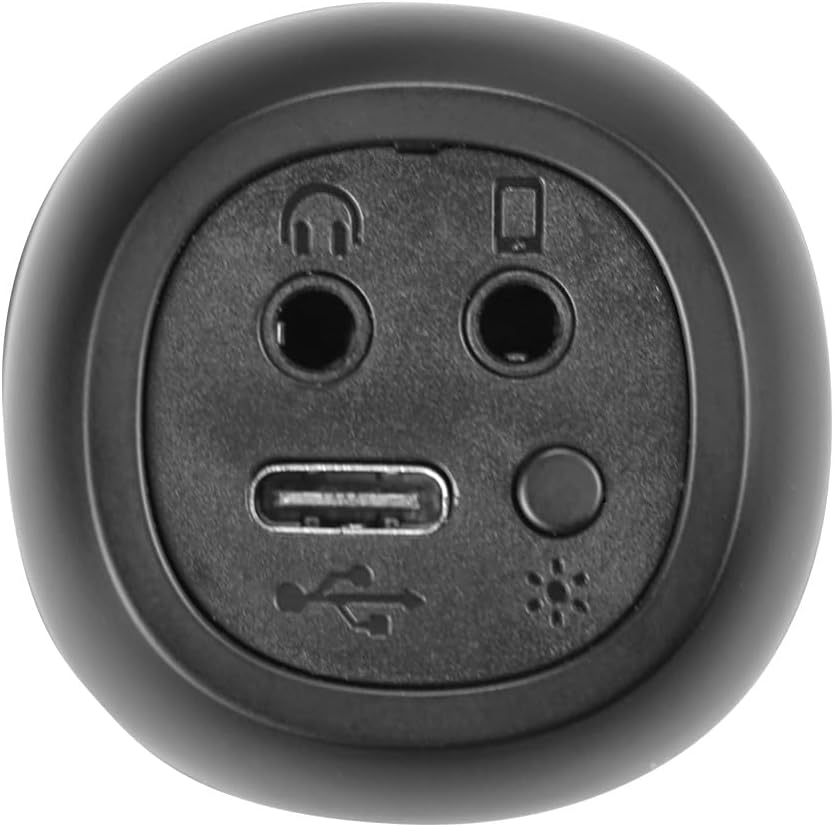
ภาพ: ระยะใกล้ view of the bottom of the microphone, showing the USB-C charging port, 3.5mm audio input/output jacks, and the light mode button.
การตั้งค่าและการเชื่อมต่อ
1. การชาร์จไมโครโฟน
Before first use, fully charge the microphone. Connect the provided USB-C cable to the microphone's USB-C port and the other end to a USB power adapter (not included) or a computer's USB port. The battery indicator light will show charging status.
2. การเปิด/ปิดเครื่อง
กดปุ่มค้างไว้ ปุ่มเปิดปิด for approximately 3 seconds to turn the microphone on or off. A sound prompt will indicate the power status.
3. การจับคู่บลูทู ธ
- Turn on the microphone. It will automatically enter Bluetooth pairing mode, indicated by a flashing Bluetooth light.
- บนสมาร์ทโฟน แท็บเล็ต หรือคอมพิวเตอร์ของคุณ ให้เปิดใช้งานบลูทูธ แล้วค้นหาอุปกรณ์ที่ใช้งานได้
- Select "Vieta Pro Karaoke Party" from the list of devices.
- Once connected, a sound prompt will confirm successful pairing, and the Bluetooth light will stop flashing.
4. True Wireless Connection (Connecting Two Microphones)
To use two Vieta Pro Karaoke Party microphones simultaneously with one device:
- Ensure both microphones are powered on and not connected to any other Bluetooth device.
- On one microphone (this will be the primary), double-press the ปุ่มบลูทูธ. It will enter True Wireless pairing mode.
- The primary microphone will search for the second microphone. Once connected, a sound prompt will confirm the True Wireless connection.
- Now, connect the primary microphone to your device via Bluetooth as described in step 3. Both microphones will now output audio from your device.

Image: Two individuals holding and using Vieta Pro Karaoke Party Microphones, demonstrating the True Wireless feature.
5. การเชื่อมต่อแบบมีสาย (AUX)
Connect an external audio source (e.g., MP3 player) to the microphone using a 3.5mm audio cable (not included) plugged into the 3.5mm audio input jack.
คำแนะนำการใช้งาน
1. ปรับระดับเสียง
ใช้ เล่ม + และ ปริมาณ - buttons on the microphone to adjust the speaker output volume. You can also control the volume from your connected device.
2. Changing Sound Modes/Effects
กดปุ่ม ปุ่มโหมด (M) repeatedly to cycle through the four available sound configuration modes or voice effects. Experiment to find your preferred sound.
3. Voice Reduction Feature
This feature allows you to reduce the vocal track of a song, making it easier to sing along. To activate or deactivate this feature, refer to the specific instructions in the full manual or experiment with the ปุ่มโหมด (M) or a dedicated button if present (not explicitly detailed in provided data, but mentioned as a feature).
4. การบันทึก
The microphone supports one-touch recording. Connect the microphone to a compatible recording device (e.g., smartphone with a recording app) via Bluetooth or the 3.5mm output jack. Press the dedicated ปุ่มบันทึก (if available, or refer to the full manual for specific button assignment) to start and stop recording.
5. เอฟเฟกต์แสงไฟ LED
กดปุ่ม ปุ่มโหมดแสง (located near the ports at the bottom) to change the LED lighting patterns or turn them off.

Image: Close-up of the Vieta Pro Karaoke Party Microphone's speaker grille, showing the integrated LED lighting effects.
การซ่อมบำรุง
- การทำความสะอาด: Use a soft, dry cloth to clean the microphone's surface. Do not use abrasive cleaners or solvents.
- พื้นที่จัดเก็บ: เก็บไมโครโฟนไว้ในที่แห้งและเย็น หลีกเลี่ยงแสงแดดโดยตรงและอุณหภูมิที่สูงหรือต่ำเกินไป
- การดูแลแบตเตอรี่ เพื่อยืดอายุการใช้งานแบตเตอรี่ ควรหลีกเลี่ยงการคายประจุแบตเตอรี่จนหมดบ่อยๆ ควรชาร์จอุปกรณ์เป็นประจำ แม้ว่าจะไม่ได้ใช้งานเป็นเวลานานก็ตาม
- การสัมผัสน้ำ: อุปกรณ์นี้ไม่กันน้ำ โปรดหลีกเลี่ยงการสัมผัสน้ำหรือความชื้นสูง
การแก้ไขปัญหา
| ปัญหา | สาเหตุที่เป็นไปได้ | สารละลาย |
|---|---|---|
| ไม่มีไฟฟ้า | แบตเตอรี่หมด | ชาร์จไมโครโฟนโดยใช้สาย USB-C |
| ไม่สามารถเชื่อมต่อผ่านบลูทูธได้ | Bluetooth is off on the device; microphone is already connected to another device; microphone is out of range. | Ensure Bluetooth is enabled on your device. Disconnect from other devices. Move microphone closer to your device (within 10 meters). Restart both devices. |
| ไม่มีเสียงออก | Volume is too low; microphone is muted; incorrect input source. | Increase volume on both the microphone and your connected device. Check if the microphone is in the correct operating mode. |
| True Wireless connection fails | One or both microphones are already paired; microphones are too far apart. | Ensure both microphones are unpaired from other devices. Place them close to each other during True Wireless pairing. Follow True Wireless pairing steps carefully. |
ข้อมูลจำเพาะ
| คุณสมบัติ | รายละเอียด |
|---|---|
| ชื่อรุ่น | Karaoke Party |
| ยี่ห้อ | เวียต้าโปร |
| เทคโนโลยีการเชื่อมต่อ | บลูทูธไร้สายแท้ |
| ประเภทขั้วต่อ | USB-C, แจ็ค 3.5 มม. |
| กำลังขับ | 18 วัตต์ |
| อายุการใช้งานแบตเตอรี่ | นานถึง 10 ชั่วโมง |
| ประเภทแบตเตอรี่ | ลิเธียมไอออน 1 ก้อน (รวมอยู่ด้วย) |
| ช่วงความถี่ | 50 ถึง 15,000 เฮิรตซ์ |
| อิมพีแดนซ์ | 600 โอห์ม |
| รูปแบบขั้ว | ทิศทางเดียว |
| อุปกรณ์ที่รองรับ | คอมพิวเตอร์ส่วนบุคคล สมาร์ทโฟน |
| คุณสมบัติพิเศษ | Volume Control, 1-Touch Recording, Lighting Modes, Battery Indicator, Radio |
| น้ำหนัก | 337 กรัม |
| วัสดุ | พลาสติก |
การรับประกันและการสนับสนุน
For warranty information and technical support, please contact the manufacturer, FRAMASON AUDIO SA, or your local retailer. Keep your proof of purchase for any warranty claims.
Manufacturer: FRAMASON AUDIO SA