
การแนะนำ
คู่มือนี้ให้คำแนะนำอย่างละเอียดเกี่ยวกับการติดตั้ง การใช้งาน และการบำรุงรักษาเครื่องปรับอากาศและปั๊มความร้อนแบบแยกส่วนไร้ท่อ KLIMAIRE 12,000 BTU 23.1 SEER2 Hyper Heat รุ่น KSIH012-H222-S(W) โปรดอ่านคู่มือนี้อย่างละเอียดก่อนการติดตั้งและการใช้งาน เพื่อให้มั่นใจถึงการใช้งานที่ถูกต้อง ประสิทธิภาพสูงสุด และความปลอดภัย โปรดเก็บคู่มือนี้ไว้เพื่อใช้อ้างอิงในอนาคต
ข้อมูลด้านความปลอดภัยที่สำคัญ
โปรดปฏิบัติตามข้อควรระวังด้านความปลอดภัยขั้นพื้นฐานเสมอเมื่อติดตั้ง ใช้งาน หรือบำรุงรักษาเครื่องใช้ไฟฟ้านี้ การไม่ปฏิบัติตามอาจทำให้เกิดไฟฟ้าช็อต ไฟไหม้ หรือการบาดเจ็บได้ เครื่องใช้ไฟฟ้านี้ต้องได้รับการติดตั้งโดยบุคลากรที่มีคุณสมบัติเหมาะสมตามข้อกำหนดด้านการเดินสายไฟระดับชาติและระดับท้องถิ่น
- ตรวจสอบให้แน่ใจว่าแหล่งจ่ายไฟตรงกับข้อกำหนดของอุปกรณ์ (230V)
- อย่าพยายามซ่อมแซมหรือดัดแปลงอุปกรณ์ด้วยตนเอง โปรดติดต่อเจ้าหน้าที่บริการที่มีคุณสมบัติเหมาะสม
- ควรทำความสะอาดบริเวณรอบๆ ยูนิตภายนอกอาคารให้ปราศจากเศษขยะและสิ่งกีดขวาง
- ตรวจสอบให้แน่ใจว่ามีการต่อสายดินอย่างเหมาะสมเพื่อป้องกันไฟฟ้าช็อต
- โปรดปิดแหล่งจ่ายไฟก่อนทำการบำรุงรักษาหรือทำความสะอาดใดๆ
เนื้อหาแพ็คเกจ
ตรวจสอบว่าส่วนประกอบทั้งหมดมีอยู่ก่อนเริ่มการติดตั้ง:
- เครื่องปรับอากาศแบบพัดลมภายในอาคาร KLIMAIRE ขนาด 12,000 BTU (KSIH012-H225-IW-2)
- เครื่องปรับอากาศอินเวอร์เตอร์ DC อัจฉริยะสำหรับใช้งานภายนอกอาคาร KLIMAIRE (KSIH012-H225-O-2)
- รีโมทคอนโทรลพร้อมที่วาง
- ชุดติดตั้งท่อ Maxwell ขนาด 16 ฟุต – ¼ x 1/2 นิ้ว (แบบขยายปลายท่อแล้ว)
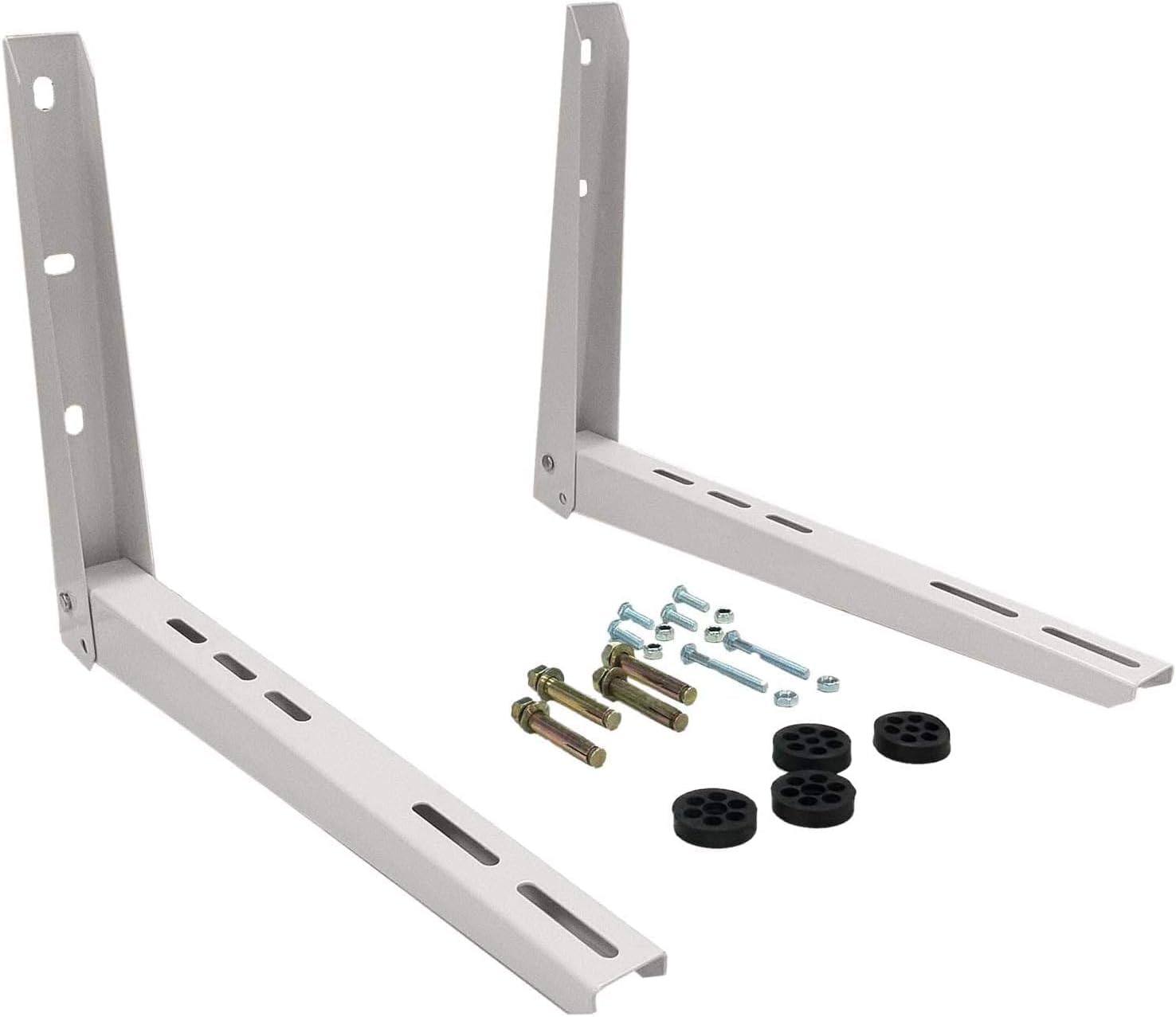
- ตัวยึดติดผนัง Maxwell
- ท่อร้อยสายไฟ (ท่อร้อยสายไฟฟ้า)
- สวิตช์ตัดการเชื่อมต่อ
- โมดูลรับสัญญาณ Wi-Fi (KPIMDWF)

ภาพ: ส่วนประกอบทั้งหมดที่รวมอยู่ในชุดเครื่องปรับอากาศแบบแยกส่วน KLIMAIRE ขนาด 12,000 BTU
การติดตั้งและการตั้งค่า
การติดตั้งระบบเครื่องปรับอากาศแบบแยกส่วนขนาดเล็กนี้ จำเป็นต้องใช้เครื่องมือและความรู้เฉพาะทาง ขอแนะนำอย่างยิ่งให้ติดตั้งโดยช่างเทคนิค HVAC ที่ได้รับการรับรอง การติดตั้งที่ไม่ถูกต้องอาจนำไปสู่ความเสียหายของอุปกรณ์ การรับประกันเป็นโมฆะ และอันตรายด้านความปลอดภัย
การติดตั้งเสร็จสิ้นview วีดีโอ
วิดีโอ: วิดีโอการติดตั้งอย่างเป็นทางการจาก KLIMAIRE นี้เป็นคู่มือภาพประกอบสำหรับการติดตั้งซีรีส์ U PRO ซึ่งมีหลักการติดตั้งคล้ายคลึงกับซีรีส์ KSIH โดยครอบคลุมการติดตั้งตัวเครื่องภายใน การเชื่อมต่อท่อ และการเดินสายไฟ
1. การติดตั้งยูนิตภายในอาคาร
- เลือกสถานที่: เลือกตำแหน่งบนผนังที่แข็งแรง หลีกเลี่ยงแสงแดดโดยตรงหรือแหล่งความร้อน และตรวจสอบให้แน่ใจว่ามีการระบายอากาศที่ดี รักษาช่องว่างขั้นต่ำจากผนังและเพดานตามที่ระบุไว้ในแบบ
- แผ่นติดตั้ง: ใช้แม่แบบการติดตั้งที่ให้มาเพื่อทำเครื่องหมายจุดเจาะสำหรับแผ่นยึดของตัวเครื่องภายในและรูสำหรับสายไฟที่ผนัง ยึดแผ่นยึดเข้ากับผนังอย่างแน่นหนาโดยใช้สกรูและพุกที่เหมาะสม ตรวจสอบให้แน่ใจว่าแผ่นยึดอยู่ในระดับที่สมบูรณ์
- เจาะรูผนัง: เจาะรู (โดยทั่วไปมีเส้นผ่านศูนย์กลาง 2.5-3 นิ้ว) ผ่านผนังสำหรับท่อประปา ท่อระบายน้ำ และสายไฟ เจาะรูให้เอียงลงเล็กน้อยไปทางด้านนอกเพื่อให้ระบายน้ำได้อย่างเหมาะสม

ภาพ: ตัวเครื่องภายในที่ติดตั้งบนผนัง แสดงให้เห็นถึงการออกแบบที่กะทัดรัดและการผสานเข้ากับพื้นที่อยู่อาศัยอย่างลงตัว
2. การติดตั้งชุดท่อและการเชื่อมต่อท่อระบายน้ำ
- เส้นทางเดินรถ: ค่อยๆ จัดวางชุดท่อ Maxwell ขนาด 16 ฟุตที่ต่อปลายไว้แล้ว ท่อระบายน้ำ และสายเคเบิลสื่อสาร ผ่านรูที่เจาะไว้ที่ผนังออกไปด้านนอกอย่างระมัดระวัง
- เชื่อมต่อกับยูนิตภายในอาคาร: เชื่อมต่อชุดท่อและท่อระบายน้ำเข้ากับพอร์ตที่ตรงกันบนตัวเครื่องภายใน ตรวจสอบให้แน่ใจว่าการเชื่อมต่อทั้งหมดแน่นสนิทและไม่มีการรั่วซึม
- ป้องกันและรักษาความปลอดภัย: หุ้มฉนวนท่อสารทำความเย็นและท่อระบายน้ำ ใช้ขายึดติดผนัง Maxwell ที่ให้มาเพื่อยึดชุดภายนอกให้แน่น
3. การเดินสายไฟฟ้า
- หมดแรง: โปรดตรวจสอบให้แน่ใจว่าได้ปิดสวิตช์ไฟหลักของบริเวณติดตั้งที่เบรกเกอร์แล้ว ก่อนเริ่มงานไฟฟ้าใดๆ
- เชื่อมต่อชุดภายในอาคาร: เชื่อมต่อสายเคเบิลสื่อสารจากตัวเครื่องภายในอาคารเข้ากับขั้วต่อไฟฟ้าของตัวเครื่องภายนอกอาคาร โดยปฏิบัติตามแผนผังการเดินสายไฟในคู่มือการใช้งานฉบับเต็ม
- เชื่อมต่อชุดภายนอก: เชื่อมต่อแหล่งจ่ายไฟหลัก (230V) เข้ากับขั้วต่อไฟฟ้าของชุดคอนเดนเซอร์ภายนอกอาคาร ใช้สายไฟและสวิตช์ตัดการเชื่อมต่อที่ให้มาเพื่อการเชื่อมต่อไฟฟ้าที่ปลอดภัยและเป็นไปตามข้อกำหนด
- โมดูล Wi-Fi: ติดตั้งโมดูลรับสัญญาณ Wi-Fi (KPIMDWF) ลงในพอร์ตที่กำหนดบนตัวเครื่องภายในอาคาร เพื่อใช้งานฟังก์ชั่นควบคุมอัจฉริยะ
4. การดูดฝุ่นชุดท่อ
ขั้นตอนสำคัญนี้จะกำจัดอากาศและความชื้นออกจากท่อสารทำความเย็น ป้องกันความเสียหายของระบบ และรับประกันการทำงานที่มีประสิทธิภาพ จำเป็นต้องใช้ปั๊มสุญญากาศและเกจวัดแรงดัน
วิดีโอ: วิดีโอนี้สาธิตขั้นตอนง่ายๆ ในการดูดอากาศออกจากระบบเครื่องปรับอากาศแบบแยกส่วน ซึ่งเป็นกระบวนการสำคัญในการกำจัดอากาศและความชื้นออกจากท่อสารทำความเย็นก่อนปล่อยสารทำความเย็นasinสารทำความเย็น
- เชื่อมต่อเกจวัด: เชื่อมต่อชุดเกจวัดแรงดันเข้ากับพอร์ตบริการบนตัวเครื่องภายนอกและปั๊มสุญญากาศ
- อพยพ: เปิดปั๊มสุญญากาศและเปิดวาล์วเกจวัดแรงดันเพื่อดูดอากาศออกจากระบบ ตรวจสอบระดับสุญญากาศจนกว่าจะถึงระดับไมครอนที่ผู้ผลิตกำหนด (โดยทั่วไปต่ำกว่า 500 ไมครอน)
- รักษาแรงดันสุญญากาศ: ปิดวาล์วเกจวัดแรงดันและปิดปั๊มสุญญากาศ สังเกตเกจวัดแรงดันอย่างน้อย 15-30 นาที เพื่อให้แน่ใจว่าแรงดันสุญญากาศคงที่ ซึ่งแสดงว่าไม่มีการรั่วไหล
- ปล่อยสารทำความเย็น: เมื่อระบบสุญญากาศทำงานได้อย่างคงที่แล้ว ให้ค่อยๆ เปิดวาล์วบริการบนชุดภายนอกเพื่อปล่อยสารทำความเย็นเข้าสู่ระบบ
คำแนะนำการใช้งาน
เครื่องปรับอากาศแบบแยกส่วน KLIMAIRE ของคุณมีโหมดการทำงานและคุณสมบัติหลากหลาย เพื่อความสะดวกสบายที่ปรับแต่งได้ตามต้องการ
ฟังก์ชั่นการควบคุมระยะไกล
ภาพ: รีโมตคอนโทรลสำหรับระบบเครื่องปรับอากาศแบบแยกส่วน KLIMAIRE แสดงให้เห็นถึงการจัดวางปุ่มที่ใช้งานง่ายสำหรับฟังก์ชันต่างๆ
- เปิด/ปิด: เปิดหรือปิดเครื่อง
- เส้นทาง: วงจรผ่านโหมดการทำงาน:
- เย็น: ให้ความเย็นสบาย
- ความร้อน: ให้ความร้อนได้อย่างมีประสิทธิภาพแม้ในอุณหภูมิแวดล้อมต่ำถึง -22 องศาฟาเรนไฮต์
- แห้ง: ลดความชื้นในอากาศ
- แฟน: หมุนเวียนอากาศโดยไม่ใช้ความร้อนหรือความเย็น
- อัตโนมัติ: เลือกโหมดอัตโนมัติตามอุณหภูมิห้อง
- อุณหภูมิ ▲/▼: ปรับอุณหภูมิได้ตามต้องการ
- แฟน: ปรับความเร็วพัดลมได้ (ปรับความเร็วพัดลมภายในอาคารได้ 12 ระดับ)
- นอน: ช่วยเพิ่มความสะดวกสบายและประหยัดพลังงานขณะนอนหลับ
- เทอร์โบ: เปิดใช้งานความเร็วพัดลมสูงสุดเพื่อการทำความเย็นหรือความร้อนอย่างรวดเร็ว
- สวิง/ตรง: ควบคุมทิศทางการไหลของอากาศผ่านบานเกล็ด
- ติดตามฉัน: รีโมทคอนโทรลทำหน้าที่เหมือนเทอร์โมสตัท โดยจะตรวจจับอุณหภูมิ ณ ตำแหน่งที่ติดตั้ง
- ตั้งเวลาเปิด/ปิด: ตั้งเวลาให้เครื่องเปิดหรือปิด
การควบคุม Wi-Fi
คุณสมบัติการเชื่อมต่อ Wi-Fi ช่วยให้คุณควบคุมระบบเครื่องปรับอากาศแบบแยกส่วนขนาดเล็กจากระยะไกลผ่านแอปพลิเคชันบนสมาร์ทโฟน โปรดดูคำแนะนำเฉพาะของโมดูล Wi-Fi สำหรับการจับคู่และการใช้งานแอป

ภาพ: ผู้ใช้งานกำลังใช้งานระบบเครื่องปรับอากาศแบบแยกส่วนขนาดเล็กผ่านแอปพลิเคชันบนสมาร์ทโฟนasing ความสะดวกสบายของการควบคุมผ่าน Wi-Fi
การซ่อมบำรุง
การบำรุงรักษาอย่างสม่ำเสมอช่วยให้การทำงานมีประสิทธิภาพและยืดอายุการใช้งานของเครื่อง ควรตัดกระแสไฟก่อนทำการบำรุงรักษาทุกครั้ง
- การทำความสะอาดตัวกรองอากาศ: ตัวเครื่องภายในมีแผ่นกรองอากาศที่สามารถล้างทำความสะอาดได้ ทำความสะอาดทุกๆ 2-4 สัปดาห์ หรือบ่อยกว่านั้นหากใช้งานหนักหรืออยู่ในสภาพแวดล้อมที่มีฝุ่นมาก ถอดแผ่นกรองออก ล้างด้วยสบู่และน้ำอ่อนๆ ล้างออกให้สะอาด และปล่อยให้แห้งสนิทก่อนติดตั้งกลับเข้าไปใหม่
- ฟังก์ชั่นทำความสะอาดตัวเอง: ควรใช้ฟังก์ชั่นทำความสะอาดตัวเองของเครื่องเป็นระยะ เพื่อป้องกันการเกิดเชื้อราและคราบตะไคร่บนคอยล์ภายในอาคาร โปรดดูคำแนะนำบนรีโมทคอนโทรลสำหรับการเปิดใช้งาน
- การทำความสะอาดยูนิตภายนอก: ตรวจสอบและทำความสะอาดคอยล์คอนเดนเซอร์ภายนอกเป็นระยะ เพื่อกำจัดสิ่งสกปรก ใบไม้ และเศษวัสดุอื่นๆ ที่อาจขัดขวางการไหลเวียนของอากาศ ใช้แปรงขนนุ่มหรือเครื่องดูดฝุ่น
- การตรวจสอบการระบายน้ำ: ตรวจสอบให้แน่ใจว่าท่อระบายน้ำไม่มีสิ่งอุดตันและมีความลาดเอียงที่เหมาะสมเพื่อให้สามารถระบายน้ำได้อย่างต่อเนื่อง

ภาพ: คุณสมบัติหลักของเครื่องปรับอากาศแบบแยกส่วน KLIMAIRE โดยเน้นที่การบำรุงรักษาที่ง่ายและระบบทำความสะอาดตัวเอง
การแก้ไขปัญหา
ก่อนที่จะติดต่อฝ่ายสนับสนุนลูกค้า โปรดอ่านview ปัญหาและวิธีแก้ไขทั่วไปต่อไปนี้:
- หน่วยไม่เปิด: ตรวจสอบแหล่งจ่ายไฟ เบรกเกอร์ และตรวจสอบให้แน่ใจว่าแบตเตอรี่ของรีโมทคอนโทรลใช้งานได้
- การทำความเย็น/ทำความร้อนไม่เพียงพอ: ตรวจสอบโหมดและการตั้งค่าอุณหภูมิให้ถูกต้อง ทำความสะอาดแผ่นกรองอากาศ ตรวจสอบสิ่งกีดขวางรอบๆ ยูนิตภายใน/ภายนอกอาคาร ตรวจสอบให้แน่ใจว่าหน้าต่างและประตูทุกบานปิดสนิท
- เสียงผิดปกติ: เสียงเล็กน้อยระหว่างการใช้งานถือเป็นเรื่องปกติ หากมีเสียงดังหรือเสียงผิดปกติเกิดขึ้น ให้ตรวจสอบชิ้นส่วนที่หลวมหรือสิ่งกีดขวาง
- การรั่วไหลของน้ำ: ตรวจสอบท่อระบายน้ำว่ามีรอยพับ การอุดตัน หรือความลาดเอียงที่ไม่เหมาะสมหรือไม่
- รหัสข้อผิดพลาด: เครื่องนี้มีระบบตรวจสอบตัวเอง หากมีรหัสข้อผิดพลาดปรากฏบนหน้าจอ โปรดดูคู่มือการใช้งานฉบับเต็มเพื่อดูความหมายของรหัสแต่ละรหัสและขั้นตอนการแก้ไขปัญหา
ข้อมูลจำเพาะ
| คุณสมบัติ | ข้อมูลจำเพาะ |
|---|---|
| ยี่ห้อ | คลิแมร์ |
| หมายเลขรุ่น | KSIH012-H222-S(W) |
| ความสามารถในการทำความเย็น | 12,000 บีทียู (ต่ำสุด 4,000 บีทียู – สูงสุด 13,800 บีทียู) |
| ความสามารถในการให้ความร้อน | 11,800 บีทียู (ต่ำสุด 5,000 บีทียู – สูงสุด 15,500 บีทียู) |
| เรตติ้ง SEER2 | 23.1 |
| คะแนน HSPF | 10.5 |
| การจัดอันดับ EER2 | 13 |
| พื้นที่ให้บริการ | พื้นที่สูงสุดถึง 550 ตร.ฟุต |
| เล่มที่tage | 230 โวลต์ |
| ระดับเสียง (ภายในอาคาร) | 36 เดซิเบล |
| อุณหภูมิในการทำงาน (การทำความร้อน) | ต่ำถึง -22°F |
| อุณหภูมิในการทำงาน (การทำความเย็น) | สูงถึง 122°F |
| ขนาดตัวเครื่องในร่ม (กว้าง x ลึก x สูง) | 32.87 x 7.80 x 11.02 นิ้ว |
| ขนาดเครื่องกลางแจ้ง (กว้าง x ลึก x สูง) | 31.5 x 13.1 x 21.8 นิ้ว |
| ประเภทวัสดุ | ทองแดง, พลาสติก |
| คุณสมบัติพิเศษ | รองรับ Wi-Fi, โหมดทำความร้อนสูง, ระบบทำความสะอาดตัวเอง, ระบบตรวจสอบตัวเอง, ระบบละลายน้ำแข็งอัตโนมัติ, ระบบรีสตาร์ทอัตโนมัติ, ฟังก์ชั่นติดตามตัว, ความเร็วพัดลมภายใน 12 ระดับ |
ข้อมูลการรับประกัน
เครื่องปรับอากาศแบบแยกส่วน KLIMAIRE ขนาด 12,000 BTU มาพร้อมกับ... การรับประกันจากผู้ผลิต 7 ปีการรับประกันนี้ครอบคลุมถึงข้อบกพร่องในวัสดุและฝีมือการผลิตภายใต้การใช้งานและการบริการตามปกติ สำหรับข้อกำหนดและเงื่อนไขโดยละเอียด โปรดดูบัตรรับประกันที่แนบมากับผลิตภัณฑ์ของคุณ หรือติดต่อฝ่ายบริการลูกค้าของ Klimaire
การสนับสนุนลูกค้า
หากต้องการความช่วยเหลือด้านเทคนิค การแก้ไขปัญหาที่อยู่นอกเหนือคู่มือนี้ หรือการเรียกร้องการรับประกัน โปรดติดต่อฝ่ายบริการลูกค้าของ Klimaire โปรดเตรียมหมายเลขรุ่นและวันที่ซื้อให้พร้อมเมื่อติดต่อฝ่ายบริการลูกค้า
ฝ่ายบริการลูกค้าของ Klimaire: โปรดดูข้อมูลอย่างเป็นทางการจาก Klimaire webโปรดตรวจสอบเว็บไซต์หรือเอกสารประกอบผลิตภัณฑ์ของคุณเพื่อดูข้อมูลติดต่อล่าสุด


