
Bmax B4
คู่มือการใช้งานมินิพีซี Bmax B4
Model: B4 | Brand: Bmax
1. บทนำ
Welcome to the user manual for your Bmax B4 Mini PC. This compact and powerful desktop computer is designed for both home and office use, featuring an Intel 12th Gen Alder Lake-N95 processor, 16GB of DDR4 RAM, and a 512GB SSD. It supports 4K dual display output, offering versatile connectivity options including HDMI 2.0, WiFi, Bluetooth, and Gigabit Ethernet.
This manual provides essential information on setting up, operating, maintaining, and troubleshooting your Bmax B4 Mini PC to ensure optimal performance and longevity.

The Bmax B4 Mini PC is designed to be ultra-light and portable, fitting easily into various workspaces.
2. อะไรอยู่ในกล่อง
เมื่อเปิดบรรจุภัณฑ์ โปรดตรวจสอบว่าประกอบด้วยสิ่งของต่อไปนี้ทั้งหมด:
- 1 x Bmax B4 Mini PC (16GB+512GB configuration)
- สาย HDMI 1 เส้น
- 1 x คู่มือผู้ใช้ (เอกสารนี้)
- 1 x แหล่งจ่ายไฟของสหรัฐฯ
- 1 x ขาตั้ง VESA พร้อมสกรู
3. สินค้าหมดview
The Bmax B4 Mini PC is engineered for performance and versatility. Below are key features and a diagram of its interfaces.

ด้านหน้าและด้านข้าง view of the Bmax B4 Mini PC, highlighting its compact design and accessible front ports.
3.1 คุณสมบัติหลัก
- โปรเซสเซอร์: โปรเซสเซอร์ Intel Alder Lake-N95 เจนเนอเรชั่นที่ 12 (4 คอร์/4 เธรด ความเร็วสูงสุด 3.4 GHz)
- หน่วยความจำ: 16GB SO-DIMM DDR4 3200MHz RAM
- พื้นที่จัดเก็บ: 512GB M.2 SATA 2280 SSD, expandable with 2.5-inch SSD/HDD (up to 2TB)
- กราฟิก: Intel UHD Graphics with 4K@60Hz dual display support
- การเชื่อมต่อ: WiFi-5 (2.4GHz/5GHz), Bluetooth 4.2, Gigabit Ethernet
- ระบบปฏิบัติการ: Supports OS 11 Pro 64 Bit and Ubuntu

โอเวอร์view of the Bmax B4 Mini PC's impressive specifications and capabilities.
3.2 เค้าโครงอินเทอร์เฟซ
Familiarize yourself with the various ports and connectors on your Mini PC:
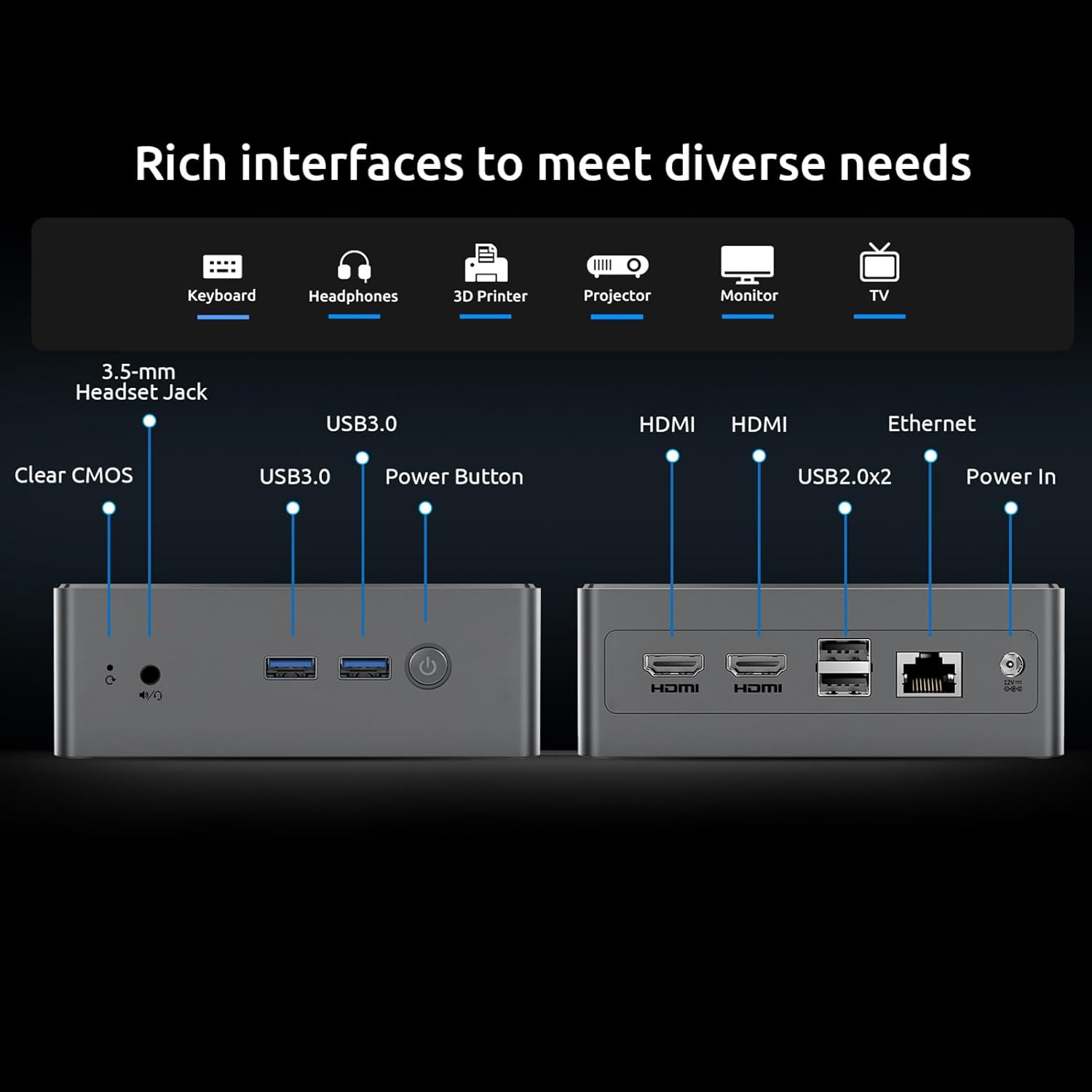
รายละเอียด view of the Bmax B4 Mini PC's rich interfaces, designed to meet diverse connectivity needs.
- แผงด้านหน้า: 3.5-mm Stereo Headset Jack, 2x USB 3.0 ports, Power Button, Clear CMOS button.
- แผงด้านหลัง: DC Port (Power In), RJ45 (Gigabit Ethernet), 2x USB 2.0 ports, 2x HDMI 2.0 ports.
3.3 วิดีโอผลิตภัณฑ์view
Watch this official product video for a visual guide to the Bmax B4 Mini PC's features and applications.
วิดีโอแสดงอย่างเป็นทางการasing the Bmax B4 Mini PC, its compact design, various ports, and potential uses in home and office environments, including gaming and multi-monitor setups.
4. คำแนะนำในการตั้งค่า
Follow these steps to set up your Bmax B4 Mini PC:
- เชื่อมต่อกับพลังงาน: Plug the US Power Adapter into the DC Port on the rear of the Mini PC, then connect it to a power outlet.
- เชื่อมต่อกับจอแสดงผล: Use the provided HDMI cable to connect one of the HDMI ports on the Mini PC to your monitor or TV. For dual display, connect a second monitor to the other HDMI port.
- เชื่อมต่ออุปกรณ์ต่อพ่วง: Plug in your keyboard and mouse to the available USB ports (USB 3.0 on the front, USB 2.0 on the rear).
- การเชื่อมต่อเครือข่าย (ทางเลือก): For a wired internet connection, connect an Ethernet cable from your router to the RJ45 port on the rear. Wireless connection (WiFi) can be configured after initial boot.
- เปิดเครื่อง: กดปุ่มเปิด/ปิดที่แผงด้านหน้าเพื่อเปิดใช้งานมินิพีซี
- ตั้งค่าเริ่มต้น: Follow the on-screen instructions to complete the operating system setup (e.g., Windows 11 Pro or Ubuntu).

The Bmax B4 Mini PC supports 4K dual display output, enhancing productivity and entertainment.
5. คู่มือการใช้งาน
Your Bmax B4 Mini PC is ready for various tasks, from daily computing to multimedia consumption.
ระบบปฏิบัติการ 5.1
The Mini PC comes pre-installed with OS 11 Pro 64 Bit and also supports Ubuntu. You can switch between or install your preferred operating system as needed.
5.2 การตั้งค่าจอแสดงผลคู่
Utilize the two HDMI 2.0 ports to extend your desktop across two 4K monitors for enhanced multitasking. Configure display settings within your operating system.

The Bmax B4 Mini PC is easy to operate and highly compatible with various applications and operating systems.
5.3 การเชื่อมต่อ
- ไวไฟ: Connect to 2.4GHz or 5GHz wireless networks for high-speed internet access.
- บลูทูธ: Pair Bluetooth 4.2 compatible devices such as wireless mice, keyboards, headphones, or printers.
- อีเธอร์เน็ต: For a stable and fast wired connection, use the Gigabit Ethernet port.
5.4 สถานการณ์การใช้งาน
The Bmax B4 is suitable for a wide range of applications:
- งานออฟฟิศ: Efficiently handle documents, spreadsheets, presentations, and video conferences.
- ความบันเทิงภายในบ้าน: Enjoy 4K movie viewing, streaming content from platforms like Netflix, YouTube, and Amazon Prime Video.
- เล่นเกมเบาๆ: Capable of running less graphically intensive games.
- การใช้งานเพื่อการศึกษา: Ideal for online learning and research.

The Bmax B4 Mini PC facilitates efficient office work with its multi-display support and processing power.

Experience immersive 4K movie viewing with your Bmax B4 Mini PC.
6. การบำรุงรักษา
Proper maintenance ensures the longevity and optimal performance of your Bmax B4 Mini PC.
6.1 ระบบทำความเย็น
The Mini PC is equipped with a smart fan for efficient heat dissipation, keeping the system cool and quiet. Ensure proper airflow around the device by not blocking the vents.

The efficient heat dissipation system ensures silent operation and stable performance.
6.2 การขยายพื้นที่เก็บข้อมูล
The 512GB SSD provides ample storage, but you can expand it further. The detachable empty base allows for easy installation of a DIY 2.5-inch SSD/HDD, supporting up to 2TB of additional storage.

Easily expand your storage by adding a 2.5-inch SSD or HDD.
6.3 การทำความสะอาด
Regularly clean the exterior of the Mini PC with a soft, dry cloth. Use compressed air to gently clear dust from vents to maintain optimal cooling.
6.4 การอัปเดตซอฟต์แวร์
Keep your operating system and drivers updated to ensure security, stability, and performance. Refer to your OS documentation for update procedures.
7 การแก้ไขปัญหา
If you encounter issues with your Bmax B4 Mini PC, refer to the following common problems and solutions:
| ปัญหา | สาเหตุที่เป็นไปได้ | สารละลาย |
|---|---|---|
| ไม่มีไฟฟ้า | ไม่ได้เชื่อมต่ออะแดปเตอร์ไฟ ปัญหาเกี่ยวกับเต้ารับไฟฟ้า | ตรวจสอบให้แน่ใจว่าอะแดปเตอร์แปลงไฟเชื่อมต่อกับคอมพิวเตอร์และเต้ารับไฟฟ้าที่ใช้งานได้แน่นหนาแล้ว ลองเสียบกับเต้ารับอื่นดู |
| ไม่มีการแสดงผล | จอภาพไม่ได้เชื่อมต่อ แหล่งสัญญาณเข้าไม่ถูกต้อง สายเคเบิลชำรุด | Check HDMI cable connections. Ensure monitor is on and set to the correct input source. Try a different HDMI cable or monitor. |
| ประสิทธิภาพการทำงานช้า | Too many applications running, insufficient free storage, outdated drivers. | Close unnecessary applications. Free up disk space. Update operating system and drivers. Check for proper ventilation. |
| ปัญหาการเชื่อมต่อเครือข่าย | Incorrect WiFi password, router issues, driver problems. | Verify WiFi password. Restart router. Update network drivers. Try a wired Ethernet connection. |
One-key Smart Recovery: If your system crashes or experiences severe issues, the Bmax B4 Mini PC supports a "One-key Smart Recovery" feature. This option allows you to restore or reinstall the system configuration to a working state. Refer to the detailed instructions in the included User Manual for this procedure.
8. ข้อมูลจำเพาะ
Detailed technical specifications for the Bmax B4 Mini PC:
| คุณสมบัติ | รายละเอียด |
|---|---|
| โปรเซสเซอร์ | Intel 12th Gen Alder Lake-N95 (4 Cores/4 Threads, up to 3.4GHz, 6M Cache) |
| แรม | 16 GB SO-DIMM DDR4 3200MHz |
| พื้นที่จัดเก็บ | 512 GB M.2 SATA 2280 SSD (Expandable with 2.5-inch SSD/HDD up to 2TB) |
| กราฟฟิก | Intel UHD Graphics (Supports 4K@60Hz, Dual HDMI 2.0) |
| ระบบปฏิบัติการ | OS 11 Pro 64 Bit, supports Ubuntu |
| การเชื่อมต่อ | WiFi-5 (802.11 a/b/g/n/ac 2.4GHz/5GHz), Bluetooth 4.2, Gigabit Ethernet (RJ45) |
| พอร์ต | 2x HDMI 2.0, 2x USB 3.0, 2x USB 2.0, 1x RJ45, 1x 3.5-mm Stereo Headset Jack, 1x DC Port, 1x Clear CMOS |
| ขนาด | 12.5 cm (W) × 11.2 cm (L) × 4.4 cm (H) |
| น้ำหนัก | ประมาณ 1.61 ปอนด์ |

Detailed specifications of the Intel N95 processor and its performance benchmark.

High configuration memory and SSD details for daily needs.
9. การรับประกันและการสนับสนุน
Bmax is committed to providing excellent customer service for your Mini PC.
- การสนับสนุนด้านเทคนิค: Enjoy lifetime technical support for your Bmax Mini PC.
- บริการออนไลน์: 7 days/24 hours online service is available for any inquiries or assistance you may need.
- การรับประกัน: สินค้ามีการรับประกัน 12 เดือน
If you have any questions or require further assistance, please do not hesitate to contact Bmax customer support.
Ask a question about this manual
Ask about setup, troubleshooting, compatibility, parts, safety, or missing instructions. Manuals+ will review the question and use this page’s manual context to help answer it.