
1. บทนำ
This manual provides detailed instructions for the setup, operation, and maintenance of your Bmax B6 Power Mini PC. This compact desktop computer is designed for various applications, from office tasks to multimedia consumption, offering a balance of performance and space efficiency.

Image 1.1: The Bmax B6 Power Mini PC, showcasinด้วยดีไซน์ที่กะทัดรัดและพอร์ตด้านหน้า
2. อะไรอยู่ในกล่อง
กรุณาตรวจสอบเนื้อหาในแพ็คเกจของคุณเพื่อให้แน่ใจว่ามีสินค้าครบทั้งหมด:
- 1 x Bmax B6 Power Mini PC (16GB+1TB configuration)
- 1 x สาย HDMI
- 1 x คู่มือผู้ใช้
- 1 x แหล่งจ่ายไฟของสหรัฐฯ
- 1 x ขาตั้ง VESA พร้อมสกรู
3. สินค้าหมดview
The Bmax B6 Power Mini PC is equipped with advanced components for efficient performance.

ภาพที่ 3.1: จบแล้วview of key features including processor, memory, storage, and connectivity.
3.1 คุณสมบัติหลัก
- โปรเซสเซอร์: Intel Core i7-1060NG7, 4 Cores/8 Threads, up to 3.8GHz.
- หน่วยความจำ: แรม LPDDR4 ขนาด 16GB
- พื้นที่จัดเก็บ: 1TB NVMe SSD, with support for dual NVMe SSDs and expandable up to 2TB via 2.5" HDD (SATA cable included).
- กราฟิก: Intel Iris Xe Graphics, supporting 4K@60Hz output.
- การแสดงผลเอาท์พุต: Supports three simultaneous displays via 2x HDMI 2.0 and 1x Full-Featured Type-C port.
- การเชื่อมต่อไร้สาย: Wi-Fi 6 (2.4G/5G 802.11a/b/g/n/ac) and Bluetooth 5.2.
- การเชื่อมต่อแบบมีสาย: 1x พอร์ต Gigabit Ethernet (RJ45)
- พอร์ต: 3x USB 3.0, 1x Full-Featured Type-C, 2x HDMI 2.0, 1x Earphone/Microphone Jack, 1x DC Power Input.
- คุณสมบัติเพิ่มเติม: VESA mount compatibility, Wake On LAN, PXE Boot, RTC Wake, Auto Power On, One-key Smart Recovery.

Image 3.2: Detailed diagram of the front and rear ports and their functions.
4. คู่มือการติดตั้ง
4.1 การเชื่อมต่ออุปกรณ์ต่อพ่วง
- เชื่อมต่อจอแสดงผล: Use the provided HDMI cable to connect your monitor or TV to one of the HDMI ports on the Mini PC. Alternatively, use a compatible USB-C to display cable for the Type-C port.
- เชื่อมต่อคีย์บอร์ดและเมาส์: Plug your USB keyboard and mouse into the available USB 3.0 ports. For wireless devices, ensure Bluetooth is enabled and pair them as per their instructions.
- เชื่อมต่อเครือข่าย (ทางเลือก): For a wired internet connection, connect an Ethernet cable from your router or modem to the RJ45 port on the Mini PC.
- เชื่อมต่อพลังงาน: Plug the US Power Adapter into the DC power input port on the Mini PC, then plug the adapter into a power outlet.
4.2 การเปิดเครื่องครั้งแรก
- Ensure all peripherals are connected.
- กดปุ่มเปิด/ปิดเครื่องที่อยู่ด้านหน้าของมินิพีซี
- The system will boot up. Follow the on-screen instructions to complete the Windows setup process. It is recommended to keep the Ethernet cable unplugged during the first boot for faster setup if prompted.
5. คู่มือการใช้งาน
5.1 การทำงานพื้นฐาน
- เปิด/ปิดเครื่อง: Press the power button to turn on the PC. To turn off, use the Windows Shut Down option or press and hold the power button for 5 seconds.
- เริ่มต้นใหม่อีกครั้ง: Use the Windows Restart option.
- โหมดสลีป: Use the Windows Sleep option or briefly press the power button.
5.2 การกำหนดค่าการแสดงผล
The Bmax B6 Power supports up to three 4K@60Hz displays simultaneously.
- Connect your displays to the available HDMI 2.0 ports and the Full-Featured Type-C port.
- In Windows, right-click on the desktop and select "Display settings" to configure multiple displays (extend, duplicate, or show only on one).

Image 5.1: Illustration of the Mini PC connected to multiple displays, demonstrating its multi-tasking capabilities.
5.3 การเชื่อมต่อเครือข่าย
- ไวไฟ : หากต้องการเชื่อมต่อกับเครือข่ายไร้สาย ให้คลิกไอคอน Wi-Fi ในแถบงาน เลือกเครือข่ายของคุณ และป้อนรหัสผ่าน
- อีเธอร์เน็ต: If an Ethernet cable is connected, the PC will automatically establish a wired network connection.
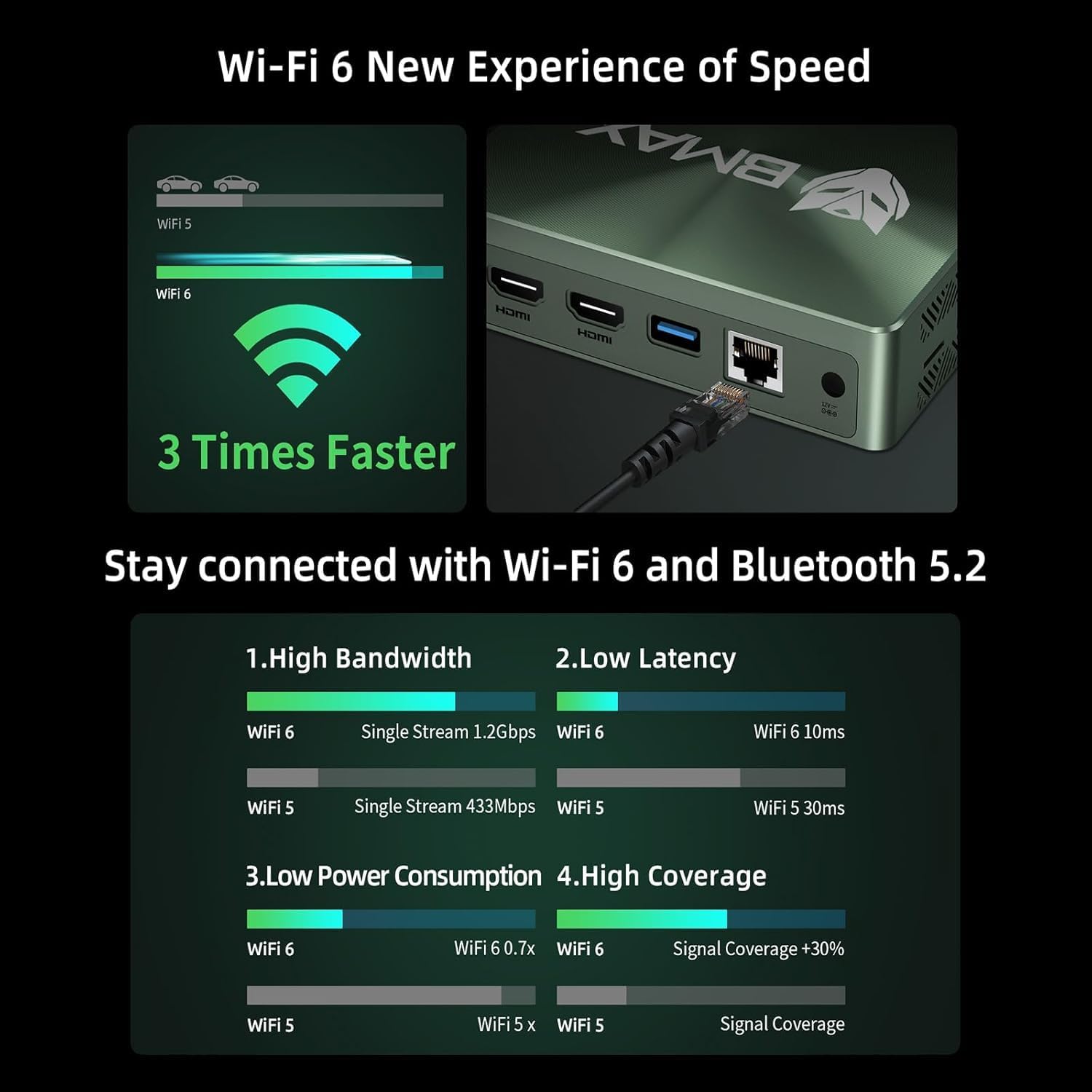
Image 5.2: Visual representation of Wi-Fi 6 and Bluetooth 5.2 capabilities, highlighting speed and connectivity benefits.
6. การบำรุงรักษา
6.1 การทำความสะอาด
- โปรดตรวจสอบให้แน่ใจว่าได้ปิดเครื่องมินิพีซีและถอดปลั๊กออกก่อนทำความสะอาด
- ใช้ผ้าแห้งนุ่มเช็ดภายนอก
- For dust accumulation in vents, use compressed air. Do not insert objects into the vents.
6.2 การขยายพื้นที่เก็บข้อมูล
The Bmax B6 Power supports additional storage. You can install a second M.2 NVMe SSD or a 2.5-inch HDD/SSD.
- Refer to the detailed instructions in the included user manual for safe installation of additional storage devices.
- Ensure the device is powered off and unplugged before opening the chassis.

Image 6.1: Diagram illustrating the M.2 NVMe SSD slot and the option for expanded storage.
7 การแก้ไขปัญหา
7.1 ไม่มีไฟฟ้า
- ตรวจสอบว่าอะแดปเตอร์แปลงไฟเสียบเข้ากับมินิพีซีและเต้ารับไฟฟ้าอย่างแน่นหนาแล้ว
- ตรวจสอบให้แน่ใจว่าเต้ารับไฟฟ้าทำงานได้
- ลองใช้เต้ารับไฟอื่น
7.2 ไม่มีการแสดงผล
- Verify that the HDMI or USB-C cable is securely connected to both the Mini PC and the monitor.
- ตรวจสอบให้แน่ใจว่าจอภาพเปิดอยู่และตั้งค่าแหล่งอินพุตที่ถูกต้อง
- ลองใช้สายจอภาพหรือจอภาพอื่นหากมี
7.3 System Recovery (One-key Smart Recovery)
If your Windows operating system encounters issues, the Bmax B6 Power features a "Smart Recovery" environment to restore factory settings.
- Step 1: Power On Mini PC.
- Step 2: Enter Recovery Mode. As soon as the screen lights up, immediately and repeatedly press the F9 key until the System Recovery menu appears.
- Step 3: Start the Recovery. คุณมีสองตัวเลือก:
- Using Keyboard: Press the 'Y' key to begin the Factory Reset.
- Using Mouse: Click the [Restore System] button.
- Step 4: Set Up Windows Once Complete. You will be greeted by the initial Windows setup screen. Simply follow the on-screen instructions to set up your fresh system.

Image 7.1: Screenshot of the Bmax Smart Recovery environment, showing options for Factory Reset and Exit.
8. ข้อมูลจำเพาะ
| คุณสมบัติ | รายละเอียด |
|---|---|
| ยี่ห้อ | บีแม็กซ์ |
| หมายเลขรุ่น | บี6 พาวเวอร์ |
| โปรเซสเซอร์ | Intel Core i7-1060NG7 (4C/8T, up to 3.8 GHz) |
| แรม | 16GB LPDDR4 ความจุ |
| พื้นที่จัดเก็บ | 1 TB NVMe SSD (expandable up to 2 TB via 2.5" HDD/SSD) |
| กราฟฟิก | กราฟิก Intel Iris Xe (รวม) |
| ความละเอียดหน้าจอสูงสุด | 3840 x 2160 พิกเซล (4K) |
| การแสดงผลเอาท์พุต | 2x HDMI 2.0, 1x Full-Featured Type-C (supports triple 4K@60Hz displays) |
| การเชื่อมต่อแบบไร้สาย | Wi-Fi 6 (802.11a/b/g/n/ac), Bluetooth 5.2 |
| การเชื่อมต่อแบบมีสาย | 1x กิกะบิตอีเทอร์เน็ต (RJ45) |
| พอร์ต USB | 3x USB 3.0, 1x Full-Featured Type-C |
| เสียง | 1x Earphone/Microphone Jack |
| ระบบปฏิบัติการ | OS (Typically Windows, specific version may vary) |
| น้ำหนักสินค้า | 1.61 ปอนด์ |
| สี | สีดำ |
| คุณสมบัติพิเศษ | VESA Mount, Wake On LAN, PXE Boot, RTC Wake, Auto Power On, Smart Recovery |
9. การรับประกันและการสนับสนุน
Bmax provides comprehensive support for your Mini PC.
- การรับประกัน: Your Bmax Mini PC comes with a 12-month warranty.
- การส่งคืน: สามารถคืนสินค้าได้ภายใน 30 วัน
- บริการลูกค้า: 7x24-hour customer service support is provided.
- การสนับสนุนด้านเทคนิค: มีบริการสนับสนุนทางเทคนิคตลอดอายุการใช้งาน
9.1 วิธีการติดต่อฝ่ายสนับสนุน
For inquiries, system updates, or troubleshooting assistance, please contact customer service through your Amazon account:
- Log in to Amazon.
- Go to "Your Account".
- ไปที่ "คำสั่งซื้อของคุณ"
- Select the Bmax B6 Power Mini PC order and click "Ask Product Question".

Image 9.1: Information on contacting Bmax after-sales support via Amazon.