
1. ข้อมูลด้านความปลอดภัย
Please read all instructions and warnings carefully before using this product. Failure to follow these safety guidelines may result in fire, electric shock, property damage, or injury.
- อย่าส่องไฟฉายเข้าตาโดยตรง ลำแสงที่แรงอาจทำให้การมองเห็นบกพร่องชั่วคราวหรือทำให้ดวงตาเสียหายถาวรได้
- เก็บไฟฉายให้พ้นมือเด็ก
- Do not disassemble the flashlight head as this may damage the reflector or LED.
- The flashlight may generate significant heat during prolonged use at high output levels. Handle with care to avoid burns.
- Use only recommended AA batteries. Do not mix old and new batteries, or different types of batteries.
- ถอดแบตเตอรี่ออกหากไม่ได้ใช้งานไฟฉายเป็นเวลานาน เพื่อป้องกันการรั่วไหล
2. เนื้อหาบรรจุภัณฑ์
ตรวจสอบว่ารายการทั้งหมดที่ระบุไว้ด้านล่างนี้รวมอยู่ในแพ็คเกจของคุณ:
- ThruNite Archer 2A V3 LED Flashlight x 1
- คลิปหนีบกระเป๋า 1 ชิ้น
- โอริงสำรอง 2 ชิ้น
- เชือกเส้นเล็ก x 1
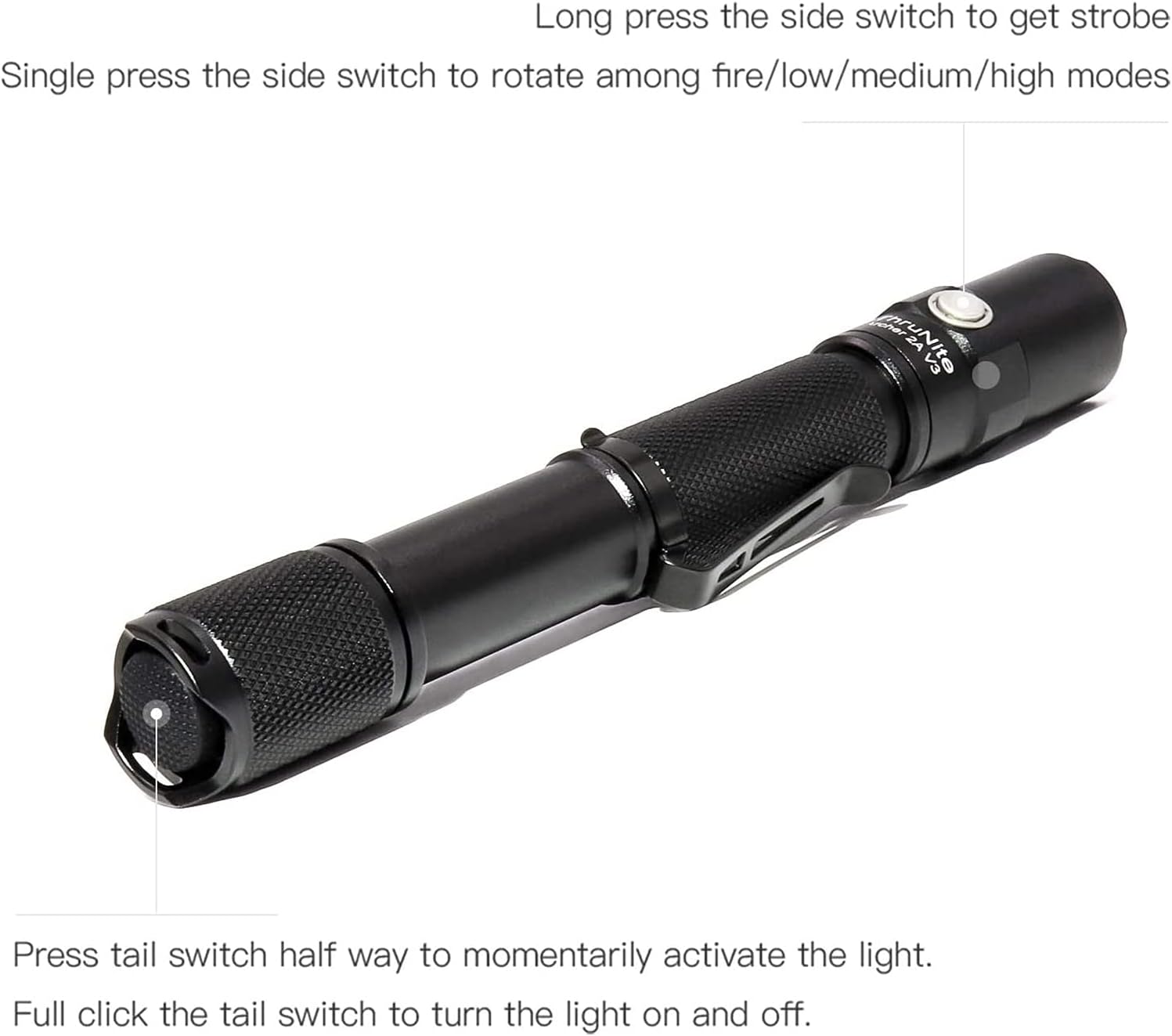
Image: All components included in the ThruNite Archer 2A V3 package, neatly laid out. This includes the flashlight body, a removable pocket clip, two spare O-rings for sealing, and a lanyard for secure carrying.
3. การตั้งค่า
3.1 การติดตั้งแบตเตอรี่
The ThruNite Archer 2A V3 operates on two AA batteries (not included). Ensure correct polarity during installation.
- คลายเกลียวฝาครอบท้ายไฟฉายโดยหมุนทวนเข็มนาฬิกา
- Insert two AA batteries into the battery compartment with the positive (+) end facing towards the flashlight head.
- หมุนฝาครอบท้ายกลับตามเข็มนาฬิกาจนกระทั่งขันแน่นสนิท
3.2 การติดคลิปหนีบกระเป๋า
The removable pocket clip can be attached to the flashlight body for convenient carrying.
- Slide the pocket clip onto the flashlight body, positioning it as desired.
- Ensure the clip is firmly seated in the groove to prevent accidental detachment.

ภาพ: รายละเอียด view of the ThruNite Archer 2A V3 flashlight, highlighting the textured grip and the securely attached removable pocket clip. This clip allows for easy attachment to clothing or gear.
4. คู่มือการใช้งาน
The Archer 2A V3 features both a tail switch and a side switch for versatile operation.
4.1 Basic Operation (Tail Switch)
- การเปิดใช้งานชั่วขณะ: Press the tail switch halfway to momentarily activate the light. Release to turn off.
- เปิด/ปิดอย่างต่อเนื่อง: กดสวิตช์ท้ายรถจนสุดเพื่อเปิดหรือปิดไฟ
4.2 Mode Switching (Side Switch)
When the flashlight is on (via tail switch):
- โหมดวงจร: Single press the side switch to cycle through the general modes: Low → Medium → High.
- โหมดแฟลช: Long press the side switch to activate Strobe mode. Single press again to return to the previously used general mode.

Image: An illustrative diagram demonstrating the operational controls of the ThruNite Archer 2A V3. It shows how to use the tail switch for momentary and constant on/off functions, and the side switch for cycling through brightness modes (Low, Medium, High) and activating the Strobe function with a long press.
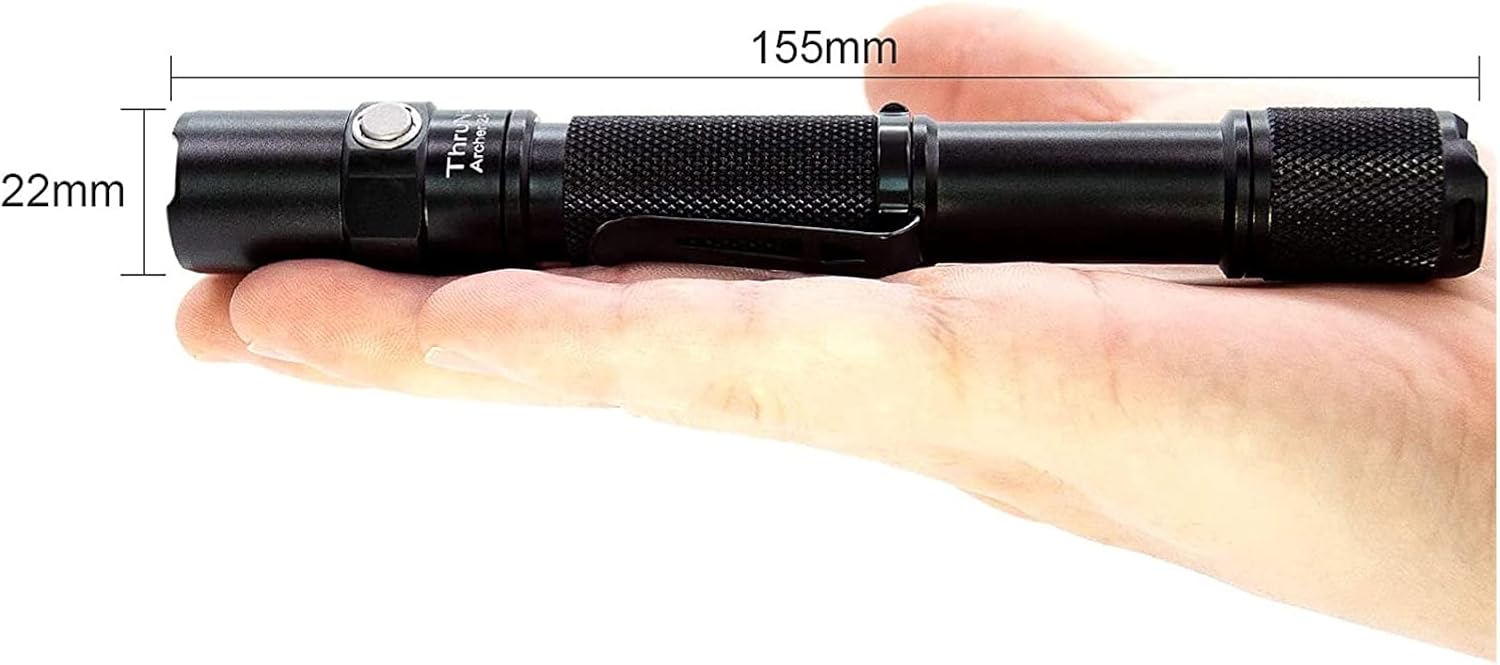
Image: A person is shown walking on a dark, unpaved path, illuminated by the powerful beam of the ThruNite Archer 2A V3 flashlight. The flashlight provides ample light to navigate the surroundings, demonstrating its effectiveness in low-light conditions.
5. การบำรุงรักษา
การบำรุงรักษาอย่างถูกวิธีจะช่วยให้ไฟฉายของคุณมีอายุการใช้งานยาวนานและทำงานได้อย่างมีประสิทธิภาพสูงสุด
- การทำความสะอาด: Clean the body of the flashlight with a soft, damp ผ้า ห้ามใช้สารทำความสะอาดที่มีฤทธิ์กัดกร่อนหรือตัวทำละลาย
- เกลียวและโอริง: ควรหล่อลื่นเกลียวและโอริงด้วยจาระบีซิลิโคนเป็นระยะ เพื่อรักษาคุณสมบัติกันน้ำและให้การทำงานราบรื่น เปลี่ยนโอริงที่สึกหรอด้วยโอริงสำรองที่ให้มา
- การดูแลแบตเตอรี่ Remove batteries if the flashlight is not used for extended periods to prevent corrosion. Store batteries in a cool, dry place.
- การดูแลเลนส์: Keep the lens clean. If it gets dirty, gently wipe it with a lens cleaning cloth.
6 การแก้ไขปัญหา
If you encounter issues with your ThruNite Archer 2A V3, try the following steps:
- ไฟฉายไม่ติด:
- ตรวจสอบว่าใส่แบตเตอรี่อย่างถูกต้องโดยให้ขั้วบวก (+) หันเข้าที่หัว
- Ensure the batteries are not depleted. Replace with fresh AA batteries.
- Confirm the tail cap is fully tightened. A loose tail cap can prevent electrical contact.
- เช็ดทำความสะอาดขั้วแบตเตอรี่และเกลียวด้วยผ้าสะอาด
- แสงสลัวหรือกระพริบ:
- แบตเตอรี่อาจอ่อน โปรดเปลี่ยนแบตเตอรี่
- ตรวจสอบให้แน่ใจว่าฝาปิดท้ายและหัวขันแน่นสนิทดีแล้ว
- ทำความสะอาดขั้วแบตเตอรี่และเกลียวให้เรียบร้อย
- น้ำเข้า:
- Check if O-rings are properly seated and not damaged. Replace if necessary.
- Ensure all parts are tightly screwed together.
หากขั้นตอนเหล่านี้ไม่สามารถแก้ไขปัญหาได้ โปรดติดต่อฝ่ายสนับสนุนลูกค้า
7. ข้อมูลจำเพาะ
Detailed specifications for the ThruNite Archer 2A V3 LED Flashlight:
| คุณสมบัติ | รายละเอียด |
|---|---|
| แหล่งกำเนิดแสง | XP-L V6 LED |
| เอาท์พุตสูงสุด | 500 ลูเมน |
| ระยะลำแสง | 108 เมตร (354 ฟุต) |
| แหล่งพลังงาน | แบตเตอรี่ AA 2 ก้อน (ไม่รวม) |
| วัสดุ | Aerospace Grade Aluminum with Type III Hard-Anodized Finish |
| คุณสมบัติพิเศษ | Lightweight, Removable Clip |
| ขนาด | Length: 155mm (6.1 inches), Diameter: 22mm (0.87 inches) |
| น้ำหนักสินค้า | ประมาณ 500 กรัม (1.1 ปอนด์) |
| โหมด | Low, Medium, High, Strobe |

Image: The ThruNite Archer 2A V3 flashlight displayed with its key dimensions: a length of 155mm and a diameter of 22mm, illustrating its compact and portable design.
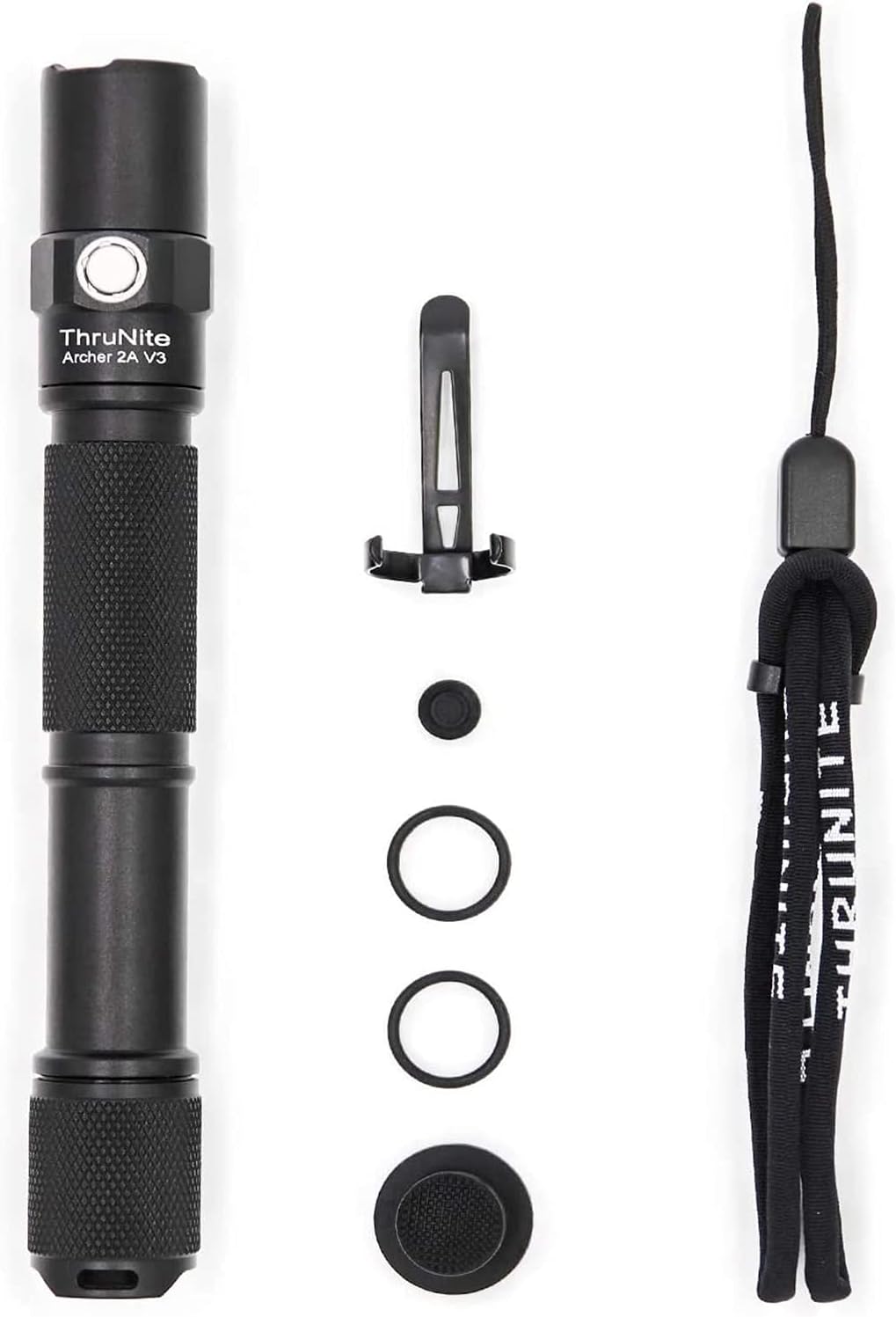
Image: A hand holding the ThruNite Archer 2A V3 flashlight, providing a clear perspective on its ergonomic design and compact size. The image also reiterates its dimensions, 6.1 inches (155mm) in length and 0.87 inches (22mm) in diameter, and highlights its lightweight nature at 48g (without batteries).
8. การรับประกันและการสนับสนุน
ThruNite is committed to providing quality products and excellent customer service.
8.1 ข้อมูลการรับประกัน
Specific warranty details may vary. Please refer to the product packaging or the official ThruNite webเว็บไซต์สำหรับนโยบายการรับประกันล่าสุด
8.2 การสนับสนุนลูกค้า
If you have any questions, require assistance with setup, operation, or troubleshooting, or need to inquire about warranty service, please contact our customer service team. Contact information can typically be found on the product packaging or the official ThruNite webเว็บไซต์.