1. บทนำ
Thank you for choosing the OBD2 Scanner Diagnostic Tool. This device is designed to help you diagnose vehicle issues by reading and clearing diagnostic trouble codes (DTCs), viewing live data, and performing various diagnostic tests. This manual provides detailed instructions on how to set up, operate, and maintain your scanner.

Image: The OBD2 Scanner Diagnostic Tool (Model YM119) with its display showing various diagnostic options and a list of key features such as Full OBD2 Functions, Turn Off Engine Light, Battery Voltage & Battery Life, 10000+ DTC Lookup, Real Time Curves, Test Cranking & Charging, and Mode 6.
2. ข้อมูลด้านความปลอดภัย
Please read all instructions carefully before operating this device. Failure to do so may result in damage to the tool or the vehicle, and may cause personal injury.
- ควรทดสอบรถยนต์ในสภาพแวดล้อมที่ปลอดภัยเสมอ
- อย่าพยายามใช้งานหรือสังเกตเครื่องมือขณะขับขี่ยานพาหนะ
- สวมอุปกรณ์ป้องกันดวงตาที่ตรงตามมาตรฐาน ANSI
- เก็บเสื้อผ้า ผม มือ เครื่องมือ อุปกรณ์ทดสอบ ฯลฯ ให้ห่างจากชิ้นส่วนที่เคลื่อนไหวหรือเครื่องยนต์ร้อนจัด
- ควบคุมรถในพื้นที่ทำงานที่มีการระบายอากาศดี ก๊าซไอเสียเป็นพิษ
- วางบล็อกไว้ด้านหน้าล้อขับเคลื่อนและอย่าทิ้งรถไว้โดยไม่มีใครดูแลในขณะทำการทดสอบ
- Be aware of the risk of electric shock from the vehicle's ignition system.
3. เนื้อหาบรรจุภัณฑ์
ตรวจสอบว่ามีรายการทั้งหมดอยู่ในแพ็คเกจของคุณ:
- 1 x OBD2 Diagnostic Tool (YM119)
4. สินค้าหมดview
The YM119 OBD2 Scanner features a compact, handheld design for ease of use. It is equipped with a 1.77" Full Color LCD - TFT Screen, bright acrylic screen protective cover, and soft, comfortable silicone buttons for durability and user comfort. The device connects to your vehicle via a 16-pin heavy-duty lead standard OBDII plug and utilizes an upgraded CPU for high-speed processing.

Image: The YM119 OBD2 scanner highlighting its handheld design, dimensions (13cm/5.11inch length, 6.5cm/2.56inch width), and key features including a 1.77" Full Color LCD, Bright Acrylic Screen Protective Cover, Soft & Comfortable Silicone Buttons, 16Pin Heavy-duty Lead Standard OBDII Plug, and Upgraded CPU for High-speed Processing.
5. การตั้งค่า
The OBD2 Scanner is designed for plug-and-play operation. No batteries or chargers are required as it draws power directly from the vehicle's OBD2 port.
5.1 การเชื่อมต่อกับยานพาหนะ
- ค้นหาขั้วต่อข้อมูล (DLC) 16 พินของรถยนต์ โดยปกติจะอยู่ใต้แผงหน้าปัดด้านคนขับ
- ตรวจสอบให้แน่ใจว่ากุญแจรถอยู่ที่ OFF
- Firmly plug the scanner's OBDII connector into the vehicle's DLC.
- Turn the vehicle's ignition to the ON position (engine can be off or running, depending on the test). The scanner will power on automatically.
6. คู่มือการใช้งาน
The YM119 scanner provides comprehensive OBD2 diagnostic functions. Navigate through the menus using the directional buttons and confirm selections with the 'OK' button.
6.1 Full OBDII Modes
The scanner supports all OBD2 functions:
- Read & Clear Codes: Retrieve and erase Diagnostic Trouble Codes (DTCs) to turn off the Check Engine Light (MIL).
- View ตรึงกรอบ: Display a snapshot of the vehicle's operating conditions at the time a fault code was set.
- สตรีมข้อมูลสด: View ข้อมูลเซ็นเซอร์แบบเรียลไทม์ในรูปแบบข้อความและกราฟ
- การทดสอบเซ็นเซอร์ O2: ดึงผลการทดสอบเครื่องตรวจสอบเซนเซอร์ O2
- Onboard Monitoring Mode: Retrieve results for emission-related powertrain components and systems that are not continuously monitored.
- การทดสอบส่วนประกอบ: ช่วยให้สามารถเริ่มการทดสอบการรั่วไหลของระบบ EVAP ของยานพาหนะได้

Image: The YM119 scanner displaying icons representing its full OBD2 capabilities, including Read Codes, Clear Codes, Mode 6, Battery Voltage Test, O2 Sensor Test, Freeze Frame, I/M Readiness, Vehicle Info, Live Data Graph, 10000+ DTC Library, and 10 Languages Support.
6.2 การค้นหา DTC
The scanner has a built-in database of over 10,000 DTCs, allowing you to search for code definitions directly on the device without needing an internet connection.

Image: The YM119 scanner screen showing a P2029 generic code and its description, alongside a menu for Diagnostic Menu options like Read Codes, Erase Codes, View Freeze Frame, I/M Readiness, Vehicle Information, Live PCM Data, and Realtime Curve. It also shows a list of various system monitors.
6.3 การทดสอบแบตเตอรี่
The Battery Test function measures the battery voltage, displays the voltage curve, and assesses battery life.
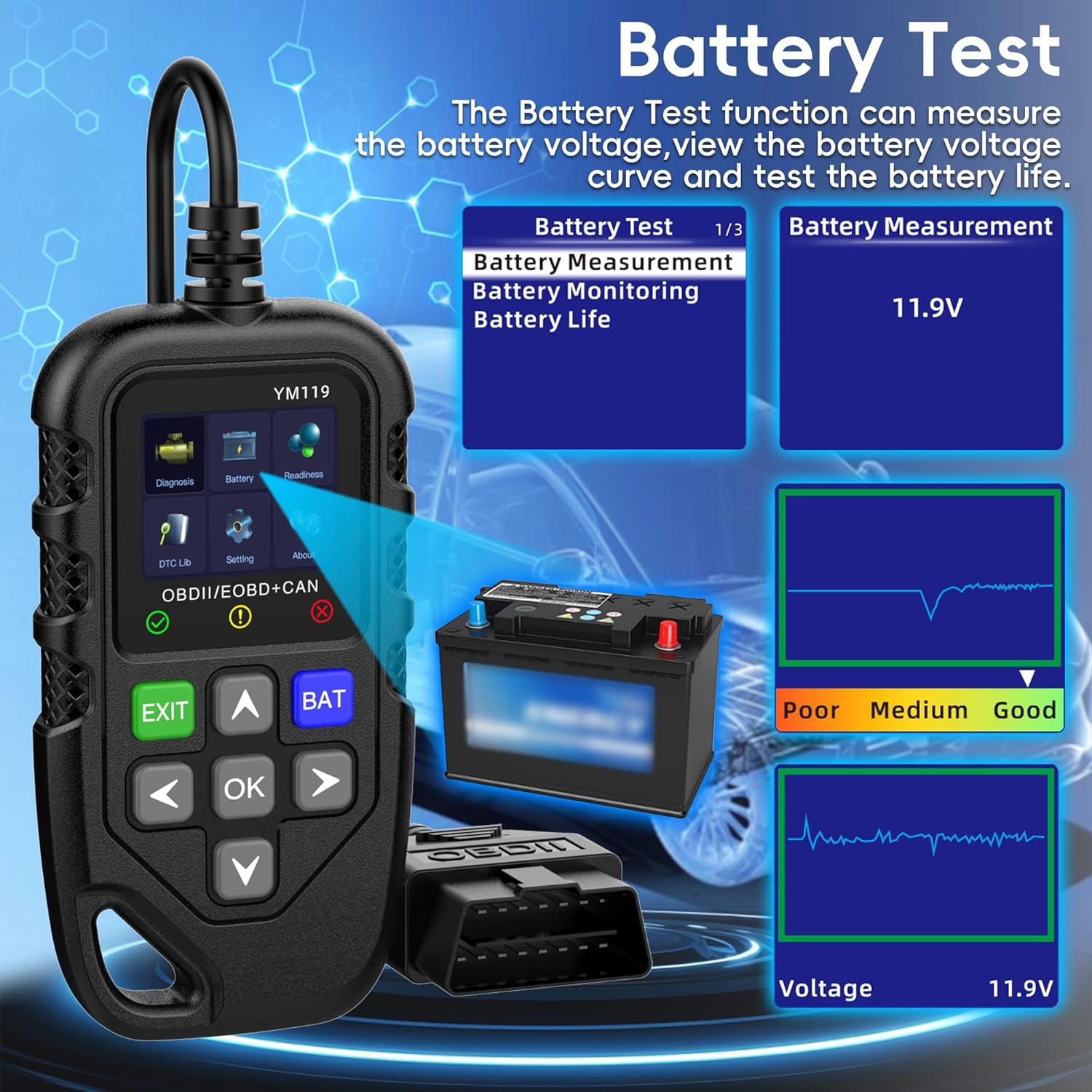
Image: The YM119 scanner screen displaying the Battery Test menu with options for Battery Test, Battery Measurement, Battery Monitoring, and Battery Life. It shows a measurement of 11.9V and a graph indicating battery condition as 'Poor', 'Medium', or 'Good'.
6.4 ความพร้อมของ I/M
This quick test determines if the vehicle is ready for an emission test by checking the status of various emission-related monitors.

Image: The YM119 scanner screen showing the I/M Readiness status, indicating whether various monitors (MIL Status, Misfire Monitor, Fuel System Mon., Comp. Component, Catalyst Mon., HTD Catalyst, EVAP System Mon) are complete or incomplete since DTCs were cleared or during the current drive cycle.
6.5 Retrieve Vehicle Information
The scanner can retrieve Vehicle Identification Number (VIN), Calibration ID(s), and Calibration Verification Numbers (CVNs). This function is useful for verifying if the Engine Control Unit (ECU) matches your vehicle.
6.6 User Interface and Visual Indicators
The scanner features visual indicator lights to provide quick insights into your car's health:
- สีเขียว: Indicates a good connection and no immediate faults.
- เหลือง: Suggests incompatibilities or conditions that need attention.
- สีแดง: Signals faults or conditions requiring immediate action.

Image: The YM119 scanner with its visual indicator lights, showing green for 'Good condition', yellow for 'Need your attention', and red for 'Need your action', illustrating the user-friendly feedback system.
7. ความเข้ากันได้
The YM119 OBD2 scanner is compatible with most cars manufactured after 1996 (USA), 2002 (EU), and 2008 (Asia). If your car has a 16-pin OBD2 port and its production time falls within these guidelines, it is likely compatible. Please note that it is not compatible with new energy vehicles, hybrid vehicles, or models that do not comply with the OBD2 protocol.
The device supports all OBD II/EOBD protocols, including CAN, ISO9141, J1850 VPW, and J1850 PWM.
It also supports 13 languages:
- ชาวจีน
- ภาษาอังกฤษ
- เกาหลี
- สเปน
- ดัตช์
- ภาษาฝรั่งเศส
- ขัด
- เยอรมัน
- ฟินแลนด์
- อิตาลี
- โปรตุเกส
- ญี่ปุ่น

Image: A graphic illustrating the supported vehicle models by region and year (US 1996-NOW, EU 2002-NOW, Asia 2008-NOW) and a list of 13 supported languages for the OBD2 scanner.
8. การบำรุงรักษา
To ensure the longevity and proper functioning of your OBD2 scanner, follow these maintenance guidelines:
- Keep the device clean. Wipe it with a soft, dry cloth. Do not use abrasive cleaners or solvents.
- Store the scanner in a dry, cool environment when not in use.
- หลีกเลี่ยงการทำอุปกรณ์หล่นหรือกระแทกอย่างรุนแรง
- อย่าให้อุปกรณ์สัมผัสกับอุณหภูมิหรือความชื้นสูง
- Inspect the cable and connector for any damage before each use.
9 การแก้ไขปัญหา
If you encounter issues with your OBD2 scanner, refer to the following common problems and solutions:
- เครื่องสแกนเนอร์ไม่เปิดเครื่อง:
- ตรวจสอบให้แน่ใจว่าได้เสียบขั้วต่อ OBDII เข้ากับพอร์ต DLC ของรถอย่างแน่นหนาแล้ว
- ตรวจสอบว่ากุญแจรถอยู่ในตำแหน่งเปิด
- Check the vehicle's fuse for the OBDII port.
- Link error/Communication error:
- Confirm the vehicle supports the OBD2 protocol (most vehicles after 1996 for USA, 2002 for EU, 2008 for Asia).
- Turn the ignition off, wait 10 seconds, then turn it back on and try again.
- ตรวจสอบให้แน่ใจว่าการเชื่อมต่อมีความปลอดภัย
- Codes not clearing:
- Some codes may be 'hard codes' that require vehicle repair before they can be cleared.
- Ensure the ignition is ON and the engine is OFF when attempting to clear codes.
10. ข้อมูลจำเพาะ
| คุณสมบัติ | คำอธิบาย |
|---|---|
| แบบอย่าง | YM119 |
| แสดง | 1.77" Full Color LCD - TFT Screen |
| แหล่งพลังงาน | Vehicle OBDII Port (Battery Powered) |
| โปรโตคอลที่รองรับ | CAN, ISO9141, J1850 VPW, J1850 PWM |
| ฐานข้อมูล DTC | 10000+ DTCs |
| ผู้ผลิต | VMAKOO |
| หมายเลขรุ่นสินค้า | YM119 |
| หมายเลขชิ้นส่วนของผู้ผลิต | 119 |
11. การสนับสนุน
For technical assistance or further inquiries, please refer to the contact information provided with your purchase or visit the manufacturer's official webเว็บไซต์.


