
TOMLOV DM9 Max
คู่มือการใช้งานกล้องจุลทรรศน์ดิจิทัล TOMLOV DM9 Max
Model: DM9 Max
1. บทนำ
The TOMLOV DM9 Max Digital Microscope is an advanced imaging tool designed for detailed observation and analysis. Featuring a 10.1-inch HD IPS display, 5X-1500X magnification, and versatile connectivity options, it is suitable for a wide range of applications including coin collection, soldering, watch repair, and plant inspection. This manual provides essential information for setting up, operating, and maintaining your microscope.
2. เนื้อหาบรรจุภัณฑ์
ตรวจสอบว่ารายการทั้งหมดที่ระบุไว้ด้านล่างนี้รวมอยู่ในแพ็คเกจของคุณ:
- 10.1-Inch HDMI Digital Microscope (1)
- 12.6-Inch Adjustable Stand (1)
- 64GB Micro SD Card (1)
- การควบคุมระยะไกล (1)
- Light Barrier (1)
- สาย USB (2)
- สาย HDMI (1)
- คู่มือการใช้งาน (1)

Image: All components included in the TOMLOV DM9 Max Digital Microscope package, laid out for inspection.
3. คู่มือการติดตั้ง
3.1 การประกอบ
- Attach the 12.6-inch adjustable stand to the base plate.
- Secure the microscope unit to the adjustable stand.
- Connect the two gooseneck side lights to the base, ensuring they are positioned to illuminate your observation area.

Image: The fully assembled TOMLOV DM9 Max Digital Microscope, showing the screen, microscope head, adjustable stand, and base with side lights.
3.2 การเปิดเครื่องและการตั้งค่าเริ่มต้น
- Connect the microscope to a power source using one of the provided USB cables. The device can also operate on its internal battery.
- Press and hold the power button on the microscope unit for approximately 5 seconds to turn it on.
- Insert the included 64GB Micro SD card into the designated slot on the side of the display unit. This card is essential for saving photos and videos.
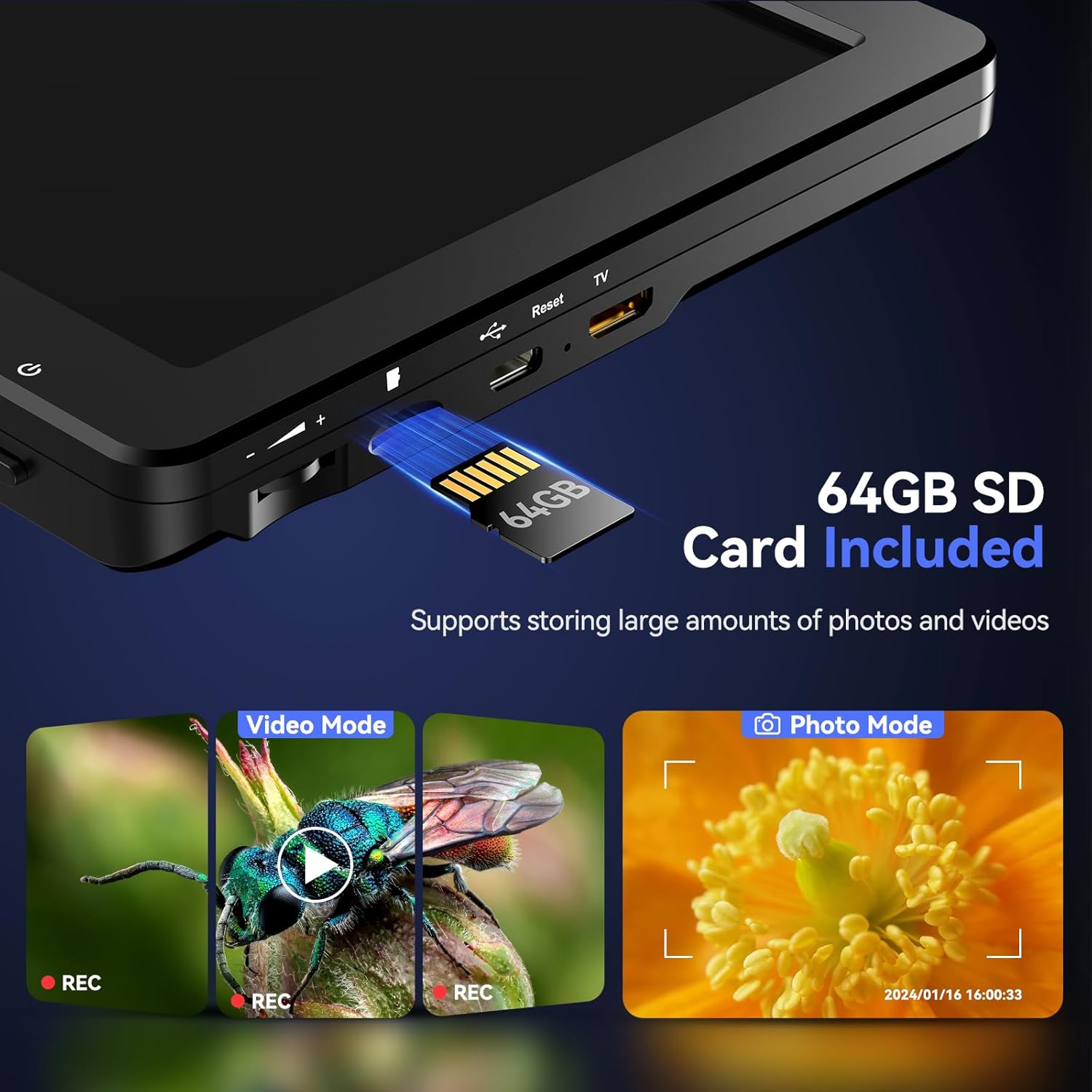
ภาพ: ภาพระยะใกล้ view of the side of the microscope's display unit, showing the slot for inserting the 64GB SD card.
3.3 Connecting to External Displays
The DM9 Max supports HDMI and USB-C output for viewing on larger screens:
- เอาท์พุต HDMI: Use the provided HDMI cable to connect the microscope to an HDMI-compatible monitor or TV for real-time viewการไอเอ็นจี
- เอาท์พุต USB: Connect the microscope to a computer via USB-C. You may need to install specific software (refer to the included user manual for software details) to view the live feed on your PC.

Image: The TOMLOV DM9 Max Digital Microscope connected to a large external monitor and a laptop, demonstrating its HDMI and USB output capabilities for a larger viewการสร้างประสบการณ์
4. การทำงานพื้นฐาน
4.1 การปรับกำลังขยายและโฟกัส
- Place the object you wish to observe on the base plate directly under the microscope lens.
- Adjust the height of the microscope unit on the stand using the adjustment knob to change the initial magnification. The 12.6-inch adjustable stand allows for a larger working distance, ideal for observing larger objects like full coins.
- Rotate the focus wheel on the microscope body until the image on the screen is clear and sharp.
- Utilize the digital zoom function via the remote control or on-screen buttons for finer magnification adjustments (5X to 1500X).

Image: A visual representation of the TOMLOV DM9 Max's magnification capabilities, displaying an object at 5X, 500X, and 1500X zoom levels.
4.2 การควบคุมแสงสว่าง
The microscope is equipped with 8 adjustable LED lights around the lens and 2 flexible gooseneck side lights to ensure optimal illumination:
- Adjust the brightness of the lens lights using the dedicated knob on the microscope unit.
- The two gooseneck side lights can be independently positioned and dimmed to eliminate shadows and enhance detail.

Image: The TOMLOV DM9 Max Digital Microscope in use, highlighting the 8 adjustable LED lights around the lens and the 2 flexible gooseneck side lights providing comprehensive illumination for detailed observation.
4.3 การถ่ายภาพและวิดีโอ
Use the one-button recording function to capture high-resolution images and videos directly to the inserted 64GB SD card:
- Press the Photo button on the remote control or microscope to take a still image.
- Press the Video button to start/stop video recording. The built-in microphone captures clear audio during video recording.
- Review captured media directly on the 10.1-inch IPS display.

Image: The vibrant 10.1-inch HD IPS display of the TOMLOV DM9 Max, showcasing crystal clear, vivid, and saturated colors for an enhanced viewการสร้างประสบการณ์
4.4 การใช้งานรีโมทคอนโทรลไร้สาย
The wireless remote control provides convenient operation, minimizing screen shaking and sample disturbance:
- ซูมเข้า/ออก: Adjust magnification without touching the microscope.
- ถ่ายภาพ/วิดีโอ: Remotely trigger image and video recording.
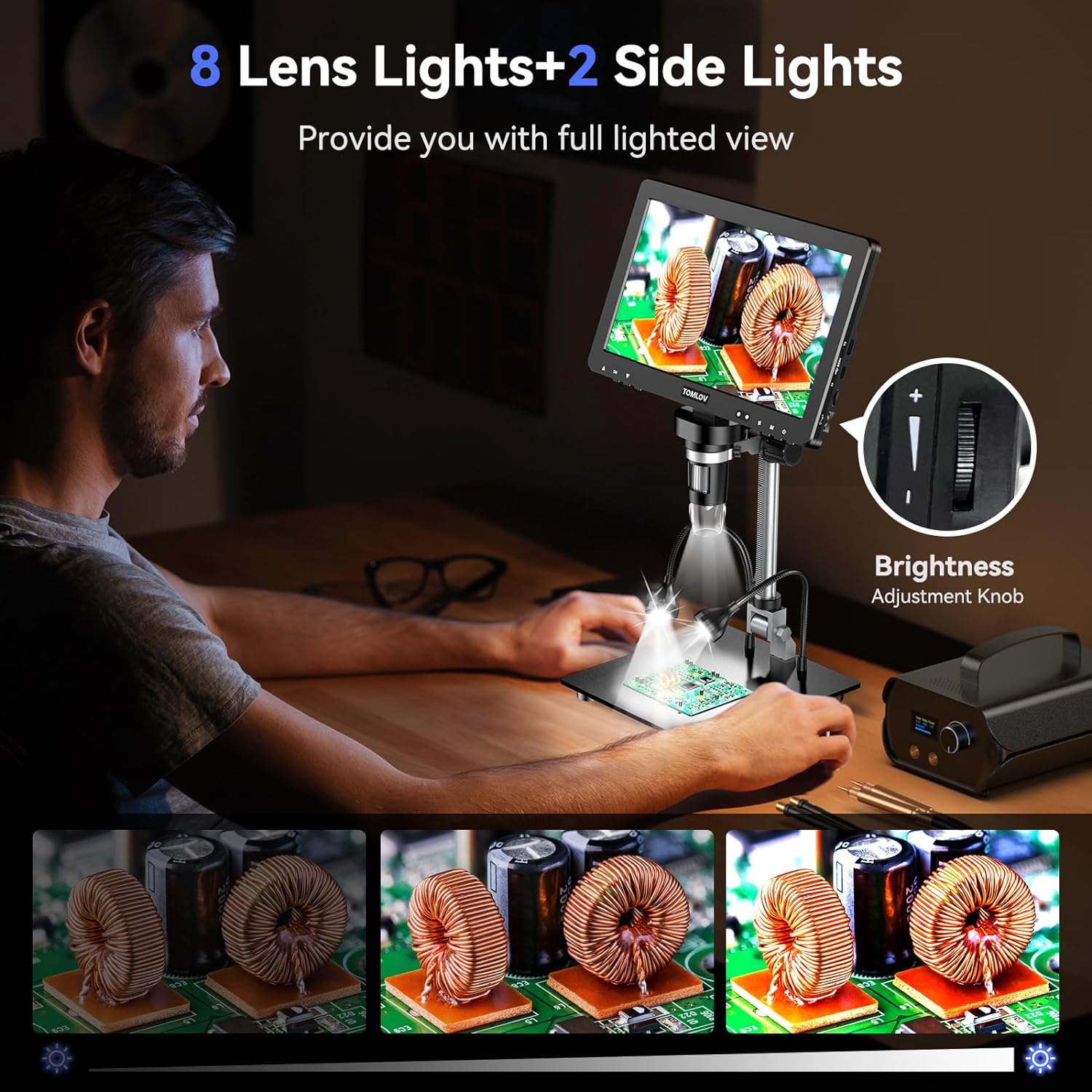
Image: The TOMLOV DM9 Max Digital Microscope with its wireless remote control, illustrating how the remote can be used to adjust zoom, capture photos, and record videos, reducing physical interaction with the device.
4.5 วิดีโอผลิตภัณฑ์view
Video: An official product video demonstrating the key features and functionalities of the TOMLOV DM9 Max 10.1" HD IPS HDMI Digital Microscope 1500X, including its display, magnification, and ease of use.
5. การดูแลรักษา
- การทำความสะอาด: Use a soft, dry cloth to clean the microscope body and screen. For the lens, use a lens cleaning cloth and specialized lens cleaning solution if necessary. Avoid abrasive materials or harsh chemicals.
- พื้นที่จัดเก็บ: Store the microscope in a cool, dry place away from direct sunlight and extreme temperatures. When not in use, cover the lens to protect it from dust.
- การดูแลแบตเตอรี่ หากเก็บรักษาเป็นเวลานาน ควรตรวจสอบให้แน่ใจว่าแบตเตอรี่มีประจุอยู่บ้าง (ประมาณ 50%) เพื่อยืดอายุการใช้งาน
6 การแก้ไขปัญหา
- Microscope not turning on: Ensure the device is charged or connected to a power source. Press and hold the power button for at least 5 seconds.
- ภาพเบลอ: Adjust the focus wheel until the image is clear. Also, ensure the object is within the microscope's working distance and adjust the height of the microscope on the stand.
- No image on external display: Verify that the HDMI or USB cable is securely connected to both the microscope and the external display/computer. Ensure the correct input source is selected on your external display.
- ไม่พบการ์ด SD: Ensure the SD card is inserted correctly. Try reinserting it or using a different compatible SD card.
- การควบคุมระยะไกลไม่ทำงาน: ตรวจสอบแบตเตอรี่ในรีโมทคอนโทรล ตรวจสอบให้แน่ใจว่าไม่มีสิ่งกีดขวางระหว่างรีโมทและกล้องจุลทรรศน์
7. ข้อมูลจำเพาะทางเทคนิค
| คุณสมบัติ | ข้อมูลจำเพาะ |
|---|---|
| ขนาดสินค้า | 12.2 x 11.4 x 4.3 นิ้ว |
| น้ำหนักสินค้า | 4.36 ปอนด์ |
| หมายเลขรุ่นสินค้า | DM9 Max |
| แบตเตอรี่ | ต้องใช้แบตเตอรี่ลิเธียมไอออน 1 ก้อน (รวมอยู่ด้วย) |
| ประเภทแหล่งกำเนิดแสง | นำ |
| วัสดุ | โลหะผสมอลูมิเนียม |
| สี | สีดำ |
| มุมจริงของ View | 178 องศา |
| กำลังขยายสูงสุด | 1500 เท่า |
| เล่มที่tage | 5 โวลต์ |
| อุปกรณ์ที่รองรับ | แล็ปท็อป โทรทัศน์ คอมพิวเตอร์ส่วนบุคคล |
8. ข้อมูลการรับประกันและการสนับสนุน
For warranty claims, technical support, or further assistance, please refer to the contact information provided on the product packaging or visit the official TOMLOV webโปรดเก็บใบเสร็จรับเงินไว้เป็นหลักฐานการซื้อเพื่อใช้ในการรับประกัน
Ask a question about this manual
Ask about setup, troubleshooting, compatibility, parts, safety, or missing instructions. Manuals+ will review the question and use this page’s manual context to help answer it.