
การแนะนำ
This manual provides detailed instructions for the safe and effective use of your pxton 666S two-way radio. Please read this manual thoroughly before operating the device to ensure optimal performance and to prevent damage. The pxton 666S is a reliable communication device designed for various applications, featuring 16 memory channels, 165 privacy codes, and multiple functions for enhanced usability.
มีอะไรอยู่ในกล่อง

Image: Contents of the pxton PX-666S walkie talkie package, including two radios, chargers, batteries, belt clips, earphones, and a user manual.
- 2 x pxton 666S Two-Way Radios
- แท่นชาร์จ USB 2 ชิ้น
- 2 x 1500mAh Lithium Batteries
- สายคล้องคอ 2 เส้น
- 2 x เข็มขัดคลิป
- หูฟัง 2 อัน
- 1 x คู่มือผู้ใช้
สินค้าเกินview
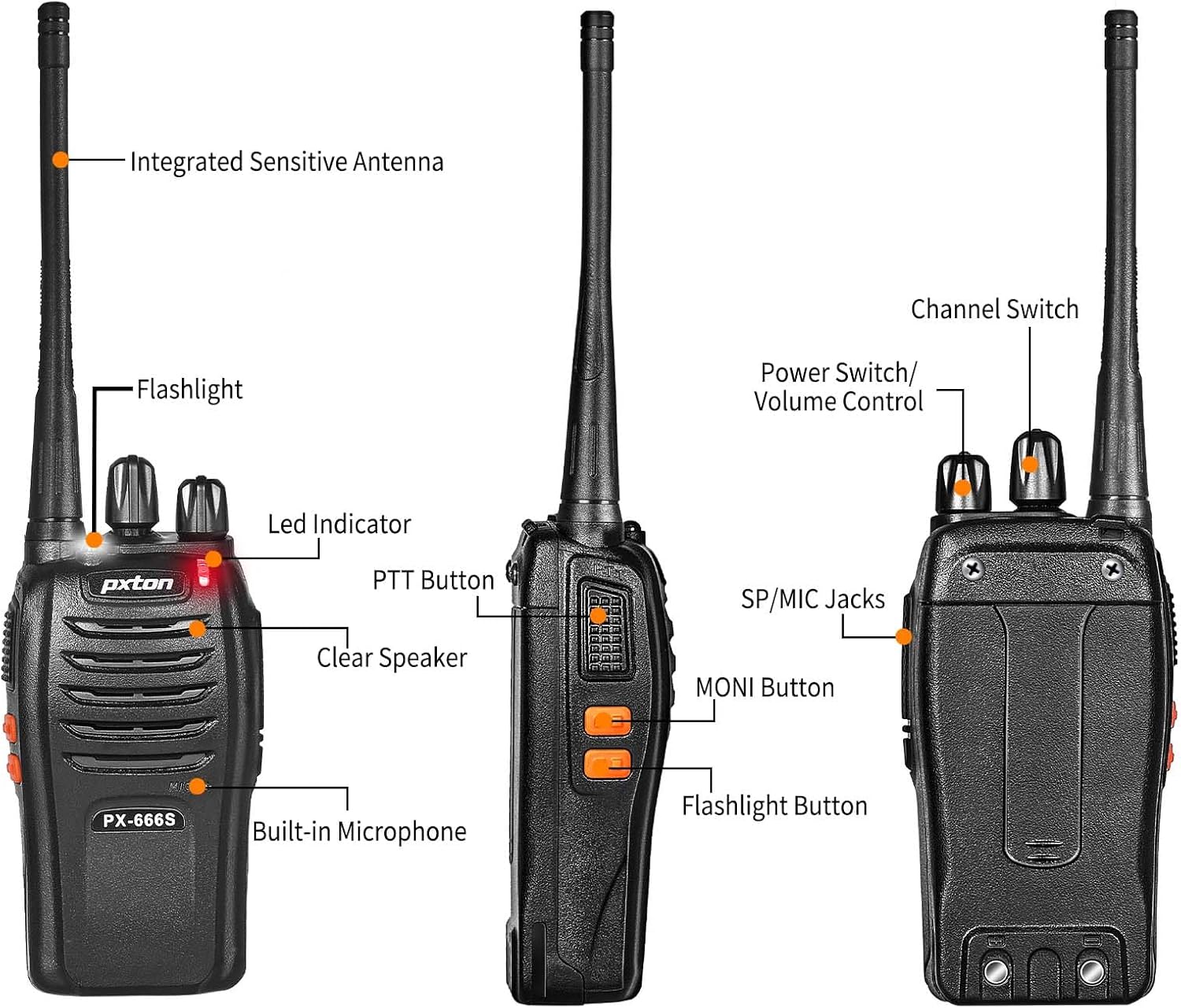
Image: Detailed diagram showing the labeled parts and controls of the pxton PX-666S two-way radio.
ชิ้นส่วนและการควบคุม:
- เสาอากาศแบบไวต่อสัญญาณในตัว: สำหรับการส่งและรับสัญญาณ
- ไฟฉาย: มีไฟ LED ในตัวเพื่อการส่องสว่าง
- ไฟแสดงสถานะ LED: Displays operational status (e.g., transmitting, receiving, charging).
- ปุ่ม PTT (กดเพื่อพูด): กดค้างเพื่อส่ง ปล่อยเพื่อรับ
- ลำโพงใส: สำหรับเอาต์พุตเสียง
- ไมโครโฟนในตัว: สำหรับการป้อนข้อมูลด้วยเสียง
- สวิตช์ช่อง: Rotary knob to select communication channels (1-16).
- สวิตช์ไฟ/การควบคุมระดับเสียง: ปุ่มหมุนสำหรับเปิด/ปิดวิทยุและปรับระดับเสียง
- แจ็ค SP/MIC: Ports for connecting external speaker/microphone or earpiece.
- ปุ่ม MONI (มอนิเตอร์): Used to temporarily disable squelch for weak signals.
- ปุ่มไฟฉาย: เปิดใช้งานไฟฉาย LED

Image: A pxton PX-666S walkie talkie shown next to a smartphone for size comparison, indicating its compact dimensions.
การตั้งค่า
1. การติดตั้งแบตเตอรี่
The pxton 666S uses a 1500mAh Li-ion battery. To install:
- ตรวจสอบให้แน่ใจว่าวิทยุปิดอยู่
- ค้นหาช่องใส่แบตเตอรี่ที่ด้านหลังของวิทยุ
- Align the battery with the compartment's contacts.
- ค่อยๆ ดันแบตเตอรี่เข้าที่จนกระทั่งคลิกเข้าที่

ภาพ: View of the pxton PX-666S battery compartment and the 1500mAh Li-ion battery, detailing battery life expectations.
2. การชาร์จแบตเตอรี่
ก่อนใช้งานครั้งแรก โปรดชาร์จแบตเตอรี่ให้เต็ม การชาร์จเต็มโดยทั่วไปใช้เวลา 3-4 ชั่วโมง
- วางวิทยุ (โดยใส่แบตเตอรี่ไว้แล้ว) ลงในแท่นชาร์จ
- Connect the USB charging dock to a power source.
- The LED indicator on the radio or charging dock will show charging status (e.g., red for charging, green for fully charged).
- Once fully charged, remove the radio from the dock.
3. การติดตั้งอุปกรณ์เสริม
- คลิปหนีบเข็มขัด: ติดคลิปหนีบเข็มขัดไว้ที่ด้านหลังวิทยุเพื่อความสะดวกในการพกพา
- หูฟัง: Plug the earphone into the SP/MIC jacks for private listening and hands-free operation.
คำแนะนำการใช้งาน
1. เปิด/ปิดเครื่องและควบคุมระดับเสียง
หมุน สวิตช์เปิด/ปิด/ควบคุมระดับเสียง knob clockwise to turn the radio on. Continue rotating clockwise to increase the volume. Rotate counter-clockwise to decrease volume and turn the radio off.
2. การเลือกช่อง
หมุน สวิตช์ช่องสัญญาณ knob to select one of the 16 available memory channels. Ensure all radios in your group are set to the same channel for communication.
3. การส่งและรับ (PTT)
- ถึง ส่งต่อกดปุ่มค้างไว้ ปุ่ม ปตท.. Speak clearly into the microphone. The LED indicator will typically glow red.
- ถึง รับ, ปล่อยตัว ปุ่ม ปตท.. The LED indicator will typically glow green when receiving a signal.
4. VOX Function (Voice Operated Transmission)
The VOX function allows for hands-free transmission. When activated, the radio will automatically transmit when it detects your voice, without needing to press the PTT button. The pxton 666S offers 5 levels of VOX sensitivity adjustment.

Image: A firefighter demonstrating the hands-free communication capability using the VOX function of the pxton walkie talkie.
5.ไฟฉาย
กดปุ่ม ปุ่มไฟฉาย to turn the built-in LED flashlight on or off. This is useful for low-light conditions.

Image: The pxton PX-666S walkie talkie's flashlight illuminating a dark camping scene, highlighting its utility.
6. Monitoring (MONI)
กดปุ่มค้างไว้ ปุ่ม MONI to temporarily disable the squelch function. This allows you to listen to very weak signals that might otherwise be blocked by the squelch, or to check if a channel is clear before transmitting.
7. การสแกน
The scanning function allows the radio to automatically scan through all channels to detect active transmissions. Refer to the full user manual for specific instructions on activating and managing the scan feature.
8. สัญญาณเตือนภัยฉุกเฉิน
The radio includes an emergency alarm feature. Consult the detailed user manual for activation and deactivation procedures for this function.
9. Noise Reduction and Automatic Squelch
These features work to reduce background noise and automatically mute the speaker when no signal is present, ensuring clearer communication and a more pleasant listening experience.
10. TOT (ตัวจับเวลาหมดเวลา)
The Time-Out Timer prevents any single user from occupying a channel for too long by automatically stopping transmission after a preset period. This helps manage channel usage efficiently.
11. ระยะการสื่อสาร
The actual communication range can vary significantly based on terrain, obstructions, and electromagnetic interference.
- Open Areas (e.g., flat terrain, mountain peaks): ระยะทางสูงสุด 3 ไมล์
- Suburban/Countryside: ประมาณ 1.2 ไมล์
- City Limits (with buildings and obstructions): ประมาณ 0.6 ไมล์

Image: Visual representation of the pxton PX-666S walkie talkie's communication range across different environments: open, suburban, and urban.
การซ่อมบำรุง
1. การดูแลแบตเตอรี่
- หลีกเลี่ยงการชาร์จแบตเตอรี่มากเกินไปหรือทำให้แบตเตอรี่หมดจนหมด
- เก็บแบตเตอรี่ไว้ในที่เย็นและแห้งเมื่อไม่ได้ใช้งาน
- หากจะไม่ใช้วิทยุเป็นเวลานาน ให้ถอดแบตเตอรี่ออก
2. การทำความสะอาด
- เช็ดวิทยุด้วยผ้านุ่มdamp ผ้า. อย่าใช้สารเคมีที่รุนแรงหรือน้ำยาทำความสะอาดที่มีฤทธิ์กัดกร่อน
- ตรวจสอบให้แน่ใจว่าวิทยุแห้งก่อนใช้งานหรือชาร์จ
3. การจัดเก็บ
Store the radio in a dry, dust-free environment away from extreme temperatures. The radio features a rugged PC+ABS durable material for anti-fall and anti-vibration protection, contributing to a longer service life.

Image: A close-up of the pxton PX-666S walkie talkie resting on rocks, emphasizing its durable and rugged construction.
การแก้ไขปัญหา
| ปัญหา | สาเหตุที่เป็นไปได้ | สารละลาย |
|---|---|---|
| ไม่มีไฟฟ้า | แบตเตอรี่ต่ำหรือไม่ได้ติดตั้งอย่างถูกต้อง | ชาร์จแบตเตอรี่หรือติดตั้งใหม่ให้ถูกต้อง |
| ไม่สามารถส่งหรือรับได้ | เลือกช่องสัญญาณไม่ถูกต้อง อยู่นอกระยะ หรือแบตเตอรี่เหลือน้อย | Verify channel selection, move closer to other radios, or charge battery. |
| คุณภาพเสียงไม่ดี | Volume too low/high, interference, or out of range. | Adjust volume, move to a different location, or check for obstructions. |
| Radio continuously transmits (VOX) | VOX sensitivity too high or background noise. | ปรับระดับความไวของ VOX ให้ต่ำลง หรือปิดใช้งาน VOX ไปเลย |
ข้อมูลจำเพาะ
- หมายเลขรุ่น: พีเอ็กซ์-666เอส-0001
- ยี่ห้อ: พิกเซลตัน
- ช่วงความถี่: ยูเอชเอฟ
- จำนวนช่องสัญญาณ: 16
- แบตเตอรี่: ลิเธียมไออน 1500mAh (รวมอยู่ด้วย)
- เล่มที่tage: 3.7 โวลต์
- ระยะการพูดคุยสูงสุด: 3 ไมล์ (พื้นที่โล่ง)
- น้ำหนักสินค้า: 1.41 ปอนด์
- ขนาดสินค้า : 9.9 x 2.2 x 6.9 นิ้ว
- คุณสมบัติพิเศษ: Automatic Squelch, Battery Saver Mode, Long Range, Rechargeable, Voice Operated Transmission (VOX), Flashlight
- ระดับการต้านทานน้ำ: ทนน้ำ
- รหัส FCC: 2AX68GTR8
การรับประกันและการสนับสนุน
Your pxton 666S two-way radio comes with a นโยบายการคืนสินค้าโดยไม่มีเงื่อนไขภายใน 30 วัน และ บริการหลังการขายตลอดอายุการใช้งาน. If you encounter any issues or require assistance, please contact pxton customer support. We are committed to providing support and resolving any concerns you may have.