
1. บทนำ
Thank you for choosing the ATTACK SHARK Ajazz AK820 Mechanical Keyboard. This 75% TKL keyboard is designed for gaming and productivity, featuring hot-swappable switches, customizable RGB backlighting, and a convenient multi-function knob. This manual provides detailed instructions for setup, operation, maintenance, and troubleshooting to ensure optimal performance and longevity of your keyboard.
2. คุณสมบัติหลัก
- รูปแบบแป้นพิมพ์ 75% (82 ปุ่ม): Compact design retaining essential arrow and function keys, optimizing desk space. Features N-key rollover for simultaneous key presses.
- Multi-Function Metal Knob: Allows independent control of volume level and mute function. Compatible with Mac and Windows operating systems.
- การออกแบบแบบติดตั้งด้วยปะเก็น: Coupled with a Flex-cut PC plate and 5 layers of sound insulation (Poron sandwich cotton, IXPE under-axis pad, PET premium sound pad, bottom cotton, bottom silicone) to maximally reduce noise and provide a softer, more elastic typing feel.
- Hot-Swappable Mechanical Sea Salt Switches: High-quality PCB supports 3/5-pin hot-swap, allowing easy switch replacement without soldering. Pre-lubed Sea Salt Linear switches offer a smooth and pleasing typing experience with a 50 million keystroke lifespan.
- ไฟแบ็คไลท์ RGB: South-facing LEDs with 1.6M RGB. Offers 20 lighting effects changeable via "FN+|" and customizable via driver software. Double-shot PBT keycaps provide superior shine-through.
3. เนื้อหาบรรจุภัณฑ์
- ATTACK SHARK Ajazz AK820 Mechanical Keyboard
- สาย USB-C
- ตัวดึงคีย์แคป/สวิตช์ 2-in-1

Image 1: The ATTACK SHARK Ajazz AK820 Mechanical Keyboard and its included USB-C cable.

ภาพที่ 2: โอเวอร์view highlighting the 82-key layout and key features like Knob Design, Gasket Mount, PBT Keycaps, RGB, 75% Layout, and Hot Swap capability.
4. คู่มือการติดตั้ง
4.1 การเชื่อมต่อคีย์บอร์ด
- Locate the USB-C port on the back or side of the keyboard.
- เชื่อมต่อปลายด้านหนึ่งของสาย USB-C ที่ให้มาเข้ากับแป้นพิมพ์
- Connect the other end of the USB-C cable to an available USB port on your computer (Laptop or PC).
- The keyboard is plug-and-play and should be automatically recognized by your operating system (Windows/Mac).

Image 3: The keyboard displaying its RGB backlighting, illustrating the 16.8 million colors and FN key combinations for controlling lighting modes.
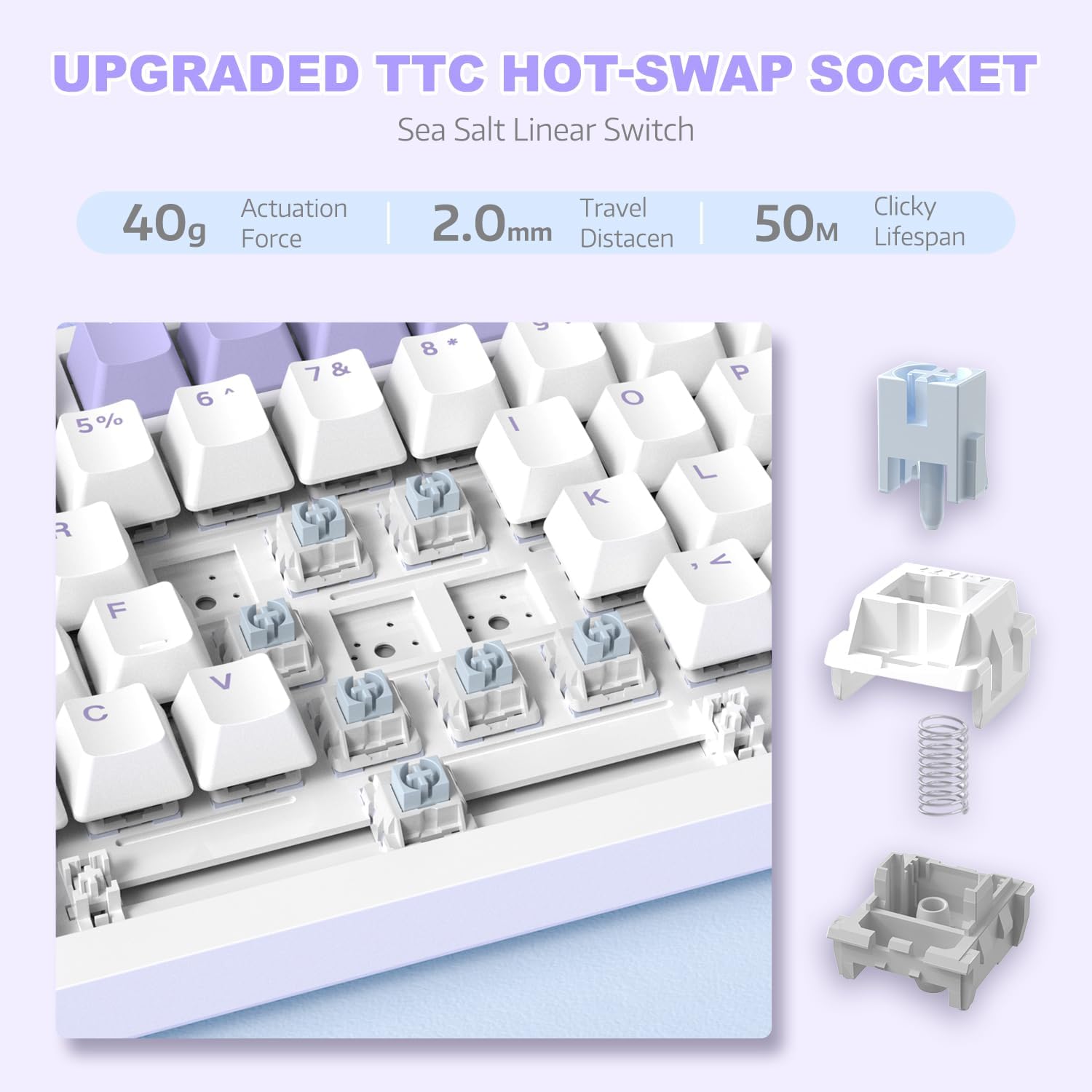
ภาพที่ 4: รายละเอียด view of the hot-swappable switch socket, demonstrating how switches can be easily removed and replaced.
5. คู่มือการใช้งาน
5.1 Multi-Function Knob Control
The metal knob located on the top right of the keyboard provides convenient multimedia control:
- หมุนตามเข็มนาฬิกา: เพิ่มปริมาณ
- หมุนทวนเข็มนาฬิกา: ลดระดับเสียง.
- กดลง: ปิด/เปิดเสียง

Image 5: The multimedia knob, illustrating its functions for adjusting volume and muting audio.
5.2 การควบคุมไฟแบ็คไลท์ RGB
คีย์บอร์ดมีไฟแบ็คไลท์ RGB สีสันสดใสพร้อมเอฟเฟกต์หลากหลาย ใช้ปุ่มต่อไปนี้เพื่อควบคุมแสงไฟ:
- FN + | (Backslash): เลือกชมเอฟเฟ็กต์แสงสีต่างๆ ได้ถึง 20 แบบ
- FN + X: Turn RGB backlighting ON/OFF.
- Refer to the included quick guide for additional lighting customization options or download the dedicated driver software for advanced control.
5.3 Hot-Swapping Switches and Keycaps
The AK820 supports hot-swapping, allowing you to change mechanical switches and keycaps without soldering.
- การถอดคีย์แคป: Use the keycap puller tool to gently grip the keycap and pull upwards until it detaches from the switch.
- การถอดสวิตช์: Use the switch puller (the other end of the 2-in-1 tool) to grip the top and bottom clips of the switch. Gently pull upwards until the switch detaches from the PCB.
- การติดตั้งสวิตช์: Align the pins of the new 3-pin or 5-pin mechanical switch with the holes on the PCB. Press down firmly until the switch clicks into place. Ensure pins are not bent.
- การติดตั้ง Keycaps: Align the cross-stem of the keycap with the stem of the switch and press down firmly until it is seated.

Image 6: Highlighting the durable PBT keycaps, known for their oil and wear resistance.
5.4 ความเข้ากันได้ของระบบปฏิบัติการ
The keyboard is compatible with both Windows and Mac operating systems. No special drivers are typically required for basic functionality.

Image 7: Visual representation of the keyboard's compatibility with both Mac and Windows operating systems.
6. การบำรุงรักษา
6.1 การทำความสะอาดแป้นพิมพ์
- ถอดแป้นพิมพ์ออกจากคอมพิวเตอร์ของคุณก่อนทำความสะอาด
- ใช้กระป๋องลมอัดเป่าฝุ่นและเศษต่างๆ ออกจากระหว่างปุ่มต่างๆ
- สำหรับการทำความสะอาดพื้นผิว ให้ใช้ผ้านุ่มที่ไม่เป็นขุยเช็ดเบาๆampล้างออกด้วยน้ำหรือน้ำยาทำความสะอาดอ่อนๆ หลีกเลี่ยงความชื้นที่มากเกินไป
- ห้ามฉีดน้ำยาทำความสะอาดลงบนแป้นพิมพ์โดยตรง
6.2 การดูแลรักษาปุ่มกดและสวิตช์
- เมื่อถอดปุ่มกดหรือสวิตช์ ควรทำอย่างเบามือเพื่อหลีกเลี่ยงความเสียหายต่อชิ้นส่วน
- Store spare keycaps and switches in a clean, dry place.

Image 8: An exploded diagram illustrating the multi-layer noise reduction installation, including PORON sandwich cotton, IXPE switch pads, PET voice actor pdd, bottom cotton, and bottom silicone.
7 การแก้ไขปัญหา
7.1 แป้นพิมพ์ไม่ตอบสนอง
- ตรวจสอบให้แน่ใจว่าสาย USB-C เชื่อมต่อกับคีย์บอร์ดและคอมพิวเตอร์อย่างแน่นหนา
- ลองเชื่อมต่อคีย์บอร์ดกับพอร์ต USB อื่นบนคอมพิวเตอร์ของคุณ
- ทดสอบแป้นพิมพ์บนคอมพิวเตอร์เครื่องอื่นเพื่อตัดปัญหาเฉพาะคอมพิวเตอร์เครื่องนั้นออกไป
- รีสตาร์ทเครื่องคอมพิวเตอร์ของคุณ
7.2 RGB Backlighting Not Working/Incorrect
- กด เอฟเอ็น + เอ็กซ์ to ensure the RGB is turned on.
- กด FN + | (Backslash) เพื่อสลับไปมาระหว่างโหมดแสงสว่างต่างๆ
- If using custom settings, ensure the driver software is installed and configured correctly.
7.3 Keys Not Registering (Anti-Ghosting)
The AK820 features N-key rollover (NKRO) to prevent ghosting. If specific keys are not registering:
- Ensure the keycap and switch are properly seated. Gently press down on the keycap to ensure it's fully attached.
- If a specific switch is faulty, use the hot-swap feature to replace it with a new one.

Image 9: Illustration of the 82-key anti-ghosting feature, demonstrating the ability to register multiple simultaneous key presses.
7.4 Video Demonstration: AK820 Keyboard Overview
วิดีโอ 1: การประชุมอย่างเป็นทางการview of the AK820 75% Wired RGB Gasket Mechanical Keyboard, demonstrating its features including the volume knob, hot-swappable switches, and RGB lighting effects.
8. ข้อมูลจำเพาะ
| คุณสมบัติ | รายละเอียด |
|---|---|
| หมายเลขรุ่น | เอเค820 |
| ขนาดสินค้า | 12.87 x 5.35 x 1.57 นิ้ว |
| น้ำหนักสินค้า | 2.05 ปอนด์ |
| ผู้ผลิต | โจมตีฉลาม |
| เทคโนโลยีการเชื่อมต่อ | แบบมีสาย (USB-C) |
| คำอธิบายแป้นพิมพ์ | การเล่นเกม |
| จำนวนคีย์ | 82 |
| ประเภทสวิตซ์ | Sea Salt Linear Switch (Hot-Swappable) |
| วัสดุปุ่มกด | พีบีที |
| การแบ็คไลท์ | RGB (South-facing LEDs) |
| คุณสมบัติพิเศษ | 5 Layers of sound insulation cotton, CNC Metal Knob, Hot-Swappable |
| อุปกรณ์ที่รองรับ | แล็ปท็อป, คอมพิวเตอร์ส่วนบุคคล (Windows, Mac) |
9. การรับประกันและการสนับสนุน
สำหรับข้อมูลการรับประกันและการสนับสนุนทางเทคนิค โปรดดูที่เว็บไซต์อย่างเป็นทางการของ ATTACK SHARK webหรือติดต่อฝ่ายบริการลูกค้าโดยตรง โปรดเก็บใบเสร็จรับเงินไว้เป็นหลักฐานการซื้อสำหรับการเรียกร้องการรับประกันใดๆ
ผู้ผลิต: โจมตีฉลาม
วันที่เข้าใช้งานครั้งแรก: วันที่ 15 ธันวาคม 2023