
1. สินค้าหมดview
The POLONO P31S is a compact and portable thermal label printer designed for various labeling needs in home, office, and school environments. It connects wirelessly via Bluetooth to your smartphone or tablet, allowing you to design and print labels using the dedicated mobile application. This device features a built-in cutter and operates without ink, utilizing thermal printing technology for clear, durable labels.
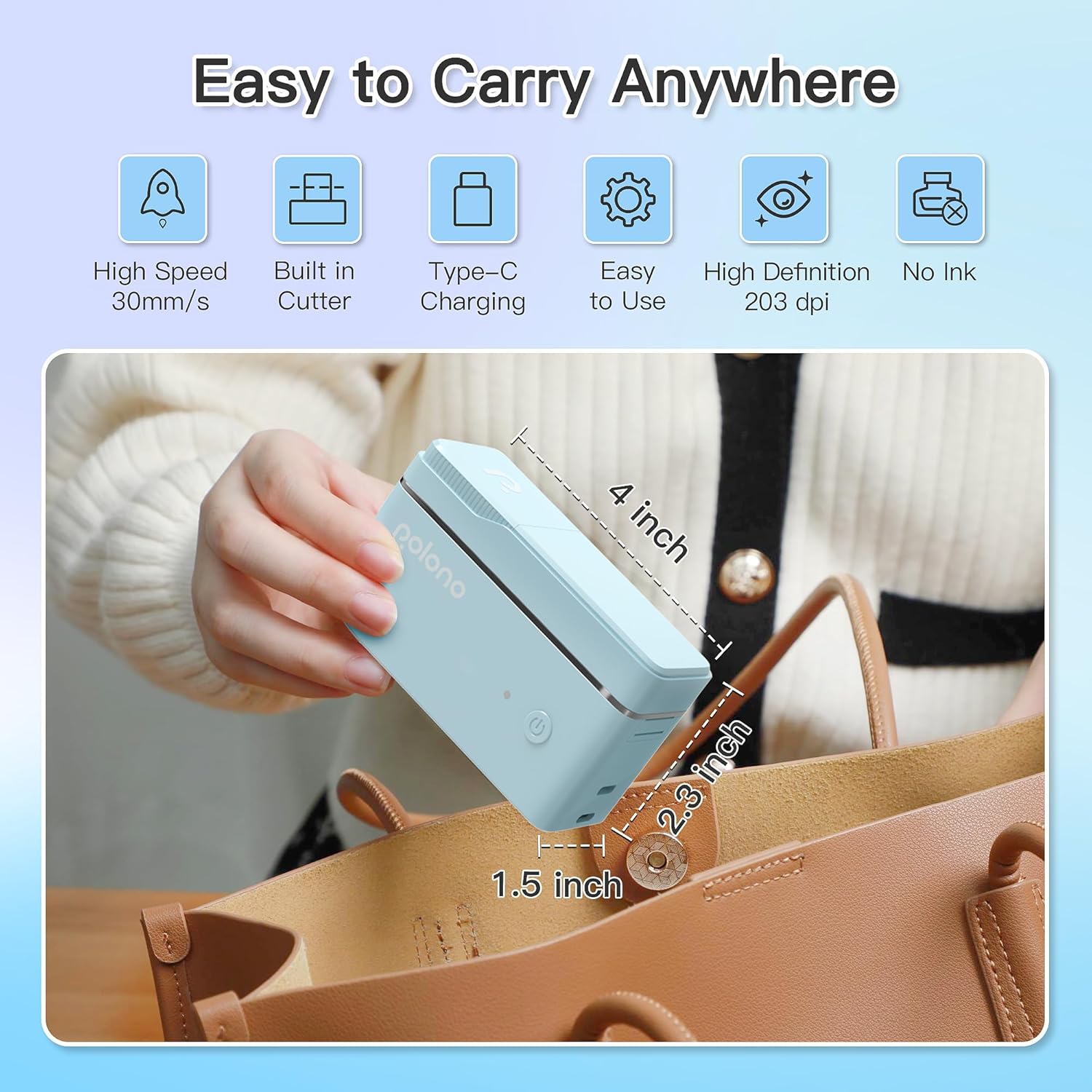
รูปที่ 1: POLONO P31S Label Printer highlighting its compact design and dimensions (approximately 4 inches long, 2.3 inches high, 1.5 inches wide).
คุณสมบัติหลัก:
- การออกแบบพกพาสะดวกและมีน้ำหนักเบา
- Bluetooth connectivity for wireless printing.
- Thermal printing technology (no ink required).
- Built-in label cutter.
- Supports various label types including text, QR codes, barcodes, and images.
- แบตเตอรี่แบบชาร์จไฟได้
2. ข้อมูลด้านความปลอดภัย
Please read and understand all safety instructions before using the POLONO P31S label printer to prevent injury or damage to the device.
- ห้ามถอดประกอบ ซ่อมแซม หรือดัดแปลงอุปกรณ์
- เก็บอุปกรณ์ให้ห่างจากน้ำ ความชื้น และอุณหภูมิที่สูงเกินไป
- Use only POLONO-approved label tapes to ensure optimal performance and prevent damage.
- หลีกเลี่ยงการสัมผัสหัวพิมพ์ทันทีหลังจากพิมพ์เสร็จ เนื่องจากอาจร้อนได้
- เก็บให้พ้นจากมือเด็ก
- Use the provided charging cable or a certified equivalent.
3. เนื้อหาบรรจุภัณฑ์
ตรวจสอบว่ามีรายการทั้งหมดอยู่ในแพ็คเกจ:
- POLONO P31S Label Printer
- Label Tape Roll (starter roll)
- สายชาร์จ USB
- คู่มือการใช้งาน (เอกสารนี้)
4. การตั้งค่า
4.1 การชาร์จอุปกรณ์
Before first use, fully charge the label printer. Connect the provided USB charging cable to the printer's charging port and to a USB power adapter (not included) or a computer's USB port. The indicator light will show charging status.
4.2 การติดตั้งเทปฉลาก
- เปิดฝาช่องใส่ฉลาก
- Insert the label tape roll with the printing surface facing up, ensuring it is properly seated.
- Pull a small portion of the label tape out, extending it past the cutter blade.
- ปิดฝาช่องใส่ฉลากให้สนิท

รูปที่ 2: Proper installation of POLONO P31S label tape. Ensure the green sticker on the tape is not removed or damaged, as it contains chip technology for optimal performance. Do not pull the label out directly; use the cutting blade.
4.3 การดาวน์โหลดแอปและการเชื่อมต่อบลูทูธ
- Download the "Labelnize" app from the Apple App Store or Google Play Store.
- Turn on the POLONO P31S label printer by pressing and holding the power button.
- เปิดใช้งาน Bluetooth บนสมาร์ทโฟนหรือแท็บเล็ตของคุณ
- Open the "Labelnize" app. The app will prompt you to allow Bluetooth access. Grant permission.
- Within the app, search for available devices and select "P31S" to connect.
- Once connected, the app will indicate a successful connection, and you are ready to create labels.
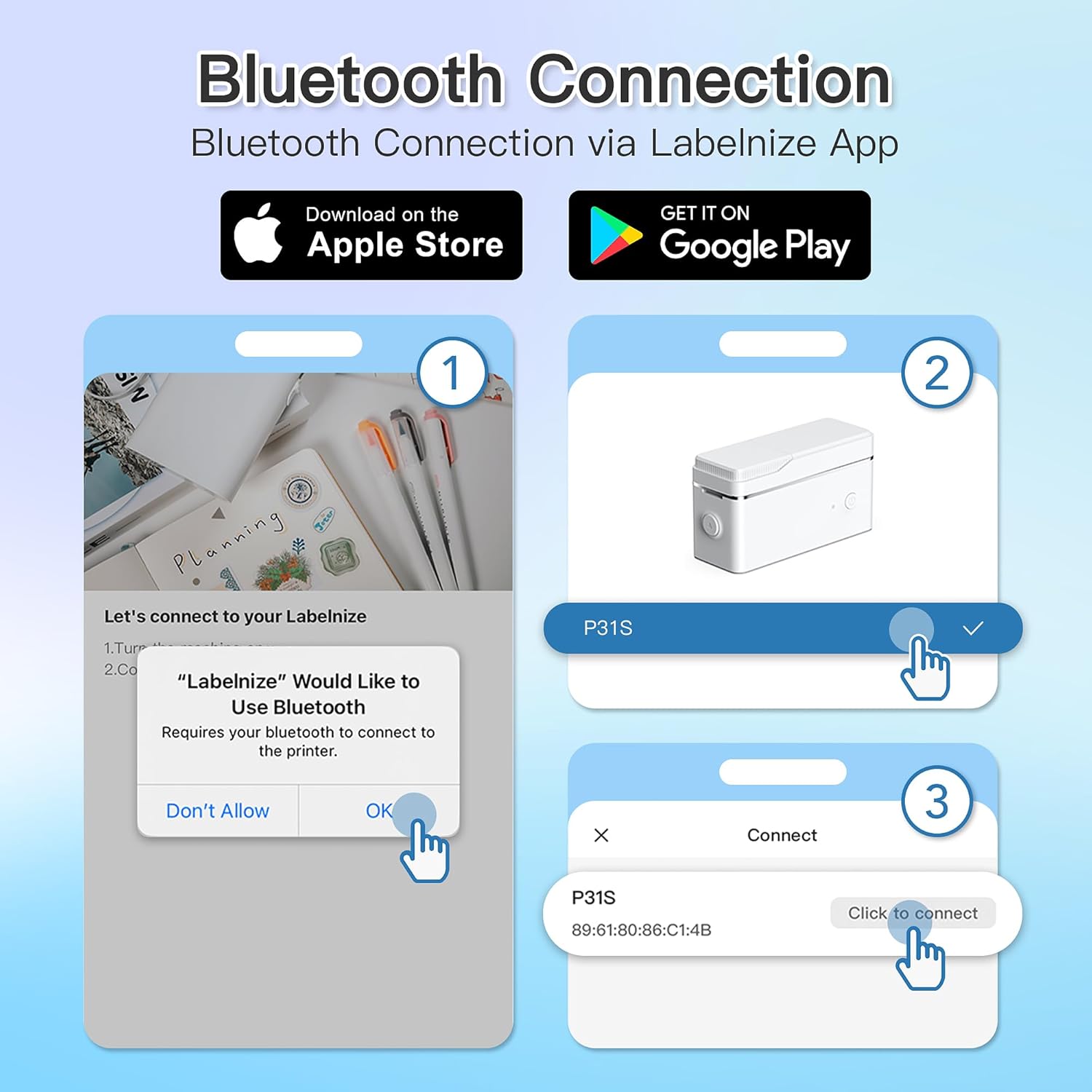
รูปที่ 3: Steps for Bluetooth connection via the Labelnize App. Download the app, allow Bluetooth access, select "P31S" from the device list, and click "Connect".
5. คู่มือการใช้งาน
5.1 Creating Labels with the Labelnize App
The Labelnize app offers a variety of tools to design your labels:
- ข้อความ: Enter custom text, choose from over 90 fonts, adjust size, style (bold, italic), and alignment.
- ขอบเขต: Select from over 95 border designs to frame your labels.
- Icons/Graphics: Access a library of over 670 tab icons and other graphics to enhance your labels.
- QR Code/Barcode: Generate QR codes or barcodes for various applications.
- รูปภาพ: Insert images from your device's gallery.
- เทมเพลต: Utilize pre-designed templates for common labeling tasks.

รูปที่ 4: The Labelnize app interface for creating labels, offering extensive customization options including borders, fonts, and icons. The app supports multiple languages.
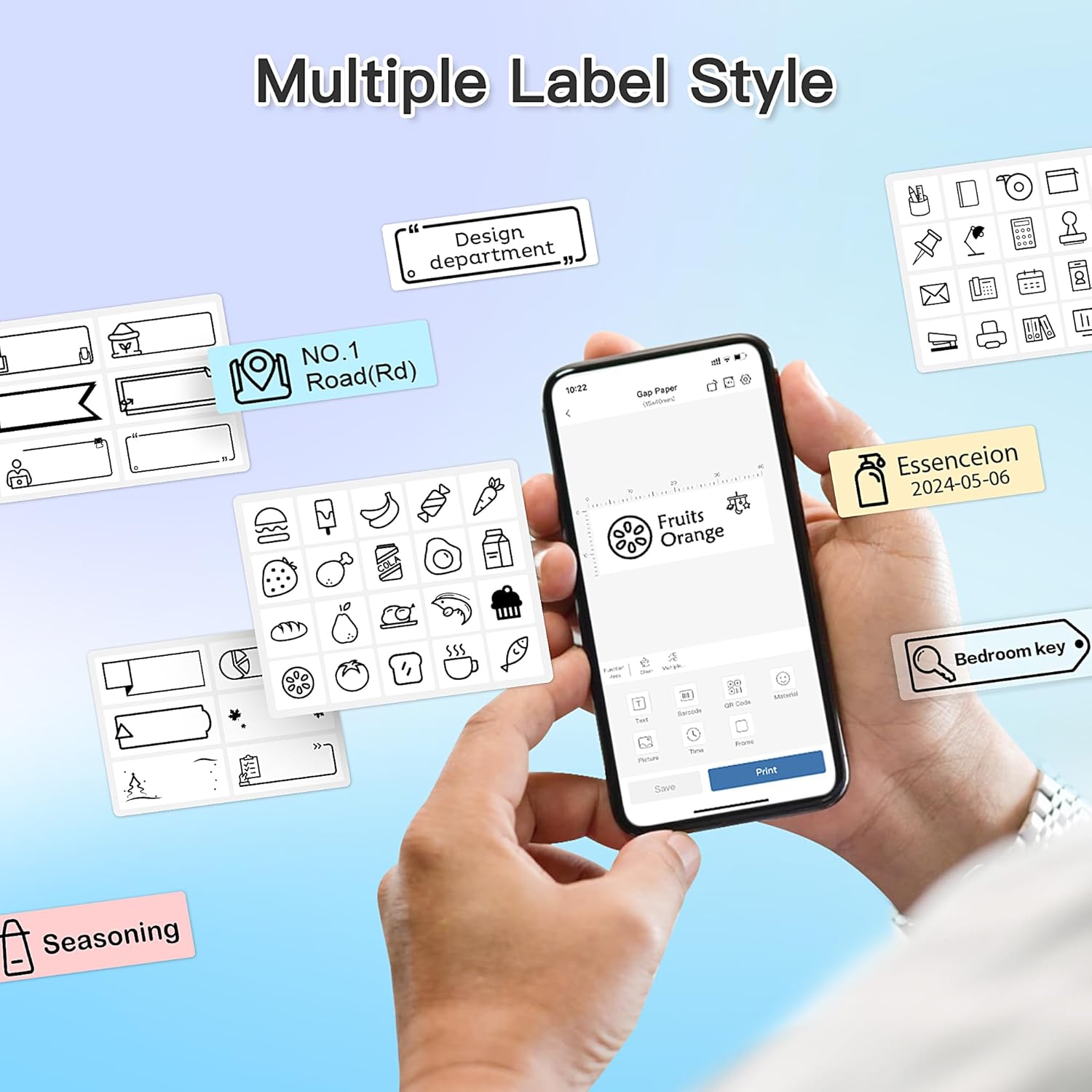
รูปที่ 5: Examples of diverse label styles achievable with the POLONO P31S, demonstrating the flexibility in design for different organizational needs.
5.2 การพิมพ์ฉลาก
After designing your label in the Labelnize app:
- Review แสดงการออกแบบฉลากของคุณบนหน้าจอแอป
- แตะปุ่ม "พิมพ์" ภายในแอป
- Confirm print settings (e.g., number of copies) if prompted.
- The printer will automatically feed and print the label.
5.3 การใช้เครื่องตัดในตัว
The POLONO P31S features a built-in cutter for clean and precise label separation. After printing, gently press the cutter button or lever (depending on model variation) to cut the label. Do not pull the label manually to tear it, as this may damage the printer or result in uneven cuts.
6. การบำรุงรักษา
6.1 การทำความสะอาดหัวพิมพ์
เพื่อรักษาคุณภาพการพิมพ์ ควรทำความสะอาดหัวพิมพ์เป็นระยะ:
- ปิดเครื่องพิมพ์และถอดสายไฟออก
- เปิดฝาช่องใส่ฉลาก
- ค่อยๆ เช็ดหัวพิมพ์ด้วยสำลีเบาๆampเคลือบด้วยแอลกอฮอล์ไอโซโพรพิล
- รอให้หัวพิมพ์แห้งสนิทก่อนปิดฝาและเปิดเครื่องพิมพ์
6.2 การดูแลแบตเตอรี่
- Charge the battery regularly, even if the printer is not used frequently, to prolong its lifespan.
- หลีกเลี่ยงการปล่อยแบตเตอรี่จนหมดเป็นเวลานาน
- เก็บเครื่องพิมพ์ไว้ในที่แห้งและเย็นเมื่อไม่ได้ใช้งาน
7 การแก้ไขปัญหา
| ปัญหา | สาเหตุที่เป็นไปได้ | สารละลาย |
|---|---|---|
| เครื่องพิมพ์ไม่เปิดใช้งาน | แบตเตอรี่เหลือน้อยหรือไม่มีพลังงาน | ชาร์จเครื่องพิมพ์โดยใช้สาย USB ที่ให้มา |
| ไม่สามารถเชื่อมต่อผ่านบลูทูธได้ | Bluetooth is off, printer is off, or app issue. | Ensure printer is on, Bluetooth is enabled on your device, and restart the Labelnize app. Try re-pairing. |
| คุณภาพการพิมพ์ไม่ดี | Dirty print head, incorrect label tape, or low battery. | Clean the print head (Section 6.1). Ensure you are using POLONO P31S compatible label tape. Charge the printer. |
| Label jam. | Improper tape installation or foreign object. | Turn off the printer, open the cover, carefully remove any jammed tape. Reinstall tape correctly. |
| Printer not responding. | ซอฟต์แวร์มีปัญหาชั่วคราว | Restart the printer and the Labelnize app. |
8. ข้อมูลจำเพาะ
| คุณสมบัติ | รายละเอียด |
|---|---|
| แบบอย่าง | พี31เอส |
| เทคโนโลยีการพิมพ์ | เทอร์มอล |
| การเชื่อมต่อ | บลูทูธ |
| ความละเอียดในการพิมพ์ | 203 x 203 จุดต่อนิ้ว |
| ความเร็วในการพิมพ์สูงสุด (ขาวดำ) | 15 หน้าต่อนาที |
| ขนาดสื่อสูงสุด | Label rolls (2 inches / 24 millimeters) |
| สีหมึก | Black (thermal print) |
| แหล่งพลังงาน | แบตเตอรี่ลิเธียมโพลิเมอร์ 1 ก้อน (รวมอยู่ด้วย) |
| ขนาดสินค้า | 7.2 x 7.4 x 12.7 ซม.; 260 กรัม |
| ส่วนประกอบที่รวมอยู่ | ฉลาก |
9. การรับประกันและการสนับสนุน
For warranty information and technical support, please refer to the official POLONO webหรือติดต่อฝ่ายบริการลูกค้า เก็บใบเสร็จรับเงินไว้เป็นหลักฐานการซื้อสำหรับการเรียกร้องการรับประกัน
เป็นทางการ Webเว็บไซต์: www.polono.com (หมายเหตุ: นี่เป็นเพียงตัวอย่างชั่วคราว URLกรุณาตรวจสอบเจ้าหน้าที่จริง website for POLONO products.)