
Fafeicy M113
Fafeicy M113 Digital Multimeter Instruction Manual
รุ่น : M113
การแนะนำ
This manual provides detailed instructions for the safe and effective use of the Fafeicy M113 Digital Multimeter. Please read this manual thoroughly before operation and retain it for future reference. The M113 is designed for automatic recognition and measurement of various electrical parameters, making it suitable for a wide range of electrical testing tasks.
ข้อมูลด้านความปลอดภัย
WARNING: To avoid electrical shock, remove test leads before opening the casing or battery cover. Fuse: F10A/250V. Meets IEC 61010-1, 600V CAT III. Pollution Degree 2.
- ตรวจสอบให้แน่ใจเสมอว่ามัลติมิเตอร์อยู่ในโหมดการวัดที่ถูกต้องก่อนเชื่อมต่อสายวัดเข้ากับวงจร
- อย่าพยายามวัดปริมาตรtagกระแสไฟฟ้าหรือค่าอื่นๆ ที่เกินขีดจำกัดสูงสุดที่กำหนดไว้
- ควรใช้ความระมัดระวังเป็นพิเศษเมื่อทำงานกับวงจรที่มีไฟฟ้าอยู่
- เปลี่ยนแบตเตอรี่ทันทีเมื่อไฟแสดงสถานะแบตเตอรี่อ่อนปรากฏขึ้นเพื่อให้แน่ใจว่าการอ่านค่าแม่นยำ
- อย่าใช้มัลติมิเตอร์หากพบว่าชำรุดหรือทำงานผิดปกติ
สินค้าเกินview
The Fafeicy M113 is a compact digital multimeter designed for automatic recognition and measurement of various electrical parameters. It features a clear digital display and intuitive controls.

ภาพ: ด้านหน้า view of the Fafeicy M113 Digital Multimeter, highlighting its display and controls. The display shows "AUTO" indicating automatic recognition mode.
ส่วนประกอบ:
- แสดง: Digital screen showing measurement readings and indicators.
- ปุ่ม NCV: เปิดใช้งาน Vol แบบไม่สัมผัสtagการตรวจจับอี
- ปุ่มเปิด/ปิด: เปิด/ปิดอุปกรณ์
- ปุ่มค้าง: หยุดการอ่านค่าปัจจุบันบนจอแสดงผล
- แจ็คอินพุต: For connecting test leads (COM, INPUT).
การตั้งค่า
การติดตั้งแบตเตอรี่
- ตรวจสอบให้แน่ใจว่ามัลติมิเตอร์ปิดอยู่ และถอดสายวัดทั้งหมดออก
- ค้นหาช่องใส่แบตเตอรี่ที่ด้านหลังของอุปกรณ์
- ใช้ไขควงเปิดฝาช่องใส่แบตเตอรี่
- Insert three AAA batteries (not included) according to the polarity markings inside the compartment.
- ใส่ฝาปิดช่องใส่แบตเตอรี่และขันให้แน่นด้วยสกรู

ภาพ: ด้านหลัง view of the M113 multimeter, displaying the battery compartment cover and safety warnings regarding fuse and battery type.
การเชื่อมต่อสายการทดสอบ
- เสียบสายทดสอบสีดำเข้าในแจ็คอินพุต "COM" (ทั่วไป)
- Insert the red test lead into the "INPUT" jack for most measurements (voltage, resistance, capacitance, frequency, current).
คำแนะนำการใช้งาน
The M113 multimeter features automatic recognition, simplifying operation for common measurements.
โหมดการรับรู้อัตโนมัติ
When powered on, the multimeter defaults to automatic recognition mode. In this mode, it can automatically identify and measure:
- ฉบับ ACtage
- DC ฉบับที่tage
- ความต้านทาน
- Continuity (Line On/Off)
การวัด AC/DC Voltage
- Turn on the multimeter. It will enter automatic recognition mode.
- เชื่อมต่อสายวัดทดสอบเข้ากับวงจรหรือชิ้นส่วนที่คุณต้องการวัด
- หน้าจอจะแสดงปริมาณtage reading (AC or DC) automatically.

Image: The M113 multimeter displaying an AC voltage reading (235V) while test leads are connected to a circuit breaker panel.
Line On/Off (Continuity) Detection
- เปิดมัลติมิเตอร์
- Connect the test probes to both ends of the wire or component.
- If a beep sound is heard, the wire is connected (continuous).
- If no beep sound is heard, the wire is disconnected (open circuit).

Image: The M113 multimeter showing "000" on the display during a continuity test, with test leads connected to a bare wire.
NCV (Non-Contact Vol .)tagจ) การตรวจจับ
- กดปุ่ม "NCV" เพื่อเปิดใช้งานระบบวัดระดับเสียงแบบไร้สัมผัสtagฟังก์ชันการตรวจจับอี
- Move the top of the multimeter near the wire or electrical outlet.
- เมื่อ AC voltage is detected, the screen index will rise by three bars, and an alarm beep will be issued.
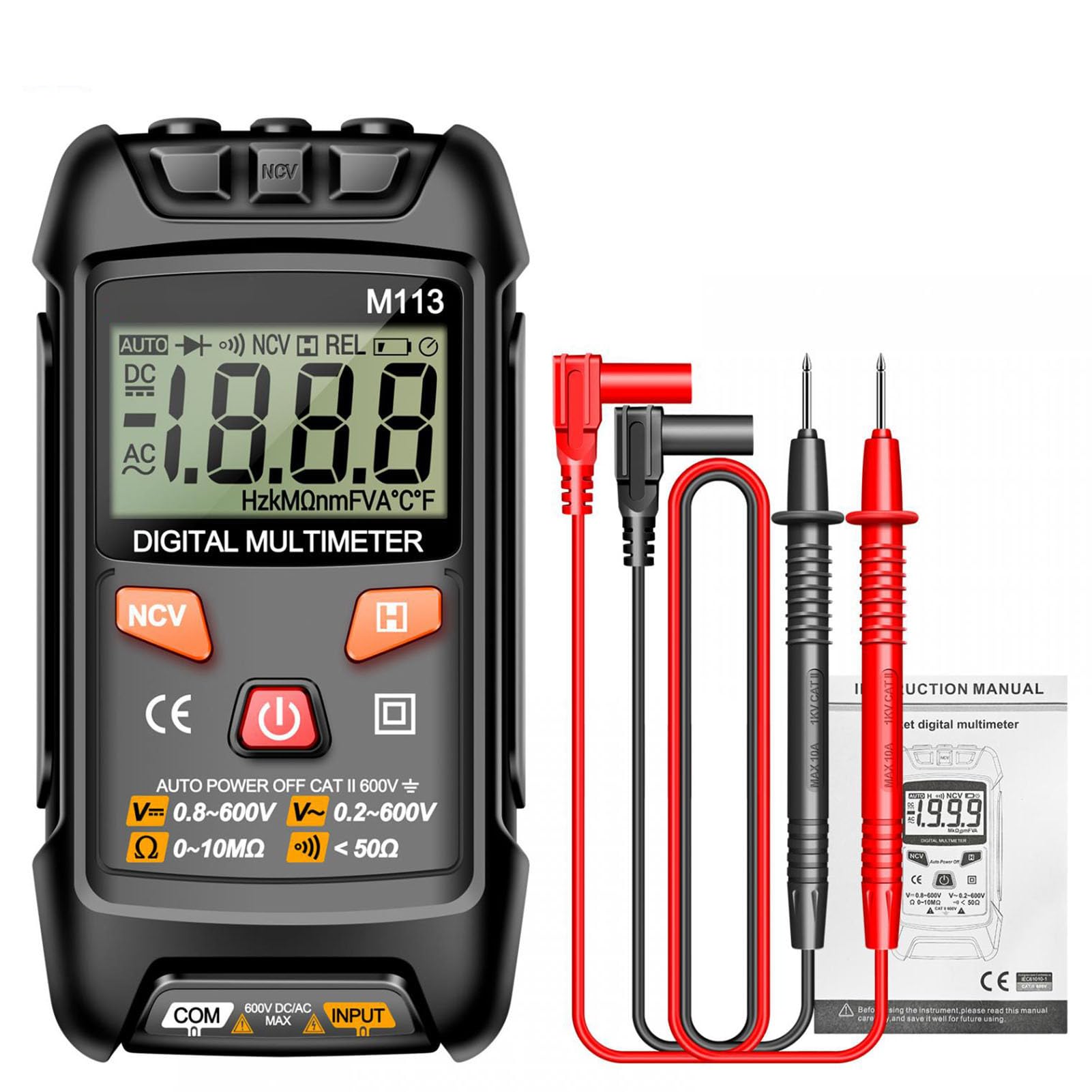
Image: The M113 multimeter held near an electrical outlet, demonstrating NCV detection. The display shows an NCV indicator and signal strength bars.
ฟังก์ชันเก็บข้อมูล
Press the "H" (Hold) button to freeze the current reading on the display. Press it again to release the hold function.
การซ่อมบำรุง
- การทำความสะอาด: ใช้แบบนุ่มๆamp ผ้าสำหรับทำความสะอาดมัลติมิเตอร์asinก. ห้ามใช้น้ำยาทำความสะอาดที่มีฤทธิ์กัดกร่อนหรือตัวทำละลาย
- การเปลี่ยนแบตเตอรี่: Replace batteries when the low battery indicator appears. Refer to the "Battery Installation" section for instructions.
- พื้นที่จัดเก็บ: เก็บมัลติมิเตอร์ไว้ในที่แห้งและเย็น หลีกเลี่ยงแสงแดดโดยตรงและอุณหภูมิที่สูงหรือต่ำเกินไป ถอดแบตเตอรี่ออกหากเก็บรักษาเป็นเวลานาน
- การเปลี่ยนฟิวส์: If the fuse blows, replace it with a fuse of the specified rating (F10A/250V). This procedure should only be performed by qualified personnel.
การแก้ไขปัญหา
| ปัญหา | สาเหตุที่เป็นไปได้ | สารละลาย |
|---|---|---|
| มัลติมิเตอร์ไม่เปิดใช้งาน | แบตเตอรี่เสียหรือติดตั้งไม่ถูกต้อง | ตรวจสอบขั้วแบตเตอรี่และเปลี่ยนแบตเตอรี่หากจำเป็น |
| ไม่มีการแสดงข้อความ "OL" หรือ "ไม่อ่านข้อความ" | Open circuit, out of range, or incorrect lead connection. | Ensure test leads are properly connected. Check if the circuit is open. Verify the measurement is within the multimeter's range. |
| การอ่านที่ไม่ถูกต้อง | Low battery, dirty test leads, or environmental interference. | เปลี่ยนแบตเตอรี่ ทำความสะอาดสายวัด และอยู่ห่างจากสนามแม่เหล็กไฟฟ้าแรงสูง |
| No beep during continuity test. | Wire is disconnected or broken. | Inspect the wire for breaks or poor connections. |
ข้อมูลจำเพาะ
| พารามิเตอร์ | พิสัย | ความแม่นยำ / ความละเอียด |
|---|---|---|
| DC ฉบับที่tage | 0-600 โวลต์ | 1 mV - 1 V, +(0.8% Read) |
| กระแสไฟฟ้าตรง | 0-600มิลลิแอมป์ | 10 mA - 1 A, +(3.0% Read) |
| ความต้านทาน | 0-10 เมกะโอห์ม | < 50Ω (Continuity) |
| อุณหภูมิ | -20°C ถึง 1000°C | +(2.0% + 2°C) |
| แหล่งพลังงาน | ใช้พลังงานจากแบตเตอรี่ | แบตเตอรี่ AAA 3 ก้อน (ไม่รวม) |
| NCV Detection | รองรับ | แบบไม่สัมผัส voltagการตรวจจับอี |
| การทดสอบ Diode | รองรับ | |
| การเก็บข้อมูล | รองรับ | |
| ระดับความปลอดภัย | IEC 61010-1, 600V CAT III | ระดับมลพิษ 2 |
การรับประกันและการสนับสนุน
For warranty information and technical support, please refer to the documentation provided with your purchase or contact Fafeicy customer service.
ผู้ผลิต: Fafeicy
แบบอย่าง: M113 (Fafeicy1veco0wd9k)
Ask a question about this manual
Ask about setup, troubleshooting, compatibility, parts, safety, or missing instructions. Manuals+ will review the question and use this page’s manual context to help answer it.