
1. บทนำ
This manual provides instructions for the GOUYESHO AKB36097101 Replacement Remote Control. This remote is designed to function as a direct replacement for original LG DVD VCR Combo and DVD Recorder remote controls, specifically compatible with models such as RC897T, RC700N, RC797T, RC397HM, RC397H, and RC389H.
The remote control is constructed from durable ABS material with soft silicone buttons, offering a comfortable and reliable user experience. It features an ergonomic design for easy handling.

Image 1.1: The GOUYESHO AKB36097101 replacement remote control, designed for LG DVD VCR Combo and DVD Recorders.
เนื้อหาแพ็คเกจ:
- 1 x GOUYESHO AKB36097101 Replacement Remote Control
- หมายเหตุ: ไม่รวมแบตเตอรี่ AAA ต้องซื้อแยกต่างหาก
2. การตั้งค่า
The AKB36097101 remote control is designed for immediate use without complex programming or pairing. Simply install the batteries, and it will be ready to operate your compatible LG device.
การติดตั้งแบตเตอรี่:
- ค้นหาช่องใส่แบตเตอรี่ที่ด้านหลังของรีโมทคอนโทรล
- เลื่อนเปิดฝาครอบช่องใส่แบตเตอรี่
- Insert two (2) AAA 1.5V alkaline batteries, ensuring correct polarity (+ and -) as indicated inside the compartment.
- ปิดฝาช่องใส่แบตเตอรี่ให้แน่น

Image 2.1: Proper installation of two AAA batteries into the remote control's battery compartment.
Once batteries are installed, the remote is ready for use. No additional setup or code entry is required for compatible LG DVD VCR Combo or DVD Recorder models.

Image 2.2: The remote control is ready to operate your device immediately after battery insertion.
3. การดำเนินการ
The AKB36097101 remote control provides full functionality for your compatible LG DVD VCR Combo or DVD Recorder. Its intuitive layout with clearly labeled buttons ensures ease of use for all ages.
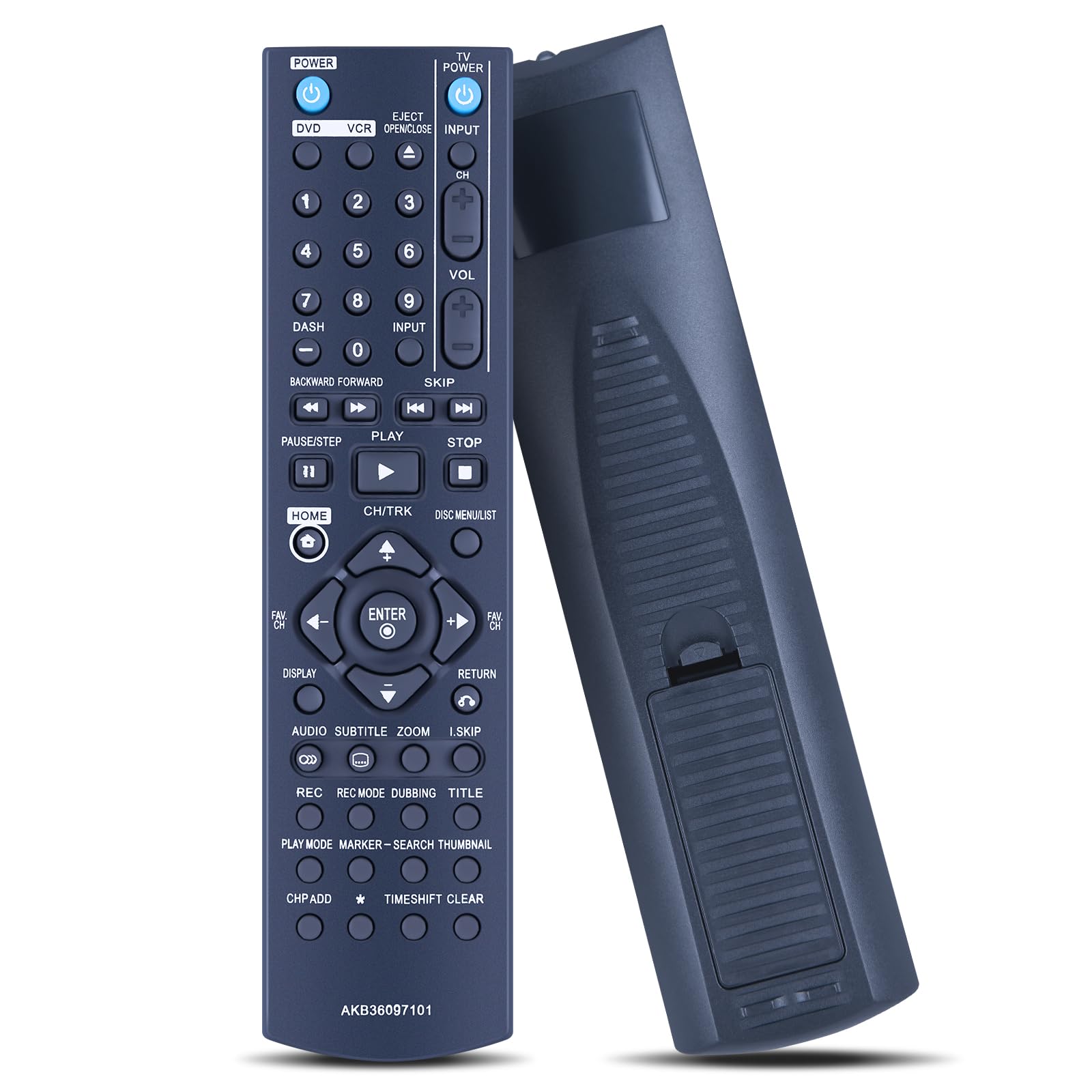
ภาพที่ 3.1: จบแล้วview เกี่ยวกับปุ่มต่างๆ บนรีโมทคอนโทรลและฟังก์ชันของปุ่มเหล่านั้น
ฟังก์ชั่นหลัก:
- พลัง: เปิดหรือปิดอุปกรณ์
- ดีวีดี/วีซีอาร์: เลือกโหมดระหว่าง DVD และ VCR
- EJECT/OPEN/CLOSE: เปิดหรือปิดถาดใส่แผ่นดิสก์
- อินพุต: Switches input sources on the connected display.
- ปุ่มตัวเลข (0-9): สำหรับการเลือกช่องโดยตรงหรือการป้อนตัวเลข
- ปริมาณ (+/-): ปรับระดับเสียง
- ช (+/-): เปลี่ยนช่อง
- Playback Controls (PLAY, PAUSE/STEP, STOP, BACKWARD/FORWARD, SKIP): ควบคุมการเล่นสื่อ
- บ้าน: Accesses the main menu or home screen.
- CH/TRK: Navigates through channels or tracks.
- DISC MENU/LIST: Accesses disc menus or lists.
- ปุ่มควบคุมทิศทาง (ขึ้น, ลง, ซ้าย, ขวา, ENTER): สำหรับการนำทางและเลือกเมนู
- การแสดงผล: แสดงข้อมูลที่แสดงบนหน้าจอ
- กลับ: กลับไปยังหน้าจอหรือเมนูที่แล้ว
- เสียง: เลือกแทร็กเสียงหรือโหมดเสียง
- คำบรรยาย: สลับหรือเลือกตัวเลือกคำบรรยาย
- ซูม: Adjusts screen zoom level.
- I.SKIP: Skips to specific intervals.
- REC, REC MODE, DUBBING, TITLE: Recording functions for VCR/DVD Recorder.
- PLAY MODE, MARKER, SEARCH, THUMBNAIL: Advanced playback and search functions.
- CH P ADD, TIMEShift CLEAR: Additional channel and time-shift related functions.
Note: Depending on your specific LG model, some functions may not be available or may operate differently than described. Refer to your device's original manual for detailed function descriptions.

Image 3.2: The ergonomic design ensures comfortable handling during use.
4. การบำรุงรักษา
การทำความสะอาด:
- To clean the remote control, use a soft, dry cloth.
- สำหรับสิ่งสกปรกฝังแน่น ให้เช็ดออกเล็กน้อยampชุบน้ำหรือน้ำยาทำความสะอาดสูตรอ่อนโยนที่ไม่มีฤทธิ์กัดกร่อนบนผ้า
- Do not use harsh chemicals, solvents, or abrasive cleaning pads, as these can damage the remote's surface and buttons.
- Ensure no liquid enters the remote control, especially around the buttons or battery compartment.
การดูแลแบตเตอรี่
- If the remote control will not be used for an extended period (e.g., one month or more), remove the batteries to prevent leakage and potential damage to the remote.
- ควรเปลี่ยนแบตเตอรี่เมื่อรีโมทเริ่มตอบสนองช้าลงหรือหยุดทำงาน
- ทิ้งแบตเตอรี่ที่ใช้แล้วอย่างรับผิดชอบตามข้อบังคับท้องถิ่น
พื้นที่จัดเก็บ:
- เก็บรีโมทคอนโทรลไว้ในที่แห้งและเย็น หลีกเลี่ยงแสงแดดโดยตรงและอุณหภูมิที่สูงหรือต่ำเกินไป
- Avoid dropping the remote or exposing it to excessive force, which could damage internal components.
5 การแก้ไขปัญหา
รีโมทคอนโทรลไม่ตอบสนอง:
- ตรวจสอบแบตเตอรี่: Ensure batteries are inserted correctly with the proper polarity. Replace old or depleted batteries with new AAA alkaline batteries.
- แนวสายตา: Make sure there is a clear line of sight between the remote control's infrared emitter and the device's IR receiver. Obstructions can block the signal.
- ระยะทาง: Ensure you are within the effective operating range (approximately 10 meters or 33 feet) of the device.
- ความเข้ากันได้ของอุปกรณ์: Verify that your LG DVD VCR Combo or DVD Recorder model is listed as compatible (e.g., RC897T, RC700N, RC797T, RC397HM, RC397H, RC389H).
- การรบกวน: Strong light sources (like direct sunlight or fluorescent lights) can sometimes interfere with IR signals. Try operating the remote in a different lighting condition.
ปุ่มบางปุ่มใช้งานไม่ได้:
- ปุ่มสะอาด: Ensure the buttons are not stuck or obstructed by dirt. Gently clean around the buttons.
- ฟังก์ชั่นอุปกรณ์: Some functions may not be supported by all compatible LG models. Refer to your device's original manual to confirm if the function is available for your specific model.
If you continue to experience issues after following these troubleshooting steps, please refer to the Support section for further assistance.
6. ข้อมูลจำเพาะ
| หมายเลขรุ่น: | AKB36097101 |
| ยี่ห้อ: | GOUYESHO |
| วัสดุ: | ABS (อะคริโลไนไตรล์ บิวทาไดอีน สไตรีน) |
| เทคโนโลยีการเชื่อมต่อ: | อินฟาเรด (IR) |
| อุปกรณ์ที่รองรับ: | LG DVD VCR Combo, LG DVD Recorders (e.g., RC897T, RC700N, RC797T, RC397HM, RC397H, RC389H) |
| แหล่งพลังงาน: | 2 x AAA 1.5V แบตเตอรี่อัลคาไลน์ (ไม่รวม) |
| ระยะสูงสุด: | ประมาณ 10 เมตร (33 ฟุต) |
| สี: | สีดำ |
| คุณสมบัติพิเศษ: | การออกแบบตามหลักสรีรศาสตร์ |

ภาพที่ 6.1: ขนาดทางกายภาพของรีโมทคอนโทรล
7. การรับประกันและการสนับสนุน
ข้อมูลการรับประกัน:
This product comes with a 30-day unlimited return and refund service. Please retain your proof of purchase for warranty claims.
การสนับสนุนลูกค้า:
If you have any questions, concerns, or require assistance with your GOUYESHO AKB36097101 Replacement Remote Control, please do not hesitate to contact our customer support team. We aim to respond to all inquiries within 108 hours during the working week.
For support, please contact the seller directly through your purchase platform or refer to the contact information provided with your order.