
1. บทนำ
This manual provides detailed instructions for the setup, operation, maintenance, and troubleshooting of your Vontar X3 S905X3/4GB/32GB Android TV Box. Please read this manual thoroughly before using the device to ensure proper functionality and to maximize your user experience. Keep this manual for future reference.
2. สินค้าหมดview
The Vontar X3 S905X3/4GB/32GB is an Android TV Box designed to transform your television into a smart entertainment hub. It runs on Android 9.0 and features a powerful S905X3 processor, 4GB of RAM, and 32GB of internal storage, providing a smooth and responsive user experience for streaming, gaming, and app usage.
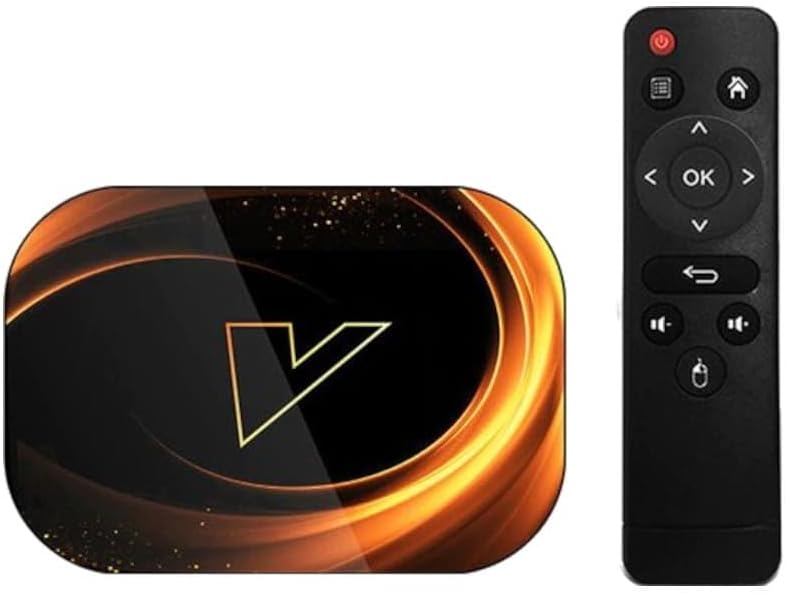
รูปที่ 2.1: The Vontar X3 Android TV Box shown alongside its included remote control. The TV box features a sleek, dark design with a prominent 'V' logo on top, while the remote is a standard black infrared type with navigation and media control buttons.
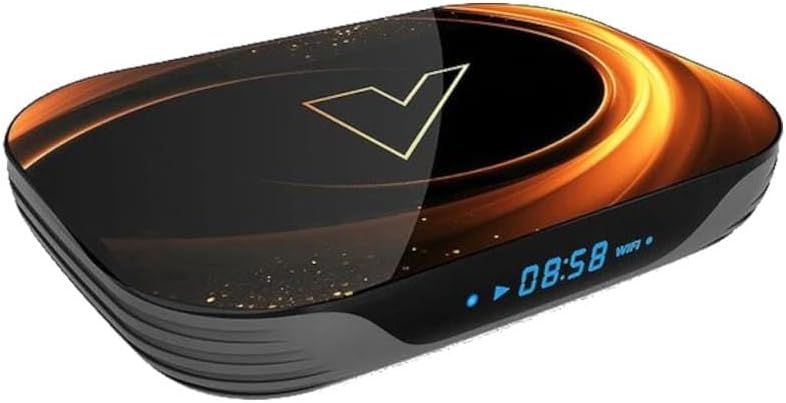
รูปที่ 2.2: มุมด้านหน้า view of the Vontar X3 Android TV Box, highlighting its digital display which shows the current time (08:58) and Wi-Fi status. The device has a dark, glossy finish with an illuminated 'V' logo and subtle golden accents.
เนื้อหาแพ็คเกจ:
- Vontar X3 S905X3/4GB/32GB Android TV Box
- รีโมทคอนโทรล
- อะแดปเตอร์แปลงไฟ
- สาย HDMI
- คู่มือการใช้งาน
3. คู่มือการติดตั้ง
3.1 การเชื่อมต่ออุปกรณ์
- เชื่อมต่อกับทีวี: Insert one end of the HDMI cable into the HDMI port on the Vontar X3 TV Box and the other end into an available HDMI input on your television.
- เชื่อมต่อกับพลังงาน: Plug the power adapter into the DC IN port on the TV Box, then plug the adapter into a wall outlet. The device should power on automatically or can be turned on using the power button on the remote.
- เชื่อมต่อกับเครือข่าย (ทางเลือก):
- ไวไฟ : Once the device is powered on, navigate to the 'Settings' menu, select 'Network & Internet', and choose your Wi-Fi network. Enter the password if prompted.
- อีเธอร์เน็ต: For a wired connection, connect an Ethernet cable from your router to the LAN port on the TV Box. The device will automatically detect the wired connection.
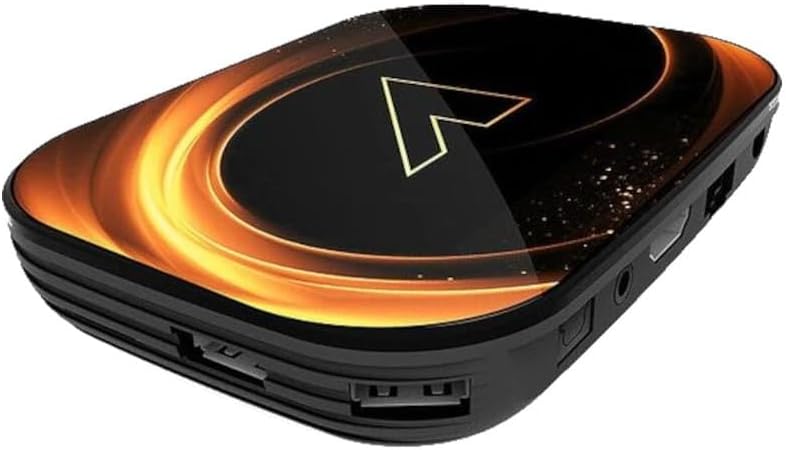
รูปที่ 3.1: หลัง view of the Vontar X3 Android TV Box, showing various ports including HDMI, Ethernet (LAN), and DC power input. These ports are essential for connecting the device to a television and power source.

รูปที่ 3.2: ด้านข้าง view of the Vontar X3 Android TV Box, displaying additional connectivity options such as USB ports (one USB 3.0, one USB 2.0) and a MicroSD card slot for expandable storage.
3.2 การบูตเครื่องครั้งแรก
After connecting all necessary cables, switch your TV's input source to the corresponding HDMI port. The Vontar X3 TV Box will display the boot-up screen. Follow any on-screen prompts for initial setup, such as language selection and Google account login.
4. คู่มือการใช้งาน
4.1 ฟังก์ชั่นการควบคุมระยะไกล
The included remote control allows you to navigate the Android TV interface and control media playback. Familiarize yourself with the main buttons:
- ปุ่มเปิด/ปิด: เปิดหรือปิดอุปกรณ์
- ปุ่มควบคุมทิศทาง (ขึ้น/ลง/ซ้าย/ขวา): เลื่อนเคอร์เซอร์หรือส่วนที่เลือก
- ปุ่มตกลง: ยืนยันการเลือกหรือเปิดรายการ
- ปุ่มย้อนกลับ: กลับไปยังหน้าจอที่แล้ว
- ปุ่มโฮม: กลับสู่หน้าจอหลัก
- ปุ่มปรับระดับเสียง: ปรับระดับเสียง
- ปุ่มเมนู: Accesses context-sensitive menus.
4.2 การใช้งานส่วนติดต่อผู้ใช้ของ Android 9.0
The Vontar X3 runs on Android 9.0, offering a user-friendly interface. Use the remote's navigation pad to browse through apps, settings, and content. The home screen typically displays frequently used apps, recommended content, and quick access to settings.
4.3 Installing and Uninstalling Applications
- การติดตั้งแอพ: Access the Google Play Store from the home screen. ค้นหา desired applications and select 'Install'.
- การถอนการติดตั้งแอป: Go to 'Settings' > 'Apps'. Select the app you wish to uninstall and choose 'Uninstall'.
4.4 การเล่นสื่อ
The device supports various media formats. You can play media from:
- บริการสตรีมมิ่ง: Install apps like Netflix, YouTube, Hulu, etc., from the Google Play Store.
- การจัดเก็บข้อมูลภายในเครื่อง: Connect a USB drive or MicroSD card to play media files directly. Use a file manager or media player app.
- ที่เก็บข้อมูลเครือข่าย: การเข้าถึงสื่อ files from network-attached storage (NAS) or shared folders on your local network.
5. การบำรุงรักษา
5.1 การทำความสะอาดเครื่อง
To clean the Vontar X3 TV Box, use a soft, dry cloth. Do not use liquid cleaners or abrasive materials, as they may damage the device's finish or internal components.
5.2 การอัปเดตซอฟต์แวร์
Periodically check for software updates to ensure optimal performance and access to the latest features. Go to 'Settings' > 'Device Preferences' > 'About' > 'System update'.
5.3 รีเซ็ตเป็นค่าโรงงาน
หากคุณพบปัญหาต่อเนื่อง การรีเซ็ตเป็นค่าโรงงานอาจแก้ไขปัญหาเหล่านั้นได้ คำเตือน: A factory reset will erase all data, settings, and installed applications. Go to 'Settings' > 'Device Preferences' > 'Reset'. Confirm your choice when prompted.
6 การแก้ไขปัญหา
This section addresses common issues you might encounter with your Vontar X3 TV Box.
| ปัญหา | สาเหตุที่เป็นไปได้ | สารละลาย |
|---|---|---|
| ไม่มีไฟฟ้า | Power adapter not connected; Power outlet not working; Device faulty. | ตรวจสอบให้แน่ใจว่าอะแดปเตอร์ไฟฟ้าเชื่อมต่อกับอุปกรณ์อย่างแน่นหนาและมีเต้ารับไฟฟ้าที่ใช้งานได้ ลองใช้เต้ารับอื่น |
| ไม่มีสัญญาณทางทีวี | Incorrect HDMI input selected; HDMI cable loose or faulty; TV Box not powered on. | Select the correct HDMI input on your TV. Check HDMI cable connections. Ensure the TV Box is powered on. |
| เชื่อมต่อ Wi-Fi ไม่ได้ | Incorrect Wi-Fi password; Router issues; Device too far from router. | Verify Wi-Fi password. Restart your router. Move the TV Box closer to the router or use an Ethernet cable. |
| รีโมตคอนโทรลไม่ทำงาน | แบตเตอรี่หมด; มีสิ่งกีดขวางระหว่างรีโมทและอุปกรณ์; รีโมทไม่ได้จับคู่ (หากใช้บลูทูธ) | Replace batteries. Ensure no obstructions. If it's a Bluetooth remote, re-pair it via settings. |
| แอปขัดข้องหรือค้าง | Insufficient memory; App specific issue; Software glitch. | Close background apps. Clear app cache/data (Settings > Apps). Restart the device. Perform a factory reset if issues persist. |
7. ข้อมูลจำเพาะ
The following are the technical specifications for the Vontar X3 S905X3/4GB/32GB Android TV Box:
- แบบอย่าง: X3 S905X3/4GB/32GB
- ระบบปฏิบัติการ: แอนดรอยด์ 9.0
- โปรเซสเซอร์: แอมลอจิก S905X3
- แรม : 4GB
- พื้นที่เก็บข้อมูลภายใน: 32GB
- การเชื่อมต่อ: Wi-Fi, Ethernet, HDMI, USB 3.0, USB 2.0, MicroSD Card Slot
- ขนาด : 13.78 x 9.45 x 6.3 นิ้ว (ขนาดบรรจุภัณฑ์)
- น้ำหนักสินค้า: 1.76 ปอนด์ (800 กรัม)
- สี: Colourful (Device exterior design)
- ผู้ผลิต: Vontar
- หมายเลขรุ่นสินค้า: 62353
- ASIN: B0CPPPXYKP
8. การรับประกันและการสนับสนุน
For warranty information and technical support, please refer to the documentation provided with your purchase or contact Vontar customer service directly. Keep your proof of purchase for any warranty claims.