
การแนะนำ
Thank you for choosing the LIORQUE S7509 Projection Alarm Clock. This manual provides detailed instructions for setting up and operating your new device. Please read it carefully to ensure proper use and to fully utilize all features.
เนื้อหาแพ็คเกจ
เมื่อแกะกล่องแล้วโปรดตรวจสอบให้แน่ใจว่ามีสิ่งของต่อไปนี้ครบถ้วน:
- LIORQUE S7509 Projection Alarm Clock
- อะแดปเตอร์แปลงไฟ
- สายไฟ USB
- คู่มือการใช้งาน

Image: The LIORQUE S7509 Projection Alarm Clock, its power adapter, USB cable, and user manual are displayed next to the product box. Product dimensions are indicated as 18cm (7.1in) width, 9.8cm (3.9in) height, and 5cm (2in) depth.
คุณลักษณะของผลิตภัณฑ์มากกว่าview
The LIORQUE S7509 Projection Alarm Clock is designed to enhance your daily routine with its versatile features:
- การฉายภาพที่หมุนได้ 180°: Project the time onto your ceiling or wall with adjustable brightness.
- จอแสดงผล LED ขนาดใหญ่: Clear time display with 4 adjustable brightness levels.
- สัญญาณเตือนคู่: ตั้งนาฬิกาปลุกสองอันแยกกันสำหรับตารางเวลาที่แตกต่างกัน
- วิทยุ FM: Enjoy your favorite radio stations with 15 preset memory slots and 15 adjustable volume levels.
- ฟังก์ชั่นเลื่อน: Provides an extra 9 minutes of sleep.
- เวลานอน: วิทยุจะปิดเองโดยอัตโนมัติหลังจากเวลาที่กำหนด (5-90 นาที)
- รูปแบบ 12/24 ชั่วโมง: Easily switch between time formats.
- แบตเตอรี่ในตัว: สำหรับสำรองไฟระหว่างการใช้งานtagใช่

Image: The LIORQUE S7509 Projection Alarm Clock is shown with its digital display set to 22:30. Surrounding icons highlight key features including 12/24 hour time, adjustable brightness, FM radio, snooze function, dual alarms, time projection, built-in battery, and a sleep timer.
คำแนะนำการตั้งค่า
1. การเชื่อมต่อไฟฟ้า
Connect the provided USB power cable to the alarm clock and plug the adapter into a standard wall outlet. The display will light up, indicating the device is powered on.

Image: The LIORQUE S7509 Projection Alarm Clock is shown on a bedside table, connected to a wall outlet via its power adapter. The clock displays 8:30, illustrating its readiness for use after power connection.
2. การตั้งเวลาเริ่มต้น
- กดปุ่มค้างไว้ ตั้งเวลา button (usually labeled with a clock icon) for 3 seconds to enter time setting mode.
- ใช้ ชั่วโมง และ นาที buttons (often labeled with '+' and '-' or arrows) to adjust the current time.
- กด ตั้งเวลา อีกครั้งเพื่อยืนยันและออก
3. รูปแบบ 12/24 ชั่วโมง
While in time setting mode, or by a dedicated button (refer to specific button labels on your device), you can toggle between 12-hour (with AM/PM indicator) and 24-hour formats.
คำแนะนำการใช้งาน
1. การตั้งปลุก
นาฬิกาเรือนนี้รองรับการตั้งปลุกอิสระ 2 แบบ (การปลุกที่ 1 และการปลุกที่ 2)
- กดปุ่มค้างไว้ นาฬิกาปลุก 1 or นาฬิกาปลุก 2 button for 3 seconds. The alarm time will flash.
- ใช้ ชั่วโมง และ นาที ปุ่มสำหรับตั้งเวลาปลุกที่ต้องการ
- กดปุ่ม เตือน กดปุ่มอีกครั้งเพื่อยืนยันเวลา
- You can then select the alarm sound (buzzer or FM radio) and alarm volume.
- กดปุ่ม เตือน button one more time to save settings and activate the alarm. An alarm icon will appear on the display.

Image: Two LIORQUE S7509 Projection Alarm Clocks are displayed side-by-side. One shows an alarm set for 8:30, labeled 'Workday', and the other shows 10:00, labeled 'Weekend', demonstrating the dual alarm capability.
2. ฟังก์ชันการฉายภาพ
The projector allows you to display the time on your ceiling or wall.
- เปิดใช้งาน/ปิดใช้งาน: กดปุ่ม โปรเจ็ก button (often labeled with a projection icon) to turn the projection on or off.
- ปรับความสว่าง: กดปุ่มซ้ำๆ โปรเจ็ก button to cycle through 3 brightness levels (Low, Medium, High) or turn it off.
- หมุนการฉายภาพ: The projector lens can be physically rotated 180° to adjust the angle of the projected time.

Image: The LIORQUE S7509 Projection Alarm Clock is shown in a bedroom, projecting the time '22:30' onto the ceiling. Below, three smaller images illustrate the three adjustable brightness levels for the projection.

Image: The LIORQUE S7509 Projection Alarm Clock is depicted with its projection arm extended, casting the time '12:45' onto a nearby surface. This image demonstrates the adjustable angle and direction of the projection feature.
3. ความสว่างของจอแสดงผล
Adjust the main display brightness to your preference.
- กดปุ่ม หรี่ไฟ button (or similar, often labeled with a sun icon) to cycle through 4 levels of display brightness.
- The levels typically range from brightest to off, allowing for comfortable viewกลางวันหรือกลางคืน.

Image: The LIORQUE S7509 Projection Alarm Clock shows the time 22:30. Below, four distinct panels illustrate the four adjustable levels of screen brightness, ranging from completely off to maximum illumination, allowing users to select the appropriate brightness for night vision.
4. วิทยุ FM
ฟังสถานีวิทยุ FM ที่คุณชื่นชอบ
- เปิด/ปิด: กดปุ่ม วิทยุ ปุ่มสำหรับเปิดหรือปิดวิทยุ FM
- การสแกนอัตโนมัติ: กดปุ่มค้างไว้ วิทยุ button for 3 seconds to automatically scan and save up to 15 FM stations.
- สถานีเปลี่ยนถ่าย: ใช้ ก่อนหน้า/ถัดไป buttons (or '+' and '-') to switch between saved stations.
- ปรับระดับเสียง: ใช้ ปริมาณ +/- buttons to adjust the radio volume through 15 levels.

Image: The LIORQUE S7509 Projection Alarm Clock displays 'FM 7.84' on its screen, surrounded by graphic representations of radio waves indicating different FM frequencies (e.g., FM90.2, FM95.6, FM96.8, FM97.5, FM98.5). The image also highlights that the device can store 15 favorite radio stations and has 15 adjustable volume levels.
5. ฟังก์ชั่นเลื่อนปลุก
เมื่อเสียงสัญญาณเตือนดังขึ้น ให้กดปุ่มขนาดใหญ่ สนูซ / ไลท์ กดปุ่มด้านบนของนาฬิกา นาฬิกาปลุกจะหยุดชั่วคราว 9 นาที แล้วจึงดังขึ้นอีกครั้ง
6. ตั้งเวลาปิดเครื่อง
ตัวตั้งเวลาปิดเครื่องอัตโนมัติช่วยให้วิทยุเล่นได้ตามระยะเวลาที่กำหนดก่อนที่จะปิดเครื่องโดยอัตโนมัติ
- ขณะที่วิทยุกำลังเล่นอยู่ ให้กดปุ่ม นอน button (or similar).
- กดปุ่มซ้ำๆ นอน button to cycle through preset sleep times (e.g., 5, 10, 15, 30, 60, 90 minutes).
- วิทยุจะปิดเองโดยอัตโนมัติหลังจากเวลาที่กำหนดไว้
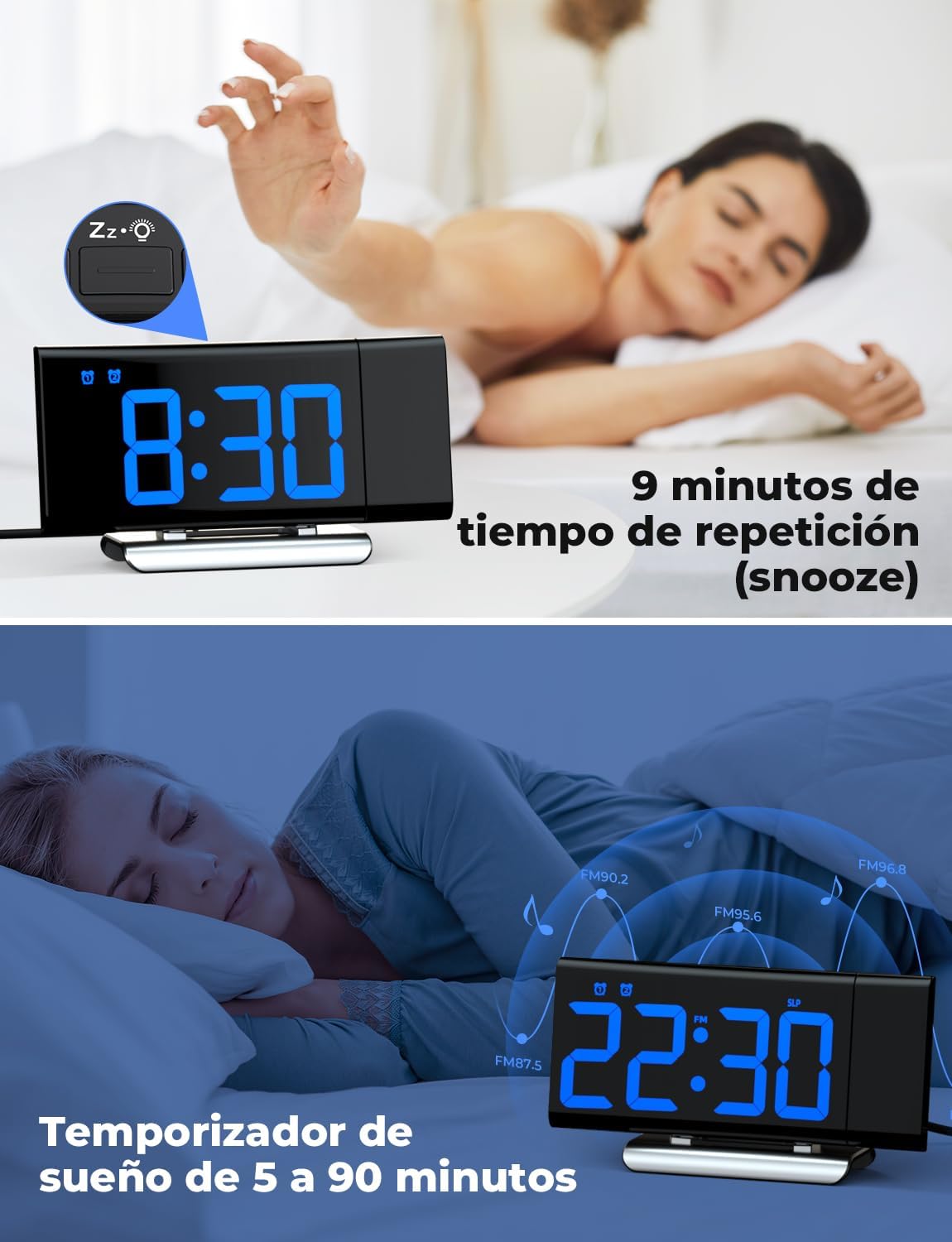
Image: The top section shows a person reaching for the snooze button on the LIORQUE S7509 Projection Alarm Clock, which displays 8:30, indicating a 9-minute snooze period. The bottom section features the clock displaying 22:30 with radio waves, illustrating the sleep timer function which can be set from 5 to 90 minutes, with a person sleeping peacefully in the background.
การซ่อมบำรุง
To ensure the longevity and optimal performance of your LIORQUE S7509 Projection Alarm Clock, follow these simple maintenance guidelines:
- การทำความสะอาด: Use a soft, dry cloth to wipe the surface of the clock. Do not use abrasive cleaners, solvents, or chemical sprays, as these can damage the finish and electronic components.
- การกำจัดฝุ่น: Gently wipe the projector lens with a soft, lint-free cloth to maintain clear projection quality.
- การจัดวาง: วางนาฬิกาบนพื้นผิวที่มั่นคงและเรียบ หลีกเลี่ยงแสงแดดโดยตรง แหล่งความร้อน และความชื้นมากเกินไป
- พลัง: Always use the provided power adapter. If the clock is not used for an extended period, you may unplug it. The built-in battery will retain settings for a short duration.
การแก้ไขปัญหา
หากคุณพบปัญหาใดๆ เกี่ยวกับนาฬิกาปลุก โปรดดูปัญหาและวิธีแก้ไขที่พบบ่อยต่อไปนี้:
| ปัญหา | สาเหตุที่เป็นไปได้ | สารละลาย |
|---|---|---|
| หน้าจอแสดงผลนาฬิกาว่างเปล่า | ไม่มีอำนาจหรืออำนาจคุณtage. | Ensure the power adapter is securely plugged into the clock and a working outlet. Check if the display brightness is set to 'off'. |
| ภาพฉายไม่ชัดหรือไม่คมชัด | Incorrect focus or distance. | Adjust the distance of the clock from the projection surface. Ensure the projector lens is clean. |
| สัญญาณเตือนภัยไม่ดัง | สัญญาณเตือนไม่ได้เปิดใช้งานหรือระดับเสียงเบาเกินไป | Verify that the alarm icon is displayed on the screen. Check the alarm volume setting. Ensure the alarm time is correctly set. |
| การรับสัญญาณวิทยุ FM ไม่ดี | สัญญาณอ่อน หรือตำแหน่งเสาอากาศไม่เหมาะสม | Extend the FM antenna fully. Reposition the clock to improve reception. |
| ปุ่มต่างๆ ไม่ตอบสนอง | ซอฟต์แวร์มีปัญหาชั่วคราว | Unplug the power adapter for a few seconds, then plug it back in to reset the device. |
ข้อมูลจำเพาะ
| คุณสมบัติ | รายละเอียด |
|---|---|
| ขนาดสินค้า | 10.5 x 3.81 x 6.2 ซม.; 340 กรัม |
| หมายเลขรุ่น | S7509 |
| ยี่ห้อ | ลิออร์ค |
| สี | สีฟ้า |
| ประเภทจอภาพ | ดิจิตอล |
| แหล่งพลังงาน | Both: Battery and AC power (with adapter) |
| รูปร่าง | สี่เหลี่ยมผืนผ้า |
| การใช้งาน | ในร่ม |
| วัสดุกรอบ | โลหะ |
| รวมแบตเตอรี่ | ใช่ |
| ประเภทการติดตั้ง | โต๊ะวางของ |
| นาฬิกาปลุก | ใช่ |
| จำนวนรายการ | 1 |
การรับประกันและการสนับสนุน
The LIORQUE S7509 Projection Alarm Clock comes with a manufacturer's warranty. For specific details regarding warranty coverage and duration, please refer to the warranty card included in your package or contact LIORQUE customer support.
If you require further assistance, have questions, or encounter issues not covered in this manual, please contact LIORQUE customer support. Contact information can typically be found on the product packaging, the official LIORQUE webไซต์หรือผ่านผู้ค้าปลีกของคุณ