
1. บทนำ
This manual provides essential information for the safe and efficient use of your Amazon Basics 24 Inch FHD 100Hz Monitor. Please read these instructions carefully before operating the device and retain them for future reference.
The Amazon Basics 24 Inch Monitor features a 23.8-inch viewable IPS panel with Full HD (1080p) resolution and a maximum refresh rate of 100Hz. It includes built-in speakers and is VESA compatible for flexible mounting options. The monitor is designed for various uses, including office work, entertainment, and gaming.

ด้านหน้า view of the Amazon Basics 24 Inch FHD 100Hz Monitor.
2. เนื้อหาบรรจุภัณฑ์
ตรวจสอบว่ามีรายการทั้งหมดอยู่ในแพ็คเกจ:
- Amazon Basics 24 Inch Monitor
- ฐานตั้ง
- ยืนคอ
- อะแดปเตอร์แปลงไฟ
- สาย HDMI

Image showing the monitor's package contents: stand base, stand neck, power adapter, and HDMI cable.
3. คำแนะนำในการตั้งค่า
3.1 การติดตั้งขาตั้ง
- Insert the stand neck into the stand base until it clicks securely into place.
- Align the assembled stand with the mounting slot on the back of the monitor. Push the stand into the slot until it locks. Ensure it is firmly attached.
3.2 สายเชื่อมต่อ
The monitor features multiple input ports for connectivity:
- DP1.2: DisplayPort input for high-resolution video and audio.
- HDMI1.4: HDMI input for video and audio from compatible devices.
- VGA: VGA input for analog video signals.
- เสียงเข้า: 3.5mm audio input for external audio sources.
- เสียงออก: 3.5mm audio output for headphones or external speakers.
- Connect the provided HDMI cable from your computer's video output port to the HDMI input port on the monitor. Alternatively, use a DisplayPort or VGA cable if your device supports those connections.
- Connect the power adapter to the monitor's power input port, then plug the power adapter into a wall outlet.
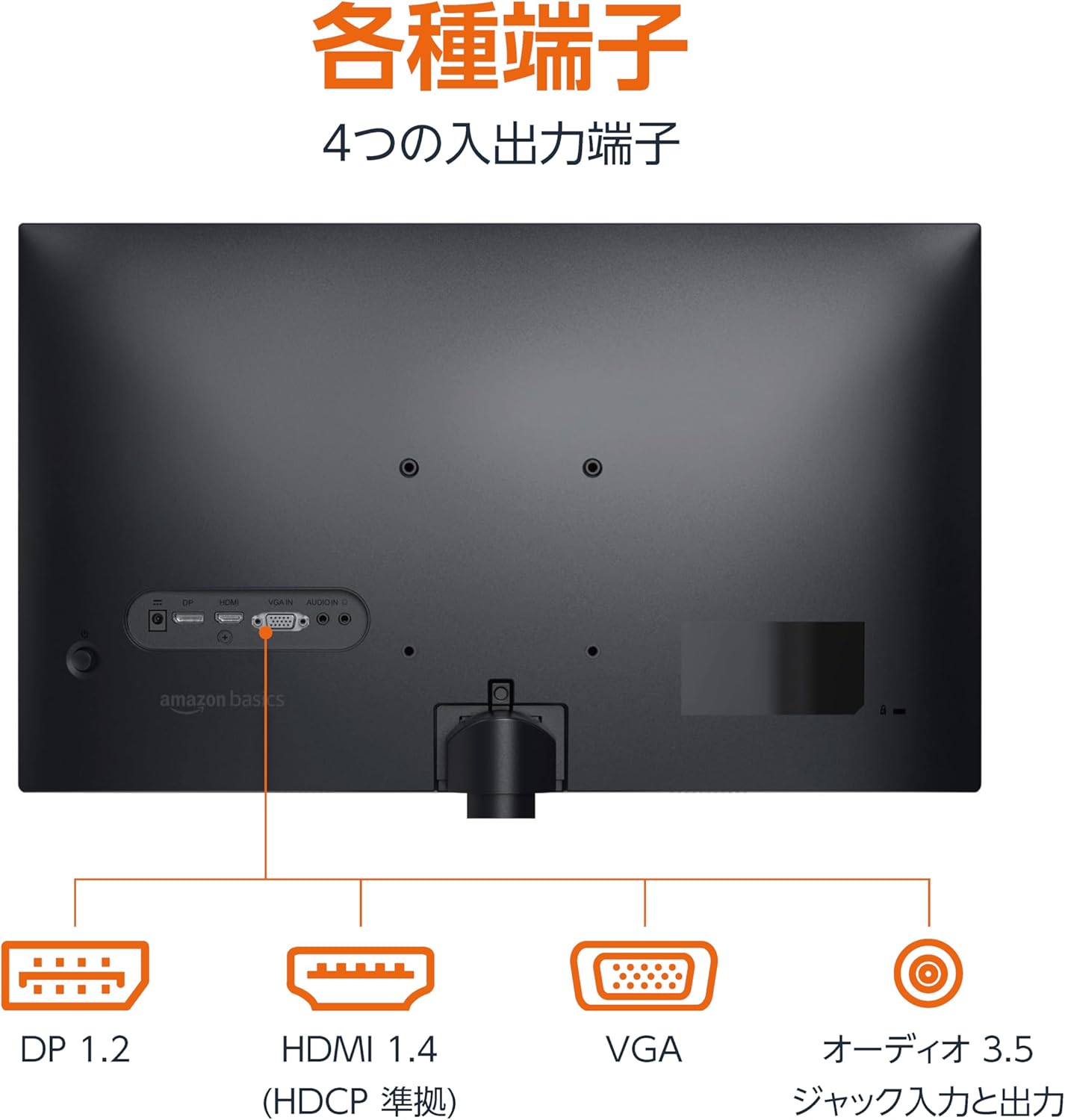
หลัง view of the monitor displaying various input and output ports.
3.3 การเปิดเครื่อง
Press the power button located on the back or bottom of the monitor to turn it on. The monitor will automatically detect the active input signal.
3.4 การปรับความเอียง
The monitor allows for tilt adjustment to achieve an optimal viewing angle. Gently hold the top and bottom edges of the monitor and tilt it forward or backward. The tilt range is approximately -5° to 20°.

Monitor demonstrating its tilt adjustment capability.
3.5 Optional: VESA Mounting and Cable Lock
The monitor is VESA compatible, allowing it to be mounted on a wall or an adjustable arm (mounting hardware sold separately). Refer to the VESA mount's instructions for installation.
An optional cable lock slot is available on the rear of the monitor to secure it to a stable object, preventing theft.
3.6 วิดีโอแนะนำการตั้งค่า
For a visual guide on setting up your Amazon Basics monitor, please watch the video below:
This video demonstrates the assembly of the stand, connecting cables, and basic adjustments for the Amazon Basics monitor.
4. คู่มือการใช้งาน
4.1 เมนูการแสดงผลบนหน้าจอ (OSD)
The monitor features an On-Screen Display (OSD) menu for adjusting various settings. Use the buttons located on the back or bottom of the monitor to navigate the menu. Common settings include:
- ความสว่าง/คอนทราสต์: ปรับระดับความสว่างและความคมชัดของจอภาพ
- การตั้งค่าสี: ปรับอุณหภูมิสี เฉดสี และความอิ่มตัวของสี
- เลือกอินพุต: Manually switch between DP, HDMI, and VGA inputs.
- เสียง: ปรับระดับเสียงสำหรับลำโพงในตัวหรือหูฟังที่เชื่อมต่ออยู่
- โหมดภาพ: Select from preset display modes (e.g., Standard, Game, Movie).
4.2 Using Built-in Speakers
The monitor includes integrated speakers. Audio will be played through these speakers when connected via HDMI or DisplayPort. If using a VGA connection, ensure an audio cable is connected to the 'AUDIO IN' port on the monitor and your computer's audio output.
5. ข้อมูลจำเพาะ
| คุณสมบัติ | ข้อมูลจำเพาะ |
|---|---|
| ยี่ห้อ | พื้นฐานของ Amazon |
| หมายเลขรุ่น | 24M2020DJP |
| ขนาดหน้าจอ | 24 Inches (23.8 inch viewสามารถ) |
| ประเภทแผง | ไอพีเอส |
| ปณิธาน | FHD 1080p (1920 x 1080) |
| อัตราการรีเฟรช | สูงสุด 100 เฮิรตซ์ |
| อัตราส่วนภาพ | 16:9 น. |
| ลำโพงในตัว | ใช่ |
| ความเข้ากันได้ของ VESA | ใช่ |
| พอร์ตอินพุต | 1x DisplayPort 1.2, 1x HDMI 1.4, 1x VGA, 1x Audio In (3.5mm) |
| พอร์ตเอาท์พุต | 1x Audio Out (3.5mm) |
| น้ำหนักผลิตภัณฑ์ | 2.8 กก. |
| ความหนาของกรอบ | 1.44 mm (slim bezel) |
| การรับประกัน | รับประกันจำกัด 1 ปี |
5.1 มิติ
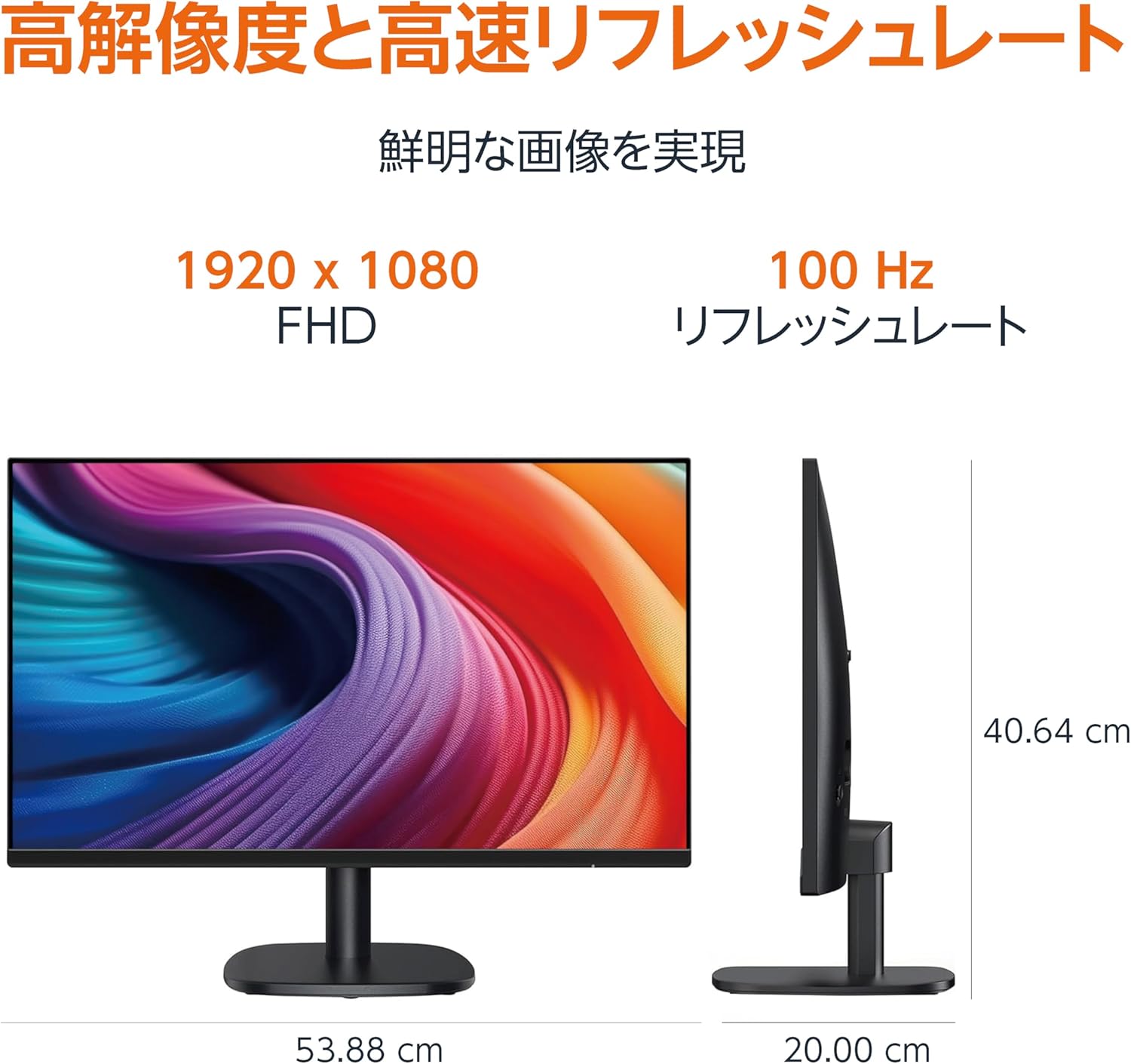
Diagram showing the monitor's dimensions (Width: 53.88 cm, Height: 40.64 cm, Depth: 20.00 cm).
5.2 Slim Bezel Design

Detail showing the monitor's slim bezel design, measuring 1.44 mm.
6 การแก้ไขปัญหา
หากคุณพบปัญหาเกี่ยวกับจอภาพของคุณ โปรดดูวิธีแก้ไขทั่วไปต่อไปนี้:
- ไม่มีไฟฟ้า: Ensure the power cable is securely connected to both the monitor and a working power outlet. Check if the power adapter's indicator light is on.
- ไม่มีสัญญาณ: Verify that the video cable (HDMI, DP, or VGA) is firmly connected to both the monitor and your computer. Ensure the correct input source is selected in the monitor's OSD menu. Try restarting your computer.
- หน้าจอกระพริบ: Check the video cable for damage or loose connections. Ensure your computer's graphics driver is up to date. Adjust the refresh rate in your computer's display settings.
- ไม่มีเสียงออกจากลำโพง: If using HDMI or DisplayPort, ensure the audio output is set to the monitor in your computer's sound settings. If using VGA, confirm the 3.5mm audio cable is connected. Check the volume level on both the monitor and your computer.
- ปัญหาคุณภาพของภาพ: Adjust brightness, contrast, and color settings via the OSD menu. Ensure the display resolution on your computer matches the monitor's native resolution (1920 x 1080).
If the problem persists after trying these steps, contact customer support.
7. การบำรุงรักษา
Proper maintenance helps ensure the longevity and performance of your monitor:
- การทำความสะอาดหน้าจอ: เช็ดหน้าจอเบาๆ ด้วยผ้านุ่มที่ไม่เป็นขุย สำหรับรอยฝังแน่น ให้เช็ดเบาๆampชุบผ้าด้วยน้ำหรือน้ำยาทำความสะอาดหน้าจอโดยเฉพาะ หลีกเลี่ยงการใช้สารเคมีรุนแรง แอลกอฮอล์ หรือวัสดุที่มีฤทธิ์กัดกร่อน
- การทำความสะอาด Casing: ใช้ผ้าแห้งนุ่มเช็ดจอภาพasing.
- การระบายอากาศ : ตรวจสอบให้แน่ใจว่าช่องระบายอากาศของจอภาพไม่ได้ถูกปิดกั้นเพื่อป้องกันความร้อนสูงเกินไป
- ปิดเครื่องเมื่อไม่ใช้งาน: ปิดจอภาพเมื่อไม่ได้ใช้งานเป็นเวลานานเพื่อประหยัดพลังงานและยืดอายุการใช้งาน
8. การรับประกันและการสนับสนุน
This Amazon Basics monitor comes with a รับประกันจำกัด 1 ปี นับจากวันที่ซื้อ การรับประกันนี้ครอบคลุมข้อบกพร่องในการผลิตและฝีมือการผลิตภายใต้การใช้งานปกติ
For warranty claims, technical support, or further assistance, please refer to the Amazon Basics support page or contact Amazon customer service directly. Keep your proof of purchase for warranty validation.