
1. บทนำ
Thank you for choosing the EASYmaxx LED Solar Spotlight. This device provides efficient, wireless outdoor lighting with a built-in motion sensor and a separate solar panel for flexible placement. It is designed for easy installation and operation, offering reliable illumination for your home entrance, garden, carport, or other outdoor areas.
2. คำแนะนำด้านความปลอดภัยที่สำคัญ
- อ่านคำแนะนำทั้งหมดอย่างละเอียดก่อนการติดตั้งและใช้งาน
- ผลิตภัณฑ์นี้ได้รับการออกแบบมาเพื่อ ใช้ภายนอกเท่านั้น.
- Do not attempt to disassemble, repair, or modify the unit. This will void the warranty.
- Ensure the solar panel is placed in an area that receives direct sunlight for most of the day to ensure optimal charging.
- Keep the solar panel and LED spotlight clean from dirt, dust, and debris to maintain efficiency.
- Do not immerse the product in water. It is IP44 water-resistant, meaning it is protected against splashing water.
- เก็บให้พ้นจากมือเด็ก
3. เนื้อหาบรรจุภัณฑ์
กรุณาตรวจสอบแพ็คเกจสำหรับรายการต่อไปนี้:
- 1x LED Solar Spotlight
- 1x Separate Solar Panel with connecting cable
- 1x รีโมทคอนโทรล
- 2x สกรูสำหรับติดตั้งบนผนัง
- 2x Wall plugs for wall mounting
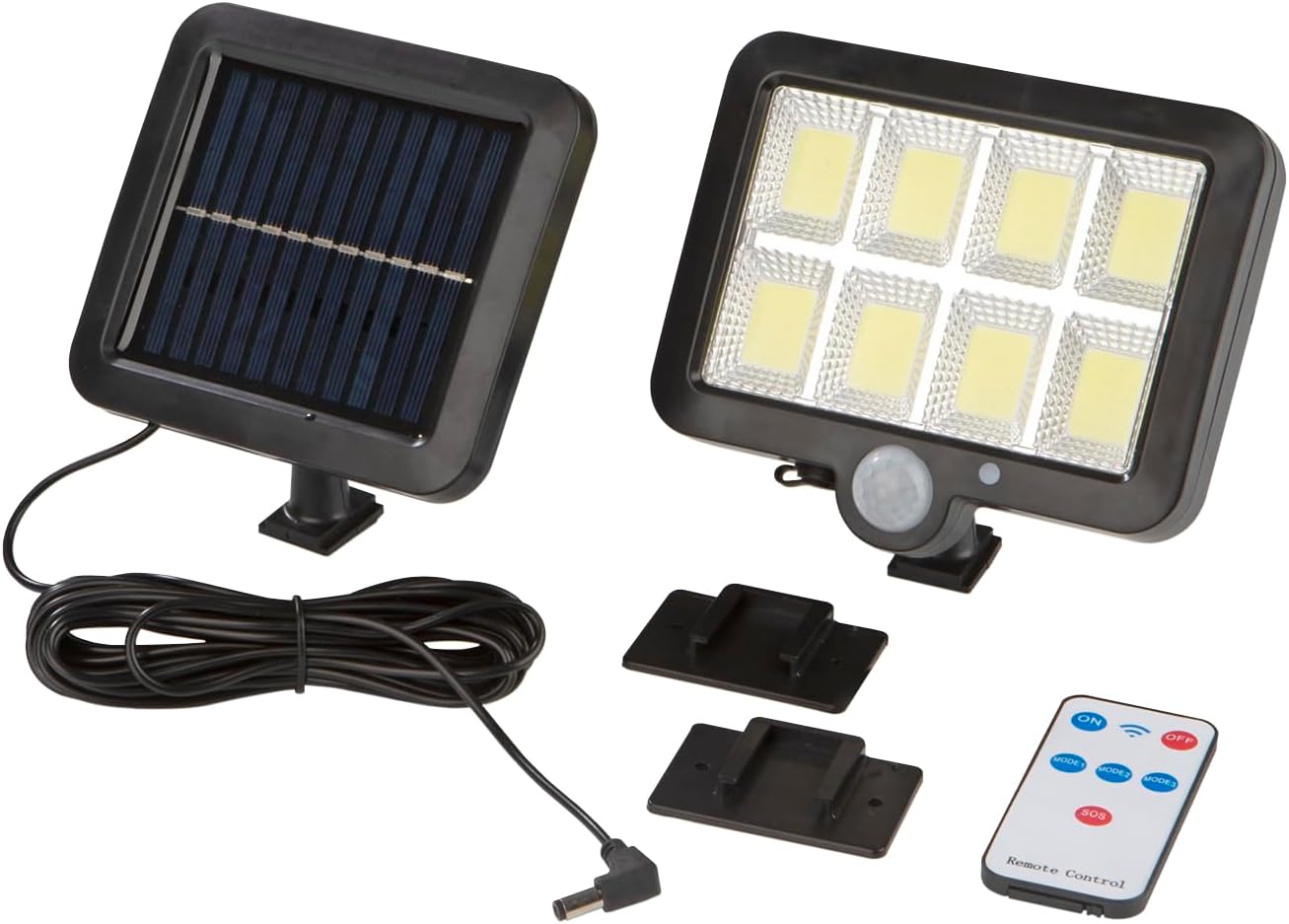
Image 1: All components included in the EASYmaxx LED Solar Spotlight package. This includes the main LED light unit with motion sensor, the separate solar panel with its connecting cable, the remote control for adjusting settings, and the necessary screws and wall plugs for installation.
4. สินค้าหมดview
The EASYmaxx LED Solar Spotlight consists of two main units: the LED spotlight and the solar panel. They are connected by a cable, allowing for flexible installation where the solar panel can receive maximum sunlight, and the spotlight can illuminate the desired area.
- LED Spotlight Unit: Features 8 COB LEDs for bright illumination (300 lumens). It includes a built-in motion sensor and a dusk sensor.
- แผงโซล่าเซลล์: Charges the internal battery of the spotlight during the day. It is designed to be mounted separately for optimal sun exposure.
- รีโมทคอนโทรล: Allows for convenient adjustment of lighting modes and power settings.
5. การติดตั้งและการตั้งค่า
ปฏิบัติตามขั้นตอนเหล่านี้เพื่อการติดตั้งที่ถูกต้อง:
- เลือกสถานที่:
- เลือกตำแหน่งสำหรับ แผงโซล่าเซลล์ where it will receive direct sunlight for at least 6-8 hours daily. Avoid shaded areas.
- เลือกสถานที่สำหรับ ไฟสปอร์ตไลท์ LED that provides the desired illumination coverage and where the motion sensor can effectively detect movement (recommended height: 2-3 meters).
- การติดตั้ง:
- Use the provided screws and wall plugs to securely mount both the solar panel and the LED spotlight to a wall, carport, or other suitable surface.
- Ensure both units are firmly attached to prevent accidental falls.
- Connect Units:
- Connect the cable from the solar panel to the input port on the LED spotlight unit. Ensure the connection is secure.
- ค่าใช้จ่ายเริ่มต้น:
- Allow the solar panel to charge the spotlight for at least 24 hours in direct sunlight before first use to ensure the battery is fully charged.
6. คู่มือการใช้งาน
The EASYmaxx LED Solar Spotlight operates automatically at dusk and can be controlled via the included remote control.
6.1 ฟังก์ชั่นการควบคุมระยะไกล
- เปิด/ปิด: Turns the spotlight on or off.
- โหมด 1: Activates Sensor Mode.
- โหมด 2: Activates Dimmed Continuous Light + Sensor Mode.
- โหมด 3: Activates Dimmed Continuous Light Mode.
- SOS: Activates an emergency flashing light (if applicable, refer to product specifics).
โหมดแสงสว่าง 6.2 โหมด
The spotlight offers three adjustable lighting modes via the remote control:
- โหมด 1 (โหมดเซ็นเซอร์):
The light remains off until motion is detected. Upon detection, the light illuminates at 100% brightness. It turns off automatically after approximately 20 seconds of no further motion.
- Mode 2 (Dimmed Continuous Light + Sensor Mode):
The light stays on at a dimmed brightness continuously. When motion is detected, it switches to 100% brightness. After approximately 20 seconds of no further motion, it returns to dimmed continuous light.
- Mode 3 (Dimmed Continuous Light):
The light stays on at 50% brightness continuously from dusk till dawn, regardless of motion.

Image 2: Visual representation of the three distinct lighting modes. Mode 1 shows the light activating at 100% upon motion and turning off after 20 seconds. Mode 2 depicts a dimmed continuous light that brightens to 100% with motion, then returns to dim after 20 seconds. Mode 3 illustrates a continuous 50% dimmed light.
6.3 เซ็นเซอร์ตรวจจับความเคลื่อนไหว
The integrated motion sensor detects movement within a range of approximately 3-5 meters and an angle of about 120 degrees. Ensure the sensor is not obstructed for optimal performance.

Image 3: Diagram showing the motion detection capabilities of the spotlight. It highlights a detection range of approximately 3-5 meters and a wide detection angle of about 120 degrees, indicating the area where movement will trigger the light.
7. การบำรุงรักษา
- การทำความสะอาด: Regularly wipe the solar panel and the LED light surface with a soft, damp cloth to remove dust, dirt, or debris. This ensures maximum light absorption and optimal performance. Do not use abrasive cleaners or solvents.
- การตรวจสอบ: Periodically check the mounting screws and connections to ensure they are secure.
- การดูแลในฤดูหนาว: In areas with heavy snow, ensure the solar panel is clear of snow to allow for charging.
8 การแก้ไขปัญหา
| ปัญหา | สาเหตุที่เป็นไปได้ | สารละลาย |
|---|---|---|
| กลางคืนไฟไม่ติด |
|
|
| Light stays on continuously during the day. | Dusk sensor malfunction or obstruction. | Check if the dusk sensor is covered or damaged. Ensure it is exposed to daylight. |
| Motion sensor not working or range is poor. |
|
|
| รีโมทคอนโทรลไม่ตอบสนอง |
|
|
9. ข้อมูลจำเพาะทางเทคนิค
| ยี่ห้อ | อีซี่แม็กซ์ |
| แบบอย่าง | B0CP7Q14FK |
| ขนาดสินค้า | 15 x 13 x 3.5 cm (Spotlight unit) |
| น้ำหนักสินค้า | 370 กรัม |
| แหล่งกำเนิดแสง | ไฟ LED COB 8 ดวง |
| ฟลักซ์ส่องสว่าง | 300 ลูเมน (โดยประมาณ) |
| แหล่งพลังงาน | พลังงานแสงอาทิตย์ |
| คุณสมบัติพิเศษ | Motion Sensor, Dusk Sensor, Remote Control |
| ช่วงเซนเซอร์จับความเคลื่อนไหว | 3-5 เมตร |
| มุมเซ็นเซอร์ตรวจจับการเคลื่อนไหว | ประมาณ 120 องศา |
| ระดับการป้องกันน้ำเข้า (IP) | IP44 (ป้องกันน้ำกระเซ็น) |
| พื้นที่การใช้งาน | ใช้กลางแจ้งเท่านั้น |
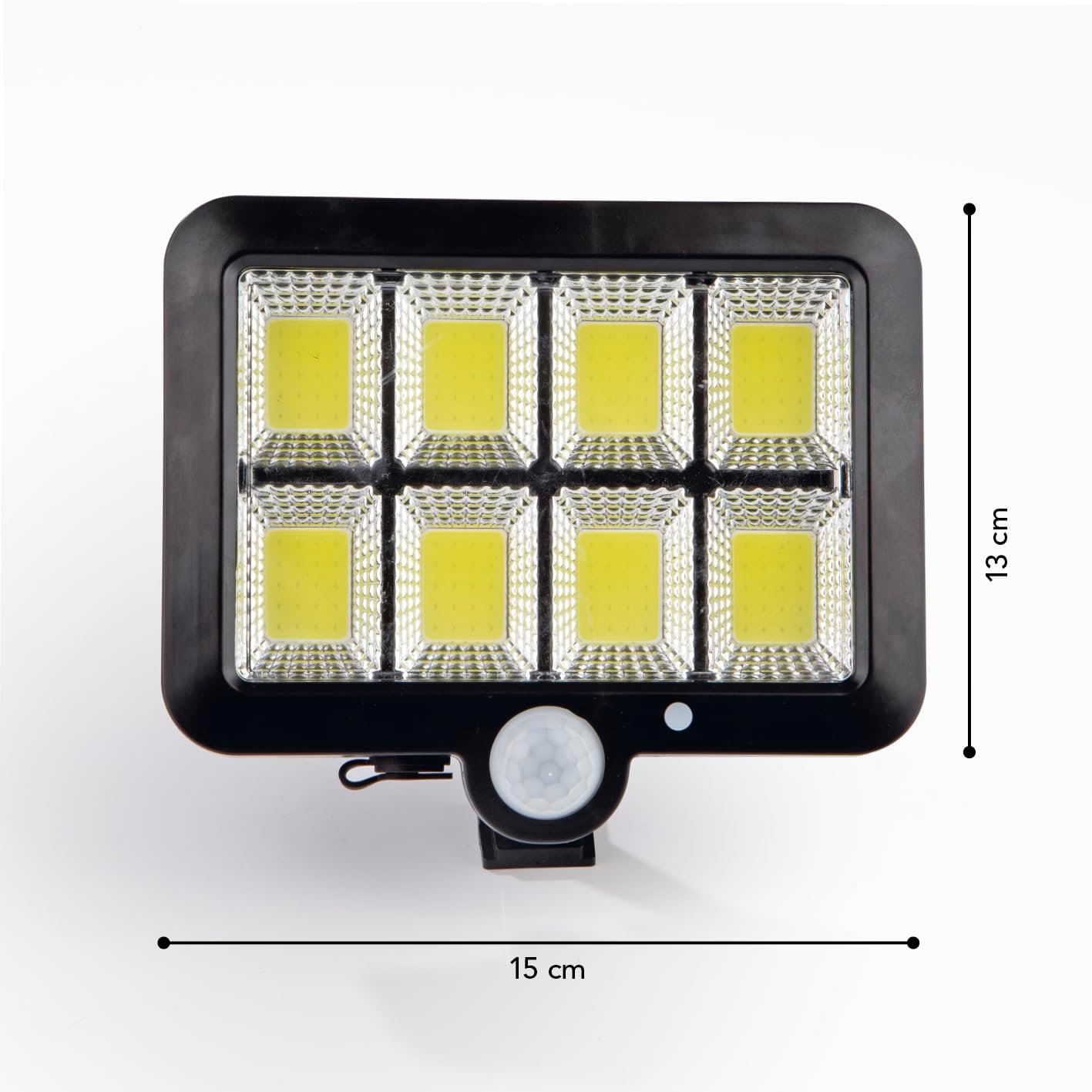
Image 4: Physical dimensions of the LED spotlight unit, showing its length of 15 cm and width of 13 cm.
10. การรับประกันและการสนับสนุนลูกค้า
For warranty information, returns, or technical support, please refer to your purchase documentation or contact the retailer where you purchased the EASYmaxx LED Solar Spotlight. You may also visit the official EASYmaxx webเว็บไซต์เพื่อขอความช่วยเหลือเพิ่มเติม
ผู้ผลิต: ดีเอส โปรดัคเต้ GmbH
ติดต่อ: Please refer to the contact information provided with your product or on the manufacturer's official webเว็บไซต์.